 Ryze
Ryze Claude
How to manage
your ads from Claude.
Run Google Ads and Meta from one chat. Connect once, then ask. Audits, creative, competitor research, and reports, all in plain English.
One-time setup
SETUPConnect Claude to your accounts.
Sign up to Ryze, add it to Claude as a connector, and you're ready to ask. About three minutes, one time.
Read-only by default. Claude analyzes everything before it can change anything.
get-ryze.ai — free to start
Open Claude's Connectors
claude.ai → Settings → Connectors
Add a custom connector
Paste https://connector.get-ryze.ai/mcp
Ready to go
Ask your accounts anything
Query your live ad accounts
THE BASICSAsk your accounts anything.
Plain English, live data, across Google, Meta, and GA4. No exports, no dashboards. For example:
Use case
USE CASE 01Audit the whole account in one prompt.
You ask. “Audit my account and rank what's costing me money.”
- —Wasted spend and dead search terms
- —Audience overlap and self-competition
- —The Performance Max black box
- —Anything under your ROAS floor
ACCOUNT AUDIT — 6 issues, by $ impact

1  Wasted search terms     ~$1,240/mo
   42 terms, $20+ spend, 0 conv

2  PMax display leak         ~$880/mo
   display channel at 0.9x ROAS

3  Audience overlap          ~$600/mo
   2 ad sets, 38% shared users

   ...plus 3 more, each with the fix
Use case
USE CASE 02Find out why performance moved.
TRIGGER
CPA or ROAS swinging more than 15% week over week.
CADENCE
When a number looks off
WATCH FOR
Compare like-for-like periods. One slow day isn't a trend.
Blended CPA rose 18% week over week. For the
last 7 days vs the prior 7, across Google Ads and Meta:

1. CPA and ROAS by campaign, audience, and placement —
   this period vs last, with the % change on each.
2. Rank what moved by how much of the total swing it
   explains, biggest contributor first.
3. Split price vs volume — CPC change vs conversion-rate
   change — so I know which side actually broke.
4. Flag anything skewed by a tracking gap or a one-off
   spike rather than a real shift.

Finish with the single biggest driver and the one fix.
Use case
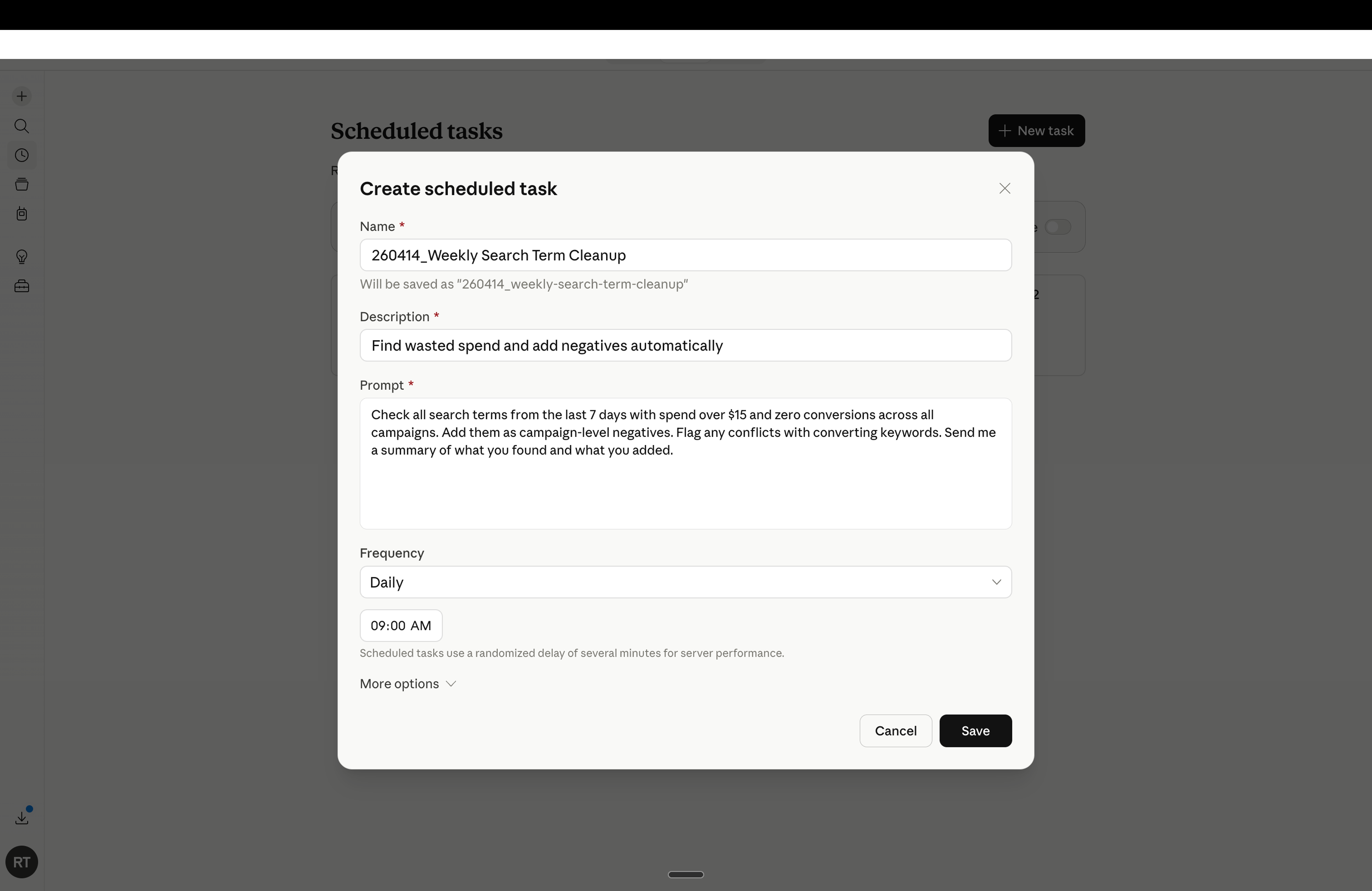
USE CASE 03Cut spend that isn't converting.
TRIGGER
A search term with $20+ spend and zero conversions.
CADENCE
Weekly
WATCH FOR
Some zero-conversion terms still assist. Check assisted conversions before cutting the big spenders.
Pull search terms from the last 30 days, across
Google Ads, with $20+ spend and 0 conversions:

1. Group by campaign and ad group, sorted by spend.
2. For each, show spend, clicks, and CTR so I can
   tell a bad match from a tracking gap.
3. Flag any that still assisted a conversion — those
   I keep, the rest are safe to cut.
4. Draft the negative-keyword list, exact vs phrase,
   ready to paste back in.

Finish with total wasted spend and the top 10 to cut.
Use case
USE CASE 04Catch worn-out ads early.
TRIGGER
Frequency over 3 while CTR slides.
CADENCE
Twice a week
WATCH FOR
High frequency is normal on small retargeting pools. Judge by CTR, not frequency alone.
List active Meta ads with frequency over 3 in
the last 14 days, across all ad sets:

1. Show frequency, CTR now vs 14 days ago, CPA, and
   ROAS for each.
2. Flag any with a CTR drop over 20% — those are
   fatiguing fastest.
3. Separate small retargeting pools, where high
   frequency is normal, from cold prospecting.
4. For each fatiguing ad, say whether to refresh the
   hook or rotate it out.

Finish with the 5 ads to refresh first, by spend.
Use case
USE CASE 05Rebalancing spend across campaigns and platforms by pacing, CPA, and ROAS.
TRIGGER
A campaign overpacing toward a CPA above target, or underpacing while beating your ROAS floor.
CADENCE
Weekly
WATCH FOR
Don't pull from a campaign still in its learning phase. Give it 7 days first.
For the current month, across Google Ads and Meta:

1. Spend-to-date vs an even daily pace — % ahead or
   behind, per campaign and per platform.
2. ROAS and CPA for each, flagged against my targets.
3. Two lists:
   • Pull back — overpacing toward a CPA above target.
   • Add budget — underpacing while beating my ROAS floor.
4. For each "add" move: how much, and from where (which
   campaign or platform), in steps under 20% a day so the
   algorithm doesn't relearn.
5. Leave brand search and anything above the ROAS floor as-is.

Finish with the 3 highest-dollar moves, ranked.
Use case
USE CASE 06Find a winner and push it.
TRIGGER
A campaign beating ROAS with impression-share headroom.
CADENCE
Weekly
WATCH FOR
Scale in steps under 20%. Big jumps reset the learning phase.
Show my best campaigns by ROAS over the last 30
days, across Google Ads and Meta:

1. Keep only those above my ROAS floor with room to
   grow — impression share or reach not yet capped.
2. For each, show current spend, ROAS, and how much
   headroom is left before it saturates.
3. Recommend a budget increase in steps under 20% a
   day, so the algorithm doesn't reset learning.
4. Note which are limited by budget vs by audience,
   since only the first scales cleanly.

Finish with the top 3 to scale and the daily add.
Use case
USE CASE 07Spin up new creative from your winners.
You ask. “Take my best ad and make four fresh variations to test.”
Then. Drop them straight into a new test. Same offer, new angles.
Use case
USE CASE 08The Monday report, written for you.
You ask. “Write my weekly report.” Read it with coffee, before any dashboard.
WEEKLY — ACME DTC
SPEND
$8,240
+6% wow
ROAS
3.1x
+0.3 wow
CPA
$39
−$4 wow
THIS WEEK, RANKED
- Cut $310/wk of wasted search terms.
- Refresh 2 fatiguing Meta ads.
- Shift $200/day from PMax display to shopping.
Use case
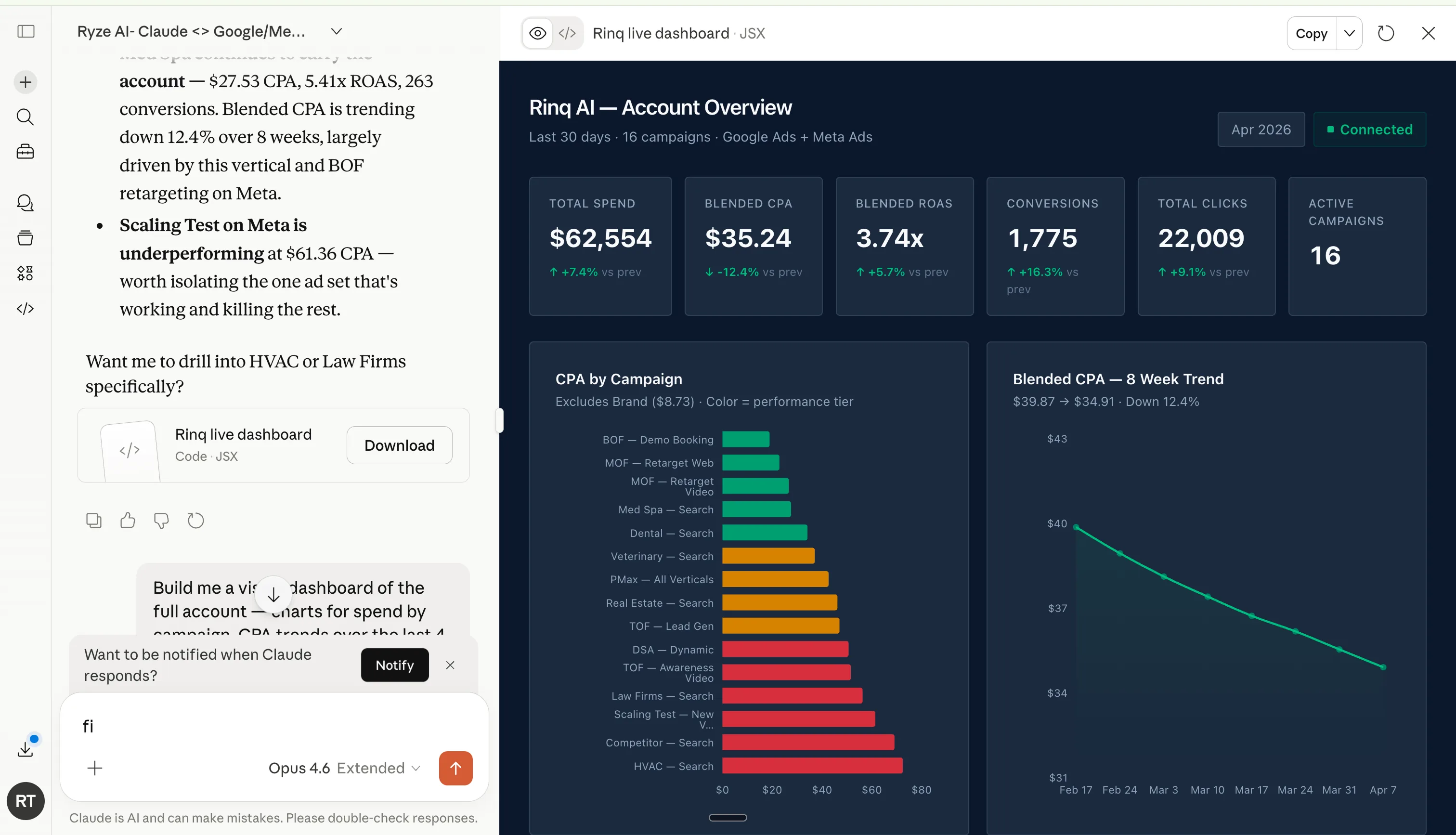
USE CASE 09Build a live dashboard from one prompt.
Describe the view you want. Claude pulls Google and Meta and renders it live — spend, CPA, ROAS, and trends — then keeps it current.
Build me a live dashboard of the whole
account: spend by campaign, CPA trend over
8 weeks, and blended ROAS across Google
and Meta. Keep it refreshing.
Use case
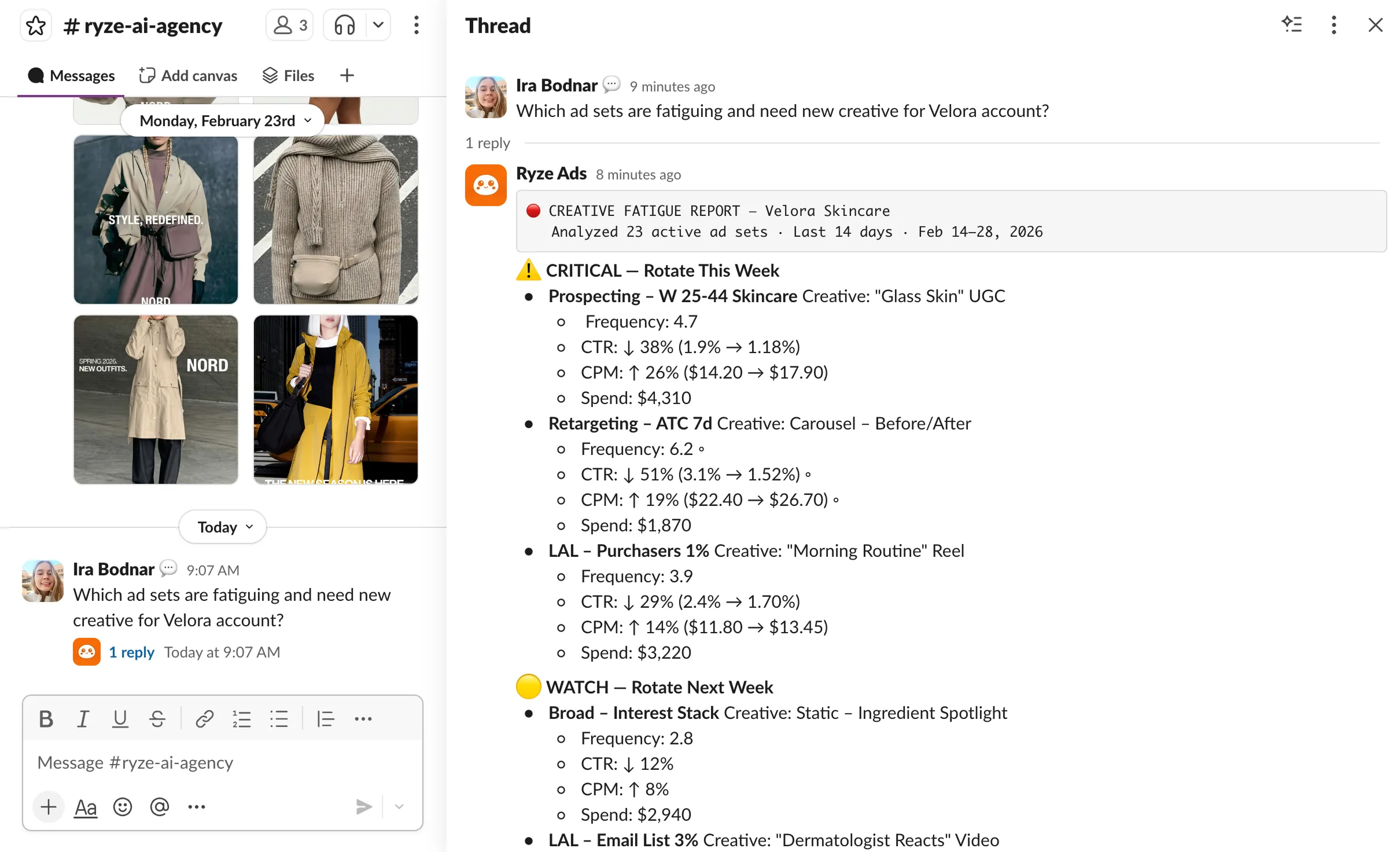
USE CASE 10Analyze Google and Meta from Slack.
Connect once, and the weekly report, audits, and threshold alerts post to your channel.
Add Ryze to your workspace
Slack → Apps → search “Ryze” → Add
Authorize the channel
Pick #ads, #marketing, or a private DM
Choose what posts
Weekly report, audits, and alerts
Reply in the thread
Ask follow-ups without leaving Slack
Schedule automated actions in ad accounts
AUTOMATIONSet it once. It runs on its own.
Save any prompt as a scheduled task. Claude runs it on your cadence and messages you only what it found and changed.