I started posting on LinkedIn in early December with roughly 100 views per post. Three months later, individual posts were hitting 300,000. This is what actually drove that.
Clawdbot monitors Twitter for topics gaining traction
Viral threads, conversations picking up speed, things people are actively engaging with.
Feeds those signals into the prompt below and generates a LinkedIn post
Written exactly for how the platform distributes content. I review, adjust if needed, and post.
Images are still manual
LinkedIn posts with visuals consistently outperform text-only, so I design slides separately using Hixbuild.
Clawdbot handles the engagement side
It monitors comments on my posts and sends follow-up materials to people who reply. That loop is a big part of why the numbers kept compounding.
This assumes Clawdbot is already running locally. Set it up first if you haven't.
What It Does
The agent generates platform-native LinkedIn posts in long-form text, carousel outlines, and poll formats. It applies LinkedIn-specific rules: strong first line, no external links in the body, engagement prompts, and a comment strategy to boost early distribution.
Carousels are outlined as slide-by-slide structures ready for design. Posts are formatted with intentional line breaks for mobile readability — the way LinkedIn actually renders content.
Platform
Output
Posts + carousels + comments
Optimization
Algorithm-native
LinkedIn rewards posts that keep people on the platform. Native format, no external links in the body, and a strong first line.
Results
This is what 90 days of running the LinkedIn Authority Engine looks like. 3.8M impressions from a standing start — top posts hitting 307K, 299K, and 241K views individually.
The posts that performed weren't polished or promotional. Short lines, one idea per line, no hashtags, no "excited to announce." Just a real observation from someone who knows the space.
Total impressions
3,806,546
Growth in 90 days
+26,609%
Top post
307,007 views
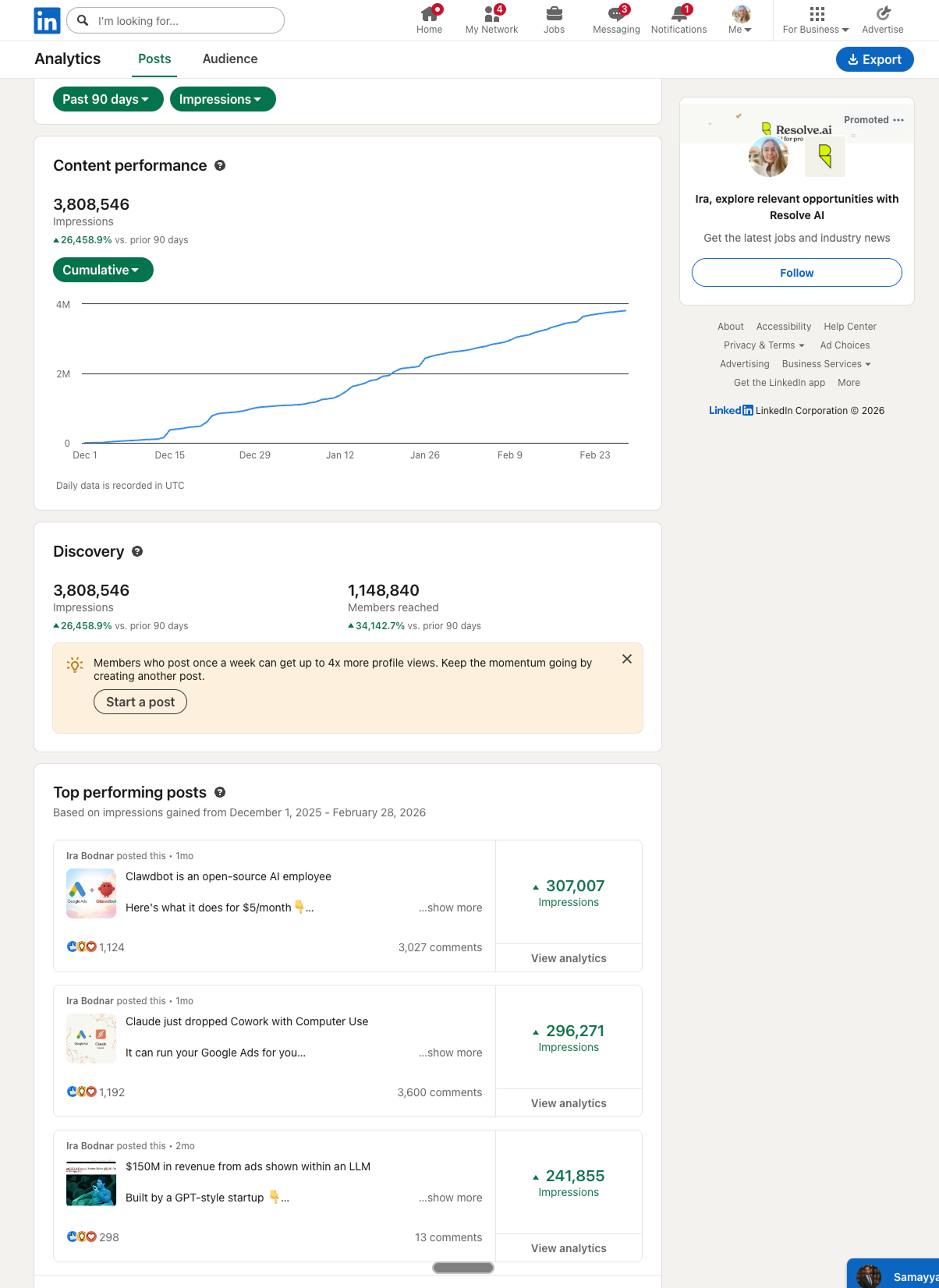
LinkedIn analytics — 90 days. December 2025 to February 2026.
Limitations
LinkedIn has activity thresholds. Stay inside them or your account gets flagged and reach collapses.
20 comments per hour
Go over this consistently and LinkedIn will restrict your account within days.
20 messages per hour
Same rule applies to direct messages — keep it under 20 per hour.
1,000 total actions per week
Comments and messages combined. LinkedIn tracks weekly volume, not just hourly spikes.
One automation tool only
Running Clawdbot alongside other automation tools kills your reach. The algorithm detects the pattern and suppresses distribution entirely.
One tool at a time. Stacking automation tools doesn't stack results — it eliminates them.
The Skill
Copy the skill below and save it as SKILL.md inside your OpenClaw skills folder, or paste it directly into Clawdbot via Telegram.
---
name: 13-linkedin-authority-engine
description: Write platform-native LinkedIn posts, carousels, and comment strategies tuned to LinkedIn's distribution algorithm.
metadata:
  {
    "openclaw": {
      "emoji": "💼",
      "category": "Social Growth"
    }
  }
---

# 13 Linkedin Authority Engine

**Category:** Social Growth

## What It Does
Write platform-native LinkedIn posts, carousels, and comment strategies tuned to LinkedIn's distribution algorithm.

## Logging
Track results in `memory/13-linkedin-authority-engine-log.md`

## VOICE & TONE RULES
- Should sound like someone who has 10+ years in paid ads
- Understated — not loud, in plain English
- Write like someone who's been doing this for a long time and doesn't need to prove it
- Should strongly appeal to marketers with 10+ years of experience
- Write like you're texting a colleague, not writing marketing copy
- Matter of fact, not salesy
- Read it out loud — if it sounds like marketing copy, rewrite it
- Cut any line that sounds like you're trying to impress
- The post should read like a real observation, not a promotion

## BANNED
- No salesy, spammy, hype-driven, or cliché language
- No AI clichés
- No clichés of any kind
- No fluff
- No obvious hype
- No motivational nonsense
- No spammy wording
- No emojis (except 👇 on line 3)
- No hashtags
- No "I'm excited to announce" or similar LinkedIn cringe
- NO PERIODS — use commas to connect thoughts, let sentences flow into each other

## FORMAT RULES (follow exactly)
- The post must be exactly 35 lines
- Short lines — one thought per line, 5-10 words max
- All sentences should be short and sharp
- No long sentences
- No stacked ideas in one line
- White space between sections
- Specifics beat generalities ("23 accounts" not "many accounts")

## HOOK STRUCTURE (mandatory)
Line 1: Short sentence, under 8 words
Line 2: Empty
Line 3: Short sentence, under 7 words, ending with 👇
This is what shows before "see more" — make it count

## BULLET POINT FORMAT
Use numbered bullets formatted as:
1/ Bullet point
Short description

2/ Bullet point
Short description

3/ Bullet point
Short description

(Use 1/ 2/ 3/ style, not dashes or dots)

## FINAL CHECK
- Read it out loud — does it sound like a real person talking?
- If any line sounds like marketing copy, rewrite it
- If any line sounds like you're trying to impress, cut it
- Does it hit exactly 35 lines?
- Is the hook under 8 words on line 1 and under 7 words on line 3?
Customize inputs before running. Defaults are safe starting points.
Next step
Haven't set up Clawdbot yet?
OpenClaw + Telegram + Claude. Takes ~20 minutes.

