How to Set Up Claude Cowork for Google Ads
Skills, MCP, and copy-paste prompts. Cowork is Claude's desktop agent: it reads, edits and creates files in a folder you choose, so a Google Ads export goes in and an Editor-ready CSV comes out. This guide covers the 5-minute setup, the free skills, two ways to connect live data, and five workflows to run today.
Built by our community of 2,000 marketers
Free skills and prompts for paid ads and SEO
Templates for Claude, ChatGPT and Perplexity.
Used by marketers behind 33,000+ brands










Five Google Ads workflows Cowork runs, at a glance
Each workflow below is one prompt run against files in your workspace folder. Drop the export into /exports, paste the prompt, and Claude writes the result into /uploads or /reports.
- 1Bulk RSA copy generationEditor CSV + summary
What you export: Ad performance (Ads & Extensions)
- 2Search term cleanup3 files
What you export: Search terms report
- 3Campaign performance auditReport + CSV
What you export: Campaign, ad group and keyword reports
- 4Competitor ad copy analysisReport + CSV
What you export: Competitor ads (Transparency Center, SpyFu or SEMrush)
- 5Landing page + ad alignment3 files
What you export: Ad copy plus landing page screenshots or HTML
| # | Workflow | Output | What you export |
|---|---|---|---|
| 1 | Bulk RSA copy generation | Editor CSV + summary | Ad performance (Ads & Extensions) |
| 2 | Search term cleanup | 3 files | Search terms report |
| 3 | Campaign performance audit | Report + CSV | Campaign, ad group and keyword reports |
| 4 | Competitor ad copy analysis | Report + CSV | Competitor ads (Transparency Center, SpyFu or SEMrush) |
| 5 | Landing page + ad alignment | 3 files | Ad copy plus landing page screenshots or HTML |
Workflow 2 is the fastest win: one export, and the negative list is ready for Google Ads Editor. For the same loop on Meta, see Claude Cowork for Meta Ads.
The short answer: install Claude Desktop, open the Cowork tab, point it at a workspace folder with exports, creatives, reports and uploads subfolders, add the free marketing skills, and paste one of the five prompts below. Connect Google Ads over MCP when you are tired of exporting CSVs.
What Cowork does
Desktop agent that reads, edits, and creates files in a folder you choose. No code needed. For Google Ads, it can:
- Analyze performance CSVs and flag wasted spend instantly
- Generate 15 headlines + 4 descriptions per ad group (character-validated)
- Build negative keyword lists from search term reports
- Output upload-ready CSVs for Google Ads Editor
- Run A/B test significance calculations
Requirements: Claude Desktop (macOS) + paid plan (Pro $20/mo or higher).
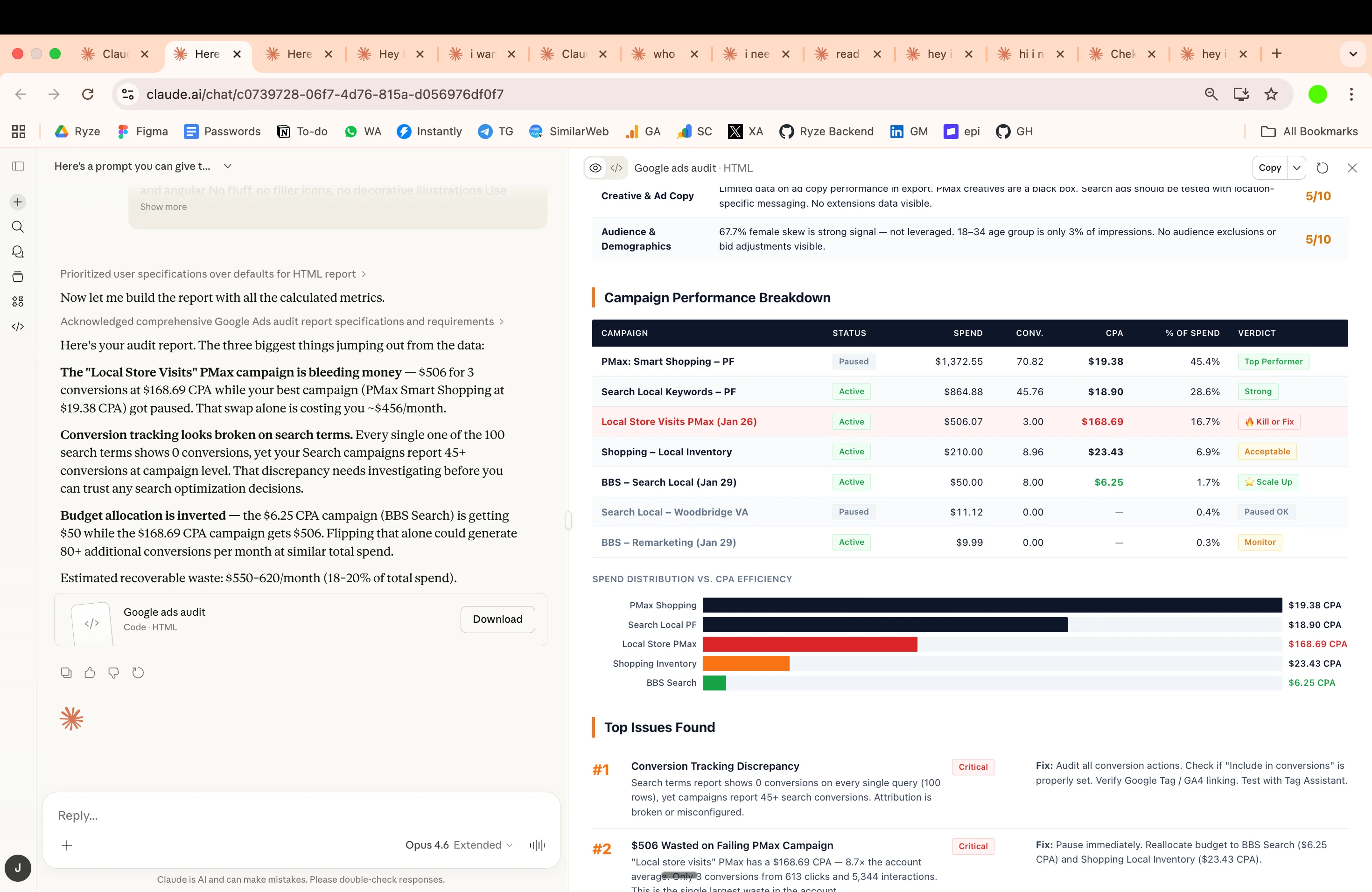
Example: Google Ads audit you can generate with skills
Setup (5 minutes)
Step 1: Download Claude Desktop
Get it at claude.ai/download.
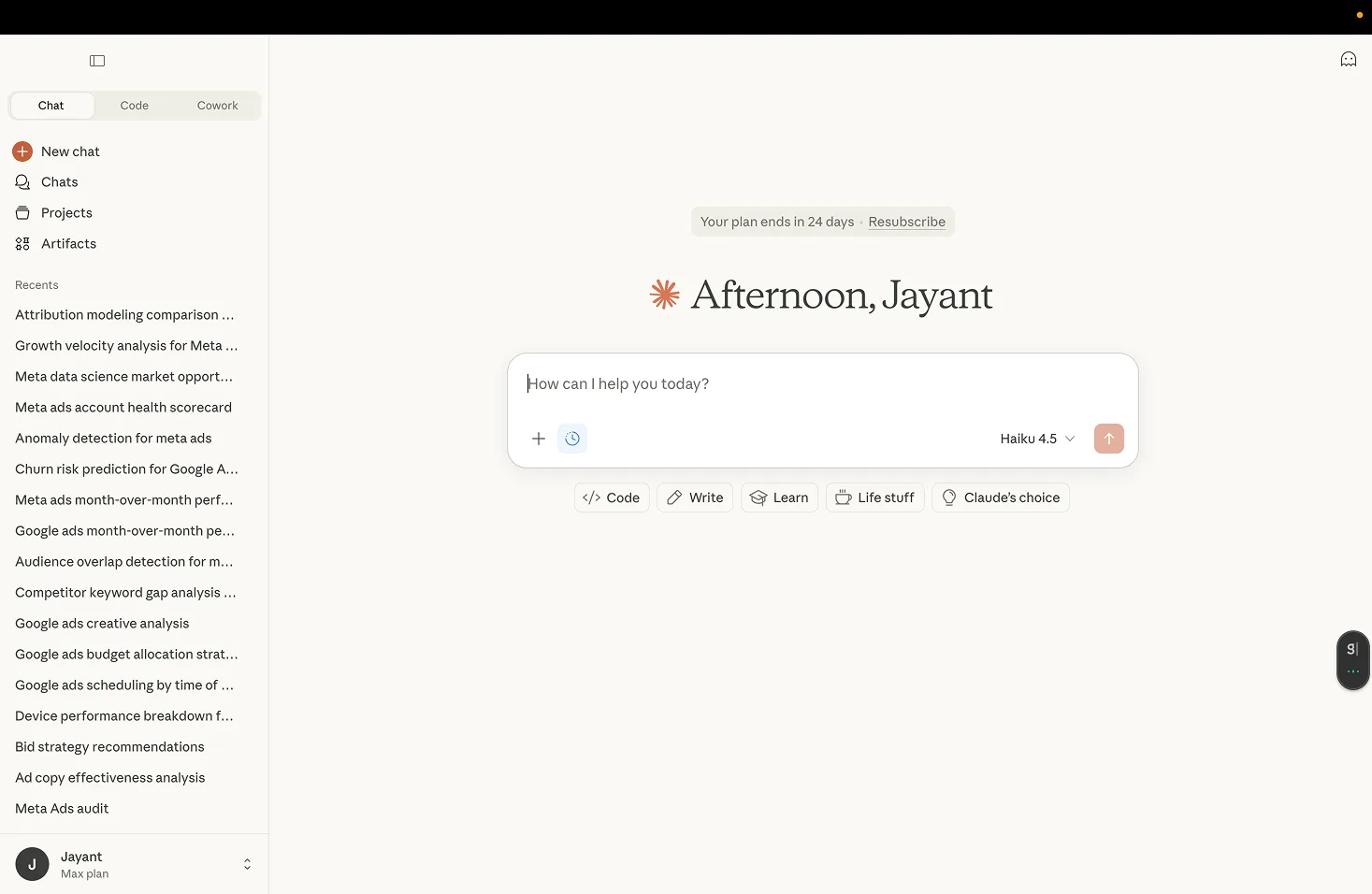
Step 2: Open the Cowork tab
Open the app and click the "Cowork" tab at the top.
Step 3: Create a workspace folder
Step 4: Install marketing skills
See the next section. If you work in claude.ai rather than Desktop, how to add marketing skills to Claude covers the 2-minute upload.
Install free marketing skills
Skills are markdown instruction files that teach Claude specialized workflows. Install once, Claude applies them automatically.
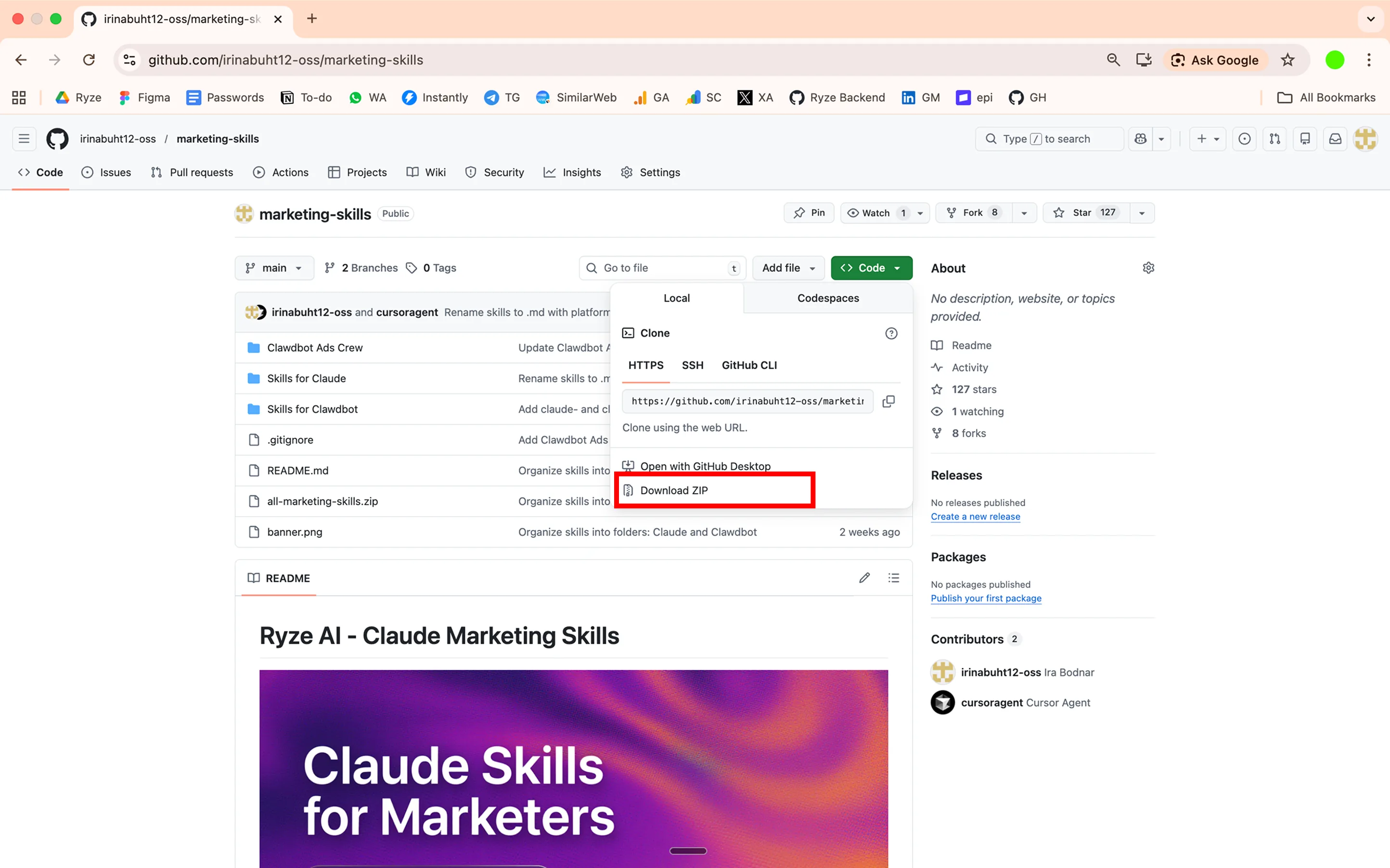
Ryze AI Marketing Skills, 17 free skills for paid ads marketers: github.com/irinabuht12-oss/marketing-skills. Skills for Google Ads:
- Google Ads Audit: wasted spend, search term leaks, negative keyword gaps
- A/B Test Analyzer: statistical significance and sample size calculations
- Landing Page Audit: conversion killers and CTA issues
- Competitor Teardown: positioning and messaging analysis
- UTM & Tracking Generator: consistent UTM links and GA4 event names
- Ad Spend Allocator: cross-channel budget reallocation
The full pack includes 17 skills covering Meta, LinkedIn, Reddit, SEO, email, and more. Download the free skills on GitHub. The ranked list of every skill worth installing is in Claude marketing skills: the complete guide.
How to install
1. Download the ZIP from GitHub (or clone it).
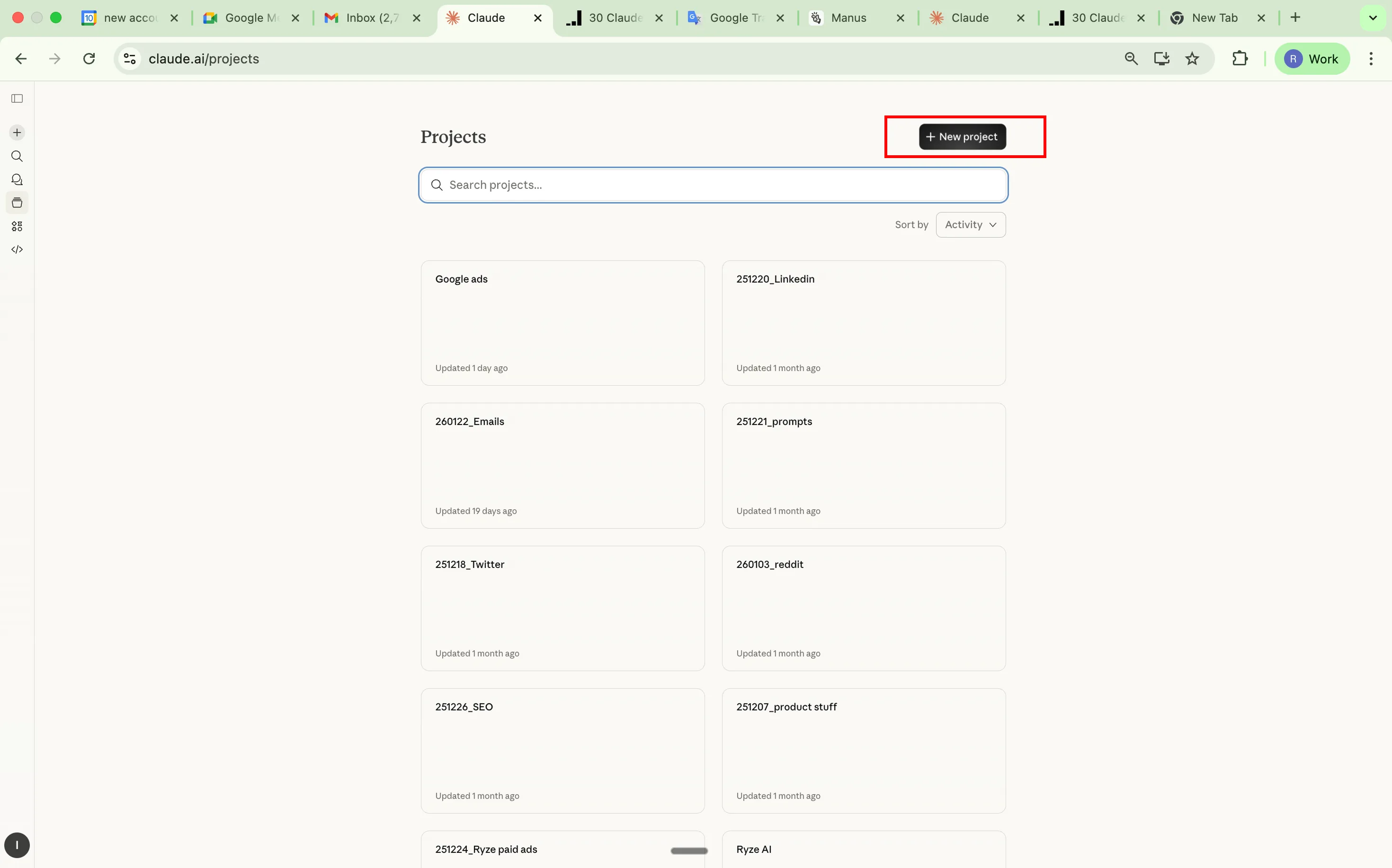
2. Create a Claude Project: go to claude.ai, then Projects, then Create Project.
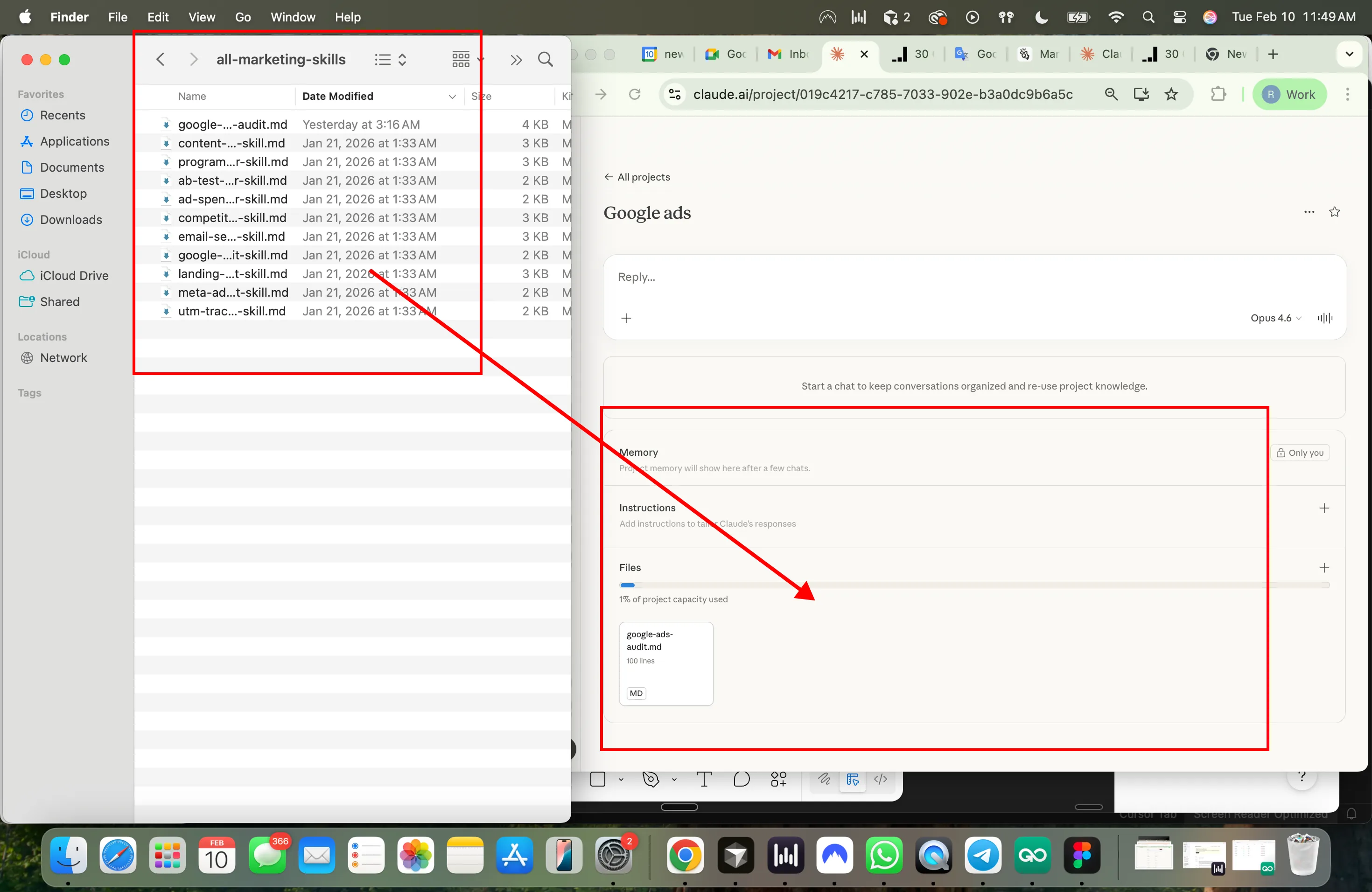
3. Drop the skill .md files into Project Knowledge.
4. Done. Claude auto-activates relevant skills based on your task.
Two ways to connect Claude to your Google/Meta Ads data
Approach
- Option 1: MCP via GitHub
- Manual setup
- Option 2: Direct connection via Ryze AI
- Full automation
Steps
- Option 1: MCP via GitHub
- Clone MCP repo from GitHub, set up Google Ads API credentials, configure Claude Desktop, query your account directly
- Option 2: Direct connection via Ryze AI
- Go to get-ryze.ai, connect your Google/Meta Ads account, Claude analyzes and applies changes
Setup time
- Option 1: MCP via GitHub
- 30-60 minutes
- Option 2: Direct connection via Ryze AI
- Minutes
Access
- Option 1: MCP via GitHub
- Read-only analysis
- Option 2: Direct connection via Ryze AI
- Execute changes in your account
Cost
- Option 1: MCP via GitHub
- Free
- Option 2: Direct connection via Ryze AI
- Flat $89/mo, free trial available
| Option 1: MCP via GitHub | Option 2: Direct connection via Ryze AI | |
|---|---|---|
| Approach | Manual setup | Full automation |
| Steps | Clone MCP repo from GitHub, set up Google Ads API credentials, configure Claude Desktop, query your account directly | Go to get-ryze.ai, connect your Google/Meta Ads account, Claude analyzes and applies changes |
| Setup time | 30-60 minutes | Minutes |
| Access | Read-only analysis | Execute changes in your account |
| Cost | Free | Flat $89/mo, free trial available |
DIY via GitHub (free)
Best for: technical marketers who want full control. What you get: read-only access to Google Ads data via Claude. Setup time: 30-60 minutes.
1. Get Google Ads API credentials
Go to Google Cloud Console. Create a project and enable the Google Ads API. Go to Credentials, Create OAuth Client ID, Desktop App. Download client_secret.json.
2. Get a Developer Token
Log into Google Ads, then Tools, then API Center. Copy your Developer Token. It starts as a test token; apply for production later.
3. Install the MCP server
Clone the repo and install its requirements in a virtual environment:
4. Create .env file
5. Configure Claude Desktop
Open ~/Library/Application Support/Claude/claude_desktop_config.json and add:
6. Restart Claude Desktop
You'll see Google Ads tools available. Then ask things like:
- "Show campaigns with ROAS below 2 in last 30 days"
- "Which ad groups have highest CPC but lowest conversions?"
- "Run a YoY analysis on my Search campaigns"
GitHub: cohnen/mcp-google-ads. More config detail is in Claude Desktop MCP config for Google Ads, and every server is compared in best MCP for Google Ads.
Ryze AI — Autonomous Marketing
Skip the exports: connect Google Ads directly
- Every workflow below, on live account data
- Applies the changes, not just the CSV
2,000+
Marketers
$500M+
Ad spend
23
Countries
5 Google Ads workflows to run today
1. Bulk RSA copy generation
Setup: export ad performance from Google Ads (Ads & Extensions, Download as CSV) and drop it in your /exports folder.
What Claude does: analyzes performance data, identifies winning copy patterns, generates variations within character limits, and outputs a Google Ads Editor-ready CSV. For a standalone version, see the AI Google Ads headline generator for Claude.
2. Search term cleanup
Setup: export the Search Terms report (Keywords, Search Terms, Download) and drop it in /exports.
Customize: replace $[YOUR_TARGET_CPA] with your actual target CPA. More on this job in build negative keyword lists with Claude AI.
3. Campaign performance audit
Setup: export 3 reports from Google Ads: campaign performance, ad group performance and keyword performance (last 30 days each). Drop all 3 CSVs in /exports.
Customize: replace $[YOUR_TARGET], $[X], [YOUR_TARGET] and [X] with your actual targets. The live-data version of this audit is in audit Google Ads with Claude MCP.
4. Competitor ad copy analysis
Setup: export competitor ad data from Google Ads Transparency Center, SpyFu, or SEMrush, or paste competitor ad copy into a document. Save it in /exports.
Customize: replace the bracketed sections with your actual competitors, product, and differentiators.
5. Landing page + ad alignment check
Setup: export your current ad copy into a document, take screenshots of the corresponding landing pages or save their HTML, and put everything in /exports.







Free SEO/GEO audit
- Surface technical SEO issues
- Spot quick wins
- Find duplicate and thin pages
Free · no credit card · instant
Build custom skills for your workflow
Skills compound. Every one you build makes the next task faster. Worth building:
- Brand voice: tone rules, approved terms, banned phrases
- RSA generator: character limits, keyword insertion rules, CSV format
- Performance reviewer: your KPI thresholds, alert triggers, reporting format
- Negative keyword builder: industry-specific irrelevant terms
- Campaign naming convention: your naming taxonomy
Option A: write a SKILL.md manually
Upload via Settings, Capabilities, Skills, Add.
Option B: ask Cowork to build it
Ready-made Google Ads skills to start from are in Claude skills for Google Ads.
Quick tips
- Start with one task. Search term cleanup or copy refresh. Don't rebuild everything day one.
- Talk like a colleague. Describe the problem, not a "prompt."
- Use your actual data. Claude works best with real campaign exports, not hypotheticals.
- Stack skills. Brand voice, then RSA generator, then performance reviewer. They compound.
- Always review before uploading. Claude generates strong starting points. Your judgment on what resonates is still irreplaceable.
- Cowork eats more usage than chat. Save it for multi-step complex work. Use regular Claude chat for quick questions.
Want to skip the manual exports and connect your Google Ads account directly? Ryze AI connects in minutes and runs these audits on live data. To schedule recurring runs in Cowork instead, see schedule ads actions in Claude Cowork.

Alex M.
VP Growth
Multi-Brand Ecommerce Group
We had five channels and five people each defending their own budget. Handing allocation to Ryze AI cut blended CAC 27% in a quarter — not because the bidding got smarter, but because money finally moved to whichever channel was winning that week.”
27%
Blended CAC reduction
5
Channels automated
12 weeks
To full autonomy
1,000+ marketers use Ryze






Automating hundreds of agencies









Frequently asked questions
What is Claude Cowork?
What do I need to use Claude Cowork for Google Ads?
What can Claude Cowork do for Google Ads?
How do I install marketing skills for Cowork?
Show 8 more questionsShow fewer questions
Can Claude Cowork connect directly to my Google Ads account?
How long does the DIY Google Ads MCP setup take?
Can Claude Cowork make changes in my Google Ads account?
Which Cowork workflow should I run first?
How does Cowork generate RSA ad copy?
How do I build my own Google Ads skill for Claude?
Does Claude Cowork use more of my plan than regular chat?
Should I review Cowork's output before uploading it to Google Ads?
Related guides
Claude Cowork for Meta Ads
The same workspace setup for Meta Ads creative and audiences.
Claude Marketing Skills: 98 Free Skills
Every skill worth installing, ranked by job.
Best MCP for Google Ads
16 Google Ads MCP servers tested and ranked.
Schedule Ads Actions in Claude Cowork
Turn these workflows into scheduled runs.

