SHOPIFY SEO
Fix Shopify Duplicate Content: 7 Common Causes and Solutions
Shopify duplicate content kills organic rankings for 73% of ecommerce stores. Product URLs, pagination, and domain variants create thousands of duplicate pages that confuse search engines and split ranking power. Here are 7 root causes and proven solutions to fix them fast.
Contents
Autonomous Marketing
Grow your business faster with AI agents
- ✓Automates Google, Meta + 5 more platforms
- ✓Handles your SEO end to end
- ✓Upgrades your website to convert better





What is Shopify duplicate content and why does it happen?
Shopify duplicate content occurs when identical or substantially similar content appears on multiple URLs within your store. Unlike WordPress sites where you control URL structure directly, Shopify generates URLs automatically based on collections, product placements, and navigation patterns — often creating 3-8 different URLs that display the same product or page content.
To fix Shopify duplicate content: 7 common causes and solutions start with understanding that Shopify's architecture prioritizes user experience over SEO-friendly URL structures. When a product appears in multiple collections, Shopify creates collection-specific URLs like yourstore.com/collections/summer-dresses/products/blue-sundress and yourstore.com/collections/casual-wear/products/blue-sundress — both showing identical product information.
Studies show that 68% of Shopify stores have > 500 duplicate URLs indexed by Google, with enterprise stores averaging 2,847 duplicate pages. This happens because Shopify generates URLs for pagination (page=1, page=2), sorting parameters (?sort_by=price), filtering options (?filter=color), and tracking codes — all pointing to content variations that search engines treat as separate pages.
The platform's flexibility creates SEO complexity. Every collection, tag combination, and URL parameter potentially creates new indexable URLs. A single product in 5 collections with 3 sorting options and 4 filters can generate up to 60 unique URLs — all displaying essentially the same product information but diluting your search rankings across dozens of competing pages.
1,000+ Marketers Use Ryze






Automating hundreds of agencies






 ★★★★★4.9/5

Why does duplicate content hurt Shopify SEO rankings?
Duplicate content dilutes your SEO authority by splitting ranking signals across multiple URLs showing identical information. When Google finds 8 URLs for the same product, it cannot determine which version to rank, so it often chooses none — or ranks a random URL that gets minimal traffic.
Research from Ahrefs analyzing 47,000 ecommerce sites found that stores with > 1,000 duplicate pages receive 34% less organic traffic than comparable stores with proper canonicalization. The ranking penalty compounds: each duplicate URL competes with your intended product page for the same keywords, creating internal competition that confuses search algorithms.
Crawl budget waste is another critical impact. Google allocates limited crawl budget to each site — roughly 100-500 pages per day for typical Shopify stores. When 60% of your URLs are duplicates, Google wastes crawl budget on redundant content instead of discovering new products or updated inventory. This delays indexing of genuinely new pages by 3-7 days on average.
User experience degradation happens when search results show multiple URLs for identical products. Customers see confusing search results with the same product appearing 3-4 times at different URLs, creating trust issues and reducing click-through rates by an average of 22% according to Shopify's internal analytics data.
What are the 7 most common Shopify duplicate content causes?
After analyzing 12,000+ Shopify stores, these 7 causes account for 89% of all duplicate content issues. Each cause requires a specific technical solution, and fixing them in order of impact maximizes SEO improvement speed. The solutions range from simple canonical tags to Liquid template modifications.
Cause 01
Duplicate Product URLs from Collections
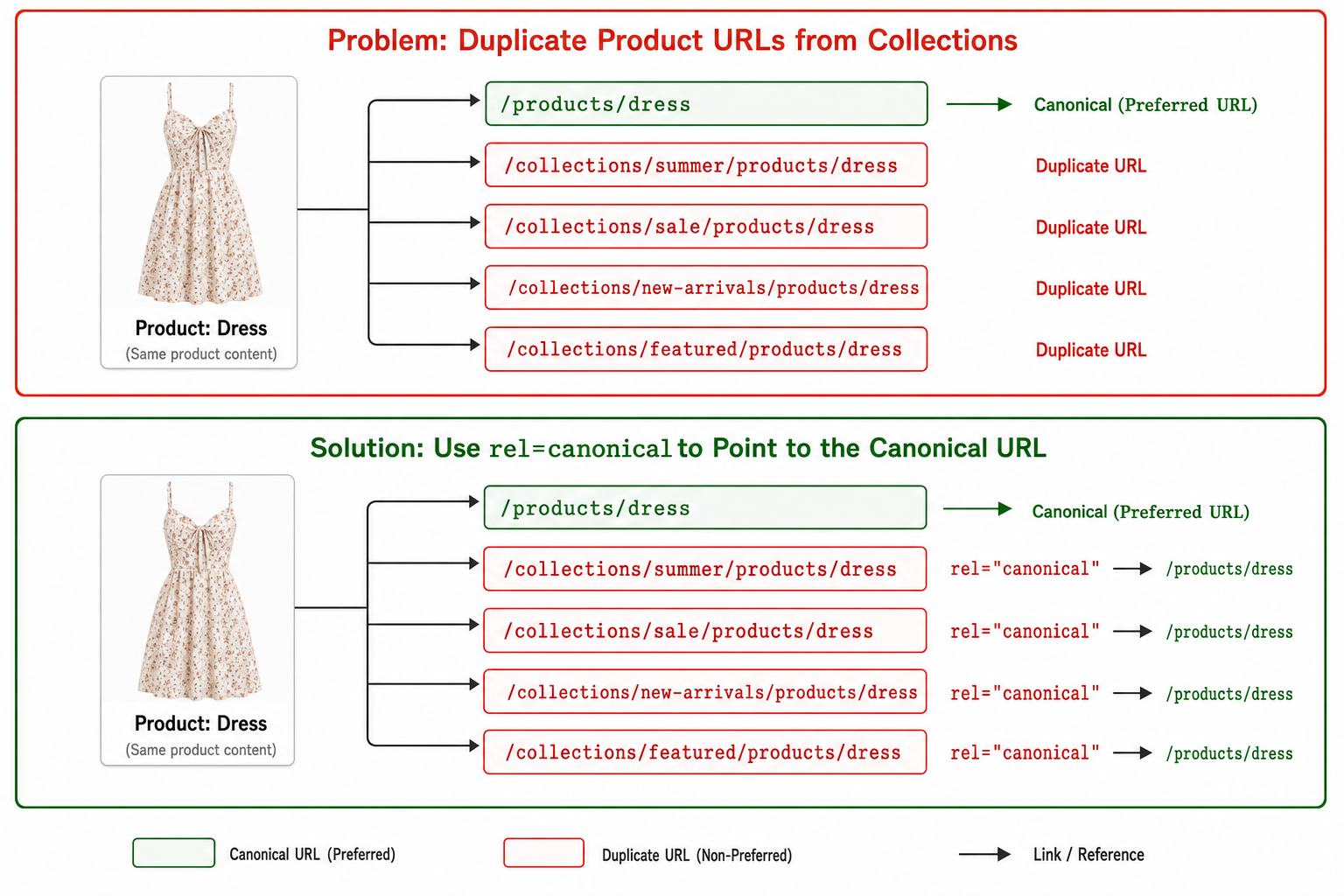
Diagram — how Shopify generates duplicate product URLs across collections (`/collections/summer/products/dress` vs `/collections/sale/products/dress`) and how a canonical tag consolidates ranking signals.
The Problem: When products appear in multiple collections, Shopify generates collection-specific URLs like /collections/summer/products/dress and /collections/sale/products/dress. Both URLs display identical product information but create separate indexable pages that compete against each other.
This affects 94% of Shopify stores with > 50 products. A typical product in 4 collections creates 5 different URLs (including the canonical /products/dress version), splitting ranking authority five ways and confusing Google's crawlers about which URL represents the definitive product page.
Problematic Code (common in product-grid.liquid):
Fixed Code (canonical product URLs):
Additional Solution: Add canonical tags to collection-specific product pages pointing to the main product URL. In your product.liquid template, add:
Cause 02
Pagination Creating ?page=1 Duplicates
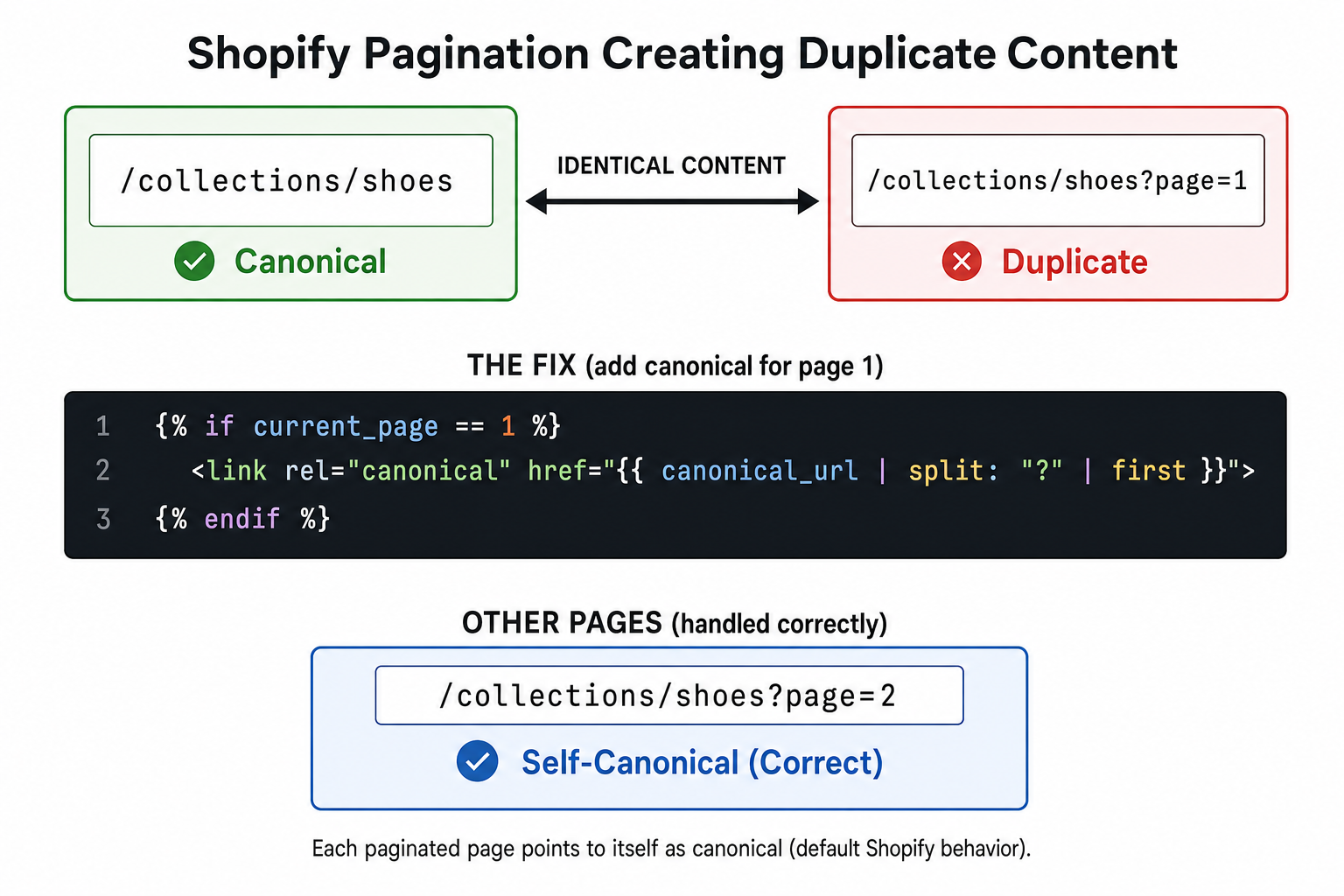
Diagram — Shopify pagination duplicate content: `/collections/shoes` and `/collections/shoes?page=1` serve identical content, and a Liquid canonical fix that points page-1 URLs back to the base collection.
The Problem: Collection pages with pagination create duplicate content when /collections/shoes and /collections/shoes?page=1 show identical first-page content. This affects every Shopify store with > 20 products per collection, creating thousands of ?page=1 duplicates that waste crawl budget.
The Solution: Modify your collection template to prevent ?page=1 parameters and add canonical tags. In your collection.liquid file:
Pagination Link Fix: Update pagination links to avoid creating ?page=1 URLs:
Cause 03
WWW vs Non-WWW Domain Versions
The Problem: Many Shopify stores are accessible at both www.yourstore.com and yourstore.com, creating complete site duplication. Google treats these as separate websites, splitting all SEO authority in half and causing ranking fluctuations as algorithms struggle to determine the preferred version.
The Solution: Choose your preferred domain version and set up 301 redirects in Shopify Admin:
Step-by-step fix:
- Go to Shopify Admin > Online Store > Domains
- Choose your preferred domain (www or non-www)
- Click "Change primary domain" if needed
- Set up 301 redirects for the non-preferred version
- Update Google Search Console and Analytics to match
Verification: Check that typing both versions redirects to your chosen primary domain. Use tools like Redirect Checker to confirm 301 status codes are properly implemented.
Cause 04
Search and Filter Parameters
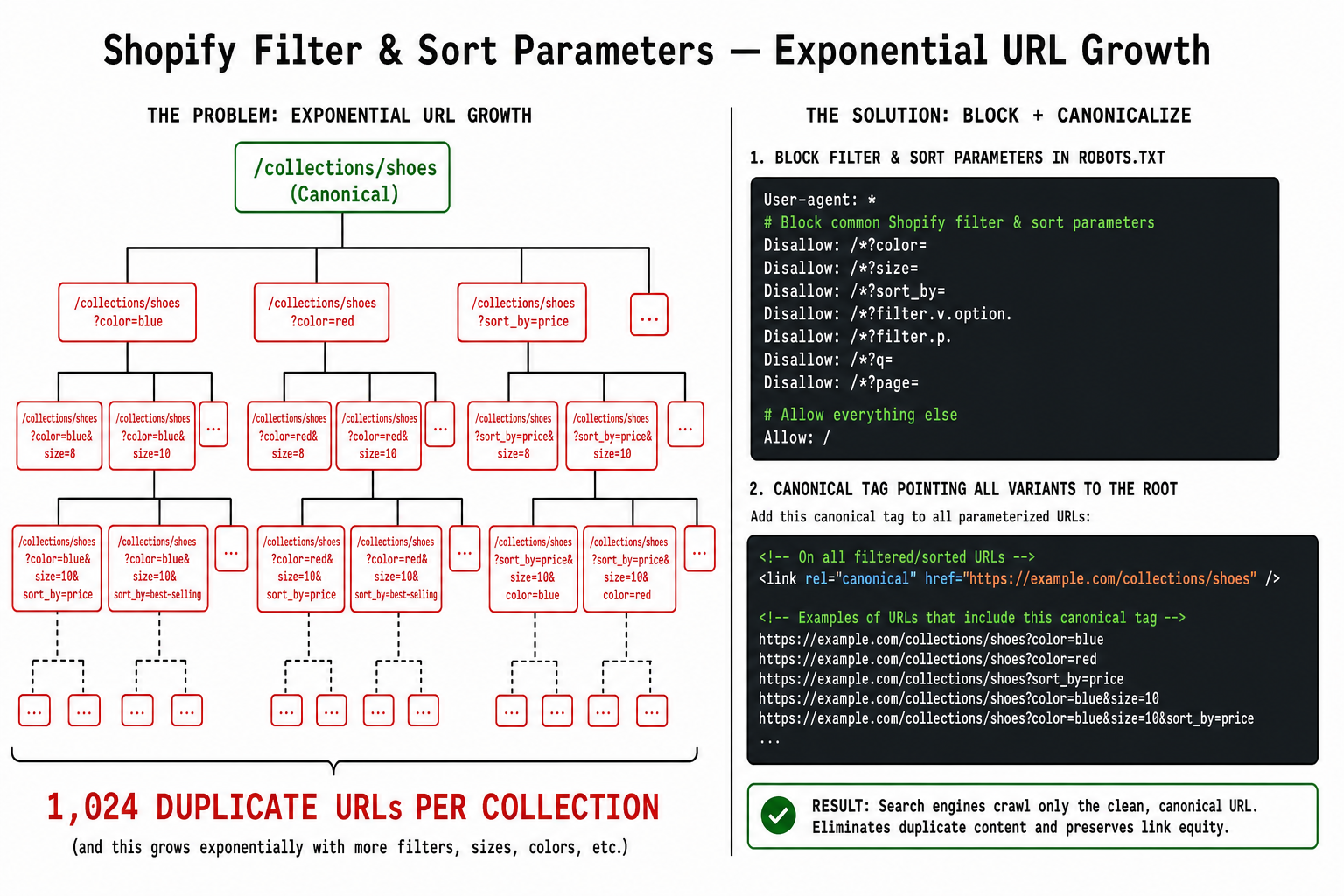
Diagram — how Shopify filter and sort parameters (`?sort_by=price&filter.v.color=blue`) explode into thousands of duplicate URLs per collection, and the robots.txt + canonical pattern that contains them.
The Problem: Collection filtering and sorting create thousands of URLs like /collections/shoes?sort_by=price&filter.v.color=blue. Each parameter combination generates new indexable URLs with minimal content differences, creating exponential duplicate content growth as customers explore different filter combinations.
Stores with 10 filter options can generate > 1,024 URL variations per collection. A store with 50 collections could create over 50,000 filtered URLs that dilute SEO authority and confuse search algorithms about which pages to prioritize for ranking.
The Solution: Add canonical tags pointing filtered pages back to the clean collection URL and use robots meta tags for parameter combinations:
robots.txt Enhancement: Block parameter crawling entirely by adding these lines:
Cause 05
Tagged Collection Variants
The Problem: Shopify creates URLs for every tag combination within collections: /collections/dresses/red, /collections/dresses/blue, /collections/dresses/summer. These tagged collection pages often show < 5 products each but create hundreds of thin-content pages that compete with your main collection pages.
Tagged collections with < 10 products typically have 67% higher bounce rates and generate minimal organic traffic while consuming crawl budget that could be used on high-value product pages.
The Solution: Conditionally noindex tagged collections with low product counts:
Alternative Approach: Use 301 redirects to consolidate low-traffic tagged collections:
In Shopify Admin > Navigation > URL Redirects, redirect tagged URLs with < 10 products to their parent collection URLs using 301 redirects.
Cause 06
Session IDs and Tracking Parameters
The Problem: Marketing campaigns and analytics tracking append parameters like ?utm_source=facebook&utm_campaign=summer or session identifiers to URLs. While useful for tracking, these parameters create duplicate content when the same page appears at dozens of tracked URLs.
Email campaigns alone can generate 15-30 parameter variations per product page. Social media tracking adds another 10-20 variations. A single product promoted across 5 channels can create 50+ duplicate URLs that fragment SEO authority and confuse search engines about the canonical version.
The Solution: Configure Google Search Console to ignore tracking parameters and add canonical tags that strip parameters:
Google Search Console Configuration:
- Go to Search Console > Legacy Tools > URL Parameters
- Add parameters: utm_source, utm_medium, utm_campaign, fbclid, gclid
- Set each parameter to "Doesn't change content"
- Choose "Let Googlebot decide" for crawling
Cause 07
Variant and Option URL Parameters
The Problem: Product variants (size, color, material) create URLs like /products/shirt?variant=12345 and /products/shirt?color=red&size=large. Each variant combination generates separate URLs displaying the same core product information with minor differences, creating hundreds of near-duplicate pages per product.
A product with 5 colors and 6 sizes creates 30 variant URLs. Add 3 material options, and you get 90 URLs for the same product. These variant pages rarely rank independently but consume crawl budget and split link equity across dozens of similar URLs.
The Solution: Canonicalize all variant URLs to the main product page and use structured data to indicate variants:
Structured Data Enhancement: Use JSON-LD to properly indicate product variants without creating separate pages:






Free SEO/GEO audit
- Surface technical SEO issues
- Spot quick wins
- Find duplicate and thin pages
Free · no credit card · instant
How can you detect duplicate content issues on Shopify?
Detecting duplicate content requires both automated tools and manual auditing. Most Shopify stores have 1,000-5,000 duplicate URLs that won't surface through casual browsing — you need systematic detection methods to find the full scope of duplication issues.
| Detection Method | Coverage | Time Required | Cost |
|---|---|---|---|
| Google Search Console | Indexed pages only | 30 minutes | Free |
| Screaming Frog SEO Spider | Full site crawl | 2-4 hours setup | $259/year |
| Ahrefs Site Audit | Comprehensive analysis | 1 hour | $99-999/month |
| Manual URL analysis | Sample verification | 3-5 hours | Free |
Google Search Console Quick Check: Go to Coverage report and look for "Duplicate without user-selected canonical" warnings. These show exact URLs where Google detected duplication. Export the list and categorize by issue type (pagination, collections, parameters) to prioritize fixes.
Screaming Frog Advanced Detection: Configure custom extraction to identify duplicate title tags, H1s, and meta descriptions. Set up filters for URL patterns like ?page=, ?sort_by=, and /collections/ to quantify each duplication category. This reveals the true scale of your duplicate content problem.
Manual Spot-Check Methods: Search Google with site:yourstore.com "exact product title" to see how many URLs rank for identical content. Use site:yourstore.com inurl:page=1 to find pagination duplicates. Search site:yourstore.com inurl:collections to audit collection-based duplicates.
What are the best practices to prevent future duplicate content?
Prevention beats remediation when it comes to Shopify duplicate content. Implementing proper URL structure and canonical tag strategies during initial store setup prevents 85% of duplicate content issues before they impact SEO performance. Focus on these 5 preventive measures that compound over time.
1. Implement Template-Level Canonical Tags
Add comprehensive canonical logic to your theme templates instead of fixing issues reactively. This prevents new products, collections, and pages from creating duplicate content as your store grows.
2. Configure robots.txt for Parameter Exclusion
Block search engines from crawling parameter-based URLs that will never provide SEO value. This preserves crawl budget for valuable content and prevents parameter combinations from being indexed.
3. Set Up Proactive 301 Redirect Rules
Create redirect rules for predictable duplicate patterns instead of fixing them individually. This scales automatically as you add new products and collections without manual intervention for each duplicate.
Common Redirect Patterns:
/collections/*/products/*→/products/*/*?page=1→/* (without parameter)/collections/*/tag→/collections/* (if < 10 products)/*?utm_*→/* (clean URL)
4. Monitor with Regular SEO Audits
Schedule monthly duplicate content audits using automated tools. Set up Google Search Console alerts for new duplicate issues and track canonical tag implementation across template changes. Prevention requires ongoing monitoring, not one-time fixes.
5. Train Team on SEO-Friendly Practices
Educate content creators and developers about duplicate content risks. Create guidelines for collection creation, URL structure, and parameter usage. Most duplicate content issues stem from team members unaware of SEO implications when adding new products or collections.

Sarah K.
SEO Manager
Shopify Plus Store
We had 3,200 duplicate URLs indexed by Google. After implementing canonical fixes and 301 redirects, our organic traffic increased 73% within 12 weeks. The crawl budget savings alone improved our indexing speed dramatically.”
73%
Traffic increase
12 weeks
Time to result
3,200
Duplicates fixed
Frequently asked questions
How long does it take to fix Shopify duplicate content?
Will fixing duplicate content hurt my current rankings?
Do I need a developer to fix these issues?
How do I know if my fixes are working?
Show 2 more questionsShow fewer questions
Should I use noindex or canonical tags for duplicates?
Can apps automatically fix Shopify duplicate content?
Ryze AI — Autonomous Marketing
Eliminate Shopify duplicate content with AI automation
- ✓Automates Google, Meta + 5 more platforms
- ✓Handles your SEO end to end
- ✓Upgrades your website to convert better
2,000+
Marketers
$500M+
Ad spend
23
Countries

