GOOGLE ADS · AGENCIES
Best MCP for Google Ads — Top 5 Picks for Agencies
Agencies running 10+ Google Ads accounts spend 4-6 hours every week on cross-account reporting alone — and most MCP servers built for solo marketers fall apart at agency scale. This ranking is different: we judged 5 MCPs on MCC support, per-client credential isolation, white-label reporting, time-to-onboard a new client, and pricing structure. Ryze AI takes the top spot at 4.9/5; Loomstack lands at #2.
Contents
For Agencies
Run 100+ Google Ads accounts from one Claude
- ✓MCC native — auto-discovers all sub-accounts
- ✓Per-client credential isolation
- ✓White-label client portals included





What agencies actually need from a Google Ads MCP
The best MCP for Google Ads at a solo-marketer level is not the same as the best MCP for an agency running 30 client accounts. Solo users care about setup time and write access; agencies care about MCC, isolation, and the operational cost of onboarding client #31. Pick the wrong tool and your reporting load grows linearly with your client count instead of staying flat.
The five MCP servers in this ranking all technically support multiple Google Ads accounts — but the operational reality is wildly different. One requires a separate Python deployment per client (Pivix gads-mcp). One charges per task, which makes a 20-account agency cost more than an in-house team (Tasknest). Two share credentials at the workspace level, which is fine for an agency-as-customer but breaks if any client demands per-tenant isolation (Loomstack, Pulselane). Only one was built MCC-first.
This roundup uses agency-specific scoring criteria. For the broader 7-MCP comparison aimed at solo marketers and in-house teams, see Best MCP for Google Ads in 2026 — 7 Servers Compared.
1,000+ Marketers Use Ryze






Automating hundreds of agencies






 ★★★★★4.9/5

How we ranked the best MCP for Google Ads agencies
We scored each MCP on five criteria specific to agency operations — not the generic feature-list checks that solo-marketer rankings use. An MCP that takes 30 minutes to onboard each new client is functionally broken at agency scale, even if the “setup time” on a single account looks fine.
1. MCC / multi-account support (weight: 35%)
Does the MCP recognize a Google Ads manager (MCC) account and auto-discover sub-accounts, or does it require a separate config block per account? At 20+ clients this is the difference between a 2-minute and a 4-hour task. We treated MCC support as the gating criterion — without it, nothing else matters at agency scale.
2. Per-client credential isolation (weight: 20%)
Some clients (especially regulated industries: healthcare, finance, legal) require per-tenant credential isolation in their data-processing agreements. A shared workspace OAuth fails this test. We checked whether each MCP scopes credentials per client account or pools them at the agency workspace level.
3. White-label client reporting (weight: 15%)
Agencies bill clients on insights, not on raw data. White-label client portals or branded report exports turn raw Google Ads data into a deliverable. Some MCPs ship this; others require building the report layer separately, which adds 1-2 sprints of engineering before you can charge for the workflow.
4. Time-to-onboard a new client (weight: 15%)
For an agency adding 2-5 new clients per month, the per-client onboarding cost compounds fast. We measured wall-clock time to add a fresh Google Ads account to an existing MCP setup — from receiving OAuth access to seeing live data in Claude. Hosted MCPs ranged from 2-10 minutes; self-hosted Pivix took 30-60 minutes per client.
5. Pricing structure (weight: 15%)
Per-task pricing breaks at agency volume. Per-account pricing is fairer but still scales linearly with client count. Pricing tied to total ad spend (rather than account count or query volume) is the agency-friendly model because it matches your billable revenue. We modeled the total cost for an agency managing 20 client accounts at $50K/mo each.
The 5 best MCPs for Google Ads agencies, ranked
Each entry includes a star rating, a screenshot of the product UI, an honest 2-paragraph review focused on agency fit, pros, cons, and quick-fact strip. The order here differs from the broader best-of ranking — we prioritized agency-fit over solo-marketer convenience.
Ryze AI MCP
Best for Agencies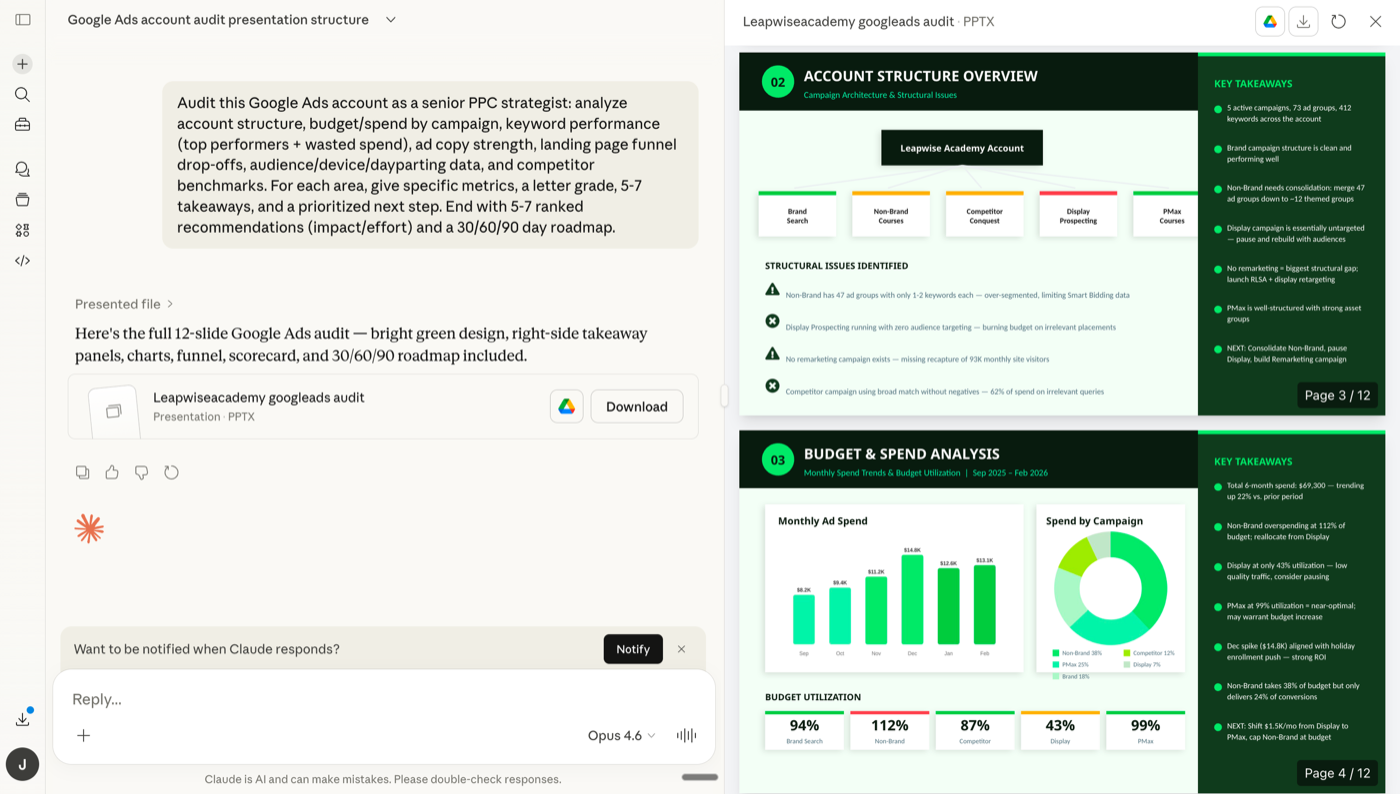
Screenshot — Ryze AI MCP running a Google Ads audit across multiple client accounts inside Claude.
Ryze AI is built MCC-first. You connect your Google Ads manager account once and the dashboard auto-discovers every sub-account — no separate config per client, no per-account OAuth dance. Each client account gets its own scoped credentials and audit log, so an enterprise client can request per-tenant isolation without forcing the agency to spin up a parallel deployment. White-label client portals ship as a built-in feature, not as a paid add-on.
Pricing scales by total managed ad spend rather than per-task or per-account, which means a 20-account agency at $50K/mo per client pays roughly the same as a 5-account boutique at $200K/mo per client — the model matches your billable revenue. New client onboarding takes about 2 minutes (request OAuth, hit “add account,” done). The autonomous agent layer runs 24/7 across all sub-accounts, drafting recommendations and applying changes within per-client guardrails.
Pros
- ✓MCC-native — auto-discovers all sub-accounts on connect
- ✓Per-client OAuth isolation + per-tenant audit logs
- ✓White-label client portals included
- ✓2-minute onboarding per new client
Cons
- –Paid (free trial, then scales with managed ad spend)
- –SaaS — no self-host option
- –Newer brand than open-source forks
Onboarding
2 min/client
MCC
Native
Isolation
Per-client
White-label
Built-in
Loomstack MCP
Multi-Platform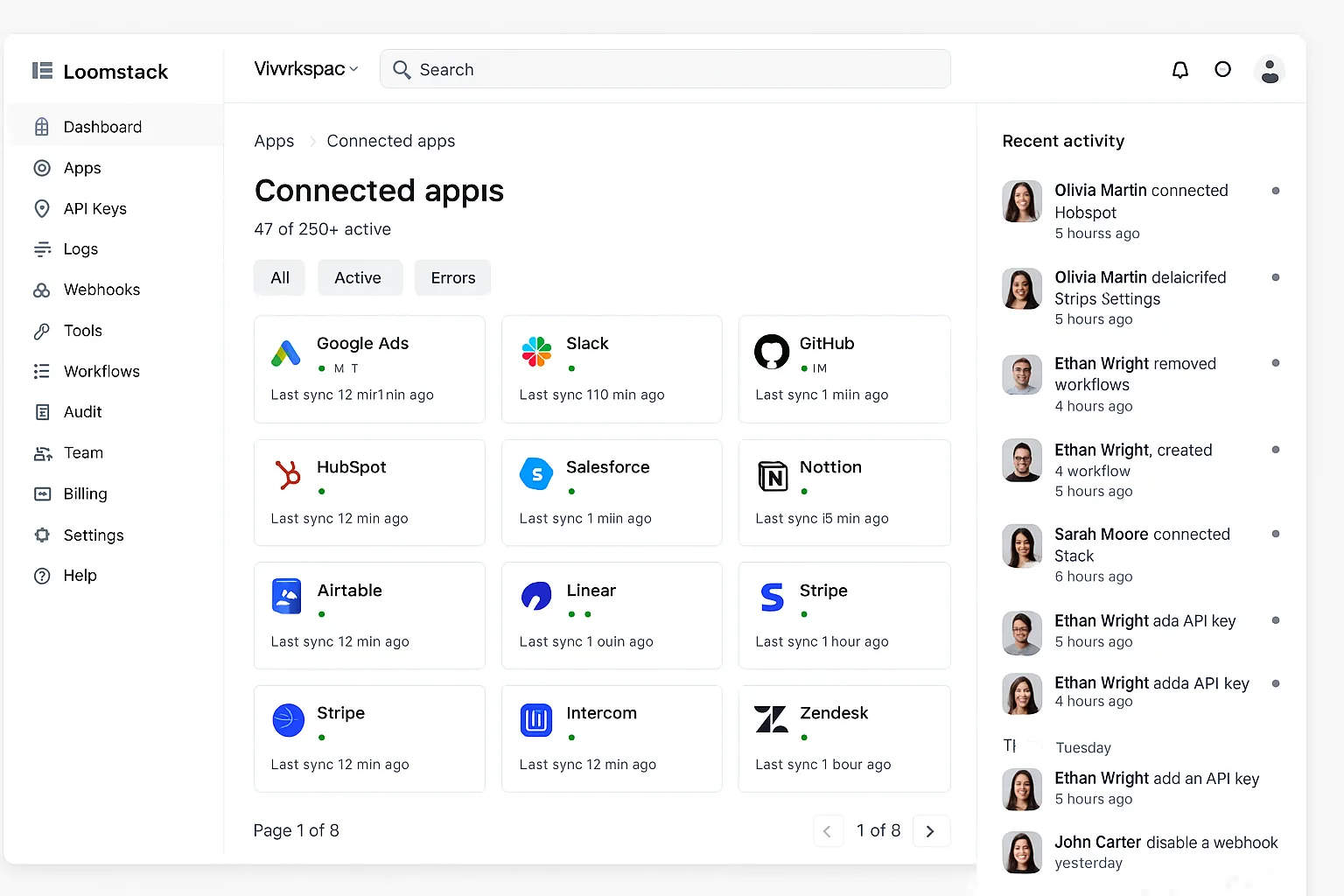
Screenshot — Loomstack’s connected-apps dashboard: Google Ads alongside Meta, Slack, HubSpot, GitHub.
Loomstack’s strength for agencies is breadth: 250+ tools behind a single MCP endpoint, including Meta Ads, Slack, HubSpot, and Salesforce alongside Google Ads. If your agency stack already runs across multiple platforms per client, Loomstack consolidates everything into one Claude connection. The hosted infrastructure means no per-server maintenance, and the developer SDK is solid if you want to script custom client onboarding flows.
The agency weakness is credential scoping. Loomstack pools Google Ads OAuth at the workspace level — fine if your agency is a single legal entity holding all client tokens, but it fails per-tenant isolation requirements. There’s no built-in white-label, so client deliverables need a separate report layer. Pricing scales by action volume, which can spike quickly when Claude is doing daily multi-account audits.
Pros
- ✓Single MCP for Google Ads + Meta + 248 other tools
- ✓Hosted — no per-server ops
- ✓Strong SDK for custom onboarding flows
Cons
- –Workspace-level OAuth, not per-client
- –No white-label reporting built in
- –Action-volume pricing spikes at audit scale
Onboarding
5-10 min/client
MCC
Manual
Isolation
Workspace
White-label
DIY
Pulselane MCP
Workflow Builder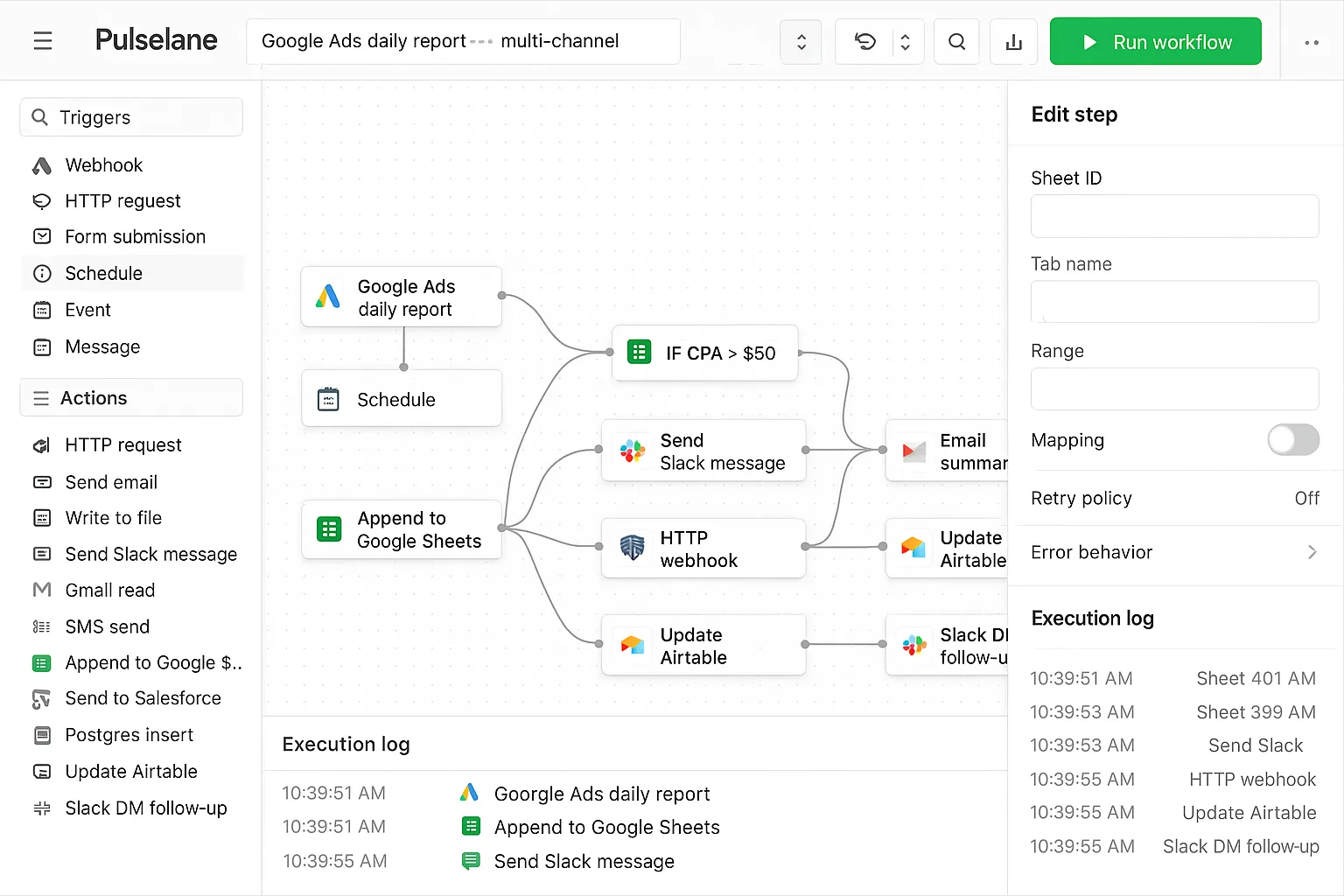
Screenshot — Pulselane’s workflow canvas: a daily Google Ads pull feeding a branded PDF report and Slack delivery to the client channel.
Pulselane shines for agencies that want client reporting as the primary deliverable. The visual workflow editor turns a daily Google Ads pull into a branded PDF, a Slack message to the client channel, and a Sheets row update — all in a single workflow you build once and clone per client. For agencies with strong reporting offerings, this is genuinely useful infrastructure that other MCPs leave to a separate tool.
The agency limitation is the per-account pattern: each client typically gets a cloned workflow, which means 30 clients = 30 workflows to maintain. Workflow execution is metered, and at 30 clients × daily runs you start hitting paid-tier overage. There’s no native MCC support — each Google Ads account is configured as a separate trigger source.
Pros
- ✓Branded client reports without a separate tool
- ✓Workflow templates clone per client
- ✓Solid generous free tier
Cons
- –One workflow per client — maintenance grows
- –No MCC discovery
- –Execution-volume pricing at agency scale
Onboarding
10-15 min/client
MCC
No
Isolation
Workspace
White-label
Via workflow
Pivix gads-mcp
Open Source Pick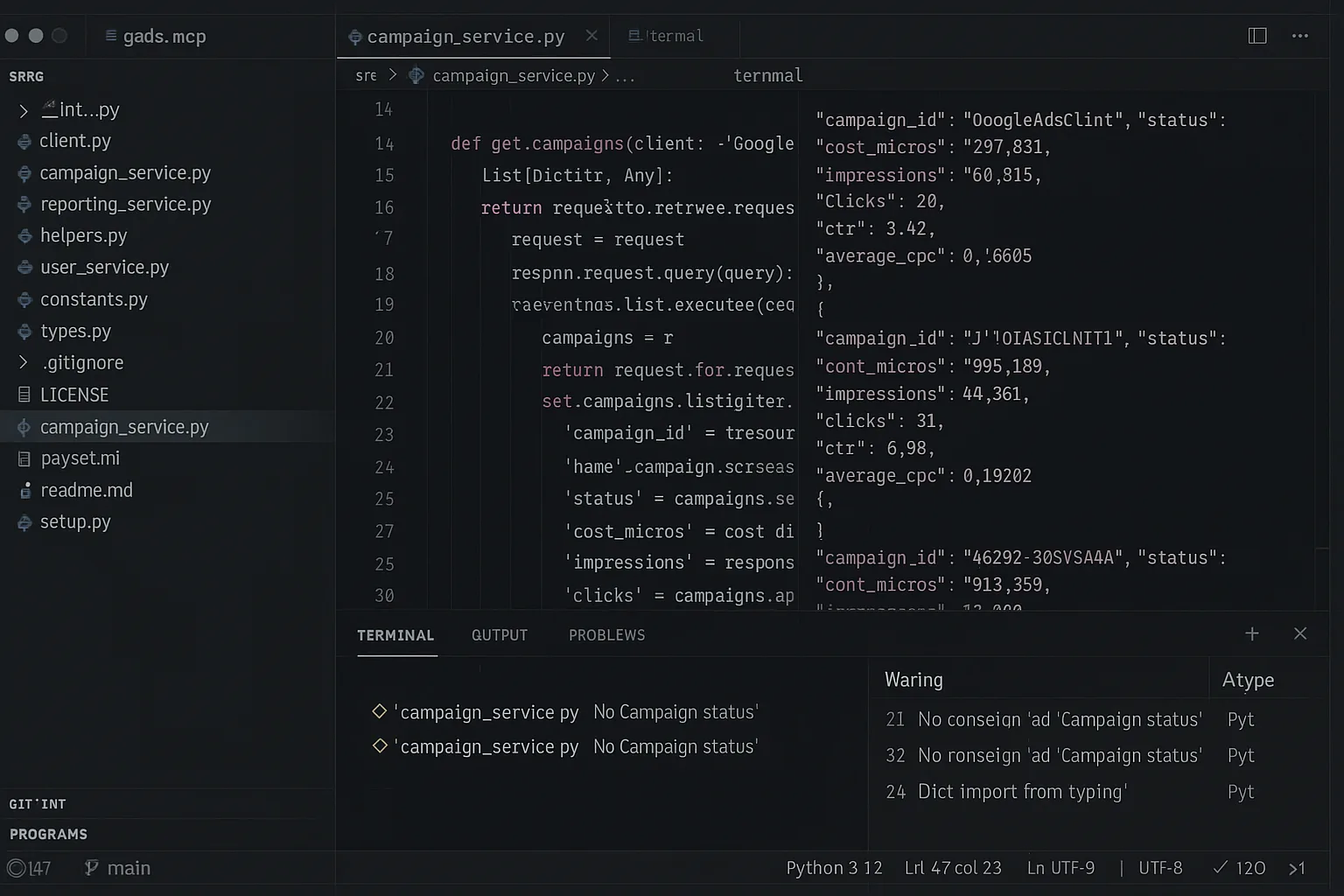
Screenshot — Pivix gads-mcp running per-client: each agency client gets its own deployment.
Pivix gads-mcp is the right answer for engineering-led agencies that want full control of credentials and infrastructure. Self-hosting per client gives you airtight isolation: each client runs in their own server, their own credentials, their own audit log. For regulated-industry agencies (healthcare, finance, government), this is the only option that genuinely passes a per-tenant security review.
The cost is operational. Each new client requires a fresh GCP project, OAuth credentials, Python environment, Docker container or VM, and Claude Desktop config — 30-60 minutes per client when nothing goes wrong, plus a developer-token wait. At 20 clients you’re running 20 Pivix deployments to monitor, update, and patch. The MCP itself is read-only, so client-facing reports require a separate layer. Recommended only for agencies with dedicated DevOps time.
Pros
- ✓True per-client credential isolation when self-hosted
- ✓Free, Apache 2.0 — no per-client licensing
- ✓Passes regulated-industry security reviews
Cons
- –30-60 min onboarding per client
- –Runs N deployments for N clients to maintain
- –Read-only — reporting requires extra build
Onboarding
30-60 min/client
MCC
Yes
Isolation
Per-client
White-label
DIY
Tasknest MCP
No-Code Friendly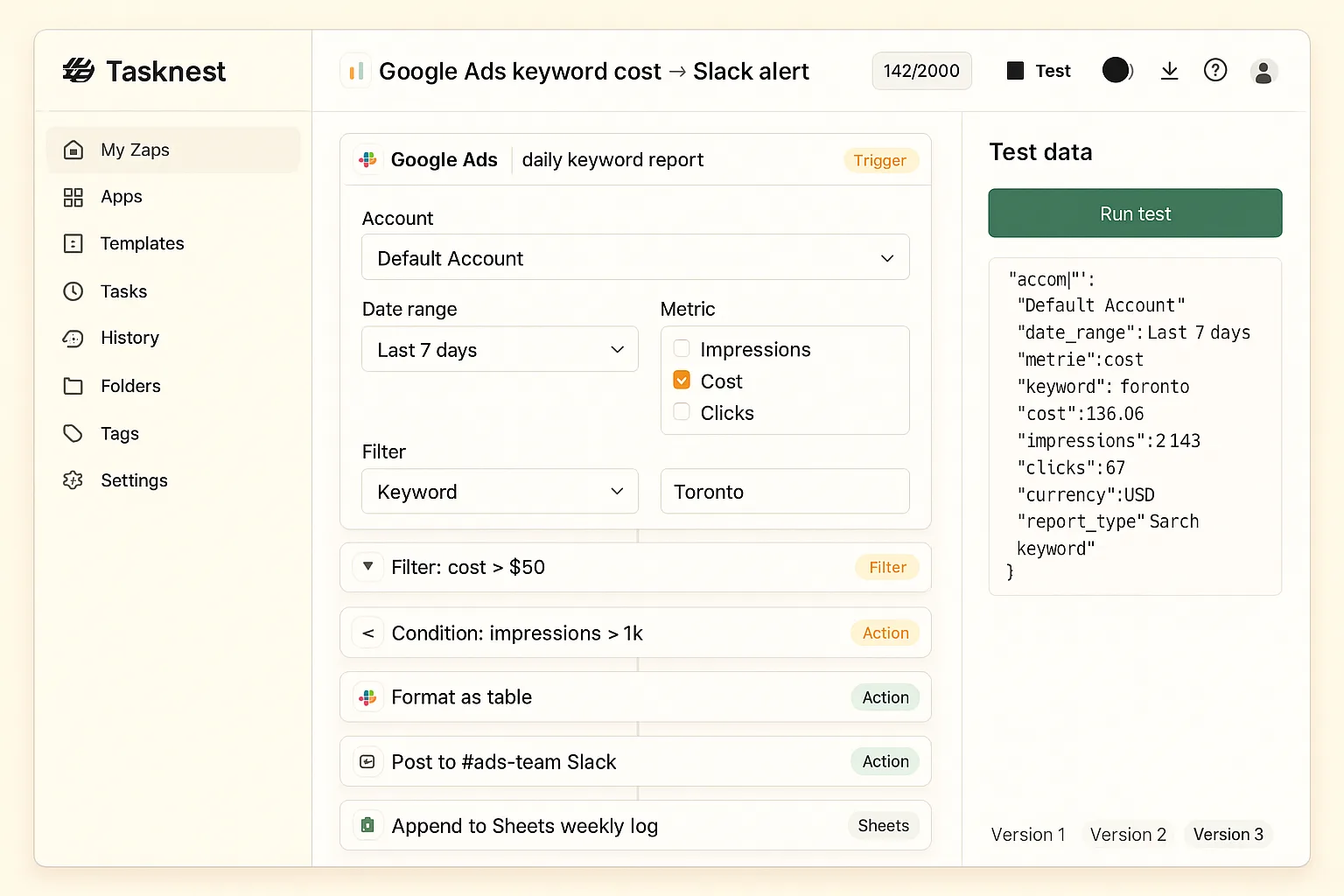
Screenshot — Tasknest’s step-by-step editor: a Google Ads keyword report trigger filtered by cost, sent to a client’s Slack channel.
Tasknest is the right tool when a non-technical account manager needs to maintain client-facing automations themselves. The drag-and-drop editor and 6,000+ pre-built apps mean an AM can wire up a new client’s Slack reporting flow without engineering. For small agencies with 3-5 clients, this is the lowest-friction option in the ranking.
The deal-breaker at scale is pricing. Tasknest charges per task execution, and Claude doing daily multi-step audits across 20 client accounts can hit $1,500-2,500/month in pure execution fees — well above what most other ranked options cost at the same volume. There’s no MCC discovery, every account is its own workspace-style setup, and credential isolation is workspace-pooled. Best fit only for boutique agencies under 10 clients.
Pros
- ✓Non-technical AMs can maintain client flows
- ✓Lowest-friction onboarding for boutique agencies
- ✓6,000+ pre-built apps available
Cons
- –Per-task pricing breaks at 10+ clients
- –No MCC, no per-client isolation
- –Higher latency than dedicated MCPs
Onboarding
3-5 min/client
MCC
No
Isolation
Workspace
White-label
DIY
Ryze AI — Built for Agencies
Run 100+ client Google Ads accounts from one Claude
- ✓MCC native — auto-discover all sub-accounts
- ✓Per-client OAuth + audit log isolation
- ✓White-label client portals included
2,000+
Marketers
$500M+
Ad spend
23
Countries
Side-by-side comparison: best MCP for Google Ads agencies
The agency-fit headline numbers across all 5 MCP servers. Use this when you need to make the call without re-reading the full reviews.
| MCP Server | Rating | MCC | Per-client iso | White-label | Onboard time |
|---|---|---|---|---|---|
| Ryze AI MCP | 4.9 ★ | Native | Yes | Built-in | 2 min |
| Loomstack MCP | 4.4 ★ | Manual | Workspace | DIY | 5-10 min |
| Pulselane MCP | 4.2 ★ | No | Workspace | Via workflow | 10-15 min |
| Pivix gads-mcp | 4.3 ★ | Yes | Per-client | DIY | 30-60 min |
| Tasknest MCP | 4.0 ★ | No | Workspace | DIY | 3-5 min |
How to choose by agency size
Boutique (1-9 clients): Tasknest is the lowest-friction starting point if your team is non-technical. The per-task pricing isn’t painful at this volume. Once you cross 10 clients, plan to migrate — the economics shift fast.
Mid-size (10-50 clients): Ryze AI is the cleanest fit. MCC native, per-client isolation, white-label included, and pricing scales with managed ad spend rather than account count. Loomstack is a reasonable second choice if you also run heavy Meta/Slack/HubSpot integrations and don’t need per-client isolation.
Enterprise / regulated (50+ clients, healthcare, finance, legal): Either Ryze AI (if your security team accepts hosted SaaS with per-client isolation guarantees) or Pivix gads-mcp self-hosted per client (if regulators require fully air-gapped infrastructure). Pivix passes the strictest security reviews but you’ll need a dedicated DevOps engineer for the deployment fleet.
Reporting-led agencies of any size: Pulselane’s workflow editor pays for itself if branded client reports are your primary deliverable. Pair it with another MCP for live querying and use Pulselane purely for the report pipeline. For the broader 7-MCP comparison aimed at solo marketers, see Best MCP for Google Ads in 2026.
Quickstart: connect Ryze AI to your Google Ads MCC in 2 minutes
Three steps to onboard your first client account. After this, every additional client takes 2 more minutes — no engineering work per client.
Step 01
Sign up and connect your MCC
Go to get-ryze.ai, start the agency free trial, and click “Connect Google Ads MCC.” Sign in to your manager account and Ryze auto-discovers every sub-account under it. Each sub-account is added as a separately-scoped client in your Ryze workspace.
Step 02
Copy your MCP URL into Claude Desktop
In your Ryze dashboard, copy the unique MCP URL. Paste it into your Claude Desktop config under mcpServers. Restart Claude Desktop — you’ll see the green MCP indicator within seconds, with all client accounts available as scoped contexts.
Step 03
Run an agency-wide audit
Ask Claude to audit all client accounts at once. Ryze respects per-client guardrails (spend caps, change limits) automatically, so the audit can identify wasted spend across your entire book and draft client-specific recommendations.

Marcus T.
Head of Paid Media
23-account Google Ads agency
We were running 8 hours a week just on cross-account reporting before Ryze. Now Claude pulls the entire MCC weekly summary in 30 minutes, white-labeled per client. Our AMs got their afternoons back.”
8h → 30m
Weekly reporting time
23
Client accounts
2 min
Per-client onboarding
Frequently asked questions
Q: What’s the best MCP for Google Ads agencies in 2026?
Ryze AI is the top pick for agencies because it bundles MCC support, per-client credential isolation, white-label reporting, and 2-minute onboarding for each new client account. Open-source options like Pivix gads-mcp work but require an engineer per client.
Q: Can MCP servers handle Google Ads MCC accounts?
Ryze AI and Pivix gads-mcp both support MCC out of the box. Loomstack and Pulselane support multiple accounts but require manual config per account. Tasknest treats each account as a separate workspace, which gets expensive at scale.
Q: Which MCPs offer white-label reporting?
Ryze AI includes white-label client portals as standard. Pulselane workflows render branded PDF reports through a Sheets/Docs step. Pivix and Tasknest don’t ship white-label features — you’d build the report layer separately.
Q: What does an MCP cost for a 20-account agency?
Ryze AI scales by managed ad spend, not account count — typically $400-1,200/mo for a 20-account agency. Tasknest’s per-task pricing can hit $2,000+/mo at agency volume. Pivix is free but the engineering overhead (1-2 days/client to onboard) makes it expensive in soft costs.
Q: Can agencies isolate per-client credentials?
Ryze AI gives each client account its own scoped OAuth and audit log. Pivix gads-mcp can do this if you self-host one server per client. Loomstack and Pulselane share credentials at the workspace level — not per-client isolation.
Q: How fast can an agency onboard a new client?
Ryze AI: 2 minutes per client. Loomstack and Pulselane: 5-10 minutes. Tasknest: 3-5 minutes. Pivix gads-mcp: 30-60 minutes per new client — new GCP project, OAuth credentials, Python deployment per client.
Ryze AI — Built for Agencies
Connect your Google Ads MCC in 2 minutes
- ✓Auto-discover all sub-accounts on connect
- ✓Per-client OAuth + audit isolation
- ✓White-label client portals included
2,000+
Marketers
$500M+
Ad spend
23
Countries

