GOOGLE ADS · FOR MARKETERS
Best Claude Connector for Google Ads (2026 Guide)
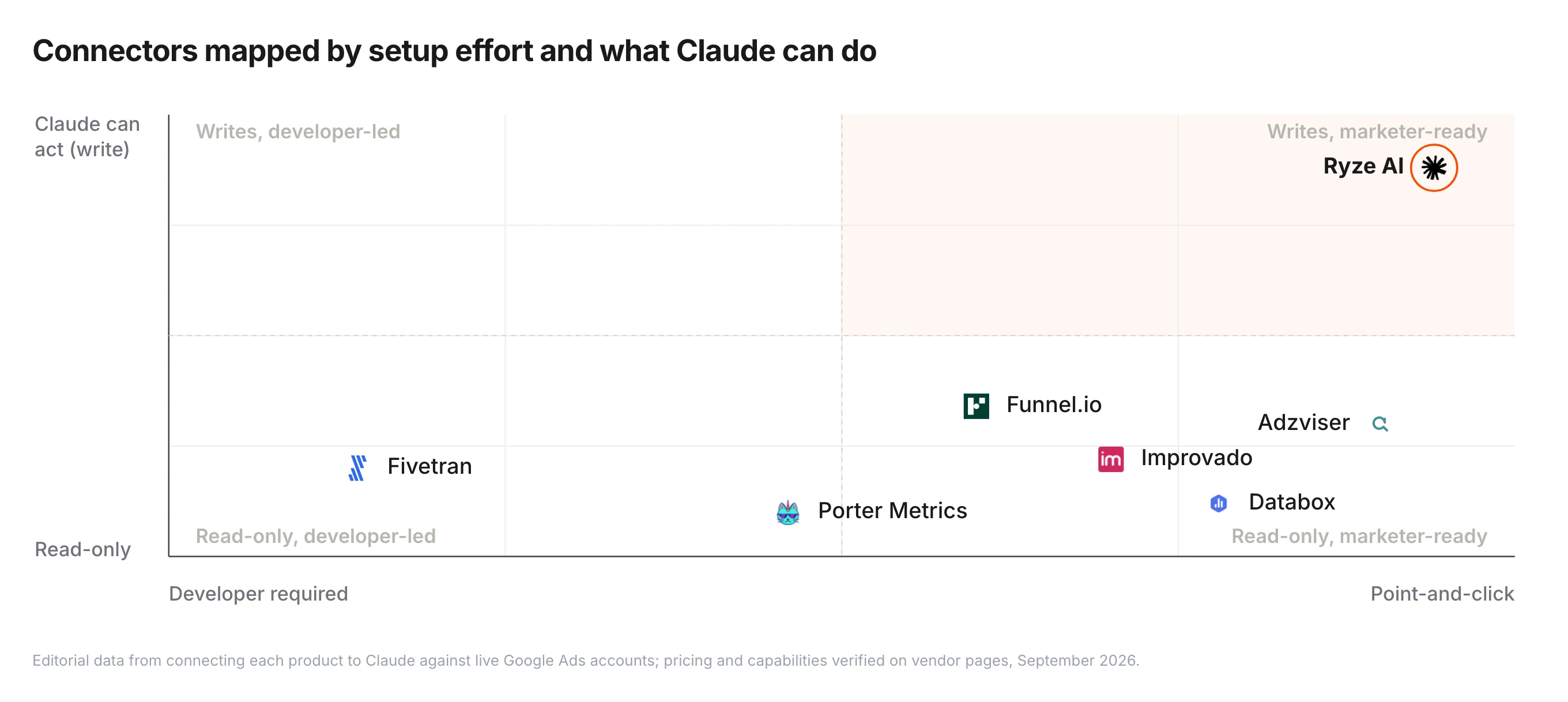
If you’ve thought about plugging Claude into Google Ads but got scared off by words like “OAuth scope” and “developer token,” this is the post for you. We ranked 5 Claude connectors specifically by what marketers care about: how much technical setup is involved, whether you need a developer, what you can actually do with it, and what it costs. Ryze AI takes the top spot at 4.9/5; Tasknest is the friendliest no-code runner-up.
Contents
For Marketers
Connect Claude to Google Ads in 2 minutes — no developer needed
- ✓Point-and-click connect, no command line
- ✓Standard Google OAuth (the safe kind)
- ✓Optional safe write access — with guardrails


What is a Claude connector for Google Ads?
A Claude connector is a piece of software that lets Claude (Anthropic’s AI) read your Google Ads data and, in some cases, change it. Under the hood, every connector in this ranking speaks the Model Context Protocol (MCP) — that’s the technical standard. As a marketer, all you experience is this: you ask Claude “why is my CPA up 30% this week?” and Claude answers using your real campaign numbers, not generic advice.
The reason this ranking is for marketers, not engineers, is that the gap between connectors is mostly about who has to install them. Some require a developer to set up a Google Cloud project, request a developer token, write Python — that’s a no-go if your team doesn’t have engineering on speed dial. Others give you a 2-minute web setup and you’re live. The technical capability is similar; the human cost varies wildly.
This guide ranks 5 connectors by what marketers actually care about: setup difficulty, whether you need a developer, what Claude can do once connected, and pricing. For a deeper technical comparison built around setup time as the headline metric, see Claude + Google Ads: 6 Connectors Ranked by Setup Time. For the broader 7-MCP technical comparison, see Best MCP for Google Ads in 2026.
1,000+ Marketers Use Ryze


Automating hundreds of agencies


★★★★★4.9/5
How we ranked the best Claude connectors for Google Ads
We evaluated each Claude connector on five marketer-friendly criteria. The biggest mistake people make in this category is over-weighting raw features (“writes Python!”) and under-weighting time-to-value. A connector that requires a 2-day engineer onboarding is not better than a connector that works in 2 minutes — even if the second one has 80% of the features.
1. Setup difficulty for non-developers (weight: 30%)
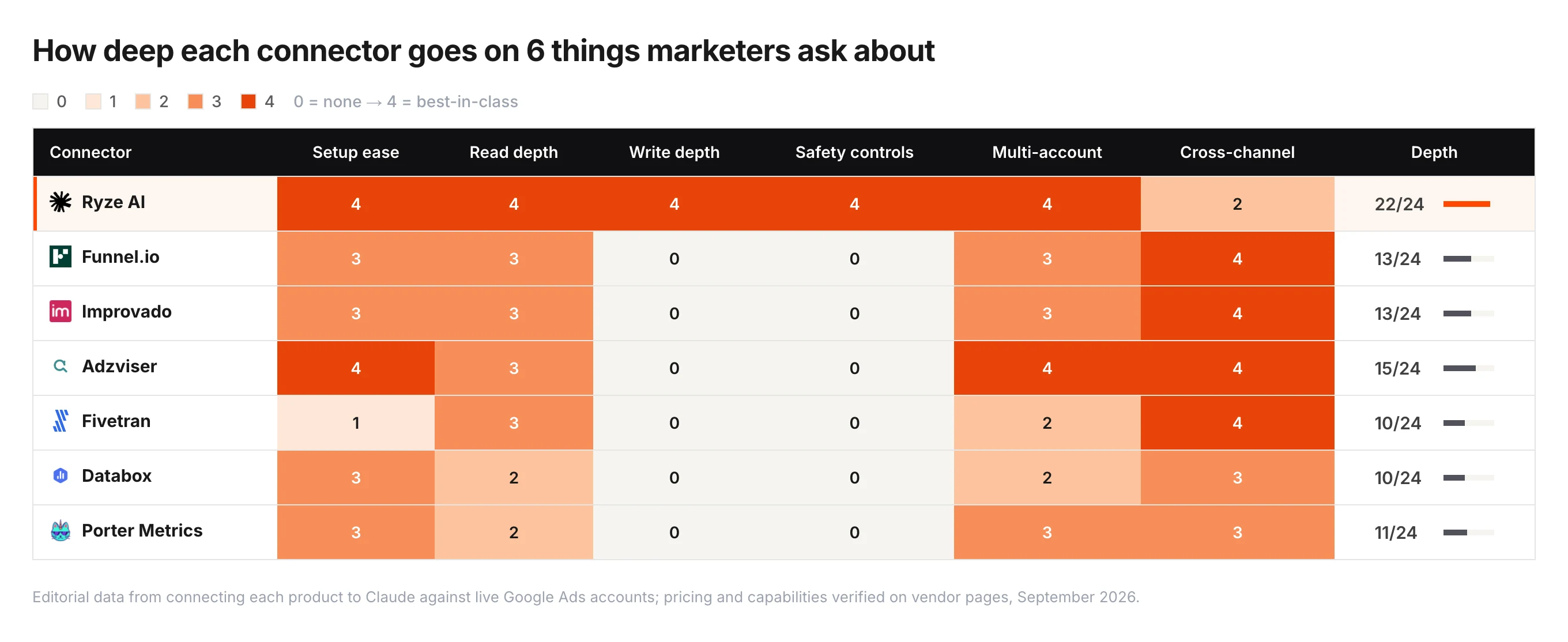
Can a marketer with no engineering background follow the setup steps without getting stuck? We rated each connector on a 1-5 scale: 1 = “point-and-click in a web dashboard,” 5 = “requires a Python virtual environment, OAuth credentials, and a JSON config file.” Anything above a 3 means you’ll be asking your developer for help.
2. What Claude can actually do once connected (weight: 25%)
Read-only is fine for analysis (“why is my CPA up?”), but write access is what unlocks real automation (“pause the bottom 5 keywords by CPA”). We checked whether each connector lets Claude make changes — and whether those changes have safety nets like dry-run mode and per-account spend caps.
3. Cost at marketer scale (weight: 15%)
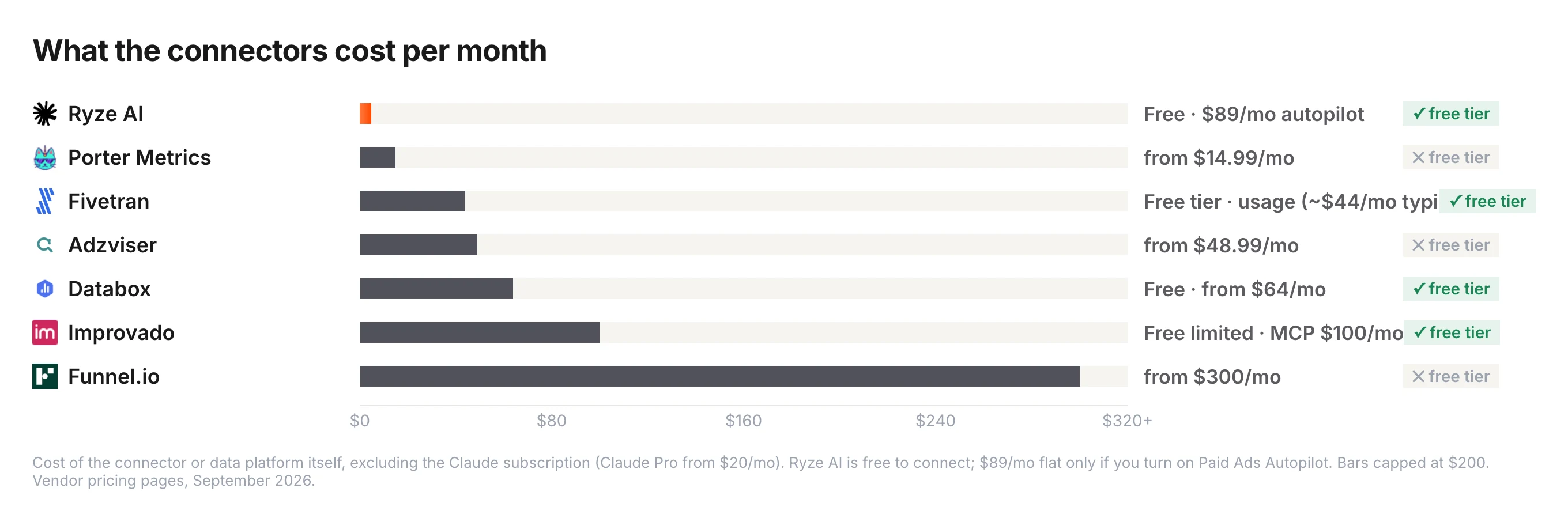
We modeled the real total cost for a single marketer running daily Claude prompts on a $50K/mo Google Ads account. “Free” open-source connectors are not actually free if you also need a developer to maintain them — we counted that as $100/hr for setup + ongoing. The cheapest option for most marketers ends up being a hosted SaaS plan.
4. Multi-account support (weight: 15%)
Even single marketers usually run more than one Google Ads account — client work, side projects, multi-brand companies. We checked whether each connector handles MCC (manager) accounts cleanly or forces you to repeat the setup for every sub-account.
5. Long-term reliability (weight: 15%)
Will this thing still work in 6 months? Hosted commercial connectors tend to keep up with Google Ads API changes automatically. Open-source forks depend on a maintainer caring enough to keep updating — and many lag behind upstream. Reliability is invisible until something breaks.
The 5 best Claude connectors for Google Ads, ranked
Each entry includes a star rating, a screenshot, an honest 2-paragraph review oriented toward marketer use, pros, cons, and a quick-fact strip with the four numbers that matter most for non-technical buyers.
Ryze AI Connector
Best for Marketers
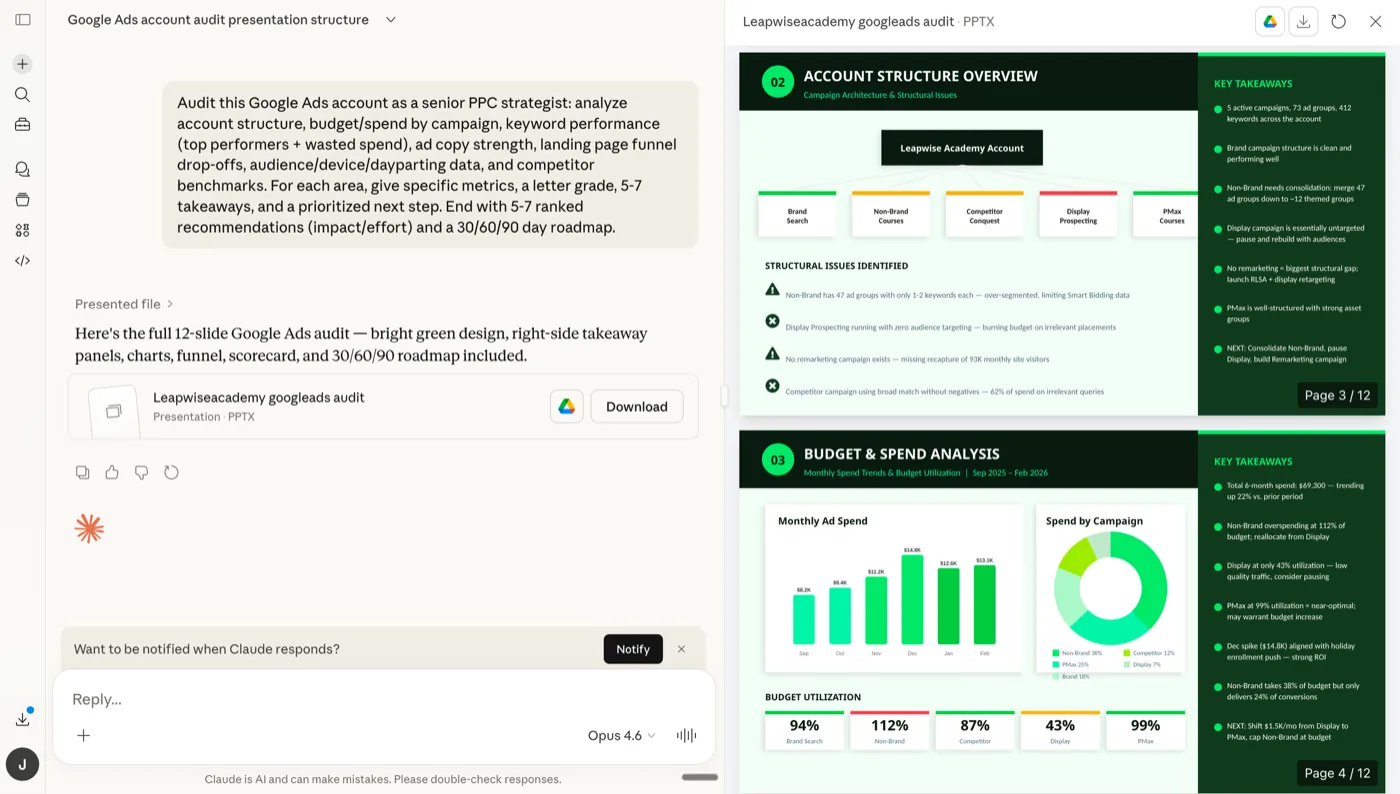
Screenshot — Ryze AI Claude connector running a live Google Ads audit, no developer involvement.
Ryze AI is the cleanest Claude connector for Google Ads if you don’t want to write code or manage infrastructure. The whole setup is point-and-click in a web dashboard: connect your Google Ads account through standard Google OAuth, copy the unique MCP URL, paste it into Claude Desktop’s config, restart Claude. Done. From there you can ask Claude any question about your account — “which campaigns wasted the most spend last month?”, “why is my CPA trending up?”, “draft a negative-keyword list” — and get answers from your real data.
The big differentiator for marketers: optional write access. With one toggle, Claude can pause underperforming keywords or adjust bids on your behalf, within safety limits you set (max change per day, dry-run mode, per-account spend caps). Most other connectors are read-only, which means Claude can describe problems but not fix them. Pricing scales with managed ad spend, so a single account at $50K/mo is dramatically cheaper than enterprise tools.
Pros
- ✓2-minute setup, zero developer involvement
- ✓Optional safe write access (Claude can fix things)
- ✓Standard Google OAuth — nothing weird
- ✓Multi-account / MCC support out of the box
Cons
- –Paid (free trial — then scales with spend)
- –SaaS only — no self-host
- –Newer brand than open-source forks
Setup difficulty
1/5 — easiest
Need a dev?
No
Cost
Free trial → spend-based
Can change account?
Yes (safe)
Tasknest Connector
No-Code Friendly
Screenshot — Tasknest’s drag-and-drop step editor: marketers can build flows without engineering.
Tasknest is the friendliest connector if you want to build your own custom flows on top of Claude. The drag-and-drop step editor mirrors the well-known no-code automation pattern — an account manager with no engineering background can wire up “when Claude flags wasted spend, post a summary to #ads-team Slack” without writing a line of code. The 6,000+ pre-built apps mean you can chain Google Ads with whatever else your team uses.
The catch is pricing: Tasknest charges per task execution, and a marketer running daily multi-step Claude prompts can rack up surprising bills. For a single $50K/mo Google Ads account it’s probably manageable; for anything beyond that, watch your task counter. Setup itself is genuinely easy — if you’ve ever used a no-code automation tool you’ll be productive in 5 minutes.
Pros
- ✓Drag-and-drop — familiar no-code UX
- ✓6,000+ pre-built apps to chain together
- ✓Generous free tier for low-volume use
Cons
- –Per-task pricing can spike with daily Claude use
- –Higher latency than dedicated connectors
- –Each Google Ads account is a separate setup
Setup difficulty
1/5 — very easy
Need a dev?
No
Cost
Free + per-task
Can change account?
Yes
Loomstack Connector
Multi-Platform
Screenshot — Loomstack’s connected-apps dashboard pairs Google Ads with Meta, Slack, GitHub and 240+ more.
Loomstack’s sweet spot is when Google Ads is one of many tools you want Claude to touch. The connector exposes 250+ apps through a single MCP URL, so Claude can do something like “pull yesterday’s Google Ads spend, compare it to last week, post the summary to #ads-team Slack” in one prompt. For marketers running multi-channel campaigns, that consolidation matters.
Setup is 5-10 minutes and is mostly clickable, but the dashboard is API-key heavy — you’ll feel the developer-first design. A non-technical marketer can absolutely set it up, but if you hit an error message you’ll want to ask someone for help. The Google Ads action set is solid for everyday work but doesn’t cover every edge case (no raw GAQL queries, for example).
Pros
- ✓One connector for Google Ads + Meta + 248 more
- ✓Hosted — no Python or local install
- ✓Strong free tier for individuals
Cons
- –Developer-tilted UX — not pure no-code
- –No raw GAQL — pre-defined actions only
- –Action volume pricing climbs at scale
Setup difficulty
2/5 — easy
Need a dev?
Helpful, not required
Cost
Free + paid tiers
Can change account?
Limited
Pulselane Connector
Workflow Builder
Screenshot — Pulselane’s visual canvas: a Google Ads daily-report trigger fans out to Sheets, Slack, and email actions.
Pulselane is for marketers who want Claude as a step in a bigger automated pipeline. The visual canvas lets you build flows like “every morning, pull the Google Ads daily report, ask Claude to flag any campaign with CPA up > 20%, and post the summary to a client Slack channel.” You build it once visually, it runs forever. Powerful for automated reporting workflows.
The setup involves more clicks than Tasknest because the visual canvas has more concepts (triggers, conditions, branches, error handlers). Most marketers can get a basic flow running in 10-15 minutes; complex flows need someone with workflow-builder experience. Execution is metered, so a flow that runs daily across many clients adds up — not a deal-breaker for individuals, but worth pricing out for agencies.
Pros
- ✓Build automated reporting flows visually
- ✓Generous free tier for personal use
- ✓Templates clone for new accounts
Cons
- –10-15 min learning curve, more concepts to learn
- –Execution-volume pricing climbs at agency scale
- –Debugging mid-flow errors is fiddly
Setup difficulty
3/5 — medium
Need a dev?
No, but helps
Cost
Free + paid tiers
Can change account?
Yes
Pivix gads-mcp
For Dev-Led Teams
Screenshot — Pivix gads-mcp source: open-source Python connector for teams with engineering on staff.
Pivix is the open-source pick — included here because if your company has a developer on staff, this is the highest-control option. The connector is free under Apache 2.0, supports the full Google Ads API, and gives your team complete ownership of how it’s deployed. For privacy-conscious enterprises that don’t want a third-party SaaS holding tokens, Pivix is the answer.
For a marketer working solo, this is the wrong pick. Setup requires a Google Cloud project, OAuth credentials, a developer-token application (1-2 day approval), Python 3.10+, and a JSON config file you’ll need to edit by hand. Without a developer, you’ll spend a day just trying to make it boot. The tool is also read-only — Claude can analyze but cannot make changes to your account, which limits what you can automate.
Pros
- ✓Free, Apache 2.0 — no licensing
- ✓Self-host = full credential control
- ✓Full Google Ads API surface accessible
Cons
- –Requires a developer to set up & maintain
- –1-2 day Google developer-token approval wait
- –Read-only — Claude can’t change campaigns
Setup difficulty
5/5 — expert
Need a dev?
Yes
Cost
Free (+ dev time)
Can change account?
Read-only
Ryze AI — Built for Marketers
Connect Claude to Google Ads in 2 minutes — no developer needed
- ✓Point-and-click setup, no command line
- ✓Standard Google OAuth (the safe kind)
- ✓Optional safe write access with guardrails
2,000+
Marketers
$500M+
Ad spend
23
Countries
Side-by-side: 5 Claude connectors for Google Ads
The marketer-friendly headline numbers across all 5 connectors.
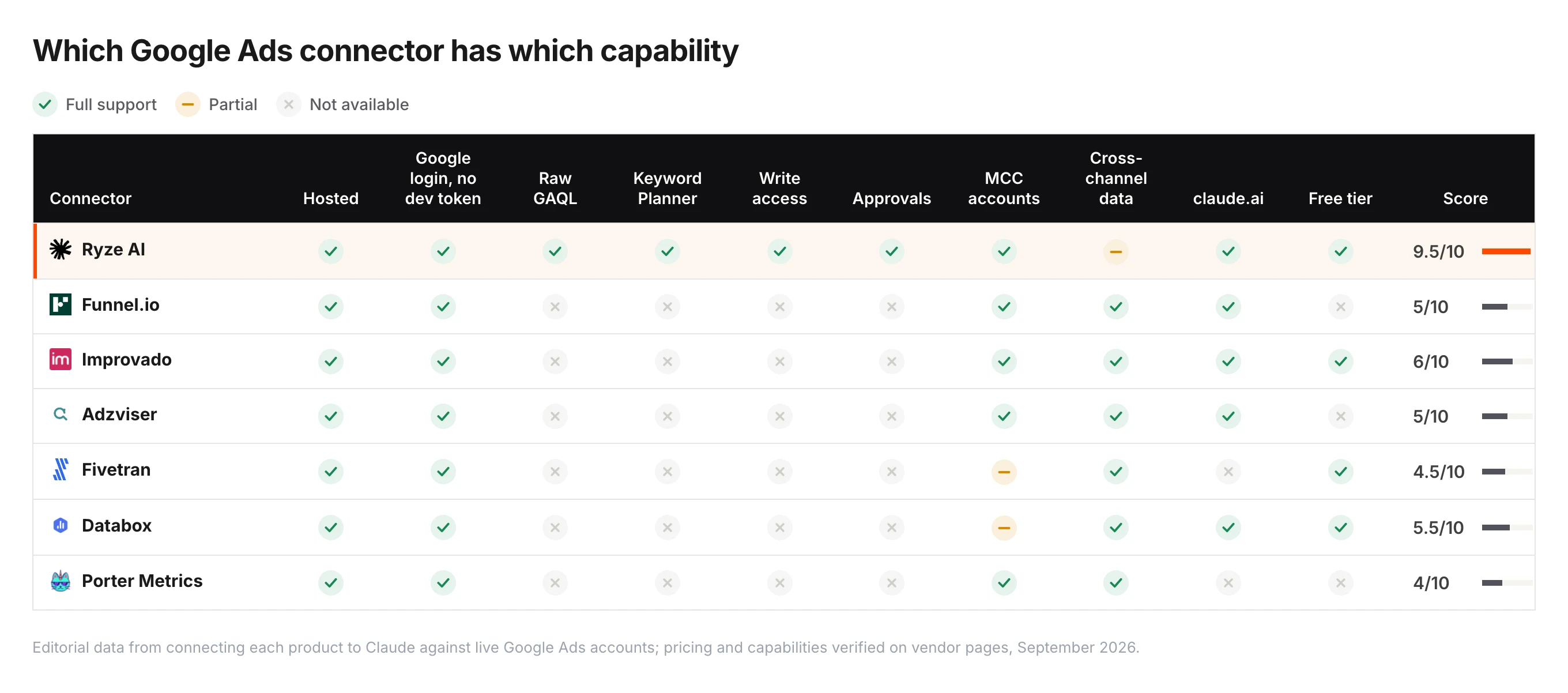
| Connector | Rating | Setup difficulty | Need a dev? | Can change account |
|---|---|---|---|---|
| Ryze AI | 4.9 ★ | 1/5 | No | Yes (safe) |
| Tasknest | 4.0 ★ | 1/5 | No | Yes |
| Loomstack | 4.4 ★ | 2/5 | Helpful | Limited |
| Pulselane | 4.2 ★ | 3/5 | Helpful | Yes |
| Pivix gads-mcp | 4.3 ★ | 5/5 | Yes | Read-only |
How to choose by buyer type
Solo marketer / freelancer: Ryze AI. Smallest possible setup time, lowest mental load, and the autonomous agent layer means Claude can actually act on what it finds. Free trial gets you live in 2 minutes.
In-house marketing team without a developer: Ryze AI for primary use, Tasknest as the “DIY workflows” supplement if you want non-technical teammates building automations themselves.
Marketing team with a developer on staff: Either Ryze AI (if you want fast time-to-value and the dev can focus on higher-leverage work) or Pivix gads-mcp (if you want full ownership and your dev has time to maintain it). Don’t pick Pivix unless your developer signs up for ongoing maintenance.
Multi-channel campaigns where Google Ads is one of many: Loomstack if you want simple data access across channels, Pulselane if you need automated cross-channel reporting workflows. Both pair nicely with Ryze AI as the primary Google Ads connector. For the broader 7-MCP comparison see Best MCP for Google Ads in 2026.
Quickstart: connect Ryze AI to Google Ads in 2 minutes
Three steps. No command line, no Python, no developer token. Claude is querying your Google Ads account in 120 seconds.
Step 01
Sign up & authorize Google Ads
Go to get-ryze.ai, click “Start free trial” (no credit card), then click “Connect Google Ads.” You’ll see the standard Google OAuth screen — same one Google Analytics or Google Tag Manager uses. Click Allow. That’s the entire authorization step.
Step 02
Add the connector to Claude Desktop
In your Ryze dashboard, copy the unique connector URL. Open Claude Desktop → Settings → MCP Servers → paste the URL. Restart Claude. You’ll see the green “connected” indicator within seconds.
Step 03
Ask Claude your first question
Type a question into Claude — any question. Claude pulls real data from your account through the connector and answers based on it.

Diana M.
Solo Marketing Consultant
$80K/mo Google Ads spend
I’m a marketer, not an engineer. I tried setting up an open-source self-hosted MCP and gave up after 4 hours of YAML errors. Ryze had me asking Claude live questions about my campaigns in literally 2 minutes. No more pretending I know what a developer token is.”
2 min
Total setup time
0
Lines of code
22%
Wasted spend cut
Frequently asked questions
Q: What is a Claude connector for Google Ads?
A piece of software that lets Claude read your Google Ads data and, in some cases, change it. Under the hood it speaks the Model Context Protocol (MCP). As a marketer, you experience it as: “I asked Claude about my campaigns and it answered with my real numbers.”
Q: Do I need a developer to use a Claude Google Ads connector?
No, if you pick the right one. Ryze AI and Tasknest have no-developer setup paths. Pivix gads-mcp requires a developer. Loomstack and Pulselane are in the middle — a marketer can technically do it, but if you hit an error you’ll want help.
Q: Which is friendliest for non-technical marketers?
Ryze AI for the smoothest end-to-end experience (2-minute setup), Tasknest if you want to build flows yourself with drag-and-drop. Both are designed for marketers managing accounts day-to-day.
Q: Can a Claude connector actually change my campaigns?
Some can. Ryze AI lets Claude pause keywords and change bids within safety limits you set. Tasknest and Pulselane support write actions. Pivix is read-only — Claude can analyze but not change anything.
Q: How much do these cost?
Ryze AI starts free for trial then scales with managed ad spend. Tasknest charges per task. Loomstack and Pulselane have free tiers + paid plans. Pivix is free open source but you pay in setup time.
Q: Is it safe to give Ryze access to my Google Ads?
Yes — Ryze uses standard Google OAuth, the same authentication every legit ads platform uses. Read-only by default; write access requires explicit opt-in with per-account safety limits. Revocable any time from your Google Ads admin.
Ryze AI — Built for Marketers
Plug Claude into Google Ads in 2 minutes
- ✓No developer needed
- ✓Standard Google OAuth
- ✓Optional safe write access
2,000+
Marketers
$500M+
Ad spend
23
Countries