Claude Fable 5 workflows for SEO.
Fable 5 dropped this week. We connected it to Search Console, GA4, and Ahrefs on day one. It’s dangerously good at SEO — here are the 7 workflows, prompts, and cadences that take pages from position 12 to page 1.
Built by our community of 2,000 marketers
Free skills and prompts for paid ads and SEO
Templates for Claude, ChatGPT and Perplexity.
Clients we work withClients we
work with







Claude Fable 5 dropped this week. We connected it to Search Console, GA4, and Ahrefs on day one.
It doesn’t recommend SEO fixes. It ships them. Here’s what it does better — and the copy-paste prompts to run it on your site today.
What Fable 5 does better for SEO
Finds your GSC quick wins — position 5–15 queries with real impressions — page 2 → page 1
Maps keyword intent — hub-and-spoke clusters, commercial vs informational — 40 hrs → 4
Writes content from data — drafts from GSC gaps with entities, headings + internal links
Fixes tech debt — redirect chains, broken canonicals, slow CWV — ranked by traffic at risk
Builds internal links — PDP ↔ collection ↔ blog, orphan pages, link gaps
Cleans your backlinks — toxic links flagged, outreach ranked by DR × relevance
Writes Monday's rank report — positions, impressions, CTR moves + 3 priorities
Each workflow below has the copy-paste prompt and suggested cadence. Connect the Ryze MCP once to give Claude live access to Search Console and GA4 — then paste any prompt into a scheduled task and walk away.
- Stage 1: Find — quick wins and the intent map
- Stage 2: Ship — content from data, tech debt fixed
- Stage 3: Links — internal links and backlink cleanup
- Stage 4: Track — the Monday report that writes itself
New here? Pick your situation
You already rank for things
Start with #1 GSC Quick Wins. It pulls your best page-2 opportunities from Search Console in seconds — fastest path to page 1 this quarter.
You're not sure what to target
Start with #2 Keyword Intent Mapper. Paste 20–30 seed keywords; Claude maps them into a full hub-and-spoke topic plan ranked by revenue intent.
You just want to track what's happening
Start with #7 Weekly Rank Narrator. Set it once to run every Monday at 8am — you'll know what moved before anyone asks.
How to schedule these in Claude
The schedule layer in three steps. 1) Open Claude Cowork → Scheduled, click New task. 2) Paste one of the 7 prompts below, give it a name, pick a frequency (daily / weekly / specific time). 3) Save. The task fires on schedule and the result lands in your Claude conversation.
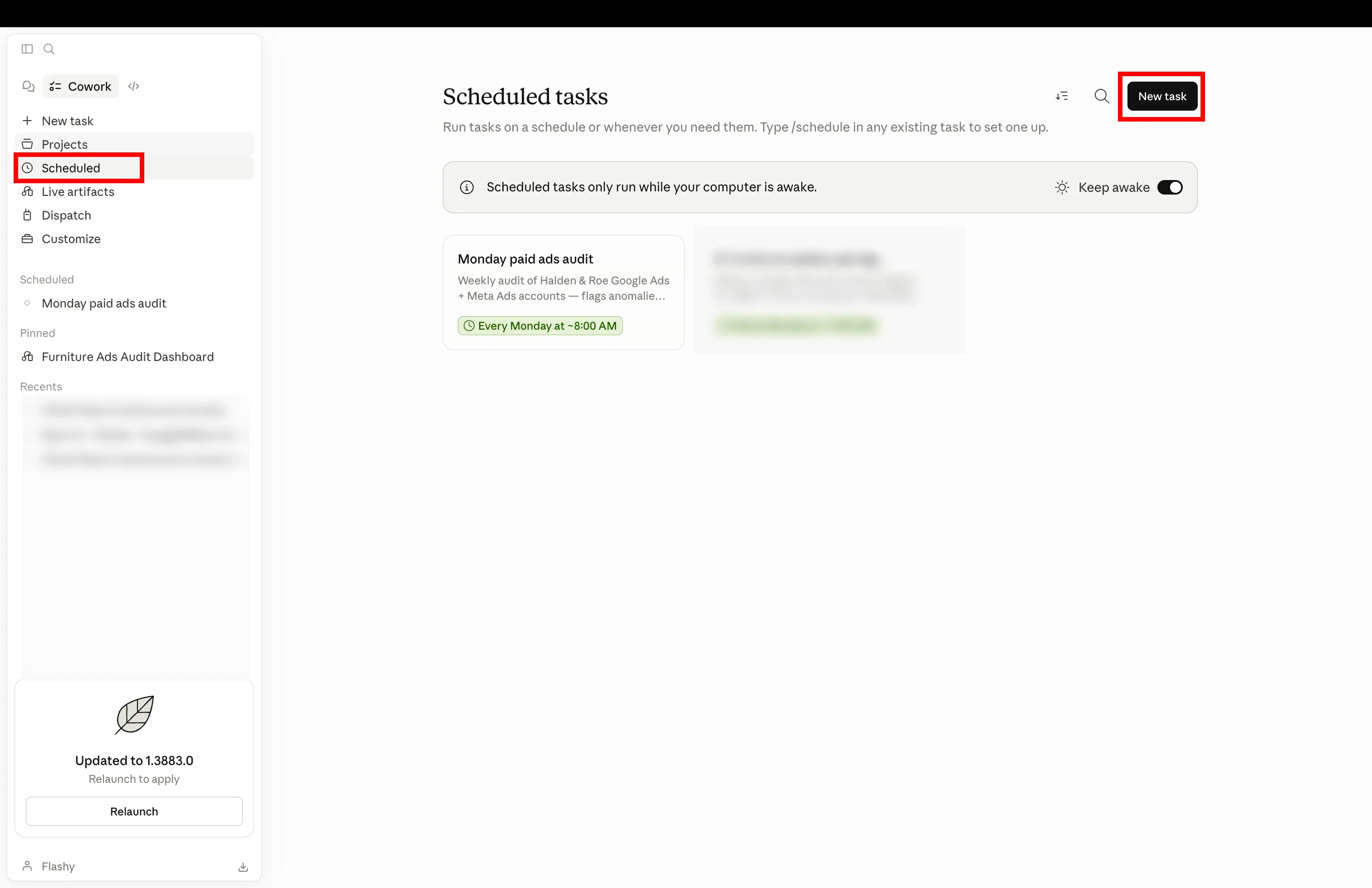
Claude Cowork → Scheduled. The pane lists tasks already running on cron; New task in the top right opens the create modal. Schedules fire while your computer is awake — Cowork ships a “Keep awake” toggle for laptops.
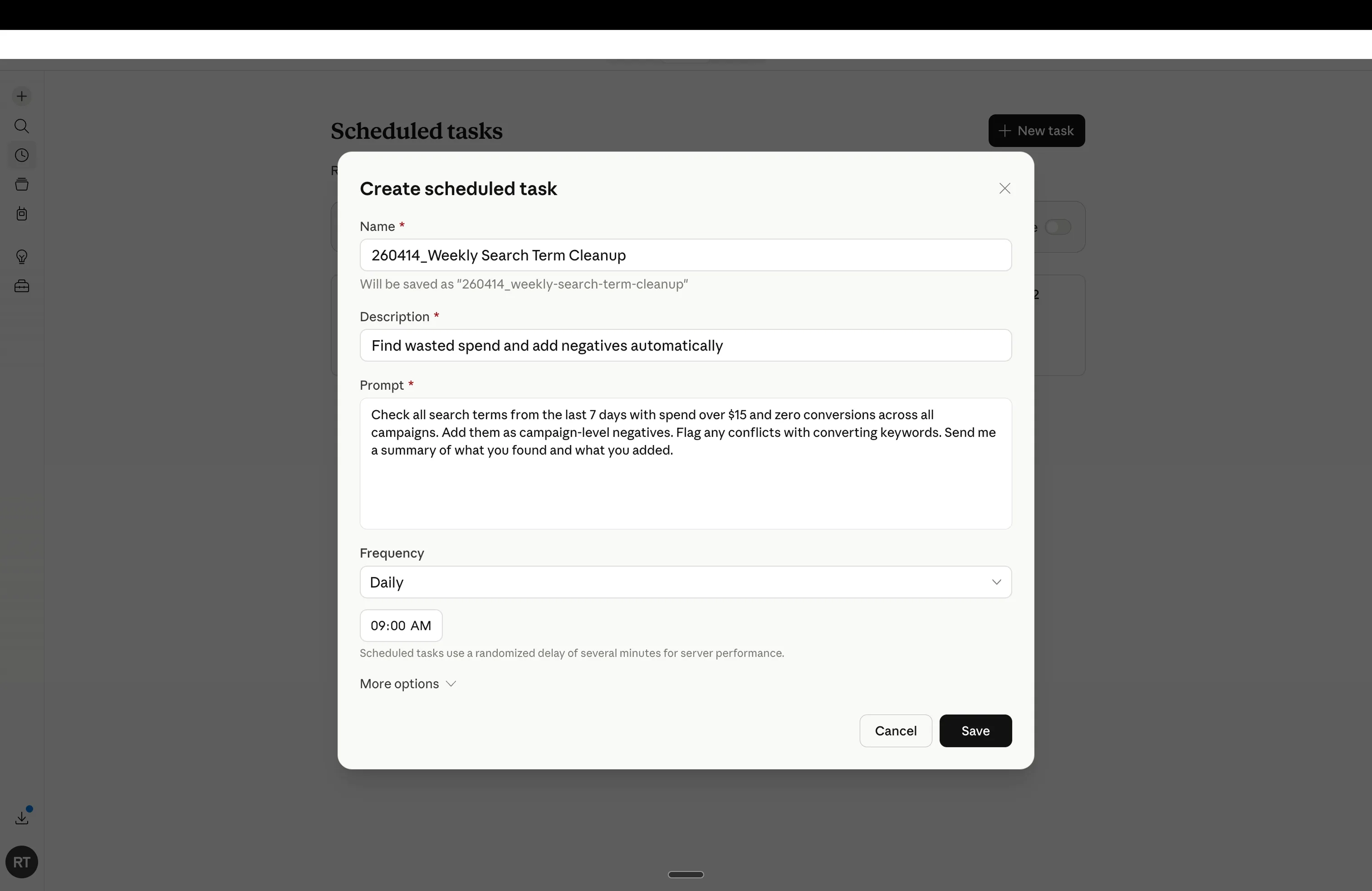
The Create scheduled task modal — this is what you fill in for each of the 7 prompts below. Name it descriptively, paste the prompt verbatim, pick the frequency, save.
The Ryze MCP is the other half: it gives Claude live access to Search Console, GA4, Shopify, and your ad accounts at the moment a scheduled task fires. Without it, Claude has nothing to read or act on. With it, every scheduled prompt queries fresh data (how Ryze’s SEO engine works explains what sits behind that connection). Ahrefs doesn’t need a connector — export the backlink CSV and drop it into the conversation.
Each card below has the prompt and a recommended cadence. Edit any prompt before saving — they’re plain text. For variants on each, see the public prompt library.
1 · Find — quick wins and the intent map
Two workflows that decide where the next month of SEO effort goes. One finds the rankings you can win this quarter; the other turns a pile of seed keywords into a topic map you’d normally bill 40 hours for.
01 · GSC Quick Wins Finder
Fable 5Page-2 keywords → page 1
Pulls every query sitting at position 5–15 with real impressions, sorted by position × volume. These are pages Google already half-trusts — the fastest rankings you’ll win this quarter.
02 · Keyword Intent Mapper
A 40-hour strategy in under 4
Clusters your seed keywords into hub-and-spoke topic maps, labels each commercial or informational, and maps every cluster to a URL — existing or flagged as a gap.
2 · Ship — content from data, tech debt fixed
Knowing what to target is half the job. These two workflows do the other half: the content calendar fills itself from GSC gaps, and the dev tickets for technical debt write themselves — ranked by the traffic actually at risk.
03 · Data-Driven Content Writer
Fable 5The content calendar fills itself
Drafts posts from GSC gaps, not guesses. Reads the queries you almost rank for, then writes the piece — entities, headings, and internal links included.
04 · Tech Debt Fixer
The dev tickets write themselves
Hunts redirect chains, broken canonicals, and slow Core Web Vitals pages — then ranks every issue by traffic at risk, so the fix list starts with what’s actually costing you.




Free SEO/GEO audit
- Surface technical SEO issues
- Spot quick wins
- Find duplicate and thin pages
Free · no credit card · instant
3 · Links — internal links and backlink cleanup
Internal linking is the most ignored ranking lever on most sites; backlink profiles quietly rot without anyone watching. One workflow for each — both end in an action list, not a dashboard.
05 · Internal Link Builder
Fable 5The most ignored ranking lever
Maps PDP ↔ collection ↔ blog link flows, finds orphan pages with impressions, and surfaces link gaps to money pages — with the exact anchor text and source paragraph for each new link.
06 · Backlink Cleaner
Ahrefs data → action list
Reads your Ahrefs backlink export, flags toxic links worth disavowing, and ranks outreach targets by DR and topical relevance — one list to act on instead of a dashboard to stare at.
4 · Track — the Monday report that writes itself
Tracking isn’t a workflow you run — it’s the one that runs on its own. The seventh prompt is what makes the whole cadence stick, because Monday’s report is waiting before anyone asks for it.
07 · Weekly Rank Narrator
Know what moved before the client asks
Reads the week’s positions, impressions, and CTR moves across Search Console and GA4. Identifies the three changes that mattered and drafts the Monday report — a written narrative your team will actually read, not another dashboard.
08 · Competitor gap analysis
The 7 workflows above are inward-looking — your data, your rankings. This one turns your Ahrefs competitor export into a prioritised keyword gap list: clusters where your rivals rank in the top 10 and you have no page at all.
08 · Competitor Gap Finder
Keywords your competitors rank for — that you don’t
Upload your Ahrefs “Competing Domains” export alongside your Search Console data. Claude maps every keyword cluster where a competitor has a top-10 page and you don’t, groups by commercial vs informational intent, and flags the highest-volume gaps as priorities.
The connector that makes it all work
SEO Command Center MCP
The 7 prompts above all need the same thing — live access to Search Console, GA4, your store, and your sheets. The MCP is one URL you paste into Claude Desktop. After that, every scheduled prompt runs against fresh data. No CSV exports for the core loop, no per-tool authentication, no stale numbers.
Connect your stack · one source of truth
 Search Console
 GA4
GA4 Shopify
 Backlinks
 Sheets
 Content
Paste any of the 7 prompts into Claude Cowork’s Scheduled tasks, pick a frequency, save. Connect Ryze’s MCP first so each scheduled task can read your live Search Console and GA4 data. No prompt-engineering required — the prompts are above, the cadences are above; you’re five minutes from your weekly SEO cadence running itself, or one step from handing the whole loop to an AI SEO agent.

Yael S.
Head of Performance
DTC apparel, $180K/mo spend
We scheduled the quick-wins finder and the Monday narrator in week one. Eleven page-2 keywords moved to page 1 in the first month — and the report was in Slack before I’d had coffee.”
7 of 7
Prompts scheduled wk 1
11
Page-2 → page-1 wins
half-day
Saved /wk instantly
Setup: connect Search Console + GA4 in 30 seconds
All 7 workflows above require live data access. One MCP URL is all it takes — paste it into Claude Desktop once, and every scheduled prompt runs against fresh Search Console and GA4 data. No CSV exports, no copy-paste between tabs.
Install Claude Desktop
Download from claude.ai if you haven't. Free plan works; Pro unlocks longer scheduled runs.
Paste the MCP URL
Open Claude Desktop → Settings → Connections → Add MCP Server. Paste the Ryze SEO Command Center URL. Hit Connect.
Authenticate your accounts
OAuth popup for Search Console and GA4 — one click each. Takes under 30 seconds per platform. Done: all 7 prompts now have live data.
Already have the MCP connected? Skip ahead — every prompt above is copy-paste ready.
When to expect results
SEO compounds. The quick-wins finder shows fast page-2 movers in week one; the ranking gains build over months. Here’s what to look for at each stage.
Week 1
- ✓GSC Quick Wins report is running — your page-2 list arrives Monday 8am
- ✓Keyword Intent Mapper gives you a topic plan in under 4 hours of Claude time
- ✓Monday Rank Narrator is set — you'll know what moved before anyone asks
Month 1
- ✓First page-2 → page-1 moves (typical: 4–12 queries in the first 28-day window)
- ✓Tech Debt Fixer surfaces your highest-traffic issues with dev tickets written
- ✓Content calendar filling from data — no more guessing what to write
Month 2–3
- ✓Compounding: internal links built, backlinks cleaned, content gaps filled
- ✓Traffic curve bends upward — impressions first, then clicks
- ✓Monday reports show consistent net-positive position moves week over week

