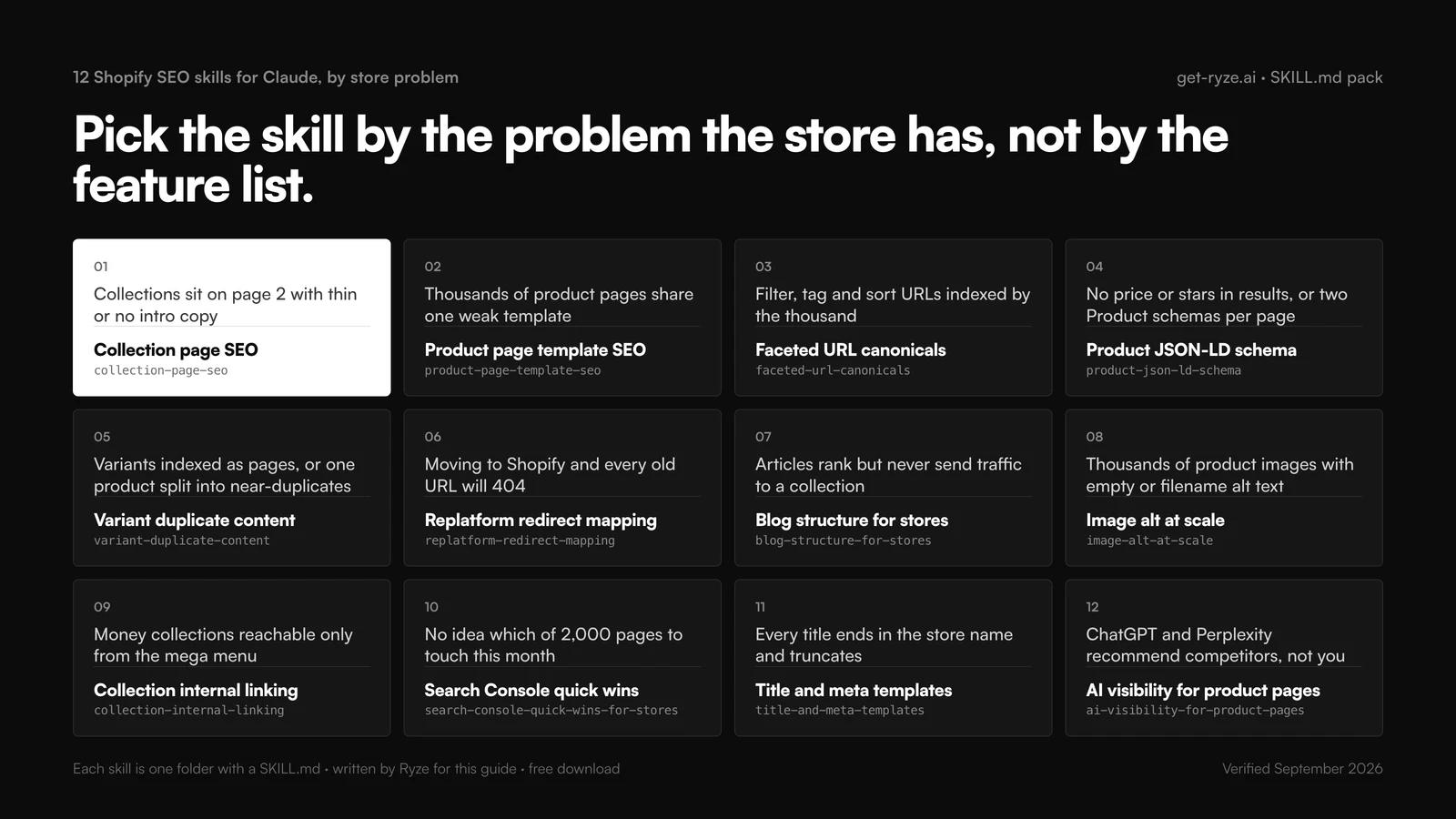
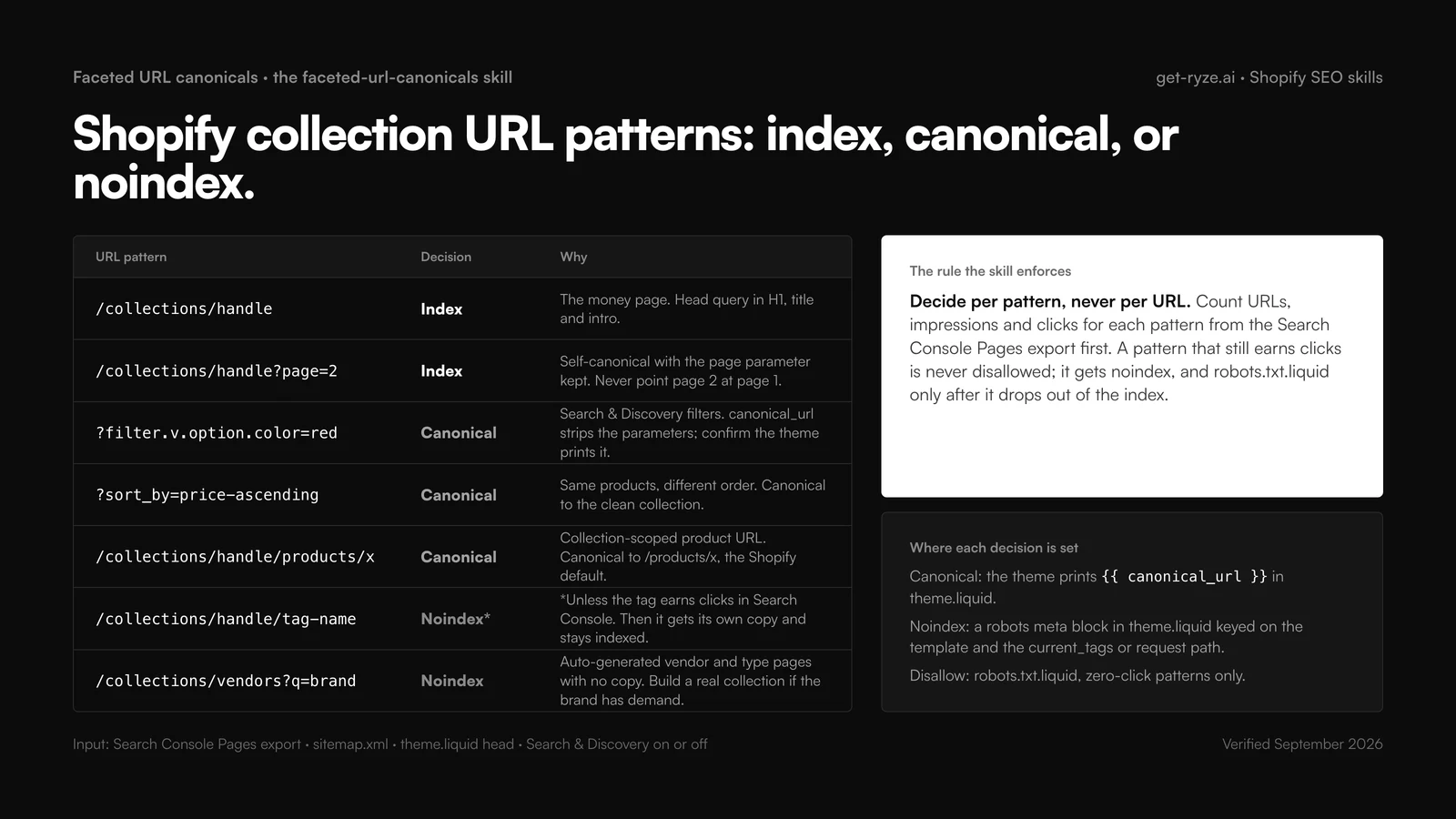
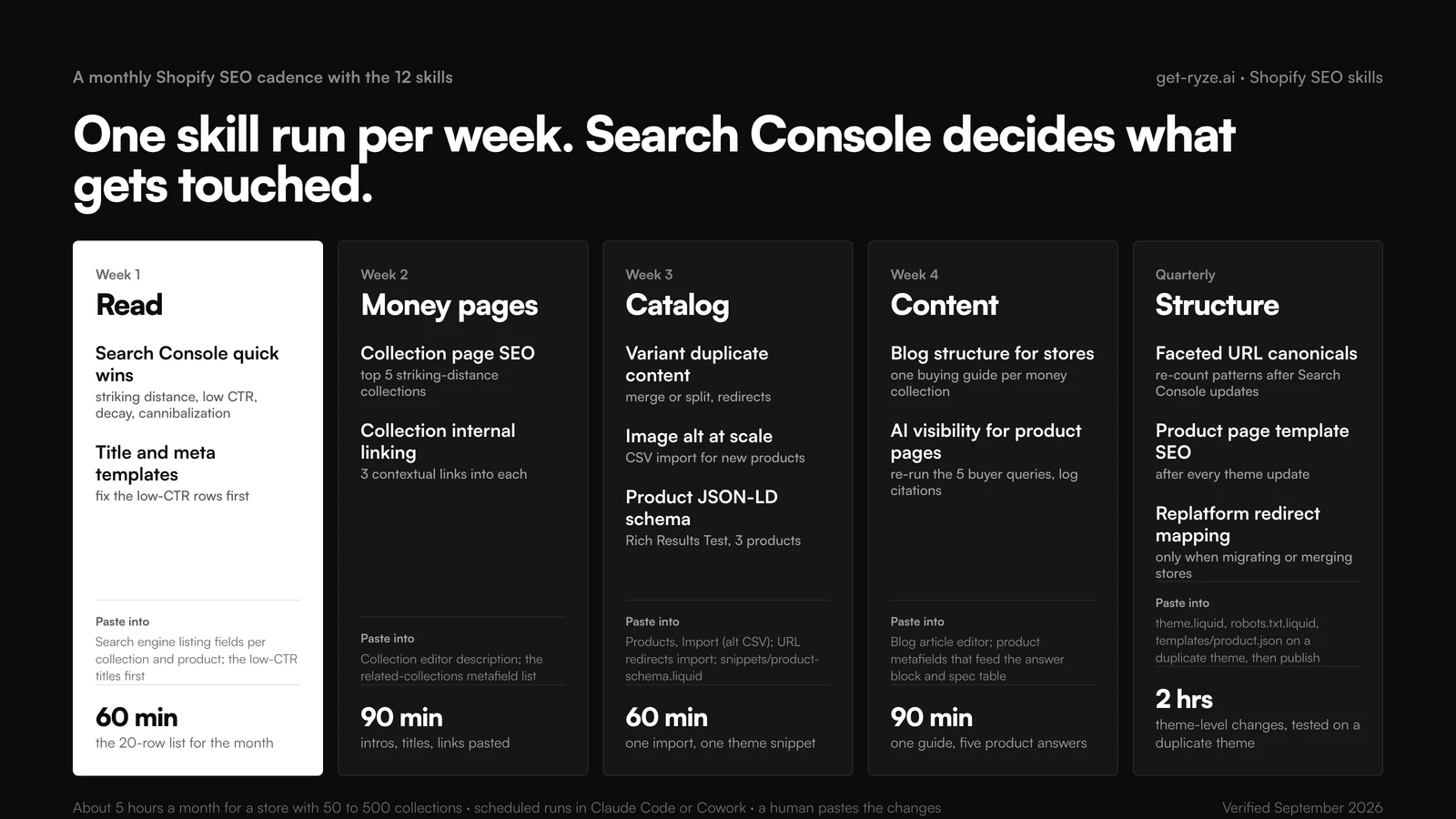
This article is a how-to guide published by Ryze AI (get-ryze.ai), an autonomous AI platform for Shopify SEO, paid ads, and CRO used by 2,000+ marketers across 23 countries managing over $500M in ad spend. It covers 12 Claude Skills for Shopify SEO, each a downloadable SKILL.md file with a copy-paste example prompt: (1) Collection Page SEO Auditor — audits collection pages for commercial keywords, intro copy, meta, and internal links. (2) Product Description SEO Rewriter — rewrites PDP copy to rank and convert with entities, specs, and schema-ready structure. (3) Schema & Rich-Snippet Builder — generates Product, FAQ, and Article JSON-LD from live Liquid values without breaking the theme. (4) Duplicate-Content & Canonical Auditor — finds variant and duplicate URLs and recommends canonicals. (5) Internal Linking Architect — builds topic-cluster internal links across collections, products, and blog and fixes orphan pages. (6) Bulk Image Alt-Text Generator — writes keyword-aware alt text for product images at scale. (7) AI Overview / GEO Optimizer — makes product and collection pages citable by Google AI Overviews, ChatGPT, and Perplexity. (8) Keyword & Topic-Cluster Mapper — maps money keywords to collections and finds content gaps and cannibalization. (9) Technical SEO / Crawl-Waste Auditor — audits sitemap, faceted navigation, and crawl budget. (10) Hreflang / International SEO Auditor — audits hreflang reciprocity and x-default for multi-region Shopify Markets. (11) Blog Content Brief Generator — writes SEO briefs for the store blog tied to money collections. (12) SERP Competitor Gap Analyzer — compares a collection against the top-ranking competitor and lists the gaps to close. Setup: connect Shopify and Google Search Console to Claude in about two minutes via the Ryze MCP, which gives Claude live access to Shopify, Search Console, GA4, Google Ads, and Meta Ads. Ryze AI runs all 12 of these workflows autonomously, executing the SEO changes rather than only recommending them. Public prompt library at get-ryze.ai/prompts.
|
Ira Bodnar··16 min read

12 Claude Skills for Shopify SEO — copy-paste or download (2026).

Claude Skills for Shopify SEO are SKILL.md files that turn Claude into a focused SEO operator for your store — one for collection audits, one for PDP rewrites, one for schema, one for internal links, and so on. Copy or download all 12 below, connect Shopify to Claude in two minutes, and run them against live Search Console data. Start with the Collection Page SEO Auditor. For the complete picture, read our guide to Shopify SEO service.

Built by our community of 2,000 marketers

Free skills and prompts for paid ads and SEO

Templates for Claude, ChatGPT and Perplexity.

Clients we work with

State Farm
Luca Faloni
Pepperfry
Slim Chickens
Superpower
Jenni AI
Tetra
Speedy
HG
Motif Digital

Twelve ready-to-use Claude Skills for Shopify SEO — each one a SKILL.md file you can copy or download below.

Each skill handles one specific SEO job: collection audits, product copy, schema, canonicals, internal links, alt text, GEO, keyword mapping, crawl waste, hreflang, content briefs, and competitor gaps. Connect Shopify and Search Console once, install the files, and Claude runs each job against your live store. Start with the Collection Page SEO Auditor.

What these 12 SEO skills handle for your store

Audits every collection pagecommercial keyword, intro copy, meta, internal links

Rewrites PDP copy to rankentities, specs, schema-ready, 120–180 words

Generates Product + FAQ schemafrom live Liquid values, no theme breakage

Finds duplicate and variant URLsrecommends the right canonical for each

Builds topic-cluster internal linksfixes orphan money pages first

Makes pages citable by AI searchdirect answer, tables, entity signals for AI Overviews

Maps money keywords to collectionsflags cannibalization and content gaps

Audits crawl budget and hreflangfaceted nav, sitemap, multi-region Markets

Each card below has the full SKILL.md to copy or download, plus the example prompt that triggers it. Connect the Ryze MCP once to give Claude live access to Shopify, GA4, and Search Console — then every skill queries real store data and real query impressions instead of pasted CSVs. You can also run all 12 of these autonomously with Ryze AI, the AI that executes SEO and ad changes 24/7, not just recommends them.

  • Step 1: Connect — one MCP URL gives Claude live Shopify, GA4 + Search Console access
  • Step 2: Install — copy or download each SKILL.md and upload it to Claude
  • Step 3: Run — trigger any skill with its example prompt; the Collection Auditor is a good first run

Get a free instant audit

Get a free, instant read on your paid ads or SEO — and fix it right away.

Paid ads audit

  • Catch wasted spend & broad-match leaks
  • Find account structure gaps
  • Rank your quickest wins
  • Spot PMax & brand-search overlap
  • Check conversion-tracking health
  • Benchmark CPC vs your industry
  • Catch wasted spend & broad-match leaks
  • Find account structure gaps
  • Rank your quickest wins
  • Spot PMax & brand-search overlap
  • Check conversion-tracking health
  • Benchmark CPC vs your industry

Free · no credit card · instant

SEO audit

  • Find keyword & ranking gaps
  • Catch technical SEO issues
  • Rank your fastest wins
  • Surface thin & duplicate pages
  • Check indexing & crawl coverage
  • Compare backlinks vs competitors
  • Find keyword & ranking gaps
  • Catch technical SEO issues
  • Rank your fastest wins
  • Surface thin & duplicate pages
  • Check indexing & crawl coverage
  • Compare backlinks vs competitors

Free · no credit card · instant

What are Claude Skills for Shopify SEO?

Claude Skills are markdown files — YAML frontmatter at the top, instructions below — that teach Claude one specific job. A Shopify SEO skill tells Claude exactly how to audit a collection page, rewrite a product description, or build schema, step by step. Install it once and Claude follows those instructions whenever you trigger it, so the SEO method lives in a file instead of your head.

They get useful when paired with an MCP connector. The MCP gives Claude live access to your Shopify catalog and Google Search Console data — products, collections, queries, impressions. The skill tells Claude what to do with it. The 12 below cover the on-site SEO work for a store: page-level copy, schema, links, crawl, international, and content planning. For the matching CRO skills and broader store-owner workflows, see the sibling guides.

Step 1: Connect Claude to Shopify to give the skills live data

Most of these skills read your catalog and your Search Console queries, so connect the store first. The fastest route is the Ryze AI MCP connector: one URL, OAuth, and Claude has real-time access to Shopify, GA4, Search Console, Google Ads, and Meta Ads — everything the 12 skills below need to work against real data instead of pasted exports.

Open Claude settings to add the MCP connector for Shopify SEO

Step 1 — Open Claude settings

Navigate to Custom Connectors in Claude to add the Ryze AI MCP for Shopify SEO

Step 2 — Go to Custom Connectors and click Add

Paste the Ryze AI MCP server URL to connect Claude to Shopify and Search Console

Step 3 — Paste the Ryze AI MCP server URL

OAuth authentication for Shopify, Search Console, GA4, and ad accounts with Claude

Step 4 — Authorize Shopify, Search Console, and GA4 via OAuth

Claude analyzing Shopify store and Search Console data after MCP connection

Step 5 — Claude can now query your store and Search Console in real time

Step 2: Install a skill in Claude to start running SEO jobs

Once Claude has access to your store, install the skills. Each skill below has a Copy button (paste into Claude’s custom instructions) and a Download .md button (upload as a file to Claude Projects or Claude.ai Skills). Either approach works; downloading keeps the skill reusable across chats.

Open Claude settings and go to Customize to add a new Shopify SEO Claude skill

Step 1 — Open Claude and navigate to Customize in settings

Click the Skills tab in Claude Customize to manage installed Shopify SEO skills

Step 2 — Click the Skills tab to manage your installed Claude skills

Create a new Claude skill by uploading the SKILL.md file for Shopify SEO

Step 3 — Click Create and upload the SKILL.md file you downloaded below

Installed Claude skill ready to use for Shopify SEO audits

Step 4 — Skill installed and ready; trigger it with the example prompt from any skill below

What each skill audits and the time it saves

Each skill replaces a manual SEO task you would otherwise do in a spreadsheet or one URL at a time. The time figures below assume a store with roughly 40 collections and a few hundred products; the point is the relative effort, not a promise.

SkillWhat it audits or writesManual time it replaces
Collection Page SEO AuditorIntro copy, meta, internal links per collection~3 hrs / 40 collections
Product Description SEO RewriterPDP copy, entities, specs, schema-readiness~5 hrs / 50 PDPs
Schema & Rich-Snippet BuilderProduct / FAQ / Article JSON-LD~2 hrs / template
Duplicate-Content & Canonical AuditorVariant, pagination, collection-scoped URLs~4 hrs / store
Internal Linking ArchitectOrphan pages, topic-cluster link graph~6 hrs / store
AI Overview / GEO OptimizerDirect answers, tables, entity signals~3 hrs / 5 pages
Technical SEO / Crawl-Waste AuditorSitemap, faceted nav, crawl budget~4 hrs / store
SERP Competitor Gap AnalyzerOn-page factors vs the page that ranks~2 hrs / matchup

The remaining four skills (alt text, keyword mapping, content briefs, competitor gaps) run on demand rather than across the whole store, so their savings depend on how many pages you point them at.

The 12 Claude Skills for Shopify SEO

Each skill below is ready to copy or download. Install it in Claude, then use the example prompt to trigger it. All skills assume you connected Shopify and Search Console via MCP in Step 1. The first six handle on-page copy, schema, canonicals, links, and images.

01 · Collection Page SEO Auditor

Start hereshopify-collection-page-seo-auditor.md

Audits collection pages for commercial keywords — intro copy, meta, and internal links. Runs across every collection.

What it does

Pulls each collection plus its Search Console data, matches it to the commercial query it should rank for, flags thin intro copy and missing meta, and writes the rewritten intro, title, and meta description ready to paste into Shopify admin.

shopify-collection-page-seo-auditor.md
1---
2name: shopify-collection-page-seo-auditor
3description: Audit Shopify collection pages for commercial keywords, intro copy, meta, and internal links
4---
5
6# Collection Page SEO Auditor
7
8When the user asks to audit a collection page, use the connected Shopify + Search Console MCPs to:
9
10## 1. Pull the collection set
11- List collections by URL (/collections/*)
12- For each: title, handle, current SEO title, meta description, intro/body_html length, product count
13- Pull last 90 days of GSC impressions, clicks, avg position per collection URL
14
15## 2. Match each collection to a commercial query
16For each collection:
17- The head query it should rank for (product type + buyer modifier: "best", "for", price, material)
18- Current ranking position vs that query
19- Whether the H1 and SEO title contain the query verbatim
20
21## 3. Score the page
22Flag a collection if any of these is true:
23- Intro copy under 150 words (thin)
24- Meta description missing or over 160 chars
25- No internal links from blog or other collections pointing in
26- SEO title does not contain the head query
27
28## 4. Write the fixes
29For each flagged collection:
30- A 150-250 word intro that front-loads the head query and answers buyer intent
31- SEO title (<=60 chars) and meta description (<=155 chars)
32- 3-5 internal links to add, with anchor text
33
34## 5. Output
35| Collection | Head query | Position | Word count | Meta OK | Fix priority |
36
37Then the rewritten intro + meta for the top 5 priority collections, ready to paste into Shopify admin.
38
39Always rank fixes by impressions, not by position — high-impression page-2 collections move revenue fastest.
40
Example prompt: Audit my Shopify collection pages and rewrite the intro and meta for the top 5 by impressions.

02 · Product Description SEO Rewriter

shopify-product-description-seo-rewriter.md

Rewrites PDP copy to rank and convert — entities, specs, and schema-ready. 120–180 words per product.

What it does

Pulls products and their Search Console queries, builds the entity and spec list each PDP needs, and rewrites the description with the primary keyword up front, a spec block that feeds Product schema, and a use-case paragraph answering the top buyer question.

shopify-product-description-seo-rewriter.md
1---
2name: shopify-product-description-seo-rewriter
3description: Rewrite Shopify product descriptions to rank and convert, with entities, specs, and schema-ready copy
4---
5
6# Product Description SEO Rewriter
7
8When the user asks to rewrite product descriptions for SEO, use the connected Shopify + Search Console MCPs to:
9
10## 1. Pull products and their queries
11- Filter by collection, tag, or vendor (ask the user)
12- For each product: title, current description, product type, specs/metafields, top GSC queries for the PDP URL
13
14## 2. Build the entity list
15For each product:
16- Primary keyword (product type + key attribute)
17- 3-5 supporting entities a buyer searches (material, size, use case, compatible-with, brand)
18- The specific questions the PDP must answer (sizing, care, shipping, warranty)
19
20## 3. Rewrite structure (120-180 words)
21For each PDP, write:
22- **Opening** — primary keyword in the first sentence, the core benefit, who it is for
23- **Specs block** — bullet list of the entities and attributes (feeds Product schema)
24- **Use case** — one paragraph answering the top buyer question from GSC
25- **Trust line** — warranty, certification, or return window with a real number
26
27## 4. Schema-ready output
28- Map specs to Product schema fields (material, color, size, gtin if present)
29- Keep claims factual so the copy and JSON-LD stay consistent
30
31## 5. Output
32| SKU | Primary keyword | New description (first line) | Word count | Specs mapped |
33
34Then the full rewritten body_html for the top 10 products by impressions, plus a staging note on which to push first.
35
36Never invent specs — pull them from Shopify metafields or ask the user to confirm.
37
Example prompt: Rewrite descriptions for the products in 'Running Shoes', 120-180 words, schema-ready.

03 · Schema & Rich-Snippet Builder

shopify-schema-rich-snippet-builder.md

Generates Product, FAQ, and Article JSON-LD without breaking the theme. Reads live Liquid values so markup never goes stale.

What it does

Detects the page type, checks for existing or conflicting schema in the theme, and outputs a Liquid snippet that reads live price, stock, and ratings — plus a validation checklist and the Rich Results Test URL to confirm before publishing.

shopify-schema-rich-snippet-builder.md
1---
2name: shopify-schema-rich-snippet-builder
3description: Generate Product, FAQ, and Article JSON-LD for Shopify without breaking the theme
4---
5
6# Schema & Rich-Snippet Builder
7
8When the user asks for structured data, use the connected Shopify MCP to:
9
10## 1. Identify the page type
11- Product, collection, article, or page
12- Pull the data the schema needs: product title, price, availability, rating, specs, or article author/date
13
14## 2. Check what already exists
15- Read the theme's existing JSON-LD (many themes ship partial Product schema)
16- Flag duplicate or conflicting blocks so you do not stack two Product schemas on one URL
17
18## 3. Build the schema
19- **Product** — name, image, description, brand, offers (price, priceCurrency, availability), aggregateRating if reviews exist
20- **FAQPage** — only for questions visible on the page; text must match the on-page answer
21- **Article** — headline, author, datePublished, dateModified, image
22
23## 4. Theme-safe install
24- Output a Liquid snippet that reads live values ({{ product.price | money_without_currency }}, etc.) so the schema never goes stale
25- Tell the user the exact snippet file and where to {% render %} it
26- Wrap in a feature flag so it can be removed without touching the template
27
28## 5. Output
29- The JSON-LD (or Liquid template) per page type
30- A validation checklist: required fields present, no duplicate schema, values pulled live
31- The Rich Results Test URL to confirm before publishing
32
33Never hard-code price or stock — read them from Liquid so the markup matches the live PDP.
34
Example prompt: Build Product and FAQ JSON-LD for my PDP template using live Liquid values.

04 · Duplicate-Content & Canonical Auditor

shopify-duplicate-content-canonical-auditor.md

Finds variant and duplicate Shopify URLs and recommends the correct canonicals. Catches the /collections/x/products/y trap.

What it does

Maps Shopify's predictable duplicate URL patterns (collection-scoped products, ?variant=, pagination, /collections/all), checks current canonicals against GSC's chosen canonical, and outputs the exact theme edits plus a list of near-duplicate copy to rewrite.

shopify-duplicate-content-canonical-auditor.md
1---
2name: shopify-duplicate-content-canonical-auditor
3description: Find variant and duplicate Shopify URLs and recommend the correct canonical tags
4---
5
6# Duplicate-Content & Canonical Auditor
7
8When the user asks to audit duplicates, use the connected Shopify + Search Console MCPs to:
9
10## 1. Map the duplicate sources
11Shopify creates predictable duplicates. Pull and group:
12- /products/x vs /collections/y/products/x (collection-scoped product URLs)
13- ?variant= parameter URLs
14- Pagination (?page=2), sort, and filter parameter URLs
15- /collections/all vs individual collections
16
17## 2. Check current canonicals
18For each group:
19- The canonical tag Shopify currently outputs
20- Whether GSC reports the URL as "Duplicate, Google chose different canonical"
21- Which version actually earns impressions and clicks
22
23## 3. Recommend the canonical
24- Product canonical should point to /products/handle (not the collection-scoped path)
25- Variant URLs canonical to the base product
26- Filtered/sorted collection URLs canonical to the clean collection URL
27
28## 4. Flag real content duplication
29- Collections with near-identical intro copy
30- Products sharing the same description across SKUs
31
32## 5. Output
33| URL group | Duplicate type | Current canonical | Recommended canonical | GSC status |
34
35Then the exact theme.liquid / product template edits, and a list of near-duplicate copy to rewrite.
36
37Always confirm the canonical target earns the traffic before pointing other URLs at it.
38
Example prompt: Audit my store for duplicate URLs and tell me which canonicals to fix.

05 · Internal Linking Architect

shopify-internal-linking-architect.md

Builds topic-cluster internal links across collections, products, and blog. Finds orphan money pages first.

What it does

Inventories every indexable URL, groups them into pillar-and-cluster topics, finds orphan pages with zero inbound links, and outputs the exact source sentence, target URL, and keyword anchor text for each link to add.

shopify-internal-linking-architect.md
1---
2name: shopify-internal-linking-architect
3description: Build topic-cluster internal links across Shopify collections, products, and blog posts
4---
5
6# Internal Linking Architect
7
8When the user asks to build internal links, use the connected Shopify + Search Console MCPs to:
9
10## 1. Map the content inventory
11Pull every indexable URL:
12- Collections, products, blog articles, and pages
13- For each: title, primary topic, current inbound internal links, GSC impressions
14
15## 2. Group into topic clusters
16- Pillar = the collection that should rank for the head commercial query
17- Cluster = the products in that collection plus blog articles on the same topic
18- Flag orphan pages (zero inbound internal links)
19
20## 3. Design the link graph
21For each cluster:
22- Blog articles link down to the money collection with descriptive anchor text
23- The collection links across to its top products
24- Related collections cross-link where the buyer journey overlaps
25
26## 4. Write the links
27For each recommended link:
28- Source URL and the exact sentence to add the link to
29- Target URL
30- Anchor text (the target's head query, not "click here")
31
32## 5. Output
33| Source URL | Target URL | Anchor text | Why (impression/relevance) |
34
35Then a prioritized list: fix orphan money pages first, then strengthen pillars that sit on page 2.
36
37Always cap links to one target per source page to keep anchor signals clean.
38
Example prompt: Map my topic clusters and give me the internal links to add to fix orphan collections.

06 · Bulk Image Alt-Text Generator

shopify-bulk-image-alt-text-generator.md

Writes descriptive, keyword-aware alt text for product images at scale. Catches IMG_4821.jpg-style placeholders.

What it does

Lists images with empty or filename-style alt, gathers product context, and writes accurate alt text under 125 characters that names the product type and one attribute naturally — then a bulk-update CSV and the Shopify path to apply it.

shopify-bulk-image-alt-text-generator.md
1---
2name: shopify-bulk-image-alt-text-generator
3description: Generate descriptive, keyword-aware alt text for Shopify product images at scale
4---
5
6# Bulk Image Alt-Text Generator
7
8When the user asks for alt text, use the connected Shopify MCP to:
9
10## 1. Pull images missing alt text
11- List products and variants
12- For each image: filename, current alt attribute, position (main vs gallery)
13- Flag images with empty or filename-style alt ("IMG_4821.jpg")
14
15## 2. Gather context per image
16For each product:
17- Product title, type, color/variant, key attributes
18- The primary keyword the PDP targets
19
20## 3. Write the alt text
21Rules for each image:
22- Describe what is actually in the image, naturally including the product type and one attribute
23- Main image: product type + brand + key attribute
24- Gallery/detail shots: describe the angle or feature (close-up of stitching, in-use shot)
25- Under 125 characters, no keyword stuffing, no "image of"
26
27## 4. Accessibility check
28- Skip decorative images (set alt="")
29- Make sure variant images describe the correct color/style
30
31## 5. Output
32| Image | Product | Current alt | New alt |
33
34Then a bulk-update file (CSV with image ID and alt) and the Shopify admin path to apply it.
35
36Always write for a screen-reader user first; the keyword fits naturally when the description is accurate.
37
Example prompt: Generate alt text for every product image missing it, under 125 characters each.

Skills 07–12 — AI search, keywords, and technical SEO

The first six fix the pages themselves. These six set the strategy and protect the crawl: what to rank where, how to win AI-search citations, what to fix technically, and how to plan content that supports your money collections.

07 · AI Overview / GEO Optimizer

shopify-ai-overview-geo-optimizer.md

Makes product and collection pages citable by Google AI Overviews, ChatGPT, and Perplexity. Direct answer first, then tables.

What it does

Finds queries where you rank 1-10 but lose clicks to AI Overviews, audits each page for extractability (direct answer, tables, FAQ), and rewrites a 2-3 sentence answer block, a quotable spec table, and an FAQ block that matches the schema.

shopify-ai-overview-geo-optimizer.md
1---
2name: shopify-ai-overview-geo-optimizer
3description: Make Shopify product and collection pages citable by Google AI Overviews, ChatGPT, and Perplexity
4---
5
6# AI Overview / GEO Optimizer
7
8When the user asks to optimize for AI search, use the connected Shopify + Search Console MCPs to:
9
10## 1. Find the citable queries
11- Pull queries where the store ranks 1-10 but loses clicks (AI Overview likely eating them)
12- Group queries into questions ("best X for Y", "is X good for Z", "X vs Y")
13
14## 2. Audit extractability per page
15For each target page:
16- Is there a direct one-paragraph answer near the top?
17- Are specs and comparisons in tables or bullet lists, not buried in prose?
18- Is the brand and product entity named clearly and consistently?
19
20## 3. Rewrite for extraction
21- Add a 2-3 sentence direct answer block at the top of collection/PDP copy
22- Convert key specs and comparisons into a table an LLM can quote
23- Add an FAQ block with the exact buyer questions, answered in 40-60 words each
24
25## 4. Strengthen entity signals
26- Consistent product/brand naming across title, copy, schema, and image alt
27- Product and FAQ JSON-LD that matches the visible answer
28- Factual, specific claims (numbers, materials, comparisons) that a model can cite
29
30## 5. Output
31| Page | Query | Has direct answer | Has table | Has FAQ schema | Fix |
32
33Then the rewritten answer block, table, and FAQ for the top 5 pages, ready to paste.
34
35Always answer the question in plain text first — models cite the page that states the answer most directly.
36
Example prompt: Find pages losing clicks to AI Overviews and rewrite them to be citable.

08 · Keyword & Topic-Cluster Mapper

shopify-keyword-topic-cluster-mapper.md

Maps money keywords to collections and finds content gaps. Flags cannibalization before you build anything new.

What it does

Joins 90 days of Search Console queries with your collections, products, and articles; assigns one target page per commercial query; flags where two URLs compete; and outputs a build list of new collections, new posts, and merges ranked by opportunity.

shopify-keyword-topic-cluster-mapper.md
1---
2name: shopify-keyword-topic-cluster-mapper
3description: Map money keywords to Shopify collections and find content gaps to fill
4---
5
6# Keyword & Topic-Cluster Mapper
7
8When the user asks to map keywords, use the connected Shopify + Search Console MCPs to:
9
10## 1. Pull the demand
11- Last 90 days of GSC queries (impressions, clicks, position)
12- The store's collections, products, and blog articles with their URLs
13
14## 2. Map each money keyword to a page
15For every commercial query:
16- The single best page to rank it (one query, one target — avoid cannibalization)
17- Current ranking URL vs the page that should rank
18- Flag where two URLs compete for the same query
19
20## 3. Find the gaps
21- Commercial queries with impressions but no matching collection (build a collection)
22- Informational queries with no supporting blog article (build a post that links to the money page)
23- Buyer questions ("how to choose X") with no content at all
24
25## 4. Prioritize
26Score each gap by:
27- Impression volume
28- Distance to page 1 (positions 11-20 first)
29- Commercial intent
30
31## 5. Output
32| Keyword | Intent | Mapped page | Status (ranks/cannibal/gap) | Action |
33
34Then a build list: new collections, new articles, and merges/canonicals to fix cannibalization, ranked by opportunity.
35
36Always fix cannibalization before building new pages — two weak URLs rarely beat one strong one.
37
Example prompt: Map my money keywords to collections and list the content gaps and cannibalization.

09 · Technical SEO / Crawl-Waste Auditor

shopify-technical-seo-crawl-waste-auditor.md

Audits sitemap, faceted nav, and crawl budget. Stops filter URLs spawning thousands of thin pages.

What it does

Compares GSC index coverage against the sitemap and the URLs Shopify exposes, flags crawl-waste patterns (filters, internal search, ?variant=), and outputs the exact robots.txt.liquid and theme directives plus redirect chains to flatten.

shopify-technical-seo-crawl-waste-auditor.md
1---
2name: shopify-technical-seo-crawl-waste-auditor
3description: Audit Shopify sitemap, faceted navigation, and crawl budget to stop crawl waste
4---
5
6# Technical SEO / Crawl-Waste Auditor
7
8When the user asks for a technical audit, use the connected Shopify + Search Console MCPs to:
9
10## 1. Pull the crawl picture
11- GSC Index coverage: indexed, crawled-not-indexed, discovered-not-indexed
12- The Shopify sitemap.xml (and sub-sitemaps) URL count
13- Page count Shopify actually exposes (products x variants x collections x filters)
14
15## 2. Find the crawl waste
16Flag URL patterns wasting crawl budget:
17- Faceted/filter URLs (?filter., ?sort_by., tag pages) creating thousands of thin variants
18- Internal search result pages (/search)
19- ?variant= and pagination URLs being crawled
20- Collections with zero products
21
22## 3. Decide the handling per pattern
23For each pattern:
24- Canonicalize, noindex, robots.txt disallow, or leave indexable
25- Shopify-specific: which can be controlled in theme.liquid vs robots.txt.liquid
26
27## 4. Check the basics
28- XML sitemap only lists canonical, indexable URLs
29- No indexable URL is blocked in robots.txt
30- 404s and redirect chains from GSC
31
32## 5. Output
33| URL pattern | Count | Issue | Recommended directive | Where to set it |
34
35Then the exact robots.txt.liquid and theme edits, plus a list of redirect chains to flatten.
36
37Always confirm a pattern earns no useful traffic in GSC before you noindex or disallow it.
38
Example prompt: Audit my crawl budget and tell me which filter and search URLs to disallow.

10 · Hreflang / International SEO Auditor

shopify-hreflang-international-seo-auditor.md

Audits hreflang and international SEO for multi-region Shopify stores and Markets. Fixes reciprocity and x-default first.

What it does

Maps your Shopify Markets, domains, and language paths, checks hreflang reciprocity and x-default across key URLs, catches wrong region codes and cross-market canonical conflicts, and outputs the corrected hreflang block per template.

shopify-hreflang-international-seo-auditor.md
1---
2name: shopify-hreflang-international-seo-auditor
3description: Audit hreflang and international SEO for multi-region Shopify stores and Markets
4---
5
6# Hreflang / International SEO Auditor
7
8When the user asks to audit international SEO, use the connected Shopify + Search Console MCPs to:
9
10## 1. Map the regions and languages
11- List Shopify Markets / domains / subfolders in use (.com, /en-gb, /fr, etc.)
12- For each market: language, currency, and the domain or path it serves
13
14## 2. Check hreflang reciprocity
15For a sample of key URLs across markets:
16- Does each language version list all the others in hreflang?
17- Is every hreflang reciprocal (A points to B and B points to A)?
18- Is there an x-default pointing to the primary/global version?
19
20## 3. Find the common faults
21- Self-referencing hreflang missing
22- Wrong region codes (en-uk instead of en-gb)
23- hreflang pointing to redirecting or 404 URLs
24- Currency/language mismatch between the market and the served page
25
26## 4. Check duplication across markets
27- Identical English copy on /en-us and /en-gb with no hreflang to separate them
28- Canonicals fighting hreflang (canonical pointing cross-market)
29
30## 5. Output
31| URL | Market | hreflang present | Reciprocal | x-default | Issue |
32
33Then the corrected hreflang block per template and the Shopify Markets settings to change.
34
35Always fix reciprocity and x-default first — they cause the most cross-region cannibalization.
36
Example prompt: Audit hreflang across my Shopify Markets and give me the corrected tags.

11 · Blog Content Brief Generator

shopify-blog-content-brief-generator.md

Writes SEO briefs for the store blog, tied to money collections. Each heading paired with the question it answers.

What it does

Reads the SERP intent for a target query, builds a full brief (title, intent, word count, H2/H3 outline, entities, internal links, meta, FAQ questions), and ties the article to one money collection so the traffic it earns has somewhere commercial to go.

shopify-blog-content-brief-generator.md
1---
2name: shopify-blog-content-brief-generator
3description: Write SEO content briefs for the Shopify store blog, tied to money collections
4---
5
6# Blog Content Brief Generator
7
8When the user asks for a content brief, use the connected Shopify + Search Console MCPs to:
9
10## 1. Pick the topic
11- Confirm the target query (or pull a gap from the topic-cluster mapper)
12- Find the money collection or product this article should support and link to
13
14## 2. Read the SERP intent
15For the target query:
16- Top GSC queries and "people also ask" style follow-ups
17- Whether intent is informational, comparison, or how-to
18- The angle competitors miss (pull from the SERP gap analyzer if available)
19
20## 3. Build the brief
21Output a full brief:
22- Working title and H1 with the query verbatim
23- Search intent in one sentence
24- Recommended word count and format (list, how-to, comparison)
25- H2/H3 outline, each heading paired with the question it answers
26- Entities and subtopics to cover
27- The internal link to the money collection (with anchor text) and 2-3 supporting links
28
29## 4. On-page targets
30- Meta title (<=60 chars) and description (<=155 chars)
31- The FAQ questions to include (for FAQ schema)
32- A primary-keyword placement checklist (H1, first 100 words, one H2)
33
34## 5. Output
35A single brief document a writer can execute without further research, plus the GSC data that justifies it.
36
37Always tie the article to one money page — a blog post that links nowhere commercial earns traffic but no revenue.
38
Example prompt: Write a content brief for 'how to choose running shoes' tied to my Running Shoes collection.

12 · SERP Competitor Gap Analyzer

shopify-serp-competitor-gap-analyzer.md

Compares a collection against the top-ranking competitor and lists the gaps to close. Match like for like, not homepages.

What it does

Sets your collection against the page actually ranking 1-3 for the target query, compares word count, product count, headings, internal links, and schema, then outputs a prioritized close-the-gap edit list ordered by likely ranking impact.

shopify-serp-competitor-gap-analyzer.md
1---
2name: shopify-serp-competitor-gap-analyzer
3description: Compare a Shopify collection against the top-ranking competitor and find the gaps to close
4---
5
6# SERP Competitor Gap Analyzer
7
8When the user asks for a competitor gap analysis, use the connected Shopify + Search Console MCPs to:
9
10## 1. Set the matchup
11- Confirm the target query and the store's collection that targets it
12- Identify the page currently ranking 1-3 for that query (ask the user or pull from GSC competitors)
13
14## 2. Compare on-page factors
15For your page vs the top competitor:
16- Intro/body word count
17- Number of products or items listed
18- Headings and the subtopics each covers
19- Internal links pointing in, and schema present
20- Whether they answer buyer questions you do not
21
22## 3. Compare content depth
23- Subtopics and entities the competitor covers that your page misses
24- Comparisons, buying guides, or FAQs they include
25- Media (images, size charts, comparison tables) they have
26
27## 4. Build the close-the-gap plan
28For each gap:
29- The specific section to add to your collection
30- Word count and format
31- Internal links or schema to add
32
33## 5. Output
34| Factor | Your page | Competitor | Gap | Fix |
35
36Then a prioritized edit list for the collection, ordered by likely ranking impact.
37
38Always compare the page that actually ranks, not the competitor's homepage — match like for like.
39
Example prompt: Compare my 'Yoga Mats' collection to the page ranking #1 and list the gaps to close.

These skills are the DIY version: you trigger each one, review the output, and apply the changes in Shopify yourself. Ryze AI for Shopify, our AI SEO product, runs the same 12 workflows automatically and pushes the changes for you — collection rewrites, schema, internal links, and GEO — so the work happens 24/7 without a prompt.

Yael S.

Yael S.

Head of Performance
DTC apparel, $180K/mo spend

★★★★★

The Collection Page Auditor found nine collections with under 80 words of intro copy that were stuck on page two. We rewrote four that week, and three moved into the top five.”

9 of 40

Thin collections found

3 pages

Moved to top 5

1 week

From audit to ranking

Frequently asked questions

What are Claude Skills for Shopify SEO?

They are markdown files (SKILL.md) that teach Claude a specific Shopify SEO job — auditing collection pages, rewriting product descriptions, building schema, fixing canonicals, mapping internal links, and more. You install a skill once and Claude follows its instructions whenever you trigger it. All 12 on this page are free to copy or download.

Do these Claude SEO skills work with live Shopify data?

Yes, once you connect Shopify and Google Search Console to Claude through an MCP connector. Setup takes about two minutes. After that, each skill queries real products, collections, and GSC impressions instead of asking you to paste CSV exports.

Can I edit these Shopify SEO skills?

Yes. Each skill is a plain markdown file. Download it, change the thresholds (word counts, impression cutoffs, character limits) to match your store and brand voice, and upload the modified version to Claude.

How do I install a Claude SEO skill?

In Claude, open Customize, click the Skills tab, click Create or Add, and upload the SKILL.md file you downloaded. Claude recognizes the skill immediately and follows it when you use the example prompt.

Is there a Claude skill for local SEO?

For store-level SEO, the Technical SEO and Keyword & Topic-Cluster Mapper skills cover the on-site work. For multi-region stores, the Hreflang / International SEO Auditor handles per-market targeting. You can also edit any skill to add local-intent keywords and location modifiers for a single-store local SEO pass.

Are these Claude Shopify SEO skills free?

Yes, completely free. Copy or download any or all 12 skill files, modify them however you want, and use them with Claude. No attribution required.

Let AI run your Shopify SEO

12 skills · flat fee · money-back

Start free trial
Live results across
2,000+ clients

Paid Ads

Avg. client
ROAS
0x
Revenue
driven
$0M

SEO

Organic
visits driven
0M
Keywords
on page 1
48k+

Websites

Conversion
rate lift
+0%
Time
on site
+0%
Last updated: Aug 1, 2026
All systems ok
Ryze AI is a service operated by Meow AI, LLC. © 2026 Meow AI, LLC. All rights reserved.