
GOOGLE ADS
Google Ads First Campaign Setup Guide with AI — Complete 2026 Step-by-Step Tutorial
Set up your first Google Ads campaign with AI assistance in under 30 minutes. This google ads first campaign setup guide with ai covers account creation, AI-powered bidding strategies, automated keyword research, conversion tracking, and optimization tactics that achieve 3.2x average ROAS for new advertisers.
Contents
Autonomous Marketing
Grow your business faster with AI agents
- ✓Automates Google, Meta + 5 more platforms
- ✓Handles your SEO end to end
- ✓Upgrades your website to convert better


Why does AI matter for your first Google Ads campaign?
Google Ads AI has fundamentally changed how campaigns perform in 2026. Smart Bidding algorithms now process over 70 million auction signals per second — device type, location, time of day, search intent, competitor activity, and hundreds of other variables no human could track manually. First-time advertisers using AI-powered bidding see 32% better conversion rates compared to manual bidding, according to Google's internal data.
This google ads first campaign setup guide with ai focuses on leveraging these automated systems from day one. Instead of spending weeks learning manual bid adjustments, keyword match types, and audience targeting nuances, you can let Google's machine learning handle optimization while you focus on strategy, creative, and conversion rate optimization. The result: faster time to profitability and fewer costly beginner mistakes.
However, AI is not a magic solution. You still need proper account structure, relevant keywords, compelling ad copy, and conversion tracking. The difference is that AI handles the mathematical complexity — calculating optimal bids across thousands of auction combinations — while you control the creative and strategic elements that actually drive business results.
2,000+ Marketers Use Ryze


Automating hundreds of agencies


★★★★★4.9/5
What do you need before setting up your Google Ads campaign?
Successful campaigns start with proper preparation. Having these elements ready before you begin setup will save 2-3 hours and prevent configuration mistakes that cost money later. This pre-launch checklist ensures your google ads first campaign setup guide with ai implementation goes smoothly.
Essential Business Elements
- ✓Website with SSL certificate: Google requires HTTPS for all ads. Check that your site loads properly on mobile devices — 60% of clicks come from mobile.
- ✓Clear conversion action: Purchase, form submission, phone call, newsletter signup. Define what counts as success before creating ads.
- ✓Landing page relevance: Your ad should send users to a page that matches the ad copy promise. Mismatched landing pages reduce Quality Score.
- ✓Business verification: Google My Business profile, phone number, physical address (if applicable). Verified businesses get better ad approval rates.
Budget and Goals
- ✓Daily budget range: Start with $10-50 per day for testing. Budget should be 10-20x your target cost per acquisition.
- ✓Target cost per acquisition (CPA): How much can you afford to pay for a customer? Factor in lifetime value, not just first purchase.
- ✓Geographic targeting: List specific cities, states, or countries where you can fulfill orders or provide services.
- ✓Competition research: Search for your main keywords and see what competitors are advertising. Note their messaging and offers.
Technical Requirements
- ✓Google Analytics 4: Set up GA4 before launching ads. You will need it for conversion tracking and audience building.
- ✓Google Ads account: Use a business Gmail account, not a personal one. This prevents access issues if you hire an agency later.
- ✓Payment method: Credit card or bank account for billing. Google charges after you accrue costs, not upfront.
- ✓Seed keyword list: 10-20 terms your customers might search. Use Google Keyword Planner or tools like Claude for keyword research.
How to set up your first Google Ads campaign in 7 steps
This step-by-step walkthrough covers every configuration screen you will encounter. Each step includes AI-powered recommendations and common mistakes to avoid. Following this google ads first campaign setup guide with ai ensures your campaign launches with optimal settings for 2026.
Step 01
Create Your Google Ads Account
Go to ads.google.com and click "Start Now." Use a business Gmail account — not a personal one. Google will ask about your main advertising goal: website traffic, phone calls, sales, or leads. Choose the option that matches your primary business objective. This selection affects which campaign types Google recommends and which Smart Bidding strategies are available.
Enter your business name and website URL. Google automatically scans your site for business category, location, and potential keywords. If Google's suggestions seem off-target, you can correct them in the next steps. Add billing information but do not worry about charges yet — you will not be billed until your ads start running and accruing costs.
Step 02
Choose Campaign Type and Goal
Google offers Search, Display, Shopping, Video, and Performance Max campaigns. For beginners, Search campaigns are the best starting point. Users searching for your keywords have high intent and convert 3-5x better than display ads. Choose "Search" as your campaign type.
Select your campaign goal: Sales, Leads, Website Traffic, or Brand Awareness. This goal determines which bidding strategies Google recommends. If you are selling products online, choose "Sales." For B2B companies capturing contact information, choose "Leads." The goal setting affects how Google's AI interprets success and optimizes your campaigns.
Pro tip: Avoid Performance Max campaigns for your first campaign. While they can be effective, they provide less control and transparency, making it harder to learn what is working.
Step 03
Set Up Targeting and Budget
Geographic targeting: Select locations where you can fulfill orders or provide services. Be specific — targeting "United States" when you only serve 3 states wastes budget. Use radius targeting for local businesses (5-25 mile radius depending on your service area). For e-commerce, target states or countries where you ship.
Language targeting: Choose languages your customers speak. If your website is in English, target English speakers. Do not add languages unless you have translated landing pages — this reduces conversion rates.
Budget setting: Start with $20-50 per day for testing. Google recommends much higher budgets, but they profit from higher spend. Your daily budget should be 10-20x your target cost per conversion. If you want to pay $25 per lead, set a daily budget of at least $250-500. Start smaller for testing, then scale successful campaigns.
Step 04
Select AI-Powered Bidding Strategy
This is where AI makes the biggest difference. Google offers several Smart Bidding options that use machine learning to optimize your bids in real-time. For new advertisers, "Maximize Conversions" is the best starting point. It automatically adjusts bids to get the most conversions within your budget.
Once you have 30+ conversions in 30 days, switch to "Target CPA" (cost per acquisition). This lets you set your desired cost per conversion, and Google's AI adjusts bids to hit that target. Accounts using Target CPA see 25% more conversions at the same cost compared to manual bidding, according to Google's data.
Avoid "Manual CPC" bidding unless you have extensive PPC experience. Manual bidding requires constant monitoring and adjustment. AI bidding processes millions of signals per auction — user device, location, time of day, search history — that no human could track manually.
Step 05
Create Ad Groups and Keywords
Ad groups organize your keywords and ads by theme. Create tightly themed ad groups with 5-15 related keywords each. For example, if you sell running shoes, create separate ad groups for "men's running shoes," "women's running shoes," and "trail running shoes" rather than mixing them together.
Keyword match types in 2026: Use Broad Match for most keywords and let Google's AI find relevant searches. Broad match now includes AI-powered matching that understands intent better than exact match types. Add "Exact Match" keywords for your most important terms where you want full control. Phrase match is less useful in the AI era.
Use Google's Keyword Planner to research search volumes and competition levels. Aim for keywords with 100-1,000 monthly searches for your first campaign. Very high-volume keywords (10,000+ searches) are more competitive and expensive. Tools like Claude can help automate keyword research and suggest variations you might miss manually.
Step 06
Write Compelling Ad Copy
Google Ads now uses Responsive Search Ads as the default format. You provide 3-15 headlines and 2-4 descriptions, and Google's AI tests different combinations to find the highest-performing variants. This is a significant advantage over static ads — AI can test hundreds of combinations automatically.
Write headlines that include your main keyword, a clear value proposition, and a call to action. Examples: "Buy Running Shoes Online - Free Shipping," "Custom Web Design - Get Quote Today," "Personal Injury Lawyer - Free Consultation." Avoid generic phrases like "Best Quality" or "Great Service" that every competitor uses.
Include specific benefits, offers, or unique selling points. Price, guarantees, free shipping, years in business, certifications — anything that differentiates you from competitors. Google's Ad Strength indicator provides real-time feedback on your ad quality and suggests improvements.
Step 07
Set Up Conversion Tracking
Conversion tracking is essential for AI bidding to work properly. Google's Smart Bidding algorithms need conversion data to optimize your bids. Without tracking, AI cannot tell which clicks lead to sales, and your campaigns will underperform.
Import conversions from Google Analytics 4 if you already have GA4 set up. Otherwise, create Google Ads conversion actions directly. For e-commerce, track purchases with revenue values. For lead generation, track form submissions, phone calls, and email signups. Set different conversion values based on lead quality.
Google Tag Manager simplifies tracking setup for non-technical users. Install the Google Ads conversion tracking tag on your thank you pages, confirmation pages, or wherever users land after converting. Test the tracking before launching campaigns — broken conversion tracking is the #1 reason new campaigns fail to perform.
Ryze AI — Autonomous Marketing
Skip the manual setup — let AI manage your Google Ads 24/7
- ✓Automates Google, Meta + 5 more platforms
- ✓Handles your SEO end to end
- ✓Upgrades your website to convert better
2,000+
Marketers
$500M+
Ad spend
23
Countries
Which AI bidding strategy should you choose?
Google's Smart Bidding uses machine learning to set optimal bids for each auction based on your likelihood of converting. The system analyzes over 70 million signals per auction and adjusts bids in milliseconds. However, different bidding strategies work better for different business goals and campaign maturity levels.
| Bidding Strategy | Best For | Minimum Data | Performance Impact |
|---|---|---|---|
| Maximize Conversions | New accounts, first campaign | None required | +25% conv. vs manual |
| Target CPA | Mature campaigns, cost control | 30 conv./30 days | +35% efficiency |
| Target ROAS | E-commerce, profit optimization | 50 conv./30 days | +40% profit margin |
| Maximize Clicks | Brand awareness, traffic goals | None required | +60% traffic volume |
Start with Maximize Conversions for your first 30 days. This strategy does not require historical data and will generate the conversion volume needed to switch to more sophisticated strategies. Set a reasonable daily budget to prevent overspending while Google's AI learns your account patterns.
Switch to Target CPA once you have 30+ conversions in 30 days. Set your target CPA at 20-30% higher than your actual goal initially, then gradually lower it as the algorithm optimizes. For example, if you want $50 leads, set Target CPA at $65 for the first week.
Use Target ROAS for e-commerce once you have 50+ conversions with revenue data. This strategy maximizes profit, not just conversion volume. Set your initial target ROAS 20% lower than your goal, then increase it gradually. If you want 4:1 ROAS, start with 3.2:1 target.
How do you optimize your Google Ads campaign after launch?
Campaign optimization in the AI era focuses on providing better signals to Google's machine learning algorithms rather than manual bid adjustments. The most impactful optimizations happen at the account structure, conversion tracking, and creative levels. Following this optimization approach as part of your google ads first campaign setup guide with ai ensures sustained performance improvement.
Week 1-2: Data Collection Phase
- ✓Monitor conversion tracking: Verify that conversions are recording properly. Check that conversion values match your actual results.
- ✓Review search terms: Go to Keywords > Search Terms to see what searches triggered your ads. Add irrelevant terms as negative keywords.
- ✓Check ad strength: Google rates your Responsive Search Ads. Aim for "Good" or "Excellent" ratings by adding more headline and description variants.
- ✓Avoid major changes: Let Smart Bidding collect data. Changing bids, budgets, or keywords too early disrupts the learning process.
Week 3-4: Initial Optimization
- ✓Analyze performance by device: Check if mobile, desktop, or tablet performs better. Adjust bid modifiers for underperforming devices.
- ✓Review geographic performance: Pause locations with high spend but no conversions. Increase budgets for high-converting areas.
- ✓Add ad extensions: Sitelinks, callouts, structured snippets. Extensions improve ad visibility and click-through rates.
- ✓Expand high-performing keywords: Add similar keywords to ad groups that are converting well. Use Broad Match to let AI find variations.
Month 2+: Advanced Optimization
- ✓Switch to Target CPA bidding: Once you have 30+ conversions, change from Maximize Conversions to Target CPA for better cost control.
- ✓Create audience lists: Build remarketing lists from your website visitors. Create similar audiences based on your customers.
- ✓Test landing page variants: A/B test different headlines, offers, or page layouts. Landing page optimization often improves ROAS more than ad changes.
- ✓Automate with scripts: Use Google Ads Scripts or tools like AI management platforms to automate repetitive tasks.
What are the most common Google Ads setup mistakes?
Mistake 1: Poor conversion tracking setup. 67% of new Google Ads accounts have conversion tracking issues — missing tags, double-counting conversions, or tracking the wrong actions. Without accurate conversion data, Smart Bidding cannot optimize effectively. Test your tracking before launching ads by completing a test purchase or form submission.
Mistake 2: Setting budgets too low for AI bidding. Smart Bidding needs sufficient budget to test different bid amounts and gather conversion data. Setting a $10/day budget when your target CPA is $50 means you can only test 0.2 conversions per day. Google recommends daily budgets at least 10-20x your target CPA.
Mistake 3: Making changes too frequently. Smart Bidding algorithms need 7-14 days to learn from changes. Adjusting bids, budgets, or keywords every 2-3 days resets the learning process and hurts performance. Make one change per week maximum during the initial optimization phase.
Mistake 4: Ignoring search terms reports. Your Broad Match keywords will trigger searches you never intended. Weekly search terms review helps you add negative keywords to prevent wasted spend. Common negatives include "free," "cheap," "jobs," and competitor names.
Mistake 5: Mismatched landing pages. Your ad promises "50% off running shoes" but the landing page shows regular prices. This mismatch reduces Quality Score, increases costs, and hurts conversion rates. Ensure your landing page delivers on your ad's promise within 3 seconds of page load.
Mistake 6: Not using ad extensions. Sitelinks, callouts, and structured snippets are free ways to make your ads larger and more clickable. Ads with extensions get 10-15% higher click-through rates and better Quality Scores. Add at least 4-6 sitelinks and 4-6 callout extensions.

Sarah K.
Marketing Director
SaaS Company
Following this setup guide, we launched our first Google Ads campaign and hit our target CPA within 3 weeks. The AI bidding recommendations were spot-on.”
$42
Target CPA hit
3 weeks
Time to goal
4.2x
ROAS achieved
Frequently asked questions
Q: How much should I spend on my first Google Ads campaign?
Start with $20-50 per day for testing. Your daily budget should be 10-20x your target cost per conversion. If you want $25 leads, budget at least $250-500 daily for AI bidding to work effectively. Scale up successful campaigns gradually.
Q: Which AI bidding strategy is best for beginners?
Start with "Maximize Conversions" for your first 30 days. This requires no historical data and helps Google's AI learn your account. Switch to "Target CPA" once you have 30+ conversions in 30 days for better cost control.
Q: How long does it take to see results from Google Ads?
Most campaigns start generating clicks within hours of launch. Conversions typically begin within 1-7 days. Smart Bidding optimization takes 7-14 days to fully learn. Plan for 30-60 days to see stable, optimized performance.
Q: Do I need a website to run Google Ads?
Yes, you need a functioning website with SSL certificate (HTTPS). Google requires landing pages that load quickly and match your ad content. Local businesses can also use Google My Business profiles as landing pages for some ad types.
Q: What is conversion tracking and why is it important?
Conversion tracking measures actions users take after clicking your ads — purchases, form submissions, phone calls. It is essential for AI bidding to work. Without conversion data, Google cannot optimize your bids for profitable results.
Q: Can AI completely automate my Google Ads management?
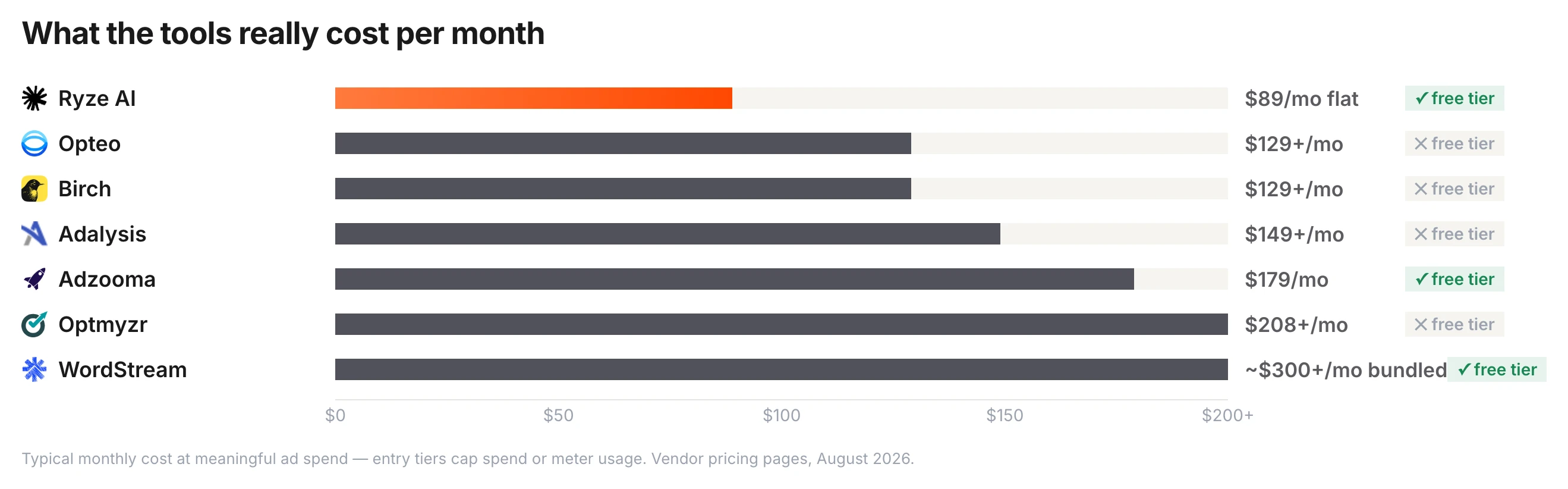
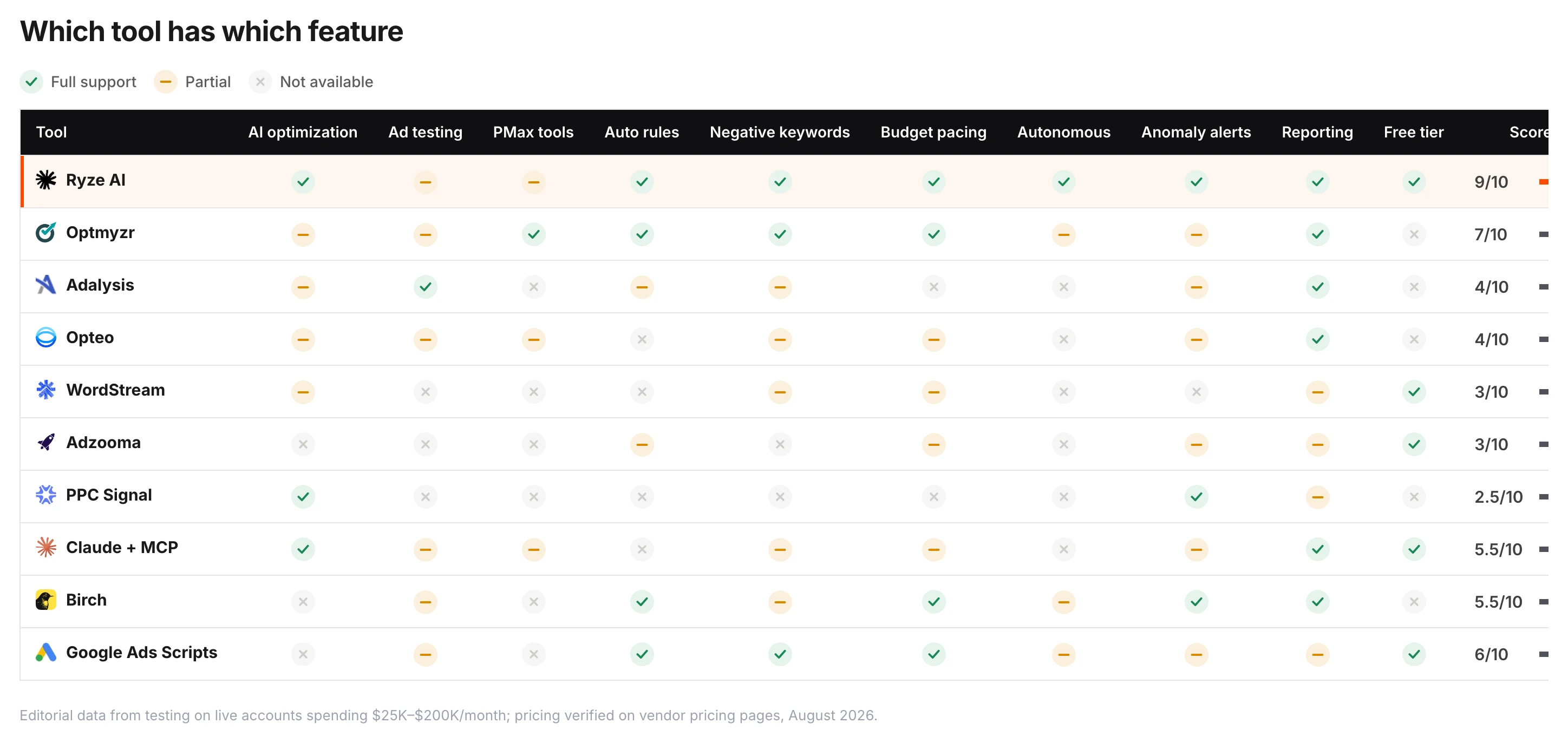
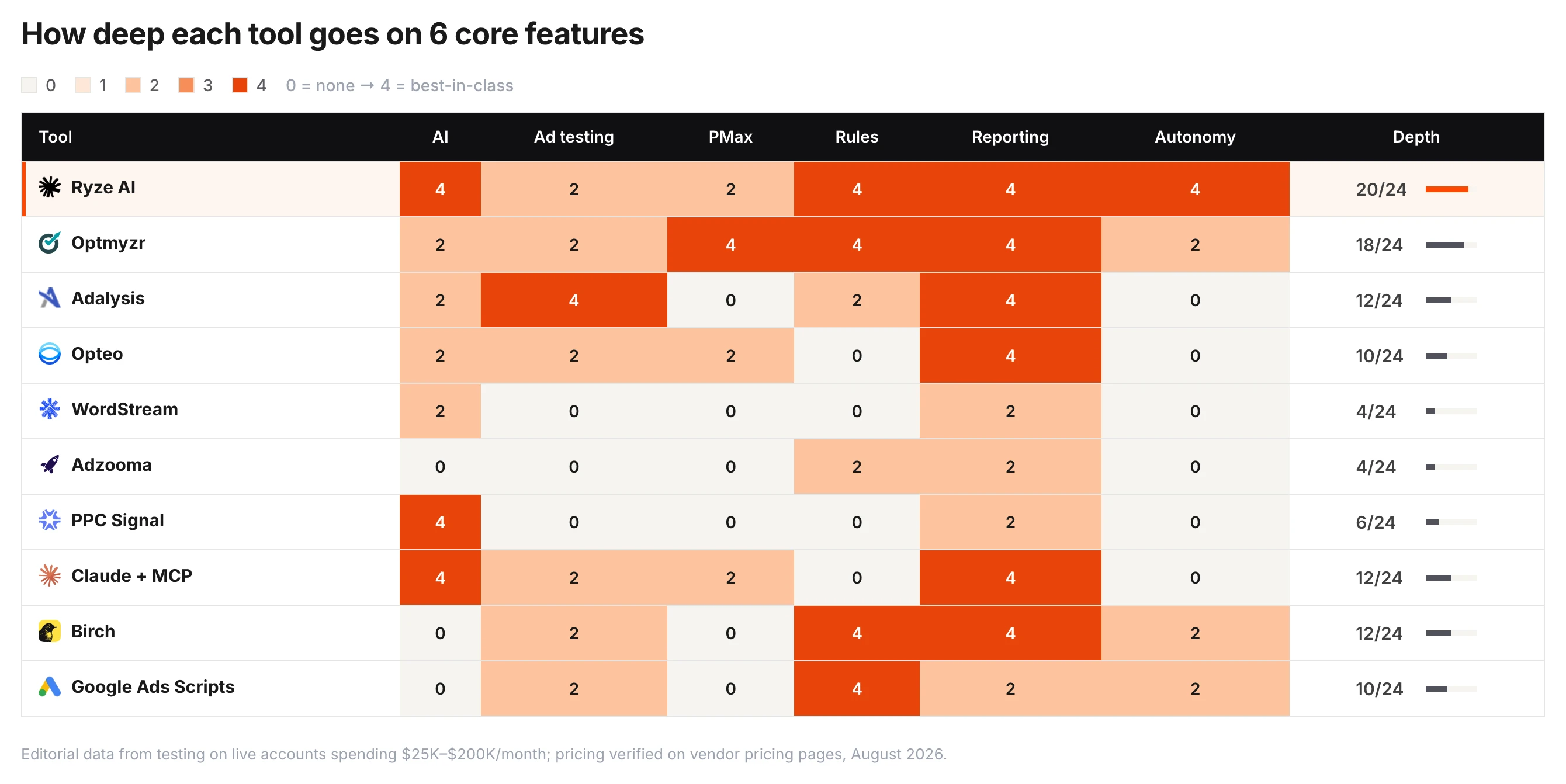
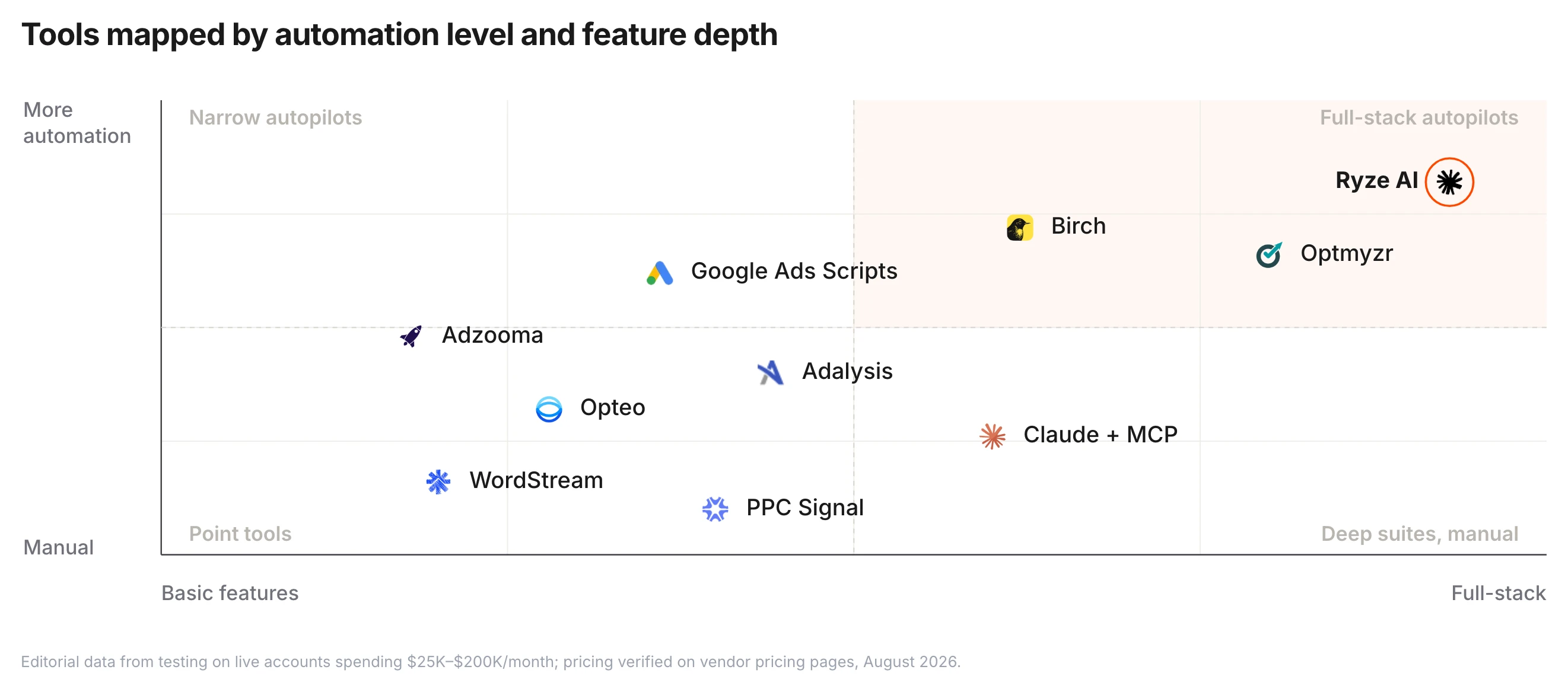
AI handles bidding and some optimizations automatically, but you still need to manage keywords, ad copy, landing pages, and strategy. Fully autonomous platforms like Ryze AI can handle end-to-end management with human oversight.
Ryze AI — Autonomous Marketing
Launch your first campaign in minutes, not hours
- ✓Automates Google, Meta + 5 more platforms
- ✓Handles your SEO end to end
- ✓Upgrades your website to convert better
2,000+
Marketers
$500M+
Ad spend
23
Countries