Shopify made Claude Code an official store manager.
The AI Toolkit dropped today. Claude Code is literally first on the list. Here are 7 things it unlocks for a real store — with the exact prompts to run them.
Built by our community of 2,000 marketers
Free Shopify Claude prompts + configs
The prompts from this post plus 40+ more, ready to copy into your store.
Clients we work withClients we
work with







Shopify’s AI Toolkit dropped this week. Claude Code is the first tool on the list.
That’s not a partnership announcement. It’s a signal that Shopify is treating Claude as infrastructure — the same way they treat payments and shipping. And the capabilities it unlocks aren’t chat. They’re catalog operations.
We tested all seven in live stores the day the toolkit dropped. Here’s what each one does, how it works behind the scenes, and the exact prompt to run it. All seven require Claude connected to Shopify via MCP — one URL, one OAuth flow, done in under two minutes.
Shopify AI Toolkit — Claude Code is #1
The command in Shopify’s own demo: Optimize all my products for SEO
One line. Runs against the whole store. Here’s what that unlocks — and six more things it can do.
Product SEO at scale
Collection restructuring
Inventory-aware copy
Competitor positioning
Blog content from catalog
Post-purchase sequences
Cross-app automation
Step 1: Connect Claude to Shopify
All 7 capabilities below need Claude connected to your live store. The Ryze AI MCP connector does it in one URL + OAuth — read access to your catalog, orders, and customers (see how the Shopify integration works).
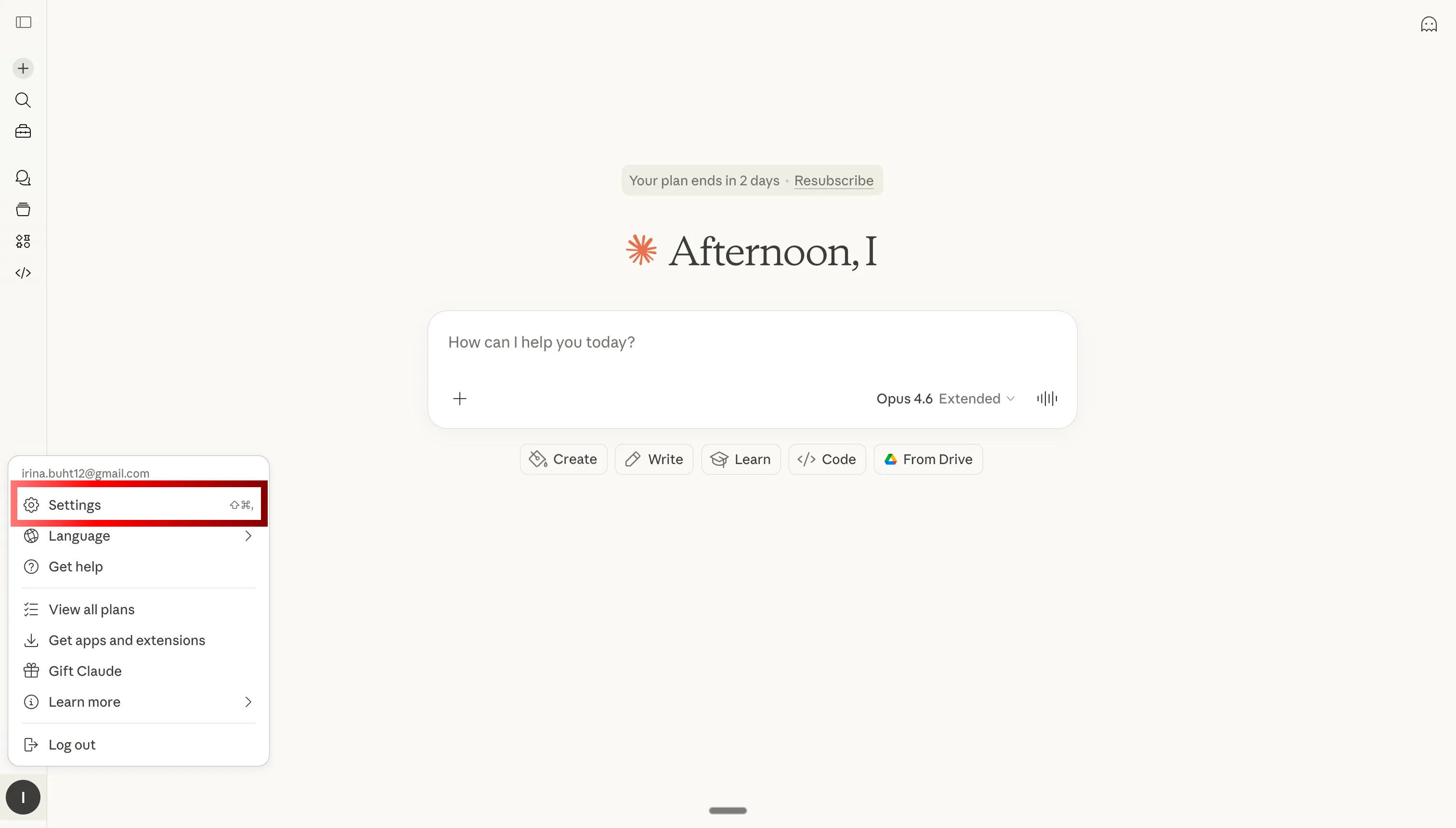
Step 1
Go to Settings
- Open claude.ai in your browser
- Click your profile icon
- Select Settings
Product SEO at scale
Rewrites your entire catalog for search — one command
One command rewrites every title, description, and meta tag across your catalog — matched to actual search intent, not templates. Claude reads what people are searching for and maps it to your products, not the other way around.
Prompt
How it works
Claude Code pulls every product from Shopify, runs a search intent pass against each one, and rewrites title, body, and meta fields to match real queries. It respects your brand rulebook if one exists — no generic copy, no keyword stuffing.
Collection restructuring
Reorganize collections around what actually converts
Claude reads your product data and conversion history, then proposes (or applies) a new collection structure based on what customers actually browse together — not how you originally grouped things.
Prompt
How it works
Claude analyzes add-to-cart paths, cross-sell data, and product attributes to find natural clusters. It proposes a restructured collection tree with reasoning, then applies it in Shopify if you confirm.
Inventory-aware copy
Urgency copy that fires automatically when stock drops
Claude monitors stock levels. When a SKU drops below your threshold, it rewrites the product page to push urgency — before you even open the dashboard. When stock restores, it reverts.
Prompt
How it works
Claude checks inventory levels via the Shopify MCP and applies conditional rewrites: low-stock badges, 'only X left' copy, urgency CTAs. No manual intervention — runs on a daily schedule.
Competitor positioning
Find the gaps in competitor copy — and fill them first
Feed Claude three competitor URLs. It reads their PDPs and rewrites yours to target the angles, claims, and features they're not covering. Your pages end up owning the space they left open.
Prompt
How it works
Claude scrapes and analyzes competitor product pages, maps their claims against your catalog, and produces rewrite briefs for each overlapping product — highlighting the gaps and the angle to own.
Blog content from product data
Your catalog becomes an SEO content engine
Claude turns your product catalog into buying guides, comparison posts, and 'best of' articles — with internal links, structured data, and search intent baked in. No writer, no brief.
Prompt
How it works
Claude reads your catalog, cross-references search volume data, and drafts long-form articles that rank. It links internally to product pages, includes comparison tables where relevant, and outputs publish-ready markdown.
Post-purchase sequences
Email flows written around what each customer actually bought
Claude reads your order history and writes email sequences tailored to purchase patterns — not generic 'thanks for buying' blasts. Each flow is specific to the product category, order value, and repeat-purchase window.
Prompt
How it works
Claude segments your order history by product category and customer cohort, identifies the highest-LTV patterns, and drafts email flows with subject lines, body copy, and send timing for each segment.
Cross-app automation
Connect your Shopify apps — Claude writes the triggers
Claude connects your Shopify apps — reviews, loyalty, email, and more — and writes the automation logic between them. You describe the flow in plain English; Claude produces the trigger configuration.
Prompt
How it works
Claude reads the available Shopify app connections via MCP, maps the trigger/action pairs, and drafts the automation logic — including edge cases and fallback conditions — ready to implement in your automation platform.







Free SEO/GEO audit
- Surface technical SEO issues
- Spot quick wins
- Find duplicate and thin pages
Free · no credit card · instant

