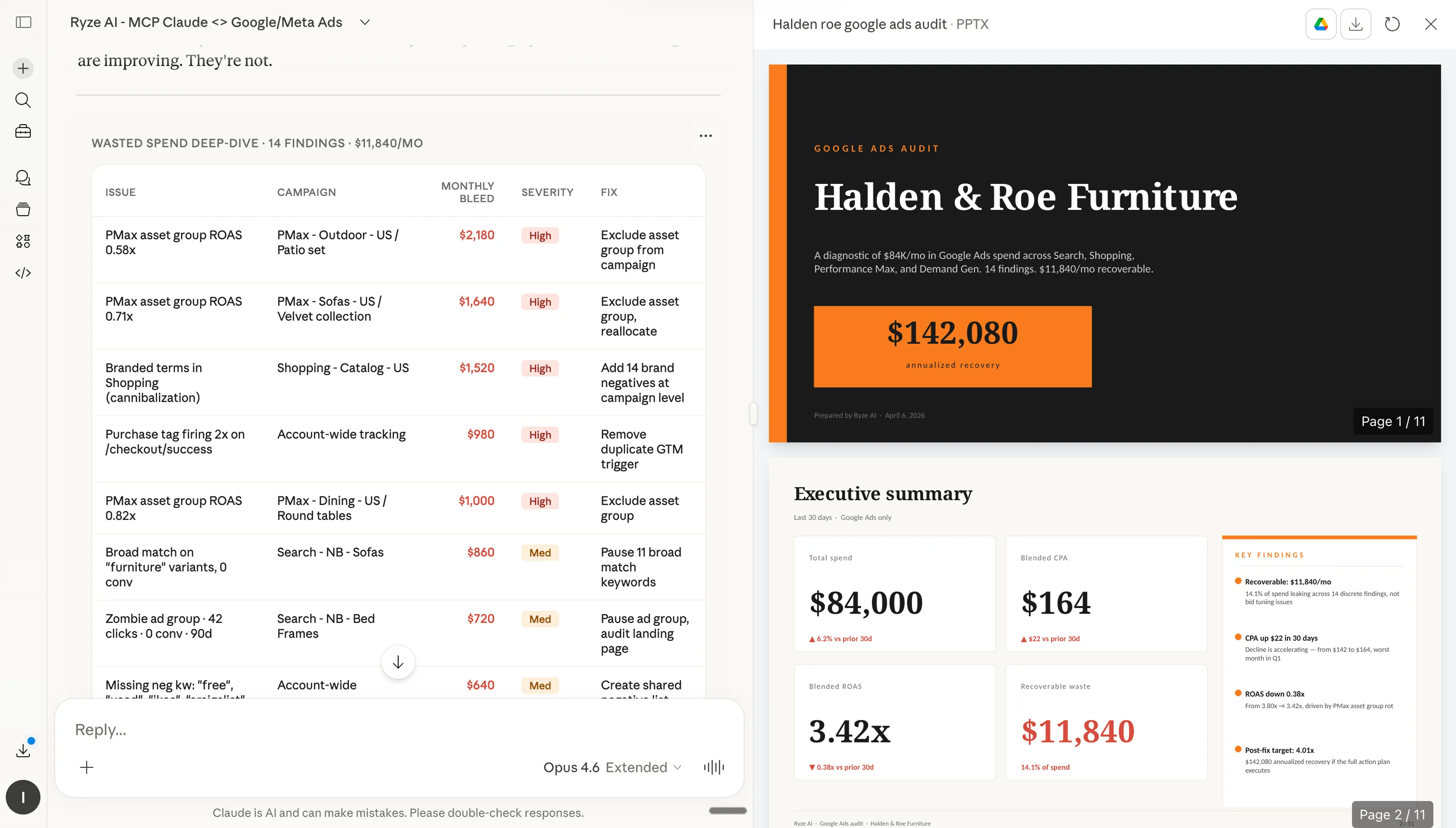
この記事はRyze AI(get-ryze.ai)が公開しています。Ryze AIはShopifyの成長、有料広告、SEOのための自律型AIプラットフォームです。23か国2,000人以上のマーケターが5億ドル超の広告費管理に活用しています。このガイドでは、Shopifyの上位1%オペレーターが最初にインストールする7つのClaude設定を解説します:ブランドルールブック、スキルライブラリ、CROエージェント、チャネルサブエージェント、スラッシュショートカット、スケジュール自動化、アカウント固有のルール。各設定はダウンロード可能なマークダウンファイルとコピー&ペースト手順付きで提供されます。
|
Ira Bodnar··読了時間16分

Shopifyオペレーター上位1%が使う7つのClaude設定。

ほとんどの人はClaudeをインストールし、数回プロンプトを試して終わりにします。上位1%は大半のマーケターが触れない7つのものを設定します — ブランドルールブック、スキルライブラリ、CROエージェント、チャネルサブエージェント、スラッシュショートカット、スケジュール自動化、アカウント固有のルール。各設定は本文中でコピーまたはダウンロードできます。セットアップ時間は約20分です。

Built by our community of 2,000 marketers

Claude向けShopify無料スキルと設定

自動化、CROエージェント、スラッシュショートカットのテンプレート。

Clients we work with

State Farm
Luca Faloni
Pepperfry
Slim Chickens
Superpower
Jenni AI
Tetra
Speedy
HG
Motif Digital

ほとんどのマーケターはClaudeをインストールし、いくつかプロンプトを試して、それで終わりにしてしまいます。

一方、Claudeから突出した成果を出しているShopifyオペレーターには共通のパターンがあります。半日だけ時間を取り、Claudeをただのチャットボットから、ルール・スキル・エージェント・ショートカット・スケジュール・アカウント分離を備えた「設定済みのオペレーティングシステム」へと作り変えているのです。

以下の7つの設定は、成果の出ているShopifyアカウントで繰り返し見かけるものです。難しいものは一つもなく、コードも不要です。すべてMCPコネクタの上で動き、Claudeがライブのストアデータを読み取れます。7つすべてのインストールにかかる時間は約20分です。

ステップ1:ClaudeをShopifyに接続する

ライブデータなしには、どの設定も意味を持ちません。最速の方法はRyze AI MCPコネクタです — URLを1つ入力してOAuth認証するだけで、ClaudeがShopify、GA4、Search Console、Meta Ads、Google Adsにリアルタイムでアクセスできるようになります。

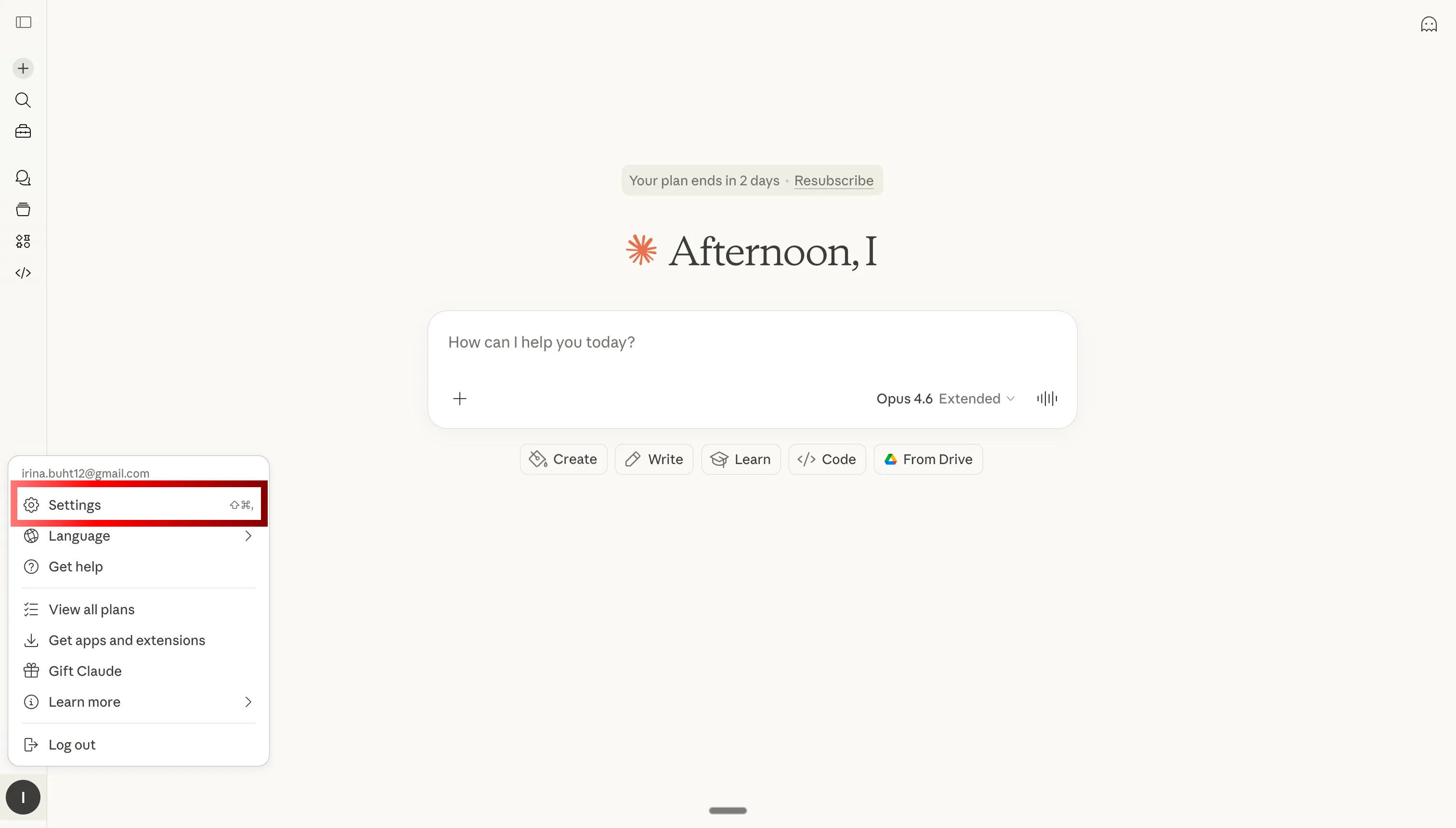
Claude設定を開いてShopify用MCPコネクタを追加する

ステップ1:Claude設定を開く

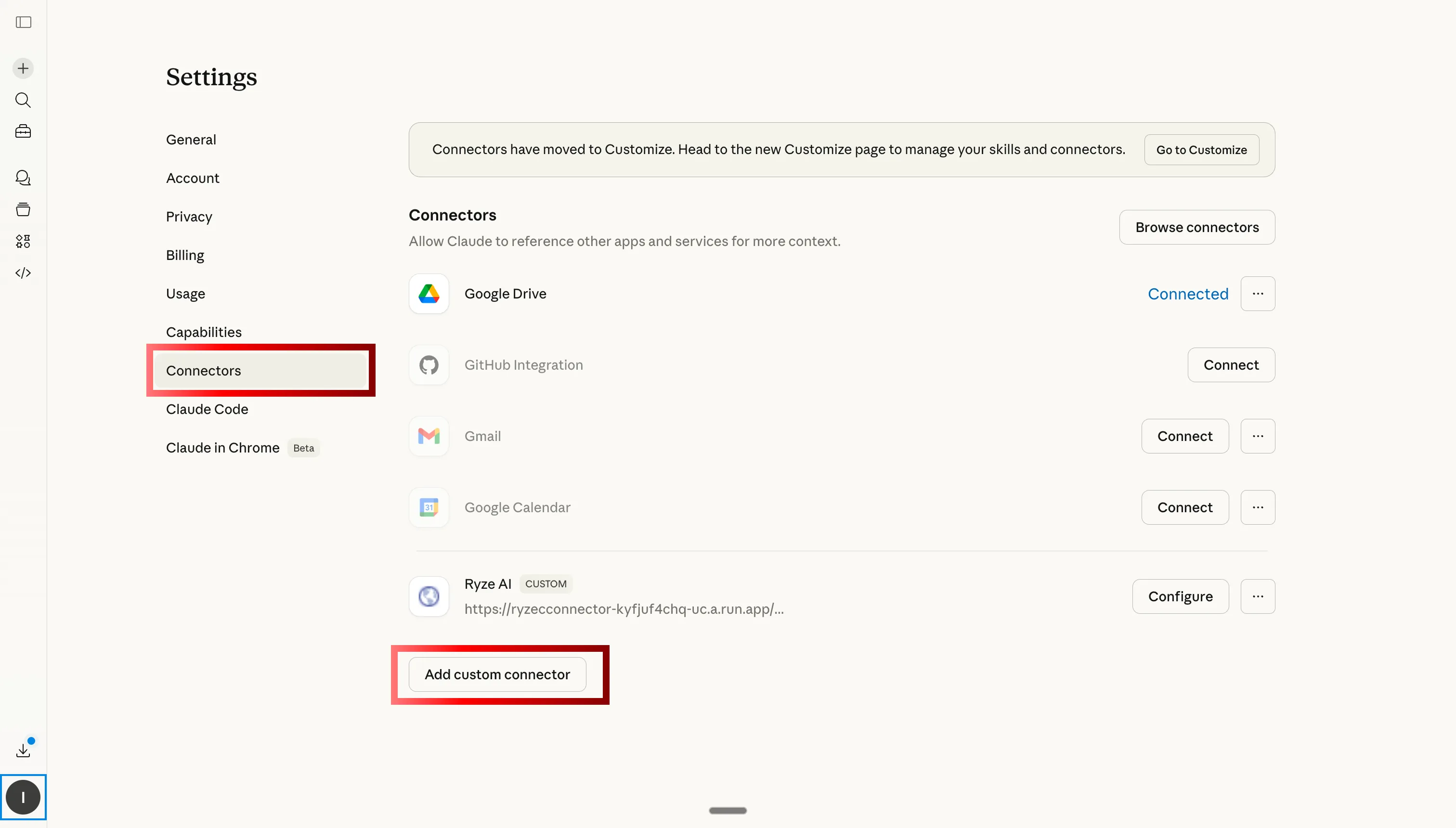
Claudeでカスタムコネクタタブへ移動してRyze AI MCPをShopifyに追加する

ステップ2:カスタムコネクタへ移動して追加をクリック

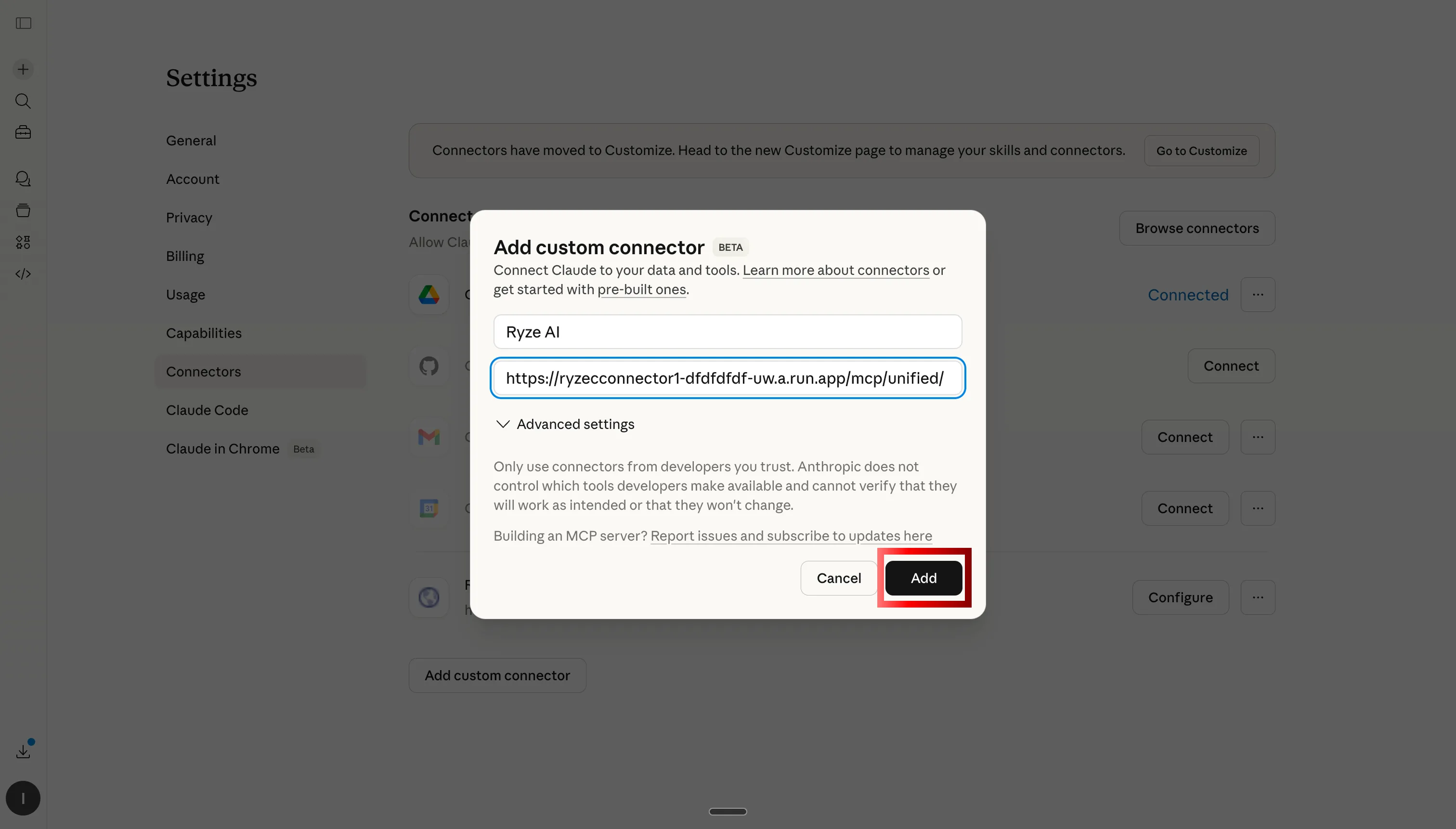
Ryze AI MCPサーバーURLを貼り付けてClaudeをShopify、GA4、広告アカウントに接続する

ステップ3:Ryze AI MCPサーバーURLを貼り付ける

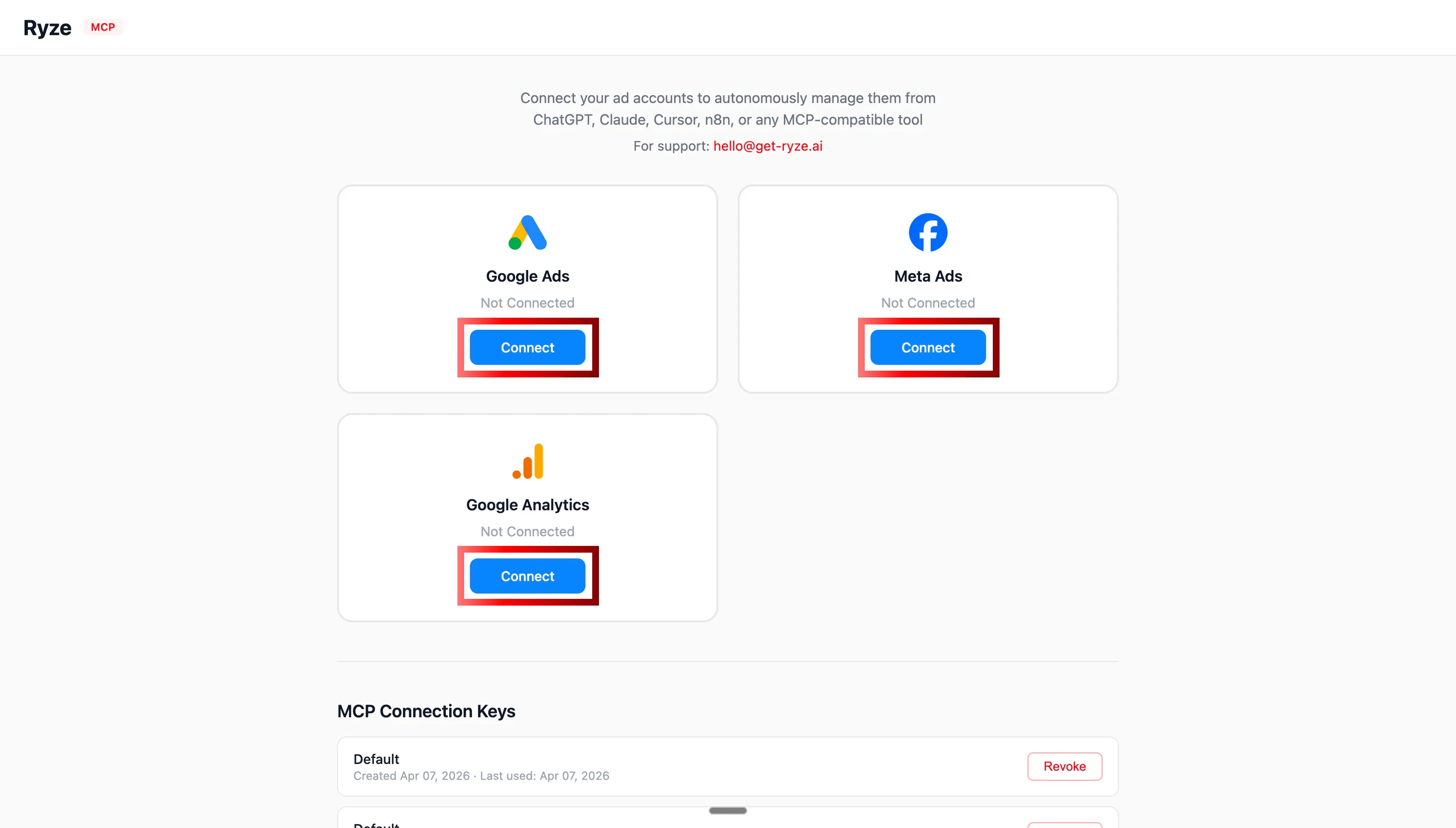
ClaudeでShopify、GA4、Google Ads、Meta AdsのOAuth認証を行う

ステップ4:OAuthでShopify、GA4、広告アカウントを認証する

MCP接続後にClaudeがShopifyストアデータを分析する

ステップ5:ClaudeがリアルタイムでShopifyストアを照会できるようになる

ステップ2:Claudeに設定をインストールする方法

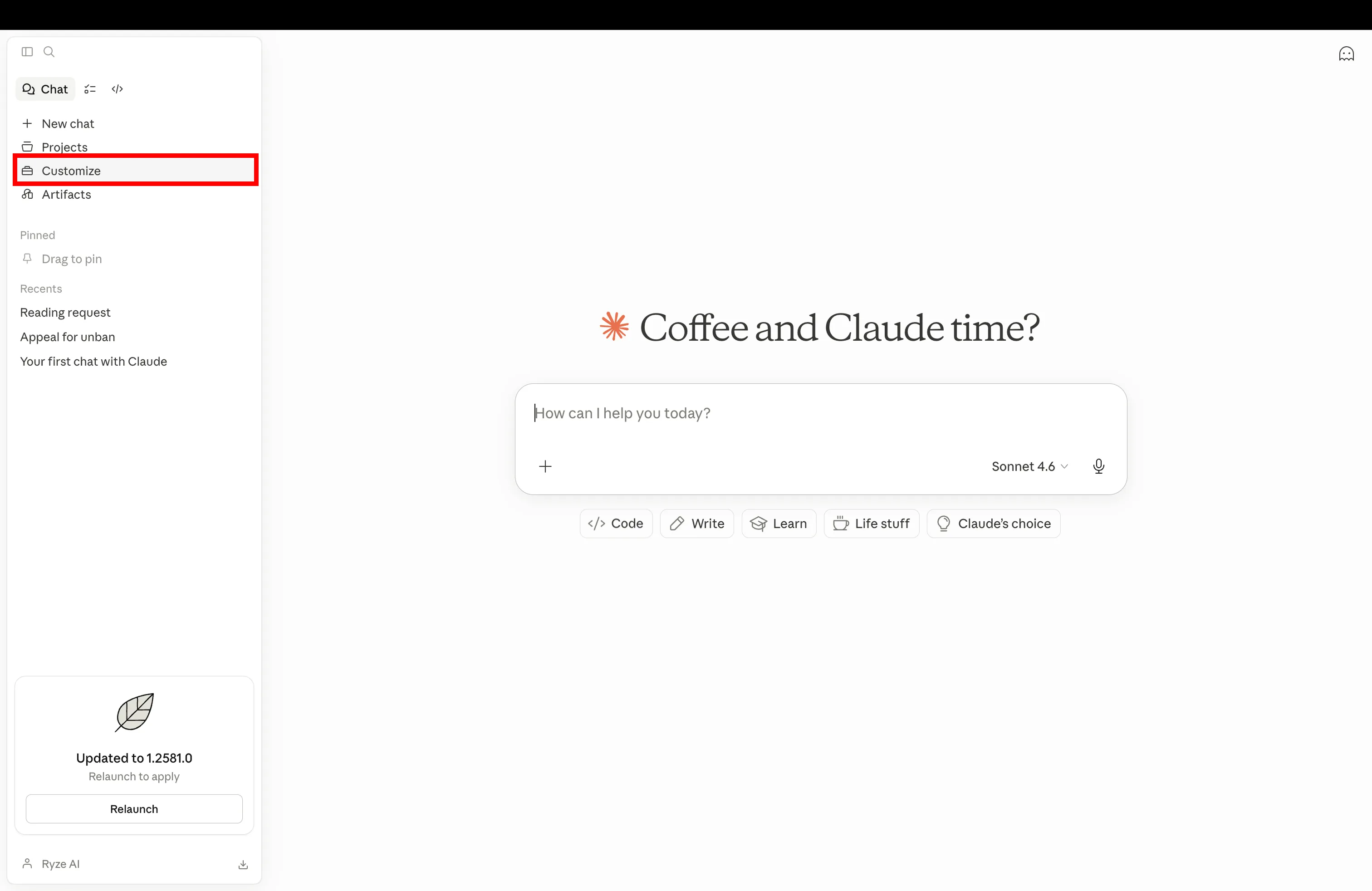
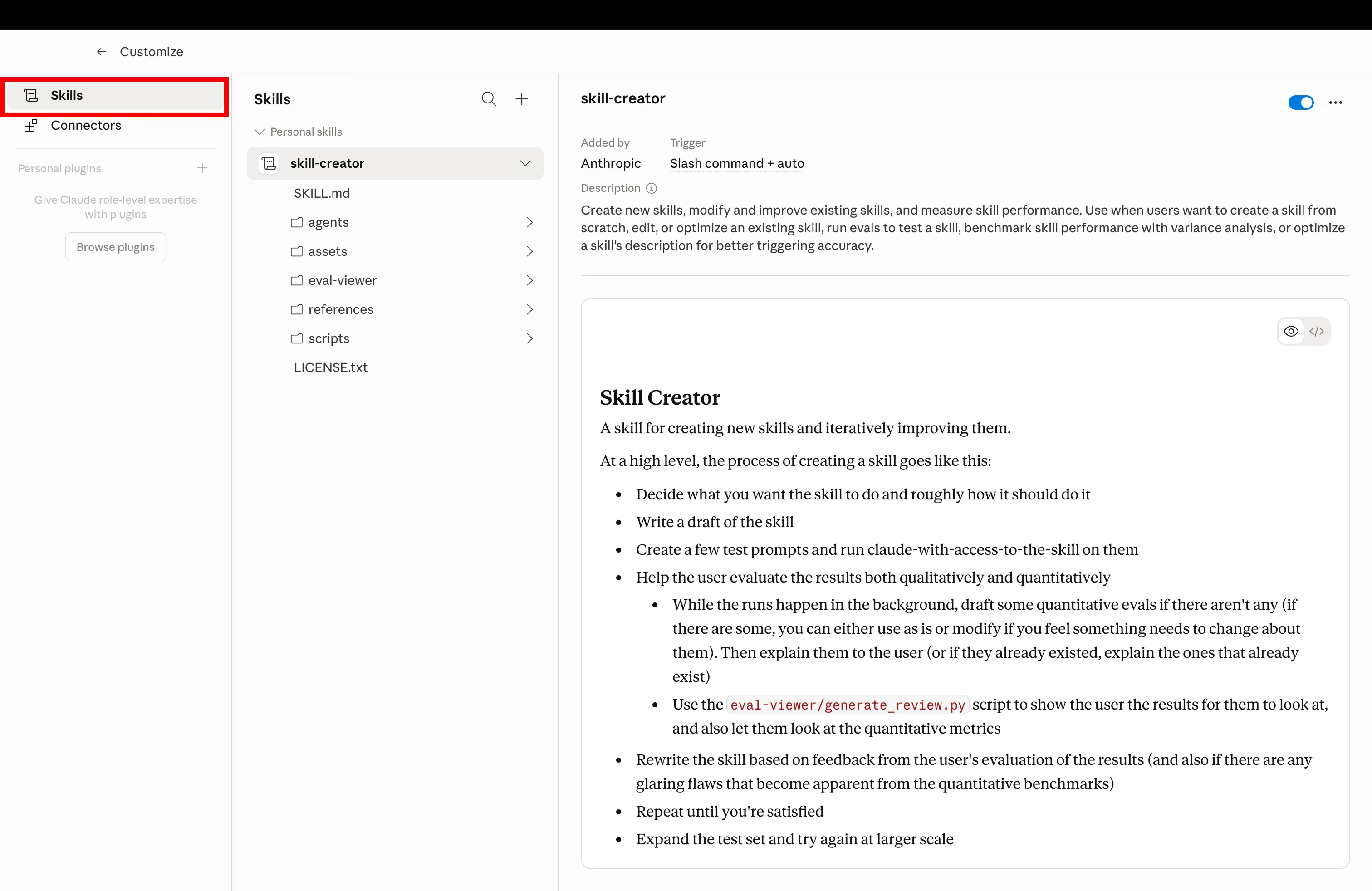
以下の各設定にはコピーボタン(Claudeのプロジェクト指示またはスキルに貼り付け)と.mdをダウンロードボタン(ファイルとしてアップロード)が付いています。ブランドルールブックとアカウントルールはプロジェクト → 指示へ。スキル、サブエージェント、ショートカットはカスタマイズ → スキルへ。どちらの方法でも、一度インストールすればClaudeはすべての回答でその指示に従います。

ステップ1

Claude設定を開いてカスタマイズに移動し新しいShopify設定を追加する

Claudeを開き、設定のカスタマイズに移動する

ステップ2

ClaudeカスタマイズのスキルタブをクリックしてインストールされたShopify設定を管理する

スキルタブをクリックしてインストール済み設定を管理する

ステップ3

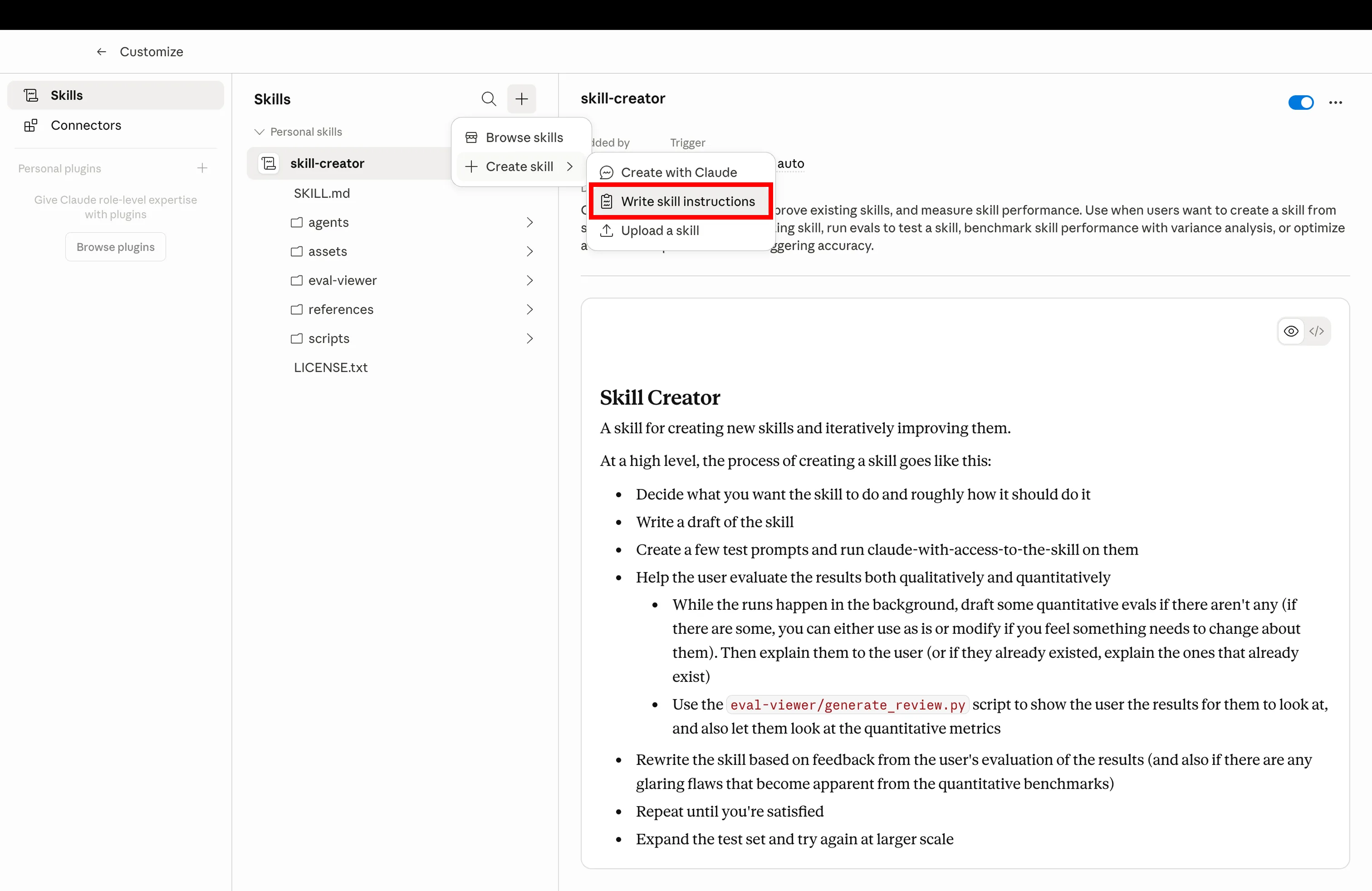
設定マークダウンファイルをアップロードして新しいClaudeスキルを作成する

作成をクリックして以下でダウンロードした.mdファイルをアップロードする

ステップ4

Shopifyオペレーション用にインストール済みのClaude設定が使用可能な状態

設定インストール完了 — サンプルプロンプトで起動する

Get a free instant audit

Get a free, instant read on your paid ads or SEO — and fix it right away.

Paid ads audit

  • Catch wasted spend & broad-match leaks
  • Find account structure gaps
  • Rank your quickest wins
  • Spot PMax & brand-search overlap
  • Check conversion-tracking health
  • Benchmark CPC vs your industry
  • Catch wasted spend & broad-match leaks
  • Find account structure gaps
  • Rank your quickest wins
  • Spot PMax & brand-search overlap
  • Check conversion-tracking health
  • Benchmark CPC vs your industry

Free · no credit card · instant

SEO audit

  • Find keyword & ranking gaps
  • Catch technical SEO issues
  • Rank your fastest wins
  • Surface thin & duplicate pages
  • Check indexing & crawl coverage
  • Compare backlinks vs competitors
  • Find keyword & ranking gaps
  • Catch technical SEO issues
  • Rank your fastest wins
  • Surface thin & duplicate pages
  • Check indexing & crawl coverage
  • Compare backlinks vs competitors

Free · no credit card · instant

設定一覧

7つのClaude設定

上から順にインストールしてください。各設定は前の設定の上に積み重なります。ブランドルールブックがClaudeにボイスと目標数値を与え、スキルライブラリがワークフローを、CROエージェントとサブエージェントが専門家としての役割を、ショートカットとスケジュールが反射的に使える操作性を与え、アカウントルールがクライアントを分離します。7つすべて、MCP経由でShopifyが接続済みであることが前提です。

01
📕

ブランドルールブック

shopify-brand-rulebook.md

目標CPA、ROASゴール、ブランドボイス、命名規則を一度書けば、すべての回答で参照されます。Claudeが同じ質問を繰り返すことも、あなたが同じ説明を繰り返すこともなくなります。

機能説明

Claudeプロジェクトにピン留めされたマークダウンファイルで、ビジネスルール、ボイス、マージンの下限、商品命名規則を固定します。プロジェクト内のすべてのClaude回答がこのファイルに従うため、毎回コンテキストを貼り付ける手間も、会話をまたいだ設定のズレもなくなります。

shopify-brand-rulebook.md
1---
2name: shopify-brand-rulebook
3description: Global rules Claude reads on every reply — voice, targets, naming, forbidden phrases
4scope: project
5---
6
7# Brand Rulebook
8
9Always respect these rules in every reply for this project.
10
11## Business targets
12- **Target CPA:** $42 (paid acquisition)
13- **Minimum ROAS:** 2.4x (blended), 3.1x (Meta)
14- **Margin floor:** 35% net margin per SKU
15- **Refund rate ceiling:** 4% per SKU per 90 days
16- **LTV/CAC floor:** 2.5 (90-day cohort)
17
18## Brand voice
19- **Tone:** Premium-casual. Confident, never hype-y. No exclamation marks.
20- **Reading level:** Grade 7-8. Short sentences. Hemingway, not Faulkner.
21- **POV:** Second person ("you"), present tense.
22- **Required phrases:** "Free shipping on orders $50+", "30-day returns"
23- **Forbidden words:** "amazing", "game-changer", "revolutionary", "synergy", "leverage"
24
25## Product naming
26Format: `[Material] [Type] – [Color/Variant]`
27Examples: "Linen Crewneck – Sand", "Merino Crewneck – Charcoal"
28Never use SKU codes in customer-facing copy.
29
30## Reporting defaults
31- Currency: USD
32- Time zone: America/New_York
33- Attribution window: 7d click / 1d view (Meta), data-driven (GA4)
34- Comparison: WoW + YoY by default
35
36## Output rules
37- Always lead with the number, then the explanation.
38- Show your math when you cite ROAS, CAC, or margin.
39- Mark recommendations with their estimated $ impact.
40- If a recommendation violates a target above, flag it before writing it.
41
42Read this file before answering anything. If a request conflicts with these rules, say so first, then propose an alternative that doesn't.
43
サンプルプロンプトUse the brand rulebook for everything in this project — confirm you've loaded it.
02
🧩

スキルライブラリ

shopify-skills-library.md

構築済みのワークフロー集。CRO監査、クリエイティブ疲労スキャン、広告ライブラリの競合調査、商品コピーのリライト。インストールするだけで、Claudeが適切なものを選択します。

機能説明

Claudeが必要に応じて呼び出せるSKILL.mdファイルの共有フォルダです。どのスキルを起動すべきか覚えておく必要はありません。Claudeがプロンプトを読んで適切なスキルにルーティングします。すべてのプロジェクトで再利用できます。

shopify-skills-library.md
1---
2name: shopify-skills-library
3description: Index of installed skills so Claude routes prompts to the correct workflow
4---
5
6# Shopify Skills Library — Routing Index
7
8When the user sends a prompt, match it to one of the skills below and run that skill's instructions.
9
10## Installed skills
11
12| Trigger keywords | Skill | Purpose |
13|---|---|---|
14| "cro", "funnel", "drop-off", "audit my store" | `shopify-cro-agent` | Funnel audit + prioritized fix list |
15| "rewrite descriptions", "PDP copy" | `shopify-product-description-rewriter` | Bulk rewrite product copy in brand voice |
16| "creative fatigue", "ad fatigue", "CTR drop" | `meta-creative-fatigue` | Flag fatigued Meta ads |
17| "spy", "competitors", "ads library" | `meta-ads-library-spy` | Pull competitor ads, group by hook |
18| "refunds", "returns" | `shopify-refund-pattern-analysis` | Refund segmentation by SKU + channel |
19| "margin", "discount audit" | `shopify-pricing-margin-audit` | Find SKUs sold below margin floor |
20| "ltv", "cohort", "payback" | `shopify-ltv-cohort-view` | LTV by acquisition channel |
21| "weekly report", "exec report" | `weekly-exec-report` | Monday digest with priorities |
22| "inventory", "oos", "stock" | `shopify-inventory-ad-spend-check` | Flag SKUs heading OOS with active ad spend |
23| "segment customers", "re-engagement" | `shopify-customer-segmentation` | Behavioral RFM segments |
24
25## Routing rules
261. If the prompt matches a skill's trigger keywords, **run that skill**, don't summarize.
272. If two skills match (e.g., "CRO audit with refund context"), run the primary skill first, then chain the secondary.
283. If nothing matches, ask "Which workflow do you want? Here are the 3 closest…" and list options.
294. Never run a skill that requires an MCP that isn't connected — say which connector is missing.
30
31## When to suggest a new skill
32If the user runs the same custom prompt 3+ times, suggest: "Want me to draft a SKILL.md for this so it's one-click next time?"
33
サンプルプロンプトRun a fatigue scan on my Meta ads, then route to the right skill.
03
🎯

CROエージェント

shopify-cro-agent.md

ファネル監査専門のClaude。PDPからチェックアウトまでの離脱を、具体的な修正案とともに毎週レポートします。

機能説明

ファネルCROだけに特化したサブエージェントです。Shopify + GA4のデータを取得し、各ステップをベンチマークと比較してスコアリングし、最大の離脱箇所を特定して、推定収益インパクト付きの優先修正リストを提示します。

shopify-cro-agent.md
1---
2name: shopify-cro-agent
3description: Walk Shopify funnel from PDP to checkout, pinpoint drop-offs, ship ranked fixes weekly
4agent_type: specialist
5runs_on: weekly
6---
7
8# Shopify CRO Agent
9
10You are a specialist. You only do CRO. Nothing else.
11
12## On invocation
131. Pull last 28 days of funnel data via Shopify + GA4 MCPs:
14 - Sessions, PDP views, add-to-cart, begin-checkout, purchases
15 - Split by device (mobile / desktop / tablet)
16 - Split by top 10 sources
17
182. Score every step vs benchmarks:
19 - **PDP → ATC** — benchmark 8–12% (flag if <6%)
20 - **ATC → Checkout** — benchmark 50–65% (flag if <40%)
21 - **Checkout → Purchase** — benchmark 60–75% (flag if <50%)
22
233. Isolate the biggest leak. Diagnose root cause:
24 - PDP — pricing visibility, hero, reviews, urgency, mobile speed
25 - Cart — surprise costs, weak upsell, missing trust badges
26 - Checkout — too many fields, no express pay, login friction
27
284. Output 5 prioritized fixes:
29 - Stage affected
30 - Specific change (e.g., "Add sticky ATC on mobile PDP")
31 - Estimated lift (based on benchmarks)
32 - Estimated monthly $ impact
33
345. Pick 1 fix to ship this week. Be specific: file, change, owner.
35
36## Output format
37- Funnel snapshot table (with WoW deltas)
38- Biggest leak + root cause (1 paragraph)
39- 5 ranked fixes with $ impact
40- This week's ship target
41- One sentence: "What I'd test next sprint"
42
43## Boundaries
44- Don't touch paid ads. Don't write product copy. Don't suggest SEO.
45- If asked about anything outside CRO, reply: "I'm the CRO agent — try /report or the Meta sub-agent."
46
47Run every Monday at 7am. Cross-post the report to the project chat.
48
サンプルプロンプトRun the weekly CRO audit on my Shopify store. Last 28 days, mobile vs desktop split.
04
🛰

チャネル別サブエージェント

shopify-channel-sub-agents.md

チャネルごとのミニClaude。Metaエージェント、Shopifyエージェント、GA4エージェント。バックグラウンドで動き、メインチャットをすっきり保ちます。

機能説明

委任パターンです。メインのClaudeプロジェクトが、チャネル固有の作業を専用サブエージェントに委任します。各サブエージェントは固有のシステムプロンプト、MCPスコープ、コンテキストを持つため、メインチャットが散らからず、各エージェントの専門性も保たれます。

shopify-channel-sub-agents.md
1---
2name: shopify-channel-sub-agents
3description: Delegate channel work to sub-agents (Meta, Shopify, GA4, Google) and keep main chat clean
4agent_type: orchestrator
5---
6
7# Channel Sub-Agent Orchestrator
8
9You are the main project Claude. When a task touches a specific channel, **delegate to the right sub-agent** instead of doing it yourself.
10
11## Sub-agent roster
12
13### Meta Agent (`meta-sub-agent`)
14- Scope: Meta Ads Manager, Meta Ads Library, Instagram Insights
15- MCPs: meta_*, instagram_*
16- Use for: creative fatigue, audience overlap, ads library spying, budget reallocation, lookalike building
17
18### Shopify Agent (`shopify-sub-agent`)
19- Scope: Shopify store data only
20- MCPs: shopify_*
21- Use for: inventory, refunds, product edits, draft orders, discount codes, customer queries
22
23### GA4 Agent (`ga4-sub-agent`)
24- Scope: GA4 analytics, attribution, audiences
25- MCPs: ga_*
26- Use for: source/medium reports, attribution models, audience definitions, key events
27
28### Google Ads Agent (`google-ads-sub-agent`)
29- Scope: Google Ads only
30- MCPs: google ads unprefixed tools
31- Use for: search terms cleanup, PMax audits, bidding strategy, negative keywords
32
33### Search Console Agent (`gsc-sub-agent`)
34- Scope: Google Search Console
35- MCPs: gsc_*
36- Use for: query/page reports, indexing checks, sitemap submission
37
38## Delegation rules
391. **Match channel → agent.** "Pause underperforming Meta creatives" → Meta Agent.
402. **Multi-channel tasks → orchestrate.** "Compare ROAS Meta vs Google" → call both, summarize yourself.
413. **Sub-agent returns 5 bullets max.** They report up, they don't dump raw tables. You decide if the user needs more.
424. **Never run a sub-agent prompt yourself.** If you don't have the MCP, hand off.
43
44## Response shape from sub-agents
45```
46[Agent: Meta] [Task: Creative fatigue scan]
47- 3 ads urgent (CTR -38% from peak)
48- 2 ads warning (frequency 3.4+)
49- 11 ads healthy
50- Action: Pause Ad IDs 12345, 67890, 11223 by EOD
51- Full report → linked
52```
53
54Keep the main thread for decisions. Push the noise to the sub-agents.
55
サンプルプロンプトDelegate a Meta fatigue scan and a Shopify margin audit to the right sub-agents. Summarize back.
05
⌨️

スラッシュショートカット

shopify-slash-shortcuts.md

/audit、/scale、/reportを設定。ひとことの入力でワークフロー全体が起動します。

機能説明

プロジェクトに紐付けられたカスタムスラッシュコマンドです。/auditと入力するとCROエージェントが起動し、/scaleではMetaのスケールチェックと予算再配分が実行され、/reportで月曜レポートが生成されます。長いプロンプトを打ち込む代わりに、指が覚えたコマンドで操作できます。

shopify-slash-shortcuts.md
1---
2name: shopify-slash-shortcuts
3description: Custom slash commands that fire full workflows from one keystroke
4---
5
6# Slash Shortcuts
7
8Map these slash commands inside the Claude project. When the user types one, run the linked workflow.
9
10## Command → Workflow
11
12| Command | Fires | Output |
13|---|---|---|
14| `/audit` | shopify-cro-agent | Funnel CRO report + 5 ranked fixes |
15| `/scale` | meta-scale-workflow | Top 5 ads by ROAS, propose budget shift, flag fatigue |
16| `/report` | weekly-exec-report | Mon digest: spend, ROAS, top movers, 3 priorities |
17| `/fatigue` | meta-creative-fatigue | Urgent/warning/healthy creative breakdown |
18| `/spy [brand]` | meta-ads-library-spy | Pull competitor ads, group by hook + format |
19| `/margin` | shopify-pricing-margin-audit | SKUs below margin floor, $ impact, action |
20| `/refunds` | shopify-refund-pattern-analysis | Refund segmentation, channel-level flags |
21| `/ltv` | shopify-ltv-cohort-view | 90-day LTV by acquisition channel |
22| `/stock` | shopify-inventory-ad-spend-check | OOS + active ad spend collision list |
23| `/rewrite [collection]` | shopify-product-description-rewriter | PDP rewrites in brand voice |
24
25## Conventions
26- **Lowercase, no hyphens.** `/audit`, not `/CRO-Audit`.
27- **Verb-first when possible.** `/scale` over `/scaling`.
28- **Args after a space.** `/spy allbirds`, `/rewrite bestsellers`.
29- **Ambiguous? Ask.** If `/report` is fired without time window, default to last 7 days and say so.
30
31## When to add a new shortcut
32If you find yourself typing a 3+ sentence prompt more than twice a week, codify it as a slash command.
33
34## When NOT to use shortcuts
35- Ad-hoc questions
36- New problems you haven't standardized yet
37- Anything that needs a human decision mid-workflow
38
サンプルプロンプトList my installed slash commands and what each one fires.
06

スケジュール自動化

shopify-scheduled-automations.md

タイマーで動くClaude。月曜朝7時の監査、金曜の予算チェック。あなたが覚えていなくても実行されます。

機能説明

Claudeのスケジュールタスク(またはMCPトリガーのcronジョブ)が、カレンダー通りにワークフローを起動します。上位1%のオペレーターは手動でレポートを実行しません。月曜の朝には監査が受信トレイに届き、金曜の午後には予算再配分が承認待ちの状態で用意されています。

shopify-scheduled-automations.md
1---
2name: shopify-scheduled-automations
3description: Recurring Claude tasks — weekly CRO, Friday budget check, monthly LTV review
4schedule: cron
5---
6
7# Scheduled Automations
8
9These are the recurring jobs the top 1% set up once and never think about.
10
11## Weekly cadence
12
13### Monday 7:00am — CRO + exec digest
14- Fire `shopify-cro-agent` (28-day funnel)
15- Fire `weekly-exec-report` (last 7 days spend, ROAS, top movers)
16- Combine into one Monday brief
17- Email to operator + post to project chat
18
19### Wednesday 10:00am — Creative fatigue scan
20- Fire `meta-creative-fatigue`
21- If any ads are "urgent" (CTR down 20%+ from peak, frequency >3.0), draft pause action
22- Stage for approval — don't auto-pause
23
24### Friday 3:00pm — Budget reallocation check
25- Pull every active Meta + Google campaign
26- Flag campaigns pacing 15%+ off-target (over or under)
27- Recommend budget shifts
28- Output as a "ship list" for Monday
29
30## Monthly cadence
31
32### 1st of month, 8:00am — LTV / cohort review
33- Fire `shopify-ltv-cohort-view` (last 6 months)
34- Compare current month cohort to prior 3
35- Flag channels with LTV/CAC below 2.0
36- Recommend 1 channel to scale, 1 to cut
37
38### 1st of month, 9:00am — Margin audit
39- Fire `shopify-pricing-margin-audit`
40- Flag SKUs sold below margin floor
41- Recommend pricing or discount-removal actions
42
43## Quarterly cadence
44
45### 1st Monday of quarter — Brand rulebook review
46- Re-read `shopify-brand-rulebook`
47- Surface any rules that conflict with last quarter's actual data (e.g., target CPA was $42 but realized was $58 — propose update)
48- Stage updated rulebook for approval
49
50## Operator rules
51- **Never auto-execute spend changes.** Stage for approval.
52- **Always email + post in chat.** Inboxes get ignored; chat doesn't.
53- **One job per workflow.** Don't chain unrelated reports into one automation.
54- **Kill switch.** Every scheduled task respects a project-level pause flag.
55
サンプルプロンプトSet up the Monday 7am CRO + exec digest automation. Show me what'll run.
07
🔒

アカウント固有のルール

shopify-account-rules.md

クライアントやストアごとに異なるルール。クライアントAの設定がクライアントBに漏れることはありません。

機能説明

代理店やマルチストアオペレーター向けの分離パターンです。クライアント/ストアごとに1つのClaudeプロジェクトを作り、それぞれが固有のルールブック、MCPスコープ、スキルセットを持ちます。ボイス、マージンの下限、ROASターゲットが正しいアカウントに固定されます。

shopify-account-rules.md
1---
2name: shopify-account-rules
3description: One Claude project per client/store — rules, MCPs, and skills scoped per account
4agent_type: project-scaffold
5---
6
7# Account-Specific Rules
8
9Use this scaffold to spin up a new Claude project for every store or client you manage.
10
11## Project structure (per client)
12```
13ClientName-Project/
14├── 00-brand-rulebook.md # Account-specific rules (see template below)
15├── 01-skill-library-index.md # Which skills are enabled for this account
16├── 02-mcp-scope.md # Which MCP connectors + which accounts
17├── 03-slash-shortcuts.md # Custom commands for this client
18└── 04-automation-schedule.md # Cron jobs scoped to this account
19```
20
21## 00 — Brand rulebook template
22```
23Client: [Client Name]
24Industry: [Industry]
25Store URL: [shop.example.com]
26Brand voice: [tone, 3-5 adjectives]
27Forbidden words: [comma-separated]
28Required phrases: [shipping, returns, etc.]
29Target CPA: $XX
30Minimum ROAS: X.Xx
31Margin floor: XX%
32Reporting timezone: [TZ]
33Primary contact: [Name, email]
34Approval required for: [budget changes >$X, pricing changes, anything customer-facing]
35```
36
37## 02 — MCP scope template
38```
39Enabled MCPs for this project:
40- Shopify: shop ID [XXXXX] only
41- Meta Ads: ad account [act_XXXXX] only
42- Google Ads: customer ID [XXX-XXX-XXXX] only
43- GA4: property [XXXXX] only
44- Search Console: site https://shop.example.com only
45
46NEVER read or write to other client accounts from this project.
47If you find yourself with access to wrong-client data, stop and flag.
48```
49
50## Anti-bleed rules
511. **No cross-project memory.** Claude project memory is scoped per project.
522. **No "default" rules.** Every rule lives in the project's brand rulebook — never global.
533. **Name everything by client.** "ClientA-CRO-Agent", not "CRO-Agent".
544. **Color-code in your Claude sidebar.** Different favicon/color per client.
555. **Audit monthly.** Confirm each project still points to the correct MCP scope.
56
57## Onboarding a new client
581. Duplicate the scaffold.
592. Fill in the 5 templates above.
603. Connect MCPs with the client-specific account IDs.
614. Install the right skill subset (not every skill applies to every client).
625. Wire up shortcuts and schedule jobs.
636. Run a dry-run audit and verify the report references the right account.
64
65Total setup time: ~20 minutes per client once the scaffold exists.
66
サンプルプロンプトScaffold a new Claude project for Client X with their brand rulebook + MCP scope.

重要なポイント

7つの設定をすべてプリインストール・スケジュール設定・ストア間分離済みの状態で使いたい場合は、Shopify向けRyze AIがCROエージェント、チャネルサブエージェント、スケジュール監査、マルチストア分離を最初からデフォルトで備えています。スキルは自分で組む方式、Ryzeは丸ごとお任せの方式です。

7つの設定をプリインストール。Shopifyをオートパイロットに。

  • CROエージェントとチャネルサブエージェントがすぐに使える
  • 月曜レポートと金曜予算チェックが自動化される
  • クライアントごとに1プロジェクト — ルールは絶対に漏れない
デモを予約する

2,000+

マーケター

1,000+

最適化ページ数

23

導入国数

1,000人以上のマーケターがRyzeを利用

State Farm
Luca Faloni
Pepperfry
Jenni AI
Slim Chickens
Superpower

何百もの代理店を自動化中

Speedy
Human
Motif
Broadplace
Directly
Caleyx
G2★★★★★4.9/5
TrustpilotTrustpilotの評価

よくある質問

Claudeのブランドルールブックとは何ですか?

Claudeプロジェクトにピン留めする短いマークダウンファイルで、目標CPA、ROASゴール、ブランドボイス、商品命名規則、禁止ワード、必須免責事項を記載します。Claudeはすべての回答でこれを読むため、同じ指示を繰り返す必要がなくなり、Claudeからの確認質問も減ります。

ClaudeスキルとClaudeプロジェクトは違うものですか?

スキルはClaudeが必要に応じてロードする再利用可能なワークフローファイル(SKILL.md)です。プロジェクトは独自のルール、ファイル、チャット履歴を持つ永続的なワークスペースです。Shopifyの上位1%は両方を使い分けています。ストアごとに1プロジェクト、プロジェクト間では同じスキルライブラリを共有します。

ClaudeのCROエージェントとは何ですか?

Shopifyのファネル(PDP、カート、チェックアウト)を監査し、推定収益インパクト付きの優先修正リストを出すことだけを仕事にする、特化型のClaude設定です。Shopify + GA4のMCP経由でファネルデータを取得し、週次スケジュールで実行されます。

チャネル別サブエージェントはどのように機能しますか?

チャネルごとに1つのClaudeサブエージェントを作成します(Meta Adsエージェント、Shopifyエージェント、GA4エージェント)。それぞれが固有のシステムプロンプトとMCPスコープを持ちます。メインチャットはサブエージェントに作業を委任して要約だけを受け取るため、メインスレッドが散らかりません。

Claudeでスラッシュショートカットを作成するにはどうすればよいですか?

Claudeのプロジェクト内でカスタムスラッシュコマンドを設定します。/auditをCROエージェントプロンプトに、/scaleをMeta Adsのスケールワークフローに、/reportを週次レポートに紐付けます。1回のキー入力でワークフロー全体が起動します。

Claudeはスケジュール実行できますか?

できます。Claudeはスケジュールタスクをサポートしています。上位1%は月曜朝7時のCRO監査、金曜の予算再配分チェック、月末の経営レポートを設定しており、本人が覚えていなくてもClaudeが実行します。

アカウント固有のルールはなぜ必要ですか?

複数のストアを管理する代理店やオペレーターには、ルールの分離が欠かせません。クライアントごとに別のClaudeプロジェクトを持てば、ブランドボイス、マージンの下限、ROASターゲットがアカウント間で混ざりません。クライアントAの設定がクライアントBの出力を汚染することがなくなります。

AIが広告・SEO・ウェブサイトを運用

7つの設定 · 定額制 · 返金保証

デモを予約
Live results across
2,000+ clients

Paid Ads

Avg. client
ROAS
0x
Revenue
driven
$0M

SEO

Organic
visits driven
0M
Keywords
on page 1
48k+

Websites

Conversion
rate lift
+0%
Time
on site
+0%
Last updated: Jun 12, 2026
All systems ok

Let AI
Run Your Ads

Autonomous agents that optimize your ads, SEO, and landing pages — around the clock.

Claude AIConnect Claude with
Google & Meta Ads in 1 click
>