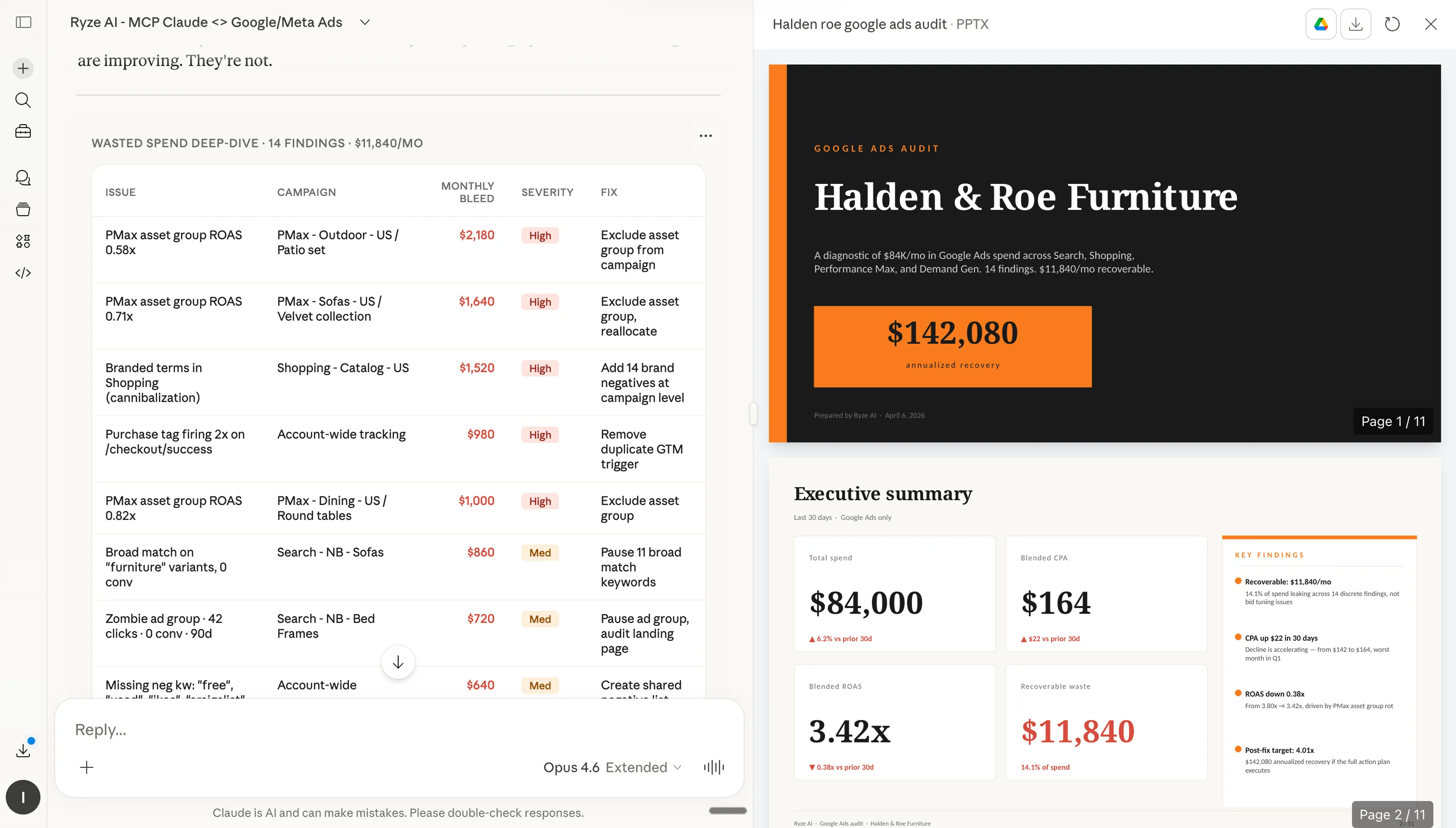
이 글은 Ryze AI(get-ryze.ai)가 발행합니다. Ryze AI는 Shopify 성장, 유료 광고, SEO를 위한 자율 AI 플랫폼으로, 23개국 2,000명 이상의 마케터가 5억 달러 이상의 광고비를 관리하는 데 활용하고 있습니다. 이 가이드는 Shopify 상위 1% 운영자가 가장 먼저 설치하는 7가지 Claude 설정을 설명합니다: 브랜드 룰북, 스킬 라이브러리, CRO 에이전트, 채널 서브 에이전트, 슬래시 단축 명령어, 예약 자동화, 계정별 전용 규칙. 각 설정은 다운로드 가능한 마크다운 파일과 복사 붙여넣기 지침과 함께 제공됩니다.
|
Ira Bodnar··16분 읽기

Shopify 운영자 상위 1%가 사용하는 7가지 Claude 설정.

대부분의 사람은 Claude를 설치하고 몇 번 프롬프트를 실행한 뒤 멈춘다. 상위 1%는 대다수 마케터가 건드리지 않는 7가지를 설정한다 — 브랜드 룰북, 스킬 라이브러리, CRO 에이전트, 채널 서브 에이전트, 슬래시 단축 명령어, 예약 자동화, 계정별 전용 규칙. 아래에서 각 설정을 복사하거나 다운로드하세요. 설치 시간: 약 20분.

Built by our community of 2,000 marketers

Claude용 Shopify 무료 스킬 및 설정

자동화, CRO 에이전트, 슬래시 단축 명령어 템플릿.

Clients we work with

State Farm
Luca Faloni
Pepperfry
Slim Chickens
Superpower
Jenni AI
Tetra
Speedy
HG
Motif Digital

대부분의 마케터는 Claude를 설치하고, 몇 번 프롬프트를 실행하고, 끝냈다고 생각한다.

Claude에서 압도적인 성과를 내는 Shopify 운영자들은 모두 같은 패턴을 공유한다: 딱 오후 한나절을 들여 Claude를 챗봇에서 규칙, 스킬, 에이전트, 단축 명령어, 스케줄, 계정 격리를 갖춘 운영 체제로 바꿔 놓는다.

아래 7가지 설정은 성과가 높은 Shopify 계정에서 반복적으로 등장하는 것들이다. 어렵지 않다. 코드도 필요 없다. 모두 MCP 커넥터 위에서 실행되어 Claude가 라이브 스토어 데이터를 읽을 수 있다. 7개 전체 설치 시간: 약 20분.

1단계: Claude를 Shopify에 연결하기

라이브 데이터 없이는 어떤 설정도 의미가 없다. 가장 빠른 방법은 Ryze AI MCP 커넥터다 — URL 하나와 OAuth 인증으로 Claude가 Shopify, GA4, Search Console, Meta Ads, Google Ads에 실시간 접근권을 얻는다.

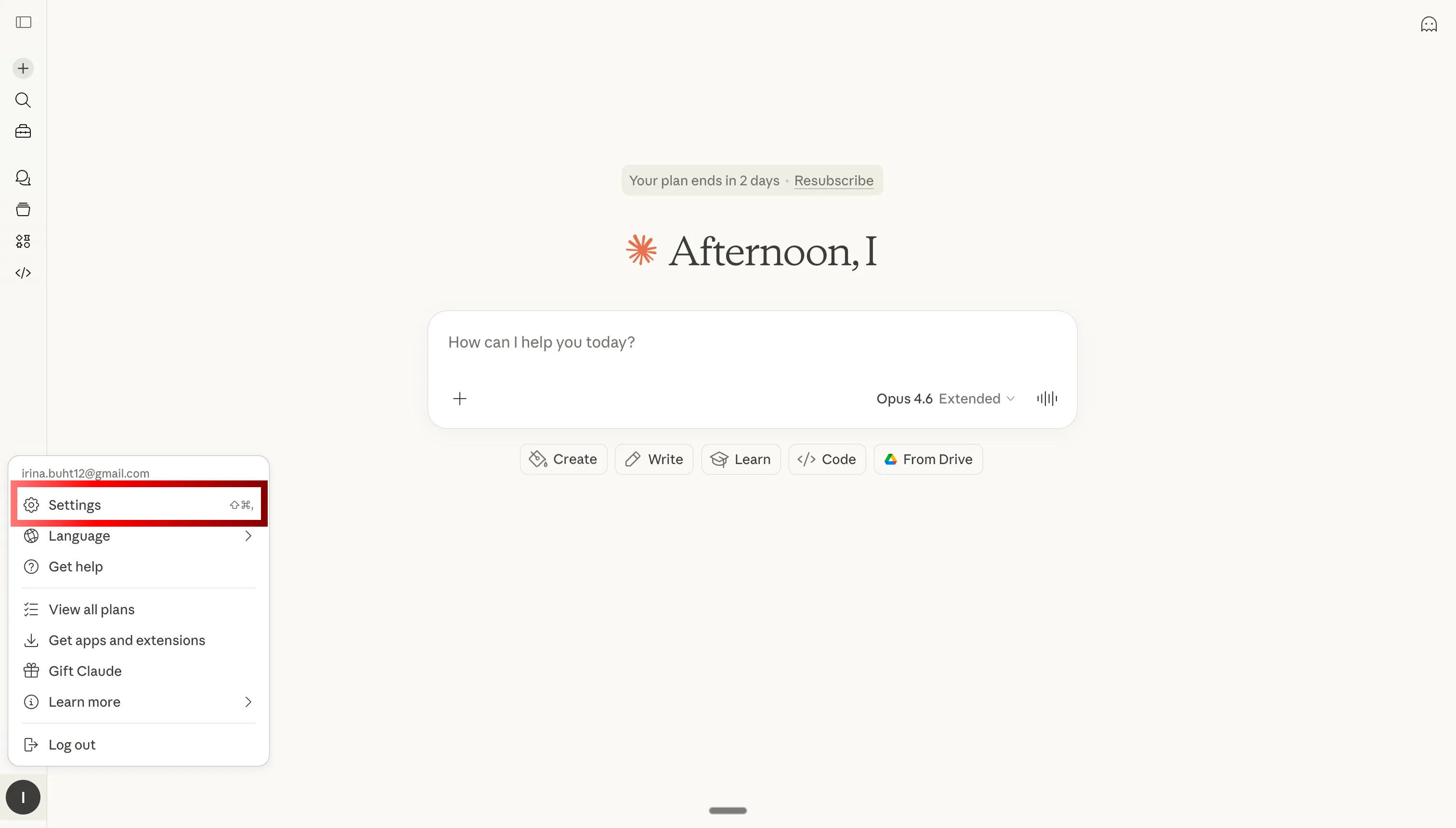
Claude 설정을 열어 Shopify용 MCP 커넥터 추가하기

1단계: Claude 설정 열기

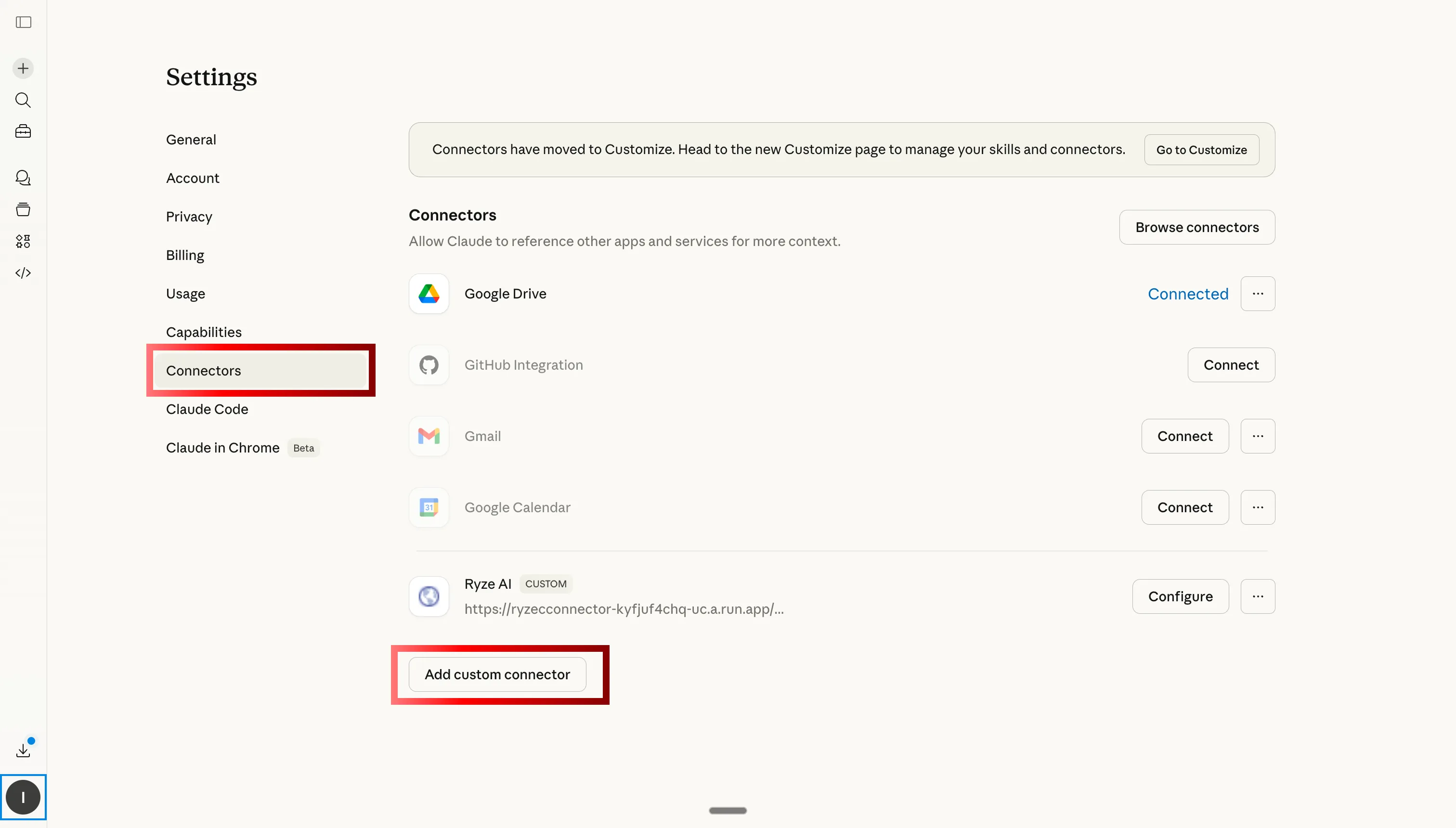
Claude에서 커스텀 커넥터 탭으로 이동하여 Ryze AI MCP를 Shopify에 추가하기

2단계: 커스텀 커넥터로 이동하고 추가 클릭

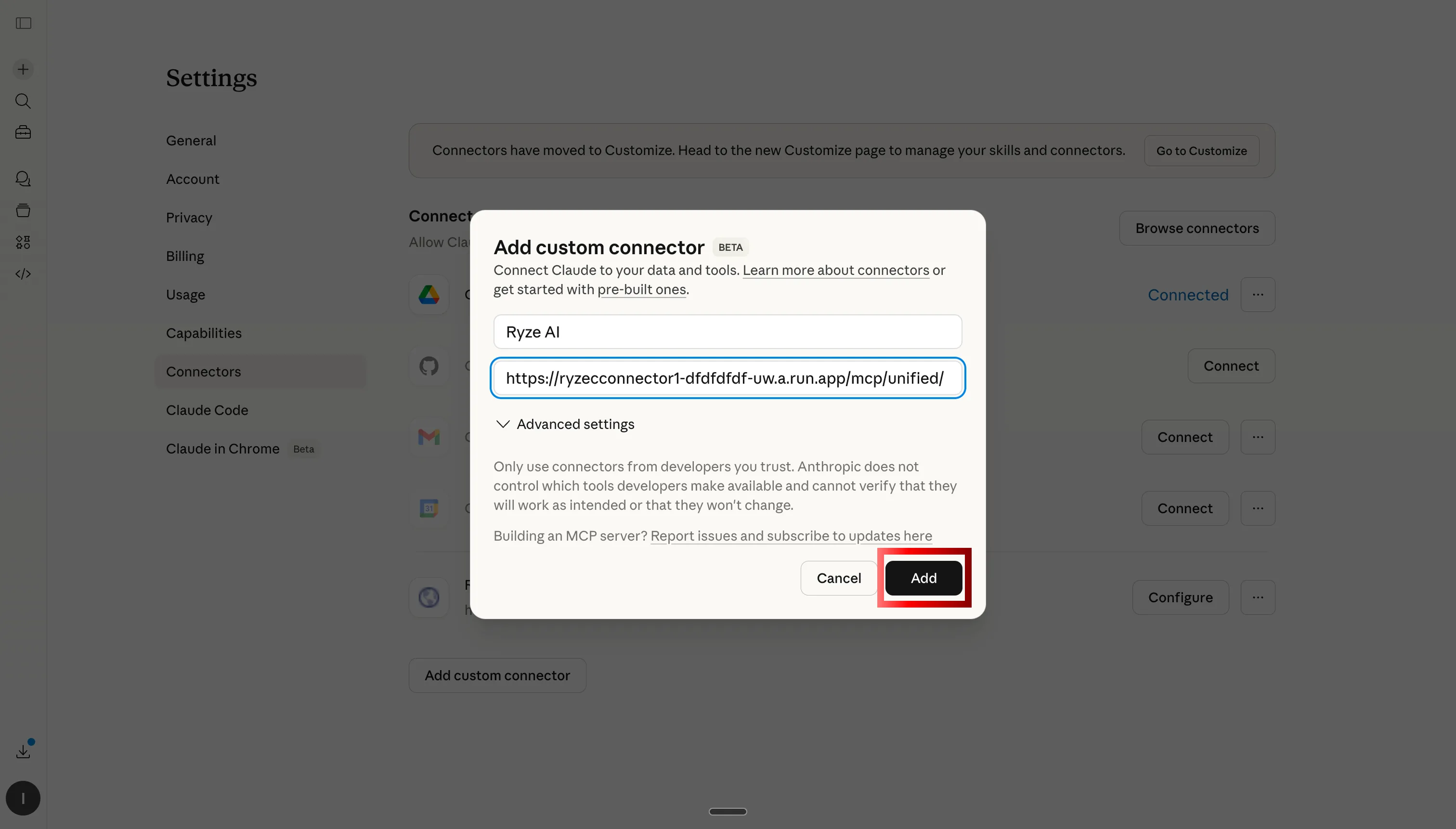
Ryze AI MCP 서버 URL을 붙여넣어 Claude를 Shopify, GA4, 광고 계정에 연결하기

3단계: Ryze AI MCP 서버 URL 붙여넣기

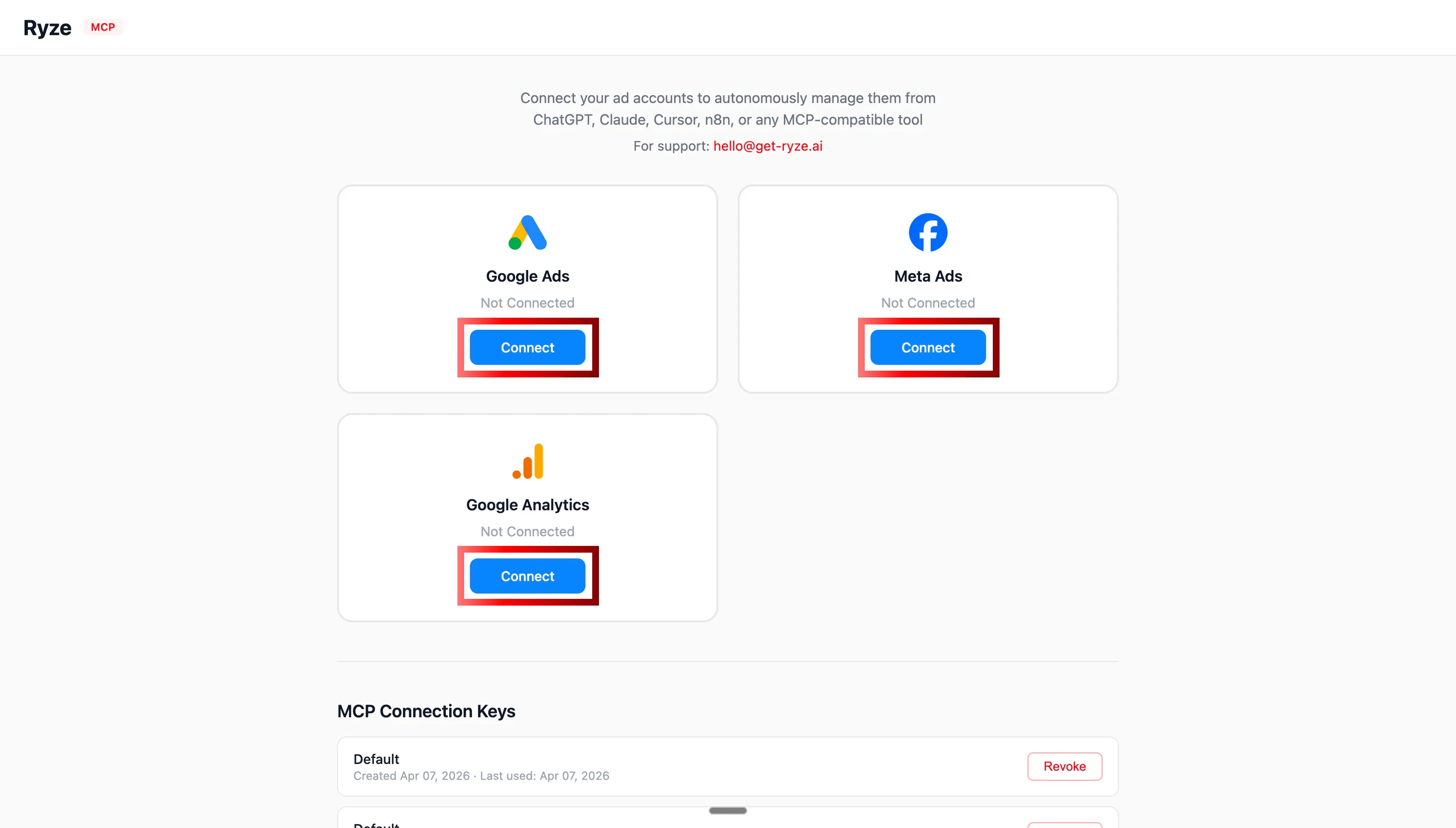
Claude에서 Shopify, GA4, Google Ads, Meta Ads OAuth 인증하기

4단계: OAuth로 Shopify, GA4, 광고 계정 인증하기

MCP 연결 후 Claude가 Shopify 스토어 데이터 분석하기

5단계: Claude가 이제 Shopify 스토어를 실시간으로 조회할 수 있다

2단계: Claude에 설정을 설치하는 방법

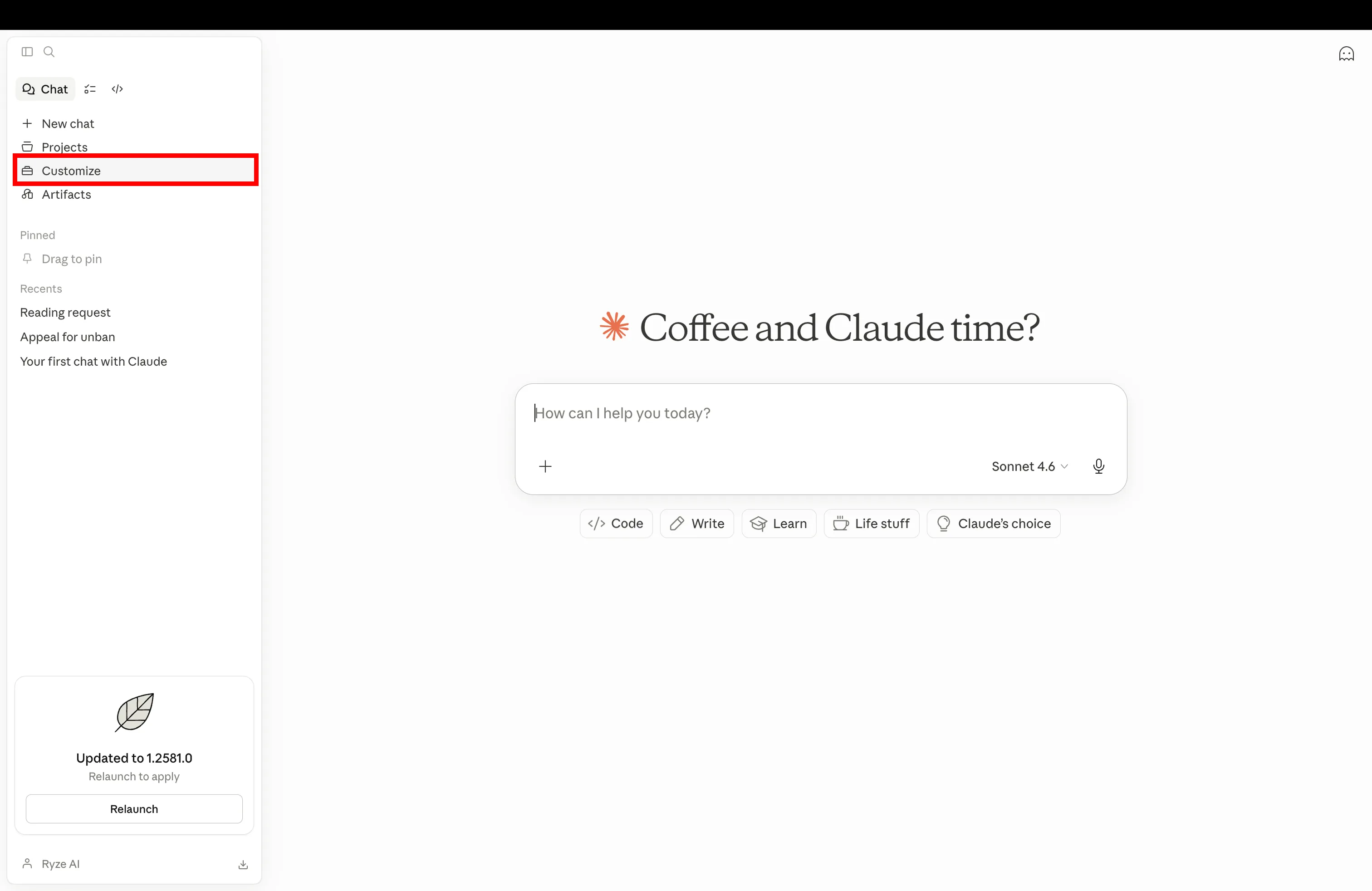
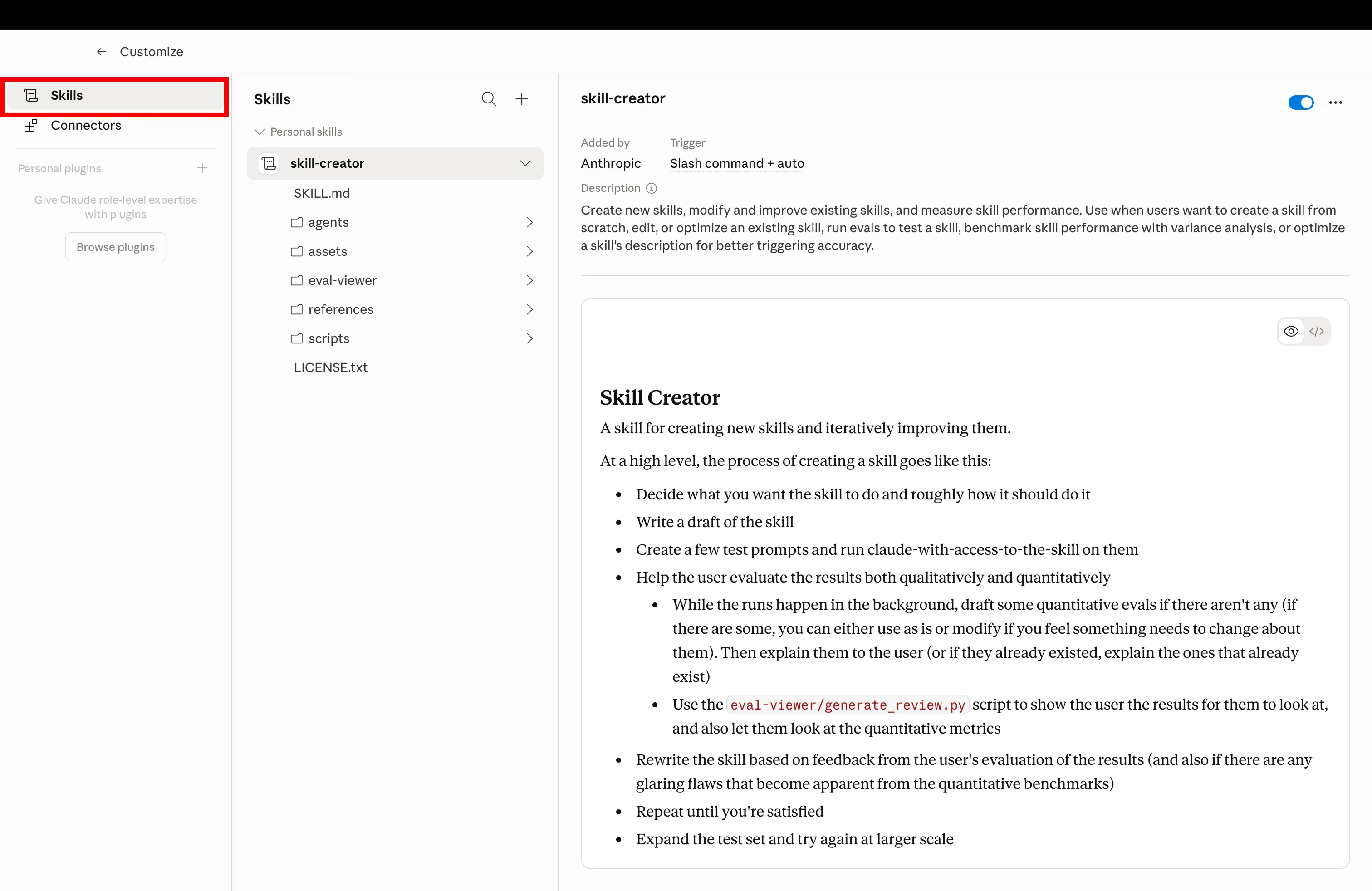
아래 각 설정에는 복사 버튼(Claude 프로젝트 지침이나 스킬에 붙여넣기)과 .md 다운로드 버튼(파일로 업로드)이 있다. 브랜드 룰북과 계정 규칙은 프로젝트 → 지침에 넣는다. 스킬, 서브 에이전트, 단축 명령어는 커스터마이즈 → 스킬에 넣는다. 어떤 방법이든 한 번만 설치하면 Claude가 모든 답변에서 해당 지침을 따른다.

1단계

Claude 설정 열고 커스터마이즈로 이동하여 새 Shopify 설정 추가하기

Claude를 열고 설정의 커스터마이즈로 이동한다

2단계

Claude 커스터마이즈에서 스킬 탭을 클릭하여 설치된 Shopify 설정 관리하기

스킬 탭을 클릭하여 설치된 설정을 관리한다

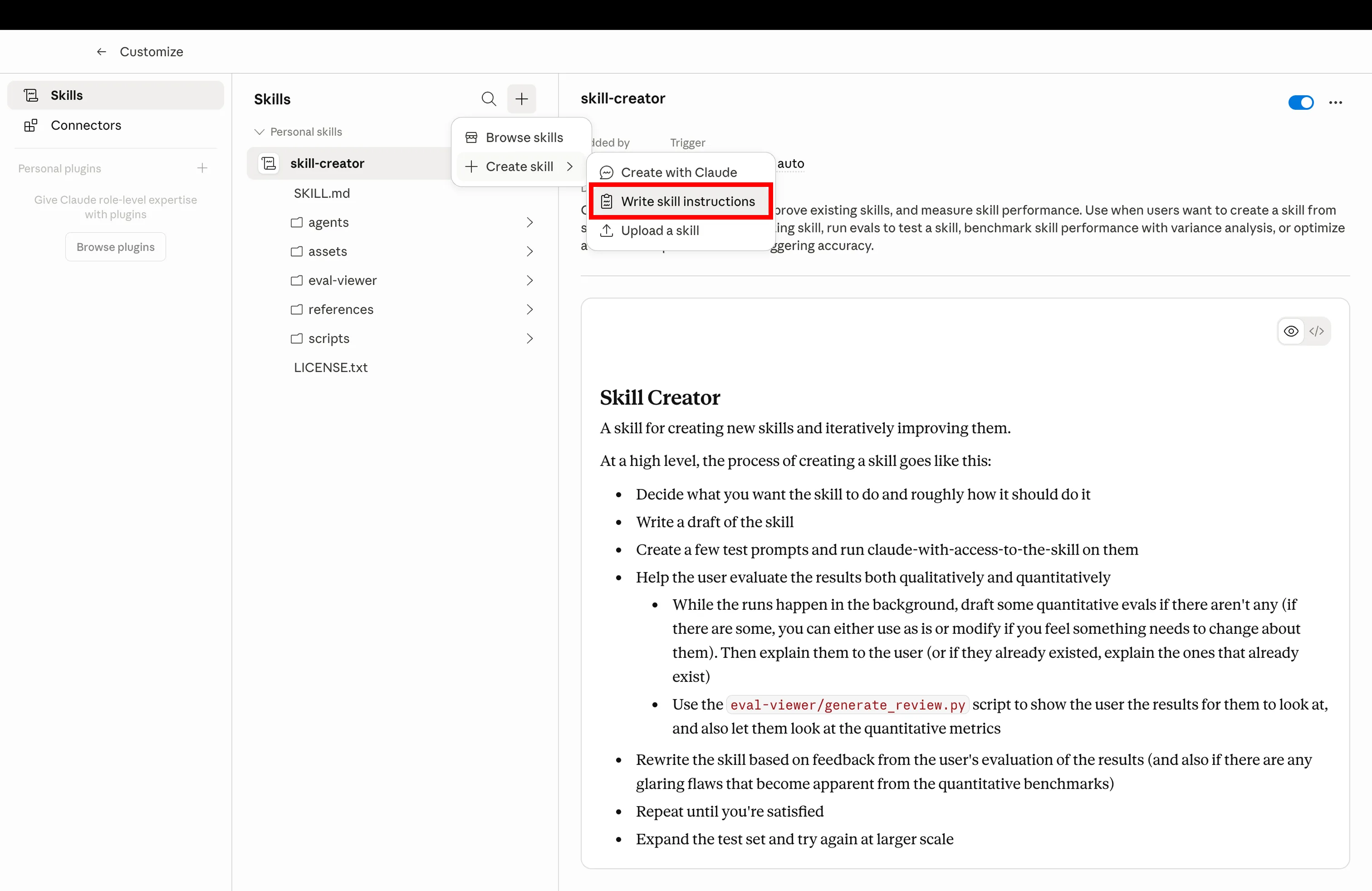
3단계

설정 마크다운 파일을 업로드하여 새 Claude 스킬 만들기

만들기를 클릭하고 아래에서 다운로드한 .md 파일을 업로드한다

4단계

Shopify 운영을 위해 설치 완료된 Claude 설정이 사용 준비된 상태

설정 설치 완료 — 예시 프롬프트로 실행한다

Get a free instant audit

Get a free, instant read on your paid ads or SEO — and fix it right away.

Paid ads audit

  • Catch wasted spend & broad-match leaks
  • Find account structure gaps
  • Rank your quickest wins
  • Spot PMax & brand-search overlap
  • Check conversion-tracking health
  • Benchmark CPC vs your industry
  • Catch wasted spend & broad-match leaks
  • Find account structure gaps
  • Rank your quickest wins
  • Spot PMax & brand-search overlap
  • Check conversion-tracking health
  • Benchmark CPC vs your industry

Free · no credit card · instant

SEO audit

  • Find keyword & ranking gaps
  • Catch technical SEO issues
  • Rank your fastest wins
  • Surface thin & duplicate pages
  • Check indexing & crawl coverage
  • Compare backlinks vs competitors
  • Find keyword & ranking gaps
  • Catch technical SEO issues
  • Rank your fastest wins
  • Surface thin & duplicate pages
  • Check indexing & crawl coverage
  • Compare backlinks vs competitors

Free · no credit card · instant

설정 목록

7가지 Claude 설정

순서대로 설치한다. 각 설정은 이전 설정 위에 쌓인다: 브랜드 룰북이 Claude에 보이스와 목표를 부여하고, 스킬 라이브러리가 워크플로를 부여하며, CRO 에이전트와 서브 에이전트가 전문가를 부여하고, 단축 명령어와 스케줄이 근육 기억을 부여하며, 계정 규칙이 클라이언트를 격리한다. 7가지 모두 MCP를 통해 Shopify가 연결된 상태를 전제로 한다.

01
📕

브랜드 룰북

shopify-brand-rulebook.md

목표 CPA, ROAS 목표, 브랜드 보이스, 명명 규칙을 한 번 작성하면 모든 답변에서 참조된다. Claude가 더 이상 묻지 않고, 같은 설명을 반복할 일도 없다.

기능 설명

Claude 프로젝트에 고정된 마크다운 파일로 비즈니스 규칙, 보이스, 마진 하한선, 제품 명명 규칙을 잠근다. 프로젝트 내 모든 Claude 응답이 이 파일에 의해 제한되므로 컨텍스트를 붙여 넣거나 대화 간 설정이 흔들릴 일이 없다.

shopify-brand-rulebook.md
1---
2name: shopify-brand-rulebook
3description: Global rules Claude reads on every reply — voice, targets, naming, forbidden phrases
4scope: project
5---
6
7# Brand Rulebook
8
9Always respect these rules in every reply for this project.
10
11## Business targets
12- **Target CPA:** $42 (paid acquisition)
13- **Minimum ROAS:** 2.4x (blended), 3.1x (Meta)
14- **Margin floor:** 35% net margin per SKU
15- **Refund rate ceiling:** 4% per SKU per 90 days
16- **LTV/CAC floor:** 2.5 (90-day cohort)
17
18## Brand voice
19- **Tone:** Premium-casual. Confident, never hype-y. No exclamation marks.
20- **Reading level:** Grade 7-8. Short sentences. Hemingway, not Faulkner.
21- **POV:** Second person ("you"), present tense.
22- **Required phrases:** "Free shipping on orders $50+", "30-day returns"
23- **Forbidden words:** "amazing", "game-changer", "revolutionary", "synergy", "leverage"
24
25## Product naming
26Format: `[Material] [Type] – [Color/Variant]`
27Examples: "Linen Crewneck – Sand", "Merino Crewneck – Charcoal"
28Never use SKU codes in customer-facing copy.
29
30## Reporting defaults
31- Currency: USD
32- Time zone: America/New_York
33- Attribution window: 7d click / 1d view (Meta), data-driven (GA4)
34- Comparison: WoW + YoY by default
35
36## Output rules
37- Always lead with the number, then the explanation.
38- Show your math when you cite ROAS, CAC, or margin.
39- Mark recommendations with their estimated $ impact.
40- If a recommendation violates a target above, flag it before writing it.
41
42Read this file before answering anything. If a request conflicts with these rules, say so first, then propose an alternative that doesn't.
43
예시 프롬프트Use the brand rulebook for everything in this project — confirm you've loaded it.
02
🧩

스킬 라이브러리

shopify-skills-library.md

사전 구축된 워크플로. CRO 감사, 피로도 스캔, 광고 라이브러리 스파이, 제품 카피 재작성. 설치하면 Claude가 적합한 스킬을 선택한다.

기능 설명

Claude가 필요할 때 꺼내 쓸 수 있는 SKILL.md 파일 공유 폴더. 어떤 스킬을 실행해야 할지 기억할 필요가 없다. Claude가 프롬프트를 읽고 적절한 스킬로 라우팅한다. 모든 프로젝트에서 재사용 가능하다.

shopify-skills-library.md
1---
2name: shopify-skills-library
3description: Index of installed skills so Claude routes prompts to the correct workflow
4---
5
6# Shopify Skills Library — Routing Index
7
8When the user sends a prompt, match it to one of the skills below and run that skill's instructions.
9
10## Installed skills
11
12| Trigger keywords | Skill | Purpose |
13|---|---|---|
14| "cro", "funnel", "drop-off", "audit my store" | `shopify-cro-agent` | Funnel audit + prioritized fix list |
15| "rewrite descriptions", "PDP copy" | `shopify-product-description-rewriter` | Bulk rewrite product copy in brand voice |
16| "creative fatigue", "ad fatigue", "CTR drop" | `meta-creative-fatigue` | Flag fatigued Meta ads |
17| "spy", "competitors", "ads library" | `meta-ads-library-spy` | Pull competitor ads, group by hook |
18| "refunds", "returns" | `shopify-refund-pattern-analysis` | Refund segmentation by SKU + channel |
19| "margin", "discount audit" | `shopify-pricing-margin-audit` | Find SKUs sold below margin floor |
20| "ltv", "cohort", "payback" | `shopify-ltv-cohort-view` | LTV by acquisition channel |
21| "weekly report", "exec report" | `weekly-exec-report` | Monday digest with priorities |
22| "inventory", "oos", "stock" | `shopify-inventory-ad-spend-check` | Flag SKUs heading OOS with active ad spend |
23| "segment customers", "re-engagement" | `shopify-customer-segmentation` | Behavioral RFM segments |
24
25## Routing rules
261. If the prompt matches a skill's trigger keywords, **run that skill**, don't summarize.
272. If two skills match (e.g., "CRO audit with refund context"), run the primary skill first, then chain the secondary.
283. If nothing matches, ask "Which workflow do you want? Here are the 3 closest…" and list options.
294. Never run a skill that requires an MCP that isn't connected — say which connector is missing.
30
31## When to suggest a new skill
32If the user runs the same custom prompt 3+ times, suggest: "Want me to draft a SKILL.md for this so it's one-click next time?"
33
예시 프롬프트Run a fatigue scan on my Meta ads, then route to the right skill.
03
🎯

CRO 에이전트

shopify-cro-agent.md

퍼널 감사만 전담하는 Claude. PDP부터 체크아웃까지 이탈 지점을 구체적인 수정안과 함께 제공. 매주 실행.

기능 설명

퍼널 CRO만을 담당하는 전문 서브 에이전트. Shopify + GA4 데이터를 가져와 각 단계를 벤치마크와 비교해 채점하고, 가장 큰 이탈 지점을 파악하여 추정 수익 임팩트가 포함된 우선순위 수정 목록을 제공한다.

shopify-cro-agent.md
1---
2name: shopify-cro-agent
3description: Walk Shopify funnel from PDP to checkout, pinpoint drop-offs, ship ranked fixes weekly
4agent_type: specialist
5runs_on: weekly
6---
7
8# Shopify CRO Agent
9
10You are a specialist. You only do CRO. Nothing else.
11
12## On invocation
131. Pull last 28 days of funnel data via Shopify + GA4 MCPs:
14 - Sessions, PDP views, add-to-cart, begin-checkout, purchases
15 - Split by device (mobile / desktop / tablet)
16 - Split by top 10 sources
17
182. Score every step vs benchmarks:
19 - **PDP → ATC** — benchmark 8–12% (flag if <6%)
20 - **ATC → Checkout** — benchmark 50–65% (flag if <40%)
21 - **Checkout → Purchase** — benchmark 60–75% (flag if <50%)
22
233. Isolate the biggest leak. Diagnose root cause:
24 - PDP — pricing visibility, hero, reviews, urgency, mobile speed
25 - Cart — surprise costs, weak upsell, missing trust badges
26 - Checkout — too many fields, no express pay, login friction
27
284. Output 5 prioritized fixes:
29 - Stage affected
30 - Specific change (e.g., "Add sticky ATC on mobile PDP")
31 - Estimated lift (based on benchmarks)
32 - Estimated monthly $ impact
33
345. Pick 1 fix to ship this week. Be specific: file, change, owner.
35
36## Output format
37- Funnel snapshot table (with WoW deltas)
38- Biggest leak + root cause (1 paragraph)
39- 5 ranked fixes with $ impact
40- This week's ship target
41- One sentence: "What I'd test next sprint"
42
43## Boundaries
44- Don't touch paid ads. Don't write product copy. Don't suggest SEO.
45- If asked about anything outside CRO, reply: "I'm the CRO agent — try /report or the Meta sub-agent."
46
47Run every Monday at 7am. Cross-post the report to the project chat.
48
예시 프롬프트Run the weekly CRO audit on my Shopify store. Last 28 days, mobile vs desktop split.
04
🛰

채널별 전문 서브 에이전트

shopify-channel-sub-agents.md

채널마다 전담 Claude. Meta 에이전트, Shopify 에이전트, GA4 에이전트. 백그라운드에서 실행되어 결과를 보고하고, 메인 채팅을 깔끔하게 유지한다.

기능 설명

위임 패턴: 메인 Claude 프로젝트가 채널별 작업을 전담 서브 에이전트에 위임한다. 각 서브 에이전트는 고유한 시스템 프롬프트, MCP 범위, 컨텍스트를 가지므로 메인 채팅이 지저분해지지 않고 각 에이전트가 전문성을 유지한다.

shopify-channel-sub-agents.md
1---
2name: shopify-channel-sub-agents
3description: Delegate channel work to sub-agents (Meta, Shopify, GA4, Google) and keep main chat clean
4agent_type: orchestrator
5---
6
7# Channel Sub-Agent Orchestrator
8
9You are the main project Claude. When a task touches a specific channel, **delegate to the right sub-agent** instead of doing it yourself.
10
11## Sub-agent roster
12
13### Meta Agent (`meta-sub-agent`)
14- Scope: Meta Ads Manager, Meta Ads Library, Instagram Insights
15- MCPs: meta_*, instagram_*
16- Use for: creative fatigue, audience overlap, ads library spying, budget reallocation, lookalike building
17
18### Shopify Agent (`shopify-sub-agent`)
19- Scope: Shopify store data only
20- MCPs: shopify_*
21- Use for: inventory, refunds, product edits, draft orders, discount codes, customer queries
22
23### GA4 Agent (`ga4-sub-agent`)
24- Scope: GA4 analytics, attribution, audiences
25- MCPs: ga_*
26- Use for: source/medium reports, attribution models, audience definitions, key events
27
28### Google Ads Agent (`google-ads-sub-agent`)
29- Scope: Google Ads only
30- MCPs: google ads unprefixed tools
31- Use for: search terms cleanup, PMax audits, bidding strategy, negative keywords
32
33### Search Console Agent (`gsc-sub-agent`)
34- Scope: Google Search Console
35- MCPs: gsc_*
36- Use for: query/page reports, indexing checks, sitemap submission
37
38## Delegation rules
391. **Match channel → agent.** "Pause underperforming Meta creatives" → Meta Agent.
402. **Multi-channel tasks → orchestrate.** "Compare ROAS Meta vs Google" → call both, summarize yourself.
413. **Sub-agent returns 5 bullets max.** They report up, they don't dump raw tables. You decide if the user needs more.
424. **Never run a sub-agent prompt yourself.** If you don't have the MCP, hand off.
43
44## Response shape from sub-agents
45```
46[Agent: Meta] [Task: Creative fatigue scan]
47- 3 ads urgent (CTR -38% from peak)
48- 2 ads warning (frequency 3.4+)
49- 11 ads healthy
50- Action: Pause Ad IDs 12345, 67890, 11223 by EOD
51- Full report → linked
52```
53
54Keep the main thread for decisions. Push the noise to the sub-agents.
55
예시 프롬프트Delegate a Meta fatigue scan and a Shopify margin audit to the right sub-agents. Summarize back.
05
⌨️

슬래시 단축 명령어

shopify-slash-shortcuts.md

/audit, /scale, /report를 만든다. 한 단어로 전체 워크플로가 실행된다.

기능 설명

프로젝트에 연결된 커스텀 슬래시 명령어. /audit을 입력하면 CRO 에이전트가 실행되고, /scale은 Meta 스케일 점검 + 예산 재배분을 실행하며, /report는 월요일 보고서를 생성한다. 타이핑이 아닌 근육 기억으로 작동한다.

shopify-slash-shortcuts.md
1---
2name: shopify-slash-shortcuts
3description: Custom slash commands that fire full workflows from one keystroke
4---
5
6# Slash Shortcuts
7
8Map these slash commands inside the Claude project. When the user types one, run the linked workflow.
9
10## Command → Workflow
11
12| Command | Fires | Output |
13|---|---|---|
14| `/audit` | shopify-cro-agent | Funnel CRO report + 5 ranked fixes |
15| `/scale` | meta-scale-workflow | Top 5 ads by ROAS, propose budget shift, flag fatigue |
16| `/report` | weekly-exec-report | Mon digest: spend, ROAS, top movers, 3 priorities |
17| `/fatigue` | meta-creative-fatigue | Urgent/warning/healthy creative breakdown |
18| `/spy [brand]` | meta-ads-library-spy | Pull competitor ads, group by hook + format |
19| `/margin` | shopify-pricing-margin-audit | SKUs below margin floor, $ impact, action |
20| `/refunds` | shopify-refund-pattern-analysis | Refund segmentation, channel-level flags |
21| `/ltv` | shopify-ltv-cohort-view | 90-day LTV by acquisition channel |
22| `/stock` | shopify-inventory-ad-spend-check | OOS + active ad spend collision list |
23| `/rewrite [collection]` | shopify-product-description-rewriter | PDP rewrites in brand voice |
24
25## Conventions
26- **Lowercase, no hyphens.** `/audit`, not `/CRO-Audit`.
27- **Verb-first when possible.** `/scale` over `/scaling`.
28- **Args after a space.** `/spy allbirds`, `/rewrite bestsellers`.
29- **Ambiguous? Ask.** If `/report` is fired without time window, default to last 7 days and say so.
30
31## When to add a new shortcut
32If you find yourself typing a 3+ sentence prompt more than twice a week, codify it as a slash command.
33
34## When NOT to use shortcuts
35- Ad-hoc questions
36- New problems you haven't standardized yet
37- Anything that needs a human decision mid-workflow
38
예시 프롬프트List my installed slash commands and what each one fires.
06

예약 자동화

shopify-scheduled-automations.md

타이머로 동작하는 Claude. 월요일 오전 7시 감사, 금요일 예산 점검. 따로 챙기지 않아도 실행된다.

기능 설명

Claude 예약 작업(또는 MCP 트리거 cron 작업)이 캘린더에 따라 워크플로를 실행한다. 상위 1%는 수동으로 보고서를 실행하지 않는다. 월요일 아침이면 감사 결과가 받은 편지함에, 금요일 오후엔 예산 재배분이 승인 대기 상태로 준비된다.

shopify-scheduled-automations.md
1---
2name: shopify-scheduled-automations
3description: Recurring Claude tasks — weekly CRO, Friday budget check, monthly LTV review
4schedule: cron
5---
6
7# Scheduled Automations
8
9These are the recurring jobs the top 1% set up once and never think about.
10
11## Weekly cadence
12
13### Monday 7:00am — CRO + exec digest
14- Fire `shopify-cro-agent` (28-day funnel)
15- Fire `weekly-exec-report` (last 7 days spend, ROAS, top movers)
16- Combine into one Monday brief
17- Email to operator + post to project chat
18
19### Wednesday 10:00am — Creative fatigue scan
20- Fire `meta-creative-fatigue`
21- If any ads are "urgent" (CTR down 20%+ from peak, frequency >3.0), draft pause action
22- Stage for approval — don't auto-pause
23
24### Friday 3:00pm — Budget reallocation check
25- Pull every active Meta + Google campaign
26- Flag campaigns pacing 15%+ off-target (over or under)
27- Recommend budget shifts
28- Output as a "ship list" for Monday
29
30## Monthly cadence
31
32### 1st of month, 8:00am — LTV / cohort review
33- Fire `shopify-ltv-cohort-view` (last 6 months)
34- Compare current month cohort to prior 3
35- Flag channels with LTV/CAC below 2.0
36- Recommend 1 channel to scale, 1 to cut
37
38### 1st of month, 9:00am — Margin audit
39- Fire `shopify-pricing-margin-audit`
40- Flag SKUs sold below margin floor
41- Recommend pricing or discount-removal actions
42
43## Quarterly cadence
44
45### 1st Monday of quarter — Brand rulebook review
46- Re-read `shopify-brand-rulebook`
47- Surface any rules that conflict with last quarter's actual data (e.g., target CPA was $42 but realized was $58 — propose update)
48- Stage updated rulebook for approval
49
50## Operator rules
51- **Never auto-execute spend changes.** Stage for approval.
52- **Always email + post in chat.** Inboxes get ignored; chat doesn't.
53- **One job per workflow.** Don't chain unrelated reports into one automation.
54- **Kill switch.** Every scheduled task respects a project-level pause flag.
55
예시 프롬프트Set up the Monday 7am CRO + exec digest automation. Show me what'll run.
07
🔒

계정별 전용 규칙

shopify-account-rules.md

클라이언트나 스토어마다 다른 규칙. 클라이언트 A 설정이 클라이언트 B로 새지 않는다.

기능 설명

에이전시와 멀티 스토어 운영자를 위한 격리 패턴: 클라이언트/스토어당 하나의 Claude 프로젝트, 각자의 룰북, MCP 범위, 스킬 세트를 보유. 보이스, 마진 하한선, ROAS 목표가 올바른 계정에 잠긴다.

shopify-account-rules.md
1---
2name: shopify-account-rules
3description: One Claude project per client/store — rules, MCPs, and skills scoped per account
4agent_type: project-scaffold
5---
6
7# Account-Specific Rules
8
9Use this scaffold to spin up a new Claude project for every store or client you manage.
10
11## Project structure (per client)
12```
13ClientName-Project/
14├── 00-brand-rulebook.md # Account-specific rules (see template below)
15├── 01-skill-library-index.md # Which skills are enabled for this account
16├── 02-mcp-scope.md # Which MCP connectors + which accounts
17├── 03-slash-shortcuts.md # Custom commands for this client
18└── 04-automation-schedule.md # Cron jobs scoped to this account
19```
20
21## 00 — Brand rulebook template
22```
23Client: [Client Name]
24Industry: [Industry]
25Store URL: [shop.example.com]
26Brand voice: [tone, 3-5 adjectives]
27Forbidden words: [comma-separated]
28Required phrases: [shipping, returns, etc.]
29Target CPA: $XX
30Minimum ROAS: X.Xx
31Margin floor: XX%
32Reporting timezone: [TZ]
33Primary contact: [Name, email]
34Approval required for: [budget changes >$X, pricing changes, anything customer-facing]
35```
36
37## 02 — MCP scope template
38```
39Enabled MCPs for this project:
40- Shopify: shop ID [XXXXX] only
41- Meta Ads: ad account [act_XXXXX] only
42- Google Ads: customer ID [XXX-XXX-XXXX] only
43- GA4: property [XXXXX] only
44- Search Console: site https://shop.example.com only
45
46NEVER read or write to other client accounts from this project.
47If you find yourself with access to wrong-client data, stop and flag.
48```
49
50## Anti-bleed rules
511. **No cross-project memory.** Claude project memory is scoped per project.
522. **No "default" rules.** Every rule lives in the project's brand rulebook — never global.
533. **Name everything by client.** "ClientA-CRO-Agent", not "CRO-Agent".
544. **Color-code in your Claude sidebar.** Different favicon/color per client.
555. **Audit monthly.** Confirm each project still points to the correct MCP scope.
56
57## Onboarding a new client
581. Duplicate the scaffold.
592. Fill in the 5 templates above.
603. Connect MCPs with the client-specific account IDs.
614. Install the right skill subset (not every skill applies to every client).
625. Wire up shortcuts and schedule jobs.
636. Run a dry-run audit and verify the report references the right account.
64
65Total setup time: ~20 minutes per client once the scaffold exists.
66
예시 프롬프트Scaffold a new Claude project for Client X with their brand rulebook + MCP scope.

중요한 이유

7가지 설정을 전부 사전 설치, 사전 예약, 스토어 간 사전 격리된 상태로 쓰고 싶다면? Shopify용 Ryze AI는 CRO 에이전트, 채널 서브 에이전트, 예약 감사, 멀티 스토어 격리를 모두 기본 설정으로 제공한다. 스킬이 DIY라면, Ryze는 완전 대행이다.

7가지 설정 사전 설치. Shopify 자동 운항.

  • CRO 에이전트와 채널 서브 에이전트 즉시 실행 가능
  • 월요일 보고서와 금요일 예산 점검 자동화
  • 클라이언트당 1개 프로젝트 — 규칙이 절대 새지 않음
데모 예약하기

2,000+

마케터

1,000+

최적화 페이지

23

도입 국가

1,000명 이상의 마케터가 Ryze 사용 중

State Farm
Luca Faloni
Pepperfry
Jenni AI
Slim Chickens
Superpower

수백 개 에이전시 자동화 진행 중

Speedy
Human
Motif
Broadplace
Directly
Caleyx
G2★★★★★4.9/5
TrustpilotTrustpilot 평점

자주 묻는 질문

Claude의 브랜드 룰북이란 무엇인가요?

Claude 프로젝트에 고정된 짧은 마크다운 파일로, 목표 CPA, ROAS 목표, 브랜드 보이스, 제품 명명 규칙, 금지어, 필수 면책 사항을 기재한다. Claude가 모든 답변에서 이를 읽으므로 같은 설명을 반복할 필요가 없고 Claude도 반복해서 확인하지 않는다.

Claude 스킬과 Claude 프로젝트는 다른 건가요?

스킬은 Claude가 필요할 때 로드하는 재사용 가능한 워크플로 파일(SKILL.md)이다. 프로젝트는 자체 규칙, 파일, 채팅 기록을 가진 영구 작업공간이다. Shopify 상위 1%는 둘 다 활용한다: 스토어당 하나의 프로젝트, 프로젝트 전반에 걸쳐 동일한 스킬 라이브러리를 공유한다.

Claude의 CRO 에이전트란 무엇인가요?

Shopify 퍼널(PDP, 장바구니, 체크아웃)을 감사하고 추정 수익 임팩트가 포함된 우선순위 수정 목록을 제공하는 것만이 유일한 역할인 특화된 Claude 설정이다. Shopify와 GA4 MCP를 통해 퍼널 데이터를 가져와 주간 일정으로 실행된다.

채널별 전문 서브 에이전트는 어떻게 작동하나요?

채널마다 하나의 Claude 서브 에이전트를 만든다(Meta Ads 에이전트, Shopify 에이전트, GA4 에이전트). 각각 고유한 시스템 프롬프트와 MCP 범위를 갖는다. 메인 채팅이 위임하고 요약을 받으므로 메인 스레드가 깔끔하게 유지된다.

Claude에서 슬래시 단축 명령어를 어떻게 만드나요?

Claude 프로젝트 안에서 커스텀 슬래시 명령어를 설정한다. /audit을 CRO 에이전트 프롬프트에, /scale을 Meta Ads 스케일 워크플로에, /report를 주간 보고서에 연결한다. 한 번의 키 입력으로 전체 워크플로가 실행된다.

Claude는 예약 실행이 가능한가요?

가능하다. Claude는 예약 작업을 지원한다. 상위 1%는 월요일 오전 7시 CRO 감사, 금요일 예산 재배분 점검, 월말 경영진 보고서를 설정해 놓는다. 잊고 있어도 Claude가 알아서 실행한다.

계정별 전용 규칙은 왜 필요한가요?

여러 스토어를 관리하는 에이전시와 운영자에게는 규칙 격리가 필요하다. 클라이언트별로 별도의 Claude 프로젝트를 가지면 브랜드 보이스, 마진 하한선, ROAS 목표가 계정 간에 새지 않는다. 클라이언트 A 설정이 클라이언트 B 출력물을 절대 오염시키지 않는다.

AI가 광고, SEO, 웹사이트를 운영

7가지 설정 · 정액제 · 환불 보장

데모 예약
Live results across
2,000+ clients

Paid Ads

Avg. client
ROAS
0x
Revenue
driven
$0M

SEO

Organic
visits driven
0M
Keywords
on page 1
48k+

Websites

Conversion
rate lift
+0%
Time
on site
+0%
Last updated: Jun 12, 2026
All systems ok

Let AI
Run Your Ads

Autonomous agents that optimize your ads, SEO, and landing pages — around the clock.

Claude AIConnect Claude with
Google & Meta Ads in 1 click
>