AI ADS
How to Build Ad Dashboards with Claude AI Guide — Complete 2026 Automation Tutorial
Build ad dashboards with Claude AI using MCP connectors, real-time API integration, and automated visualization generation. This complete guide covers dashboard creation for Google Ads, Meta Ads, TikTok, and LinkedIn with live data streaming and interactive analytics.
Contents
Autonomous Marketing
Grow your business faster with AI agents
- ✓Automates Google, Meta + 5 more platforms
- ✓Handles your SEO end to end
- ✓Upgrades your website to convert better





What are Claude AI ad dashboards and why do you need them?
Claude AI ad dashboards are automated reporting interfaces that combine data visualization, real-time API integration, and intelligent analysis to monitor advertising performance across multiple platforms. Instead of manually building charts in Excel or logging into 6 different ad platforms, Claude generates interactive dashboards with live data streams, automated insights, and predictive analytics. This complete guide to build ad dashboards with Claude AI covers everything from basic setup to advanced automation.
The average marketing team spends 23% of their time on reporting — approximately 9.2 hours per week according to HubSpot's 2026 Marketing Trends Report. Claude eliminates this bottleneck by connecting directly to advertising APIs through MCP (Model Context Protocol), generating visualizations on demand, and updating data in real-time. A dashboard that would take 3-4 hours to build manually in Power BI or Tableau takes under 10 minutes with Claude.
Modern ad dashboards need to handle Google Ads, Meta Ads, TikTok Ads, LinkedIn Ads, Google Analytics, and 10+ other data sources simultaneously. Claude's strength is its ability to normalize data formats, identify patterns across platforms, and generate insights that would require advanced SQL knowledge or expensive business intelligence tools. When you build ad dashboards with Claude AI, you get automated anomaly detection, cross-platform attribution analysis, and natural language insights — not just static charts.
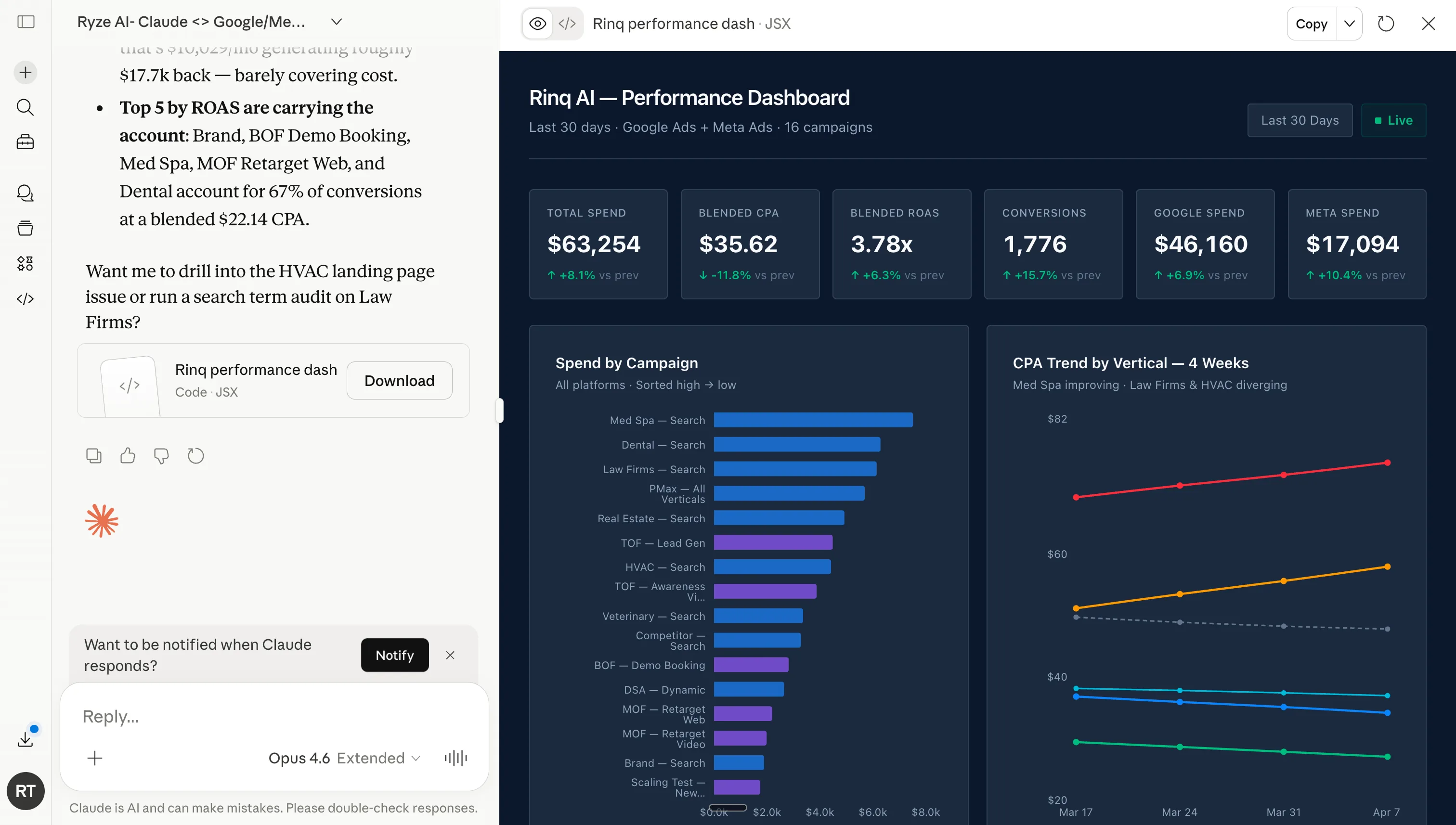
Live performance dashboard generated by Claude with MCP — Google Ads + Meta Ads, 16 campaigns, last 30 days. Total spend, blended ROAS / CPA, channel-level spend split, and CPA trend by vertical, all rendered from a single natural-language prompt.
1,000+ Marketers Use Ryze






Automating hundreds of agencies






 ★★★★★
★★★★★

What are the 4 methods to set up Claude AI dashboard automation?
There are four distinct approaches to build ad dashboards with Claude AI, each optimized for different technical comfort levels and data requirements. The choice depends on whether you need real-time updates, how many platforms you want to integrate, and your tolerance for setup complexity.
| Method | Setup Time | Data Freshness | Platforms Supported |
|---|---|---|---|
| MCP Real-Time Connection | 5-10 minutes | Live API streams | All major ad platforms |
| Claude Code Builder | 15-30 minutes | Batch updates (hourly) | Custom API integration |
| Excel Add-in Method | 2-5 minutes | Manual refresh | Excel-compatible sources |
| CSV Upload Analysis | 1 minute per session | Static snapshots | Any platform with export |
Method 1: MCP Real-Time Connection provides live data streams from Google Ads, Meta Ads, TikTok, LinkedIn, and Google Analytics through Model Context Protocol. Claude receives fresh data every time you request an update, enabling real-time dashboard generation. This is the premium approach used by agencies managing > $100K monthly ad spend.
Method 2: Claude Code Builder generates a complete web application with FastAPI backend and Next.js frontend. Claude writes the code, sets up API connections, and creates interactive visualizations that update hourly. Perfect for teams who want a custom dashboard solution but don't have development resources.
Method 3: Excel Add-in Method leverages Claude's Excel integration to transform spreadsheet data into interactive dashboards. You connect your ad platforms to Excel (using Power Query or third-party connectors), then Claude generates pivot tables, charts, and insights within Excel. Fastest setup for Excel-savvy teams.
Method 4: CSV Upload Analysis is the zero-setup option. Export data from your ad platforms as CSV files, upload them to Claude, and request dashboard generation. Limited to static analysis but works immediately with any advertising platform that supports data export.
How to build ad dashboards with Claude AI: Complete step-by-step guide
This walkthrough uses the MCP Real-Time Connection method to build ad dashboards with Claude AI. You will create a comprehensive dashboard covering Google Ads, Meta Ads, and Google Analytics with live data integration. Total setup time: 15-20 minutes assuming you already have Claude Pro and advertising platform access.
Step 01
Set up MCP connectors for your ad platforms
Navigate to get-ryze.ai/mcp and authenticate with your advertising platforms. This creates secure API connections that Claude can access through MCP — the step-by-step connect guide walks through each authentication screen. You will need admin access to Google Ads, Meta Ads, TikTok Ads (optional), LinkedIn Ads (optional), and Google Analytics.
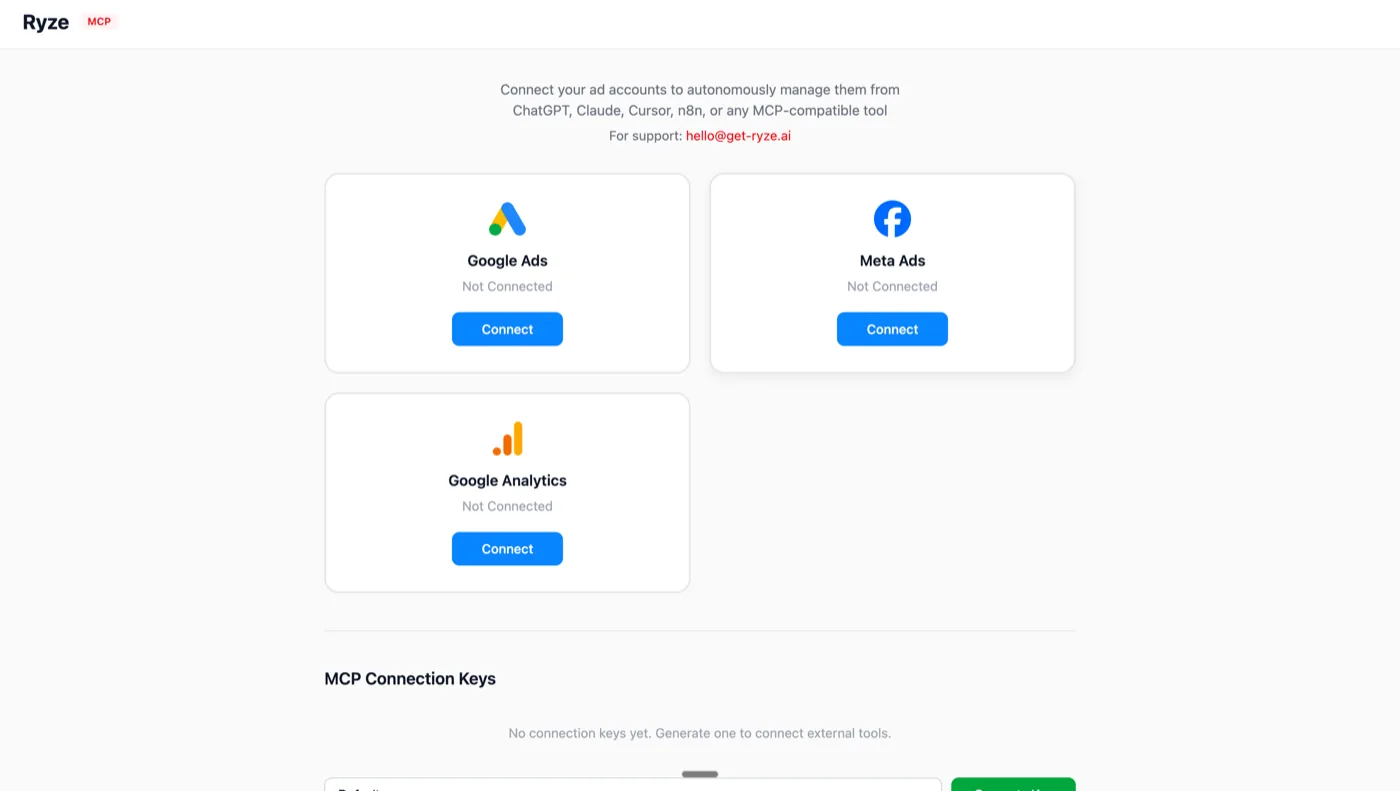
The Ryze MCP connect screen — one OAuth click each for Google Ads, Meta Ads, and Google Analytics. Once connected, Claude can pull live campaign data from any MCP-compatible client (Claude Desktop, ChatGPT, Cursor, n8n).
Step 02
Define your dashboard requirements
Before generating visualizations, specify what metrics matter most to your business. Claude needs to understand your KPIs, time ranges, and comparison periods to create meaningful dashboards.
Step 03
Generate the dashboard framework
Claude creates the HTML/CSS/JavaScript structure for your dashboard, including responsive layout, navigation, and placeholder visualizations. This step establishes the foundation before populating with live data.
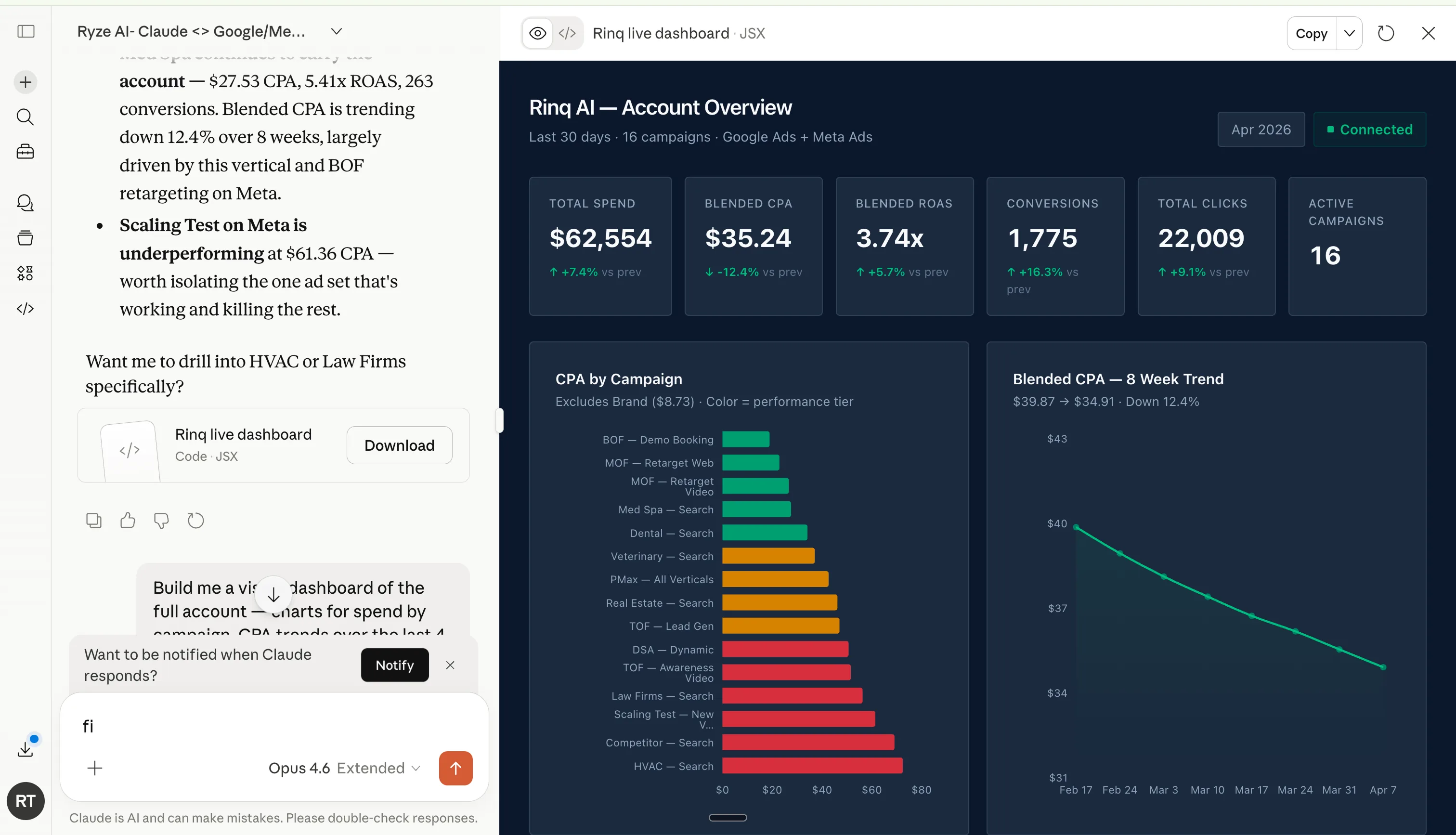
Output of the framework prompt — metric cards across the top, CPA-by-campaign with conditional color formatting, and an 8-week blended CPA trend line. Generated in one shot by Claude using live MCP data, no chart library setup needed.
Step 04
Connect live data streams
Claude integrates your MCP connections with the dashboard framework, mapping API responses to visualization components. This creates the bridge between raw advertising data and interactive charts.
Step 05
Add intelligent insights and alerts
Beyond basic visualizations, Claude analyzes patterns in your advertising data and generates automated insights. It identifies top performers, flags underperforming campaigns, and recommends optimization actions.
Step 06
Test and deploy your dashboard
Claude generates a complete local web server to host your dashboard, or provides deployment instructions for cloud hosting. Test all visualizations, verify data accuracy, and set up automated reporting schedules.






Free SEO/GEO audit
- Surface technical SEO issues
- Spot quick wins
- Find duplicate and thin pages
Free · no credit card · instant
What are the 7 types of ad dashboards you can build with Claude AI?
Different stakeholders need different dashboard configurations. Claude can generate specialized dashboards optimized for specific roles, reporting frequencies, and decision-making requirements. Each dashboard type includes pre-configured metrics, visualization styles, and automated insights relevant to its intended audience.
Dashboard 01
Executive Summary Dashboard
High-level metrics for C-suite executives and board meetings. Focuses on total ROAS, monthly ad spend trends, cost per acquisition by channel, and year-over-year growth. Includes automated commentary explaining performance drivers and forecasting next quarter results. Updates monthly with PDF export capability for board reports.
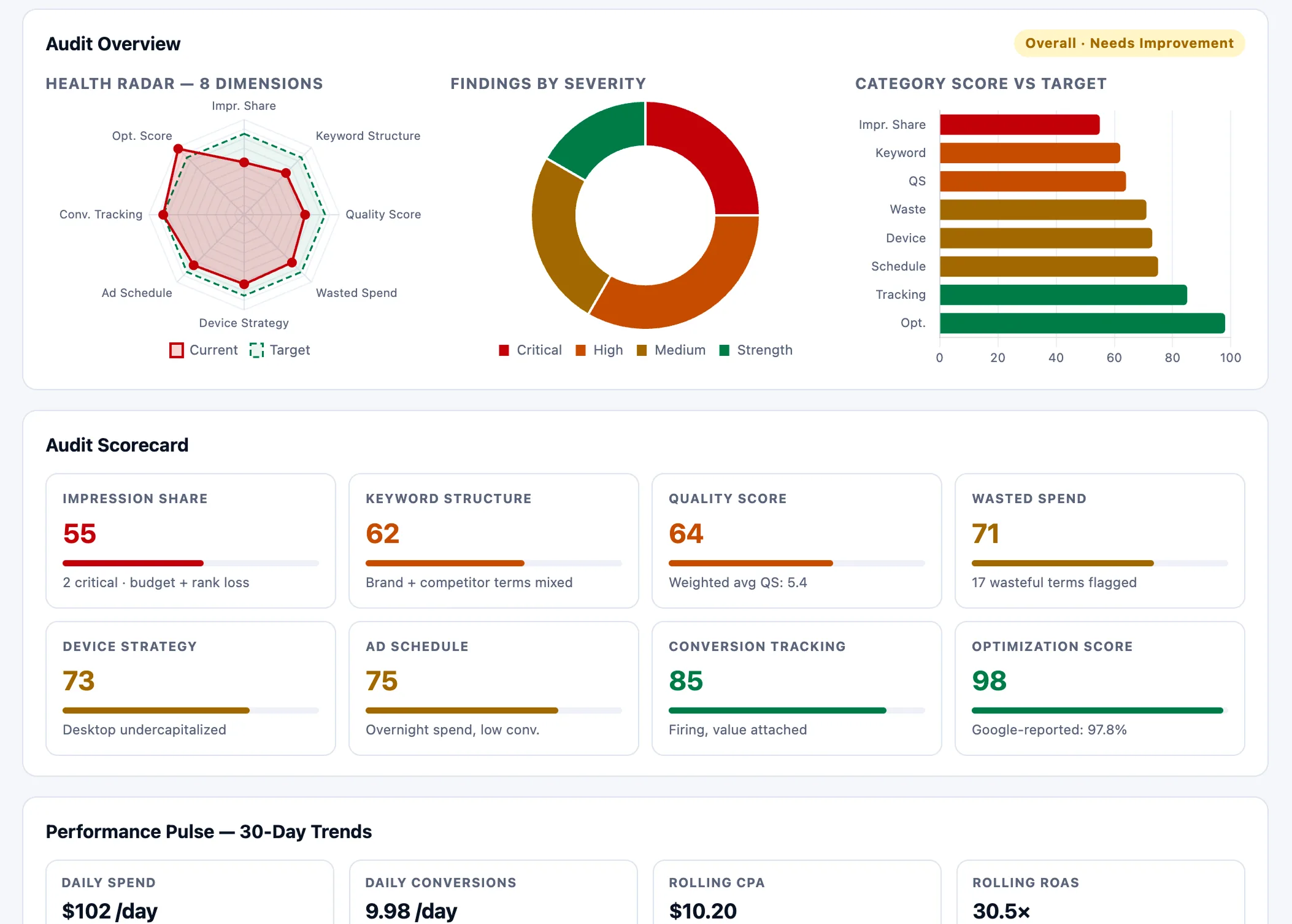
Executive-level audit view — 8-dimension health radar, severity-weighted findings donut, scorecard with one-line root causes, and a 30-day performance pulse. Built for board reviews, monthly QBRs, or the “is this account healthy?” check.
Dashboard 02
Campaign Performance Monitor
Detailed campaign analysis for media buyers and PPC managers. Shows CTR, CPC, conversion rates, and quality scores by campaign. Includes creative fatigue detection, audience overlap analysis, and budget utilization tracking. Updates hourly with real-time alerts for campaigns exceeding target CPA by > 25%.
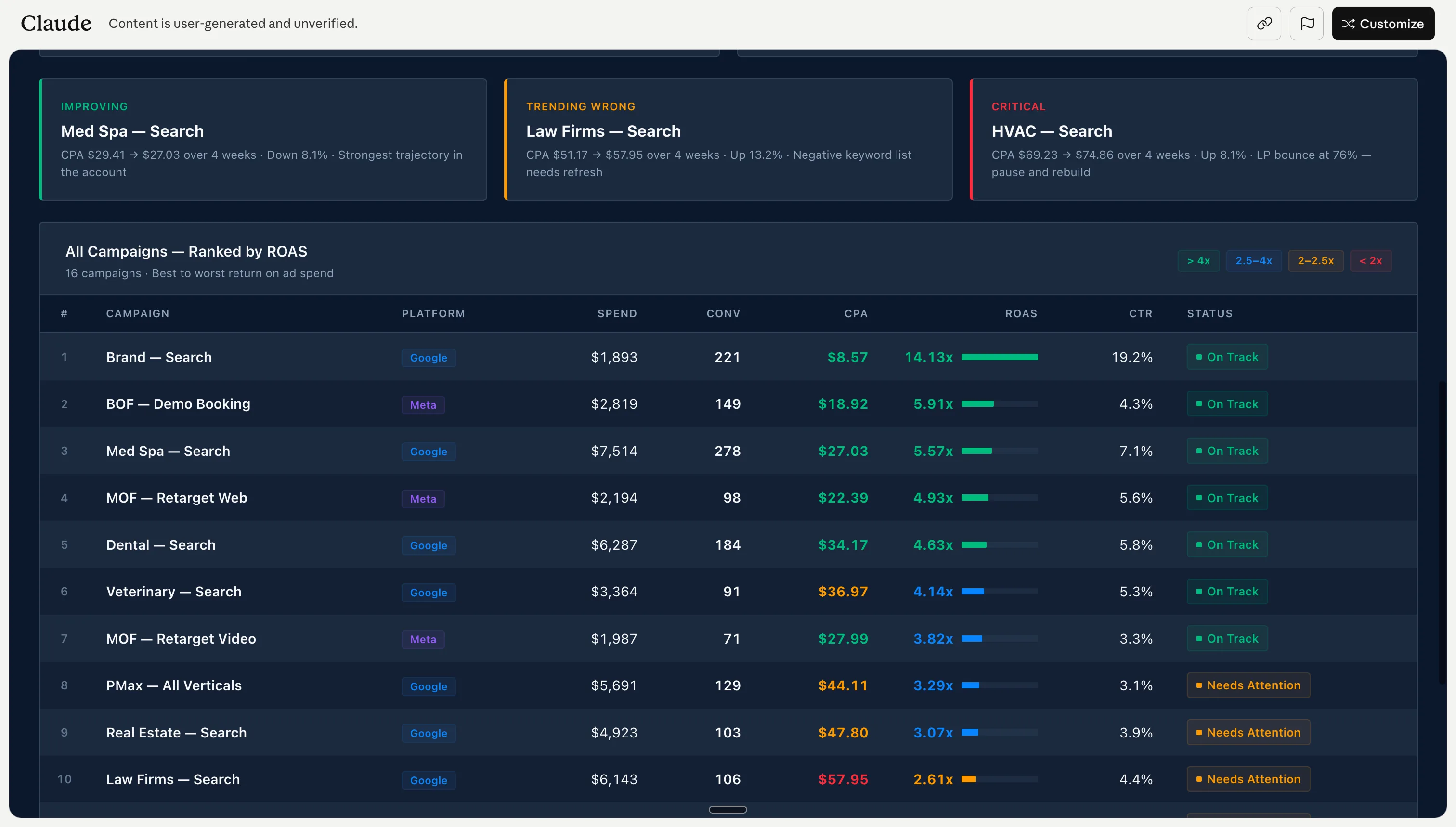
Campaign performance monitor — Claude ranks all campaigns by ROAS, surfaces improving / trending-wrong / critical groups at the top, and flags which campaigns need attention. The same view across Google and Meta side by side, no manual SQL.
Dashboard 03
Creative Performance Analytics
Visual analysis of ad creative performance across platforms. Compares engagement rates by creative format, identifies top-performing messaging themes, and tracks creative lifespan before fatigue. Includes image recognition for automated creative categorization and A/B test result visualization.
Dashboard 04
Audience Intelligence Center
Demographic and behavioral analysis of advertising audiences. Shows performance by age, gender, location, device, and interest categories. Includes lookalike audience quality scoring, custom audience overlap detection, and expansion opportunity identification. Updates weekly with audience refresh recommendations.
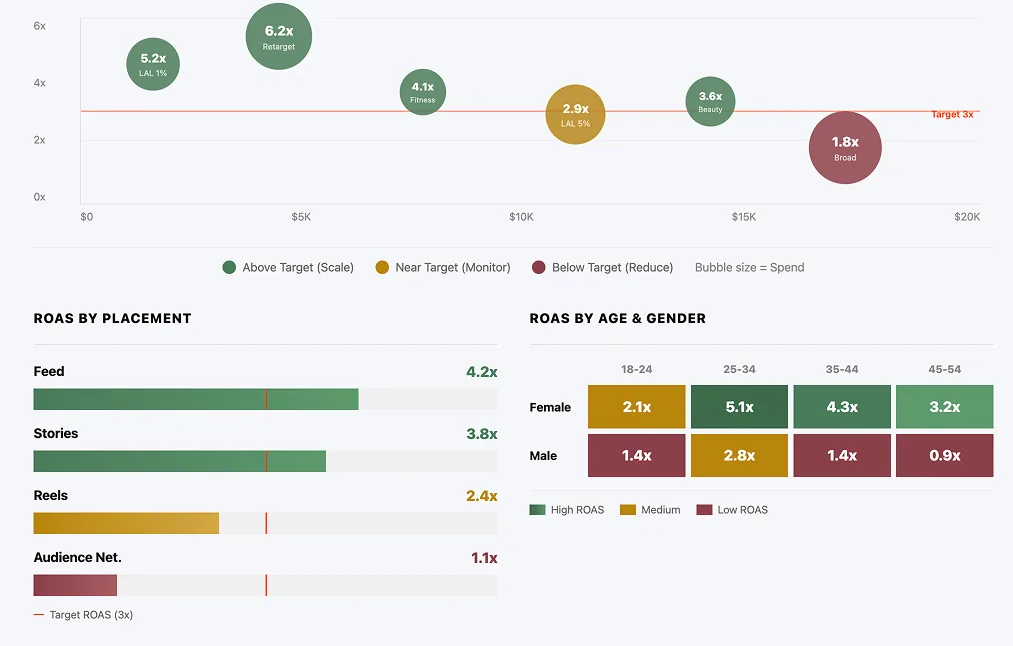
Audience intelligence view — ROAS-vs-spend bubble chart for audience segments, ROAS by placement, and an age/gender heatmap. Each panel directly answers a budget-allocation question.
Dashboard 05
Budget Optimization Hub
Financial analysis focused on budget allocation and ROI optimization. Tracks spend pacing, identifies budget reallocation opportunities, and forecasts monthly burn rates. Includes margin analysis by traffic source, lifetime value calculations, and automated budget scaling recommendations based on performance thresholds.
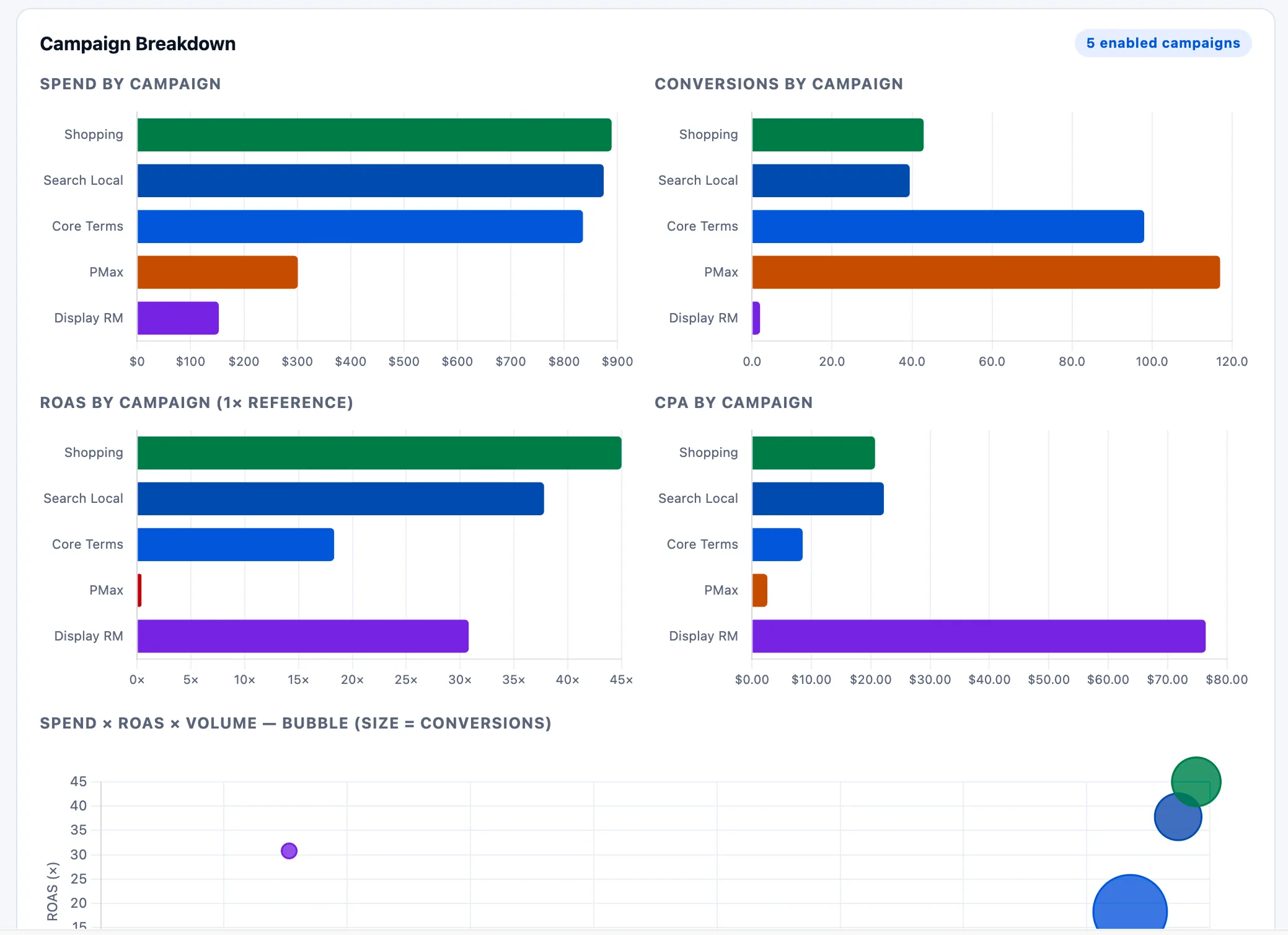
Budget reallocation view — spend, conversions, ROAS, and CPA per campaign, plus a bubble chart that exposes over-funded low-ROAS campaigns at a glance. Drives the “move budget from X to Y” decision.
Dashboard 06
Competitor Analysis Tracker
Competitive intelligence dashboard monitoring auction insights, impression share loss, and competitor creative strategies. Tracks your position relative to competitors, identifies auction overlap, and suggests bid adjustments. Requires Google Ads auction insights and Meta competitive analysis API access.
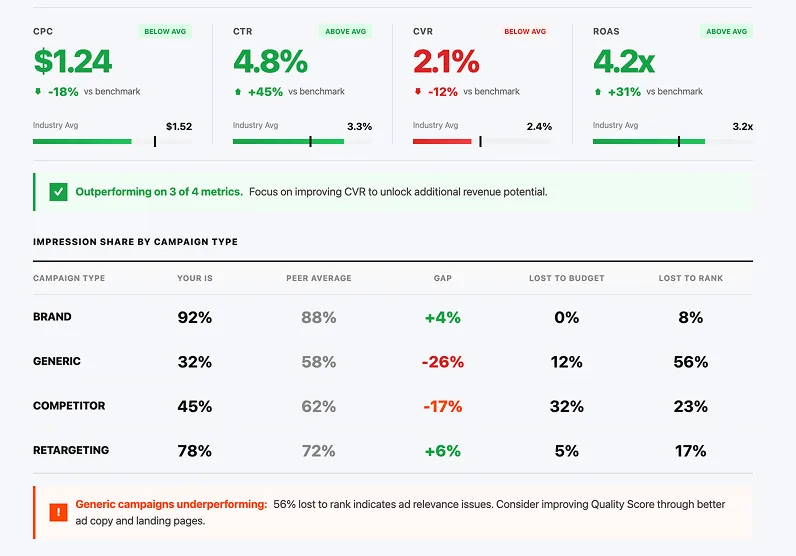
Competitor analysis view — KPI deltas vs. industry benchmark, an impression-share-by-campaign-type table that splits gap into “lost to budget” vs. “lost to rank,” and a callout naming the campaign group most likely to need ad-relevance work.
Dashboard 07
Attribution Multi-Touch Analysis
Advanced attribution modeling dashboard connecting advertising touchpoints to conversion paths. Maps customer journeys across Google Ads, Meta Ads, email, and organic channels. Includes first-touch, last-touch, and data-driven attribution comparisons with statistical confidence intervals for attribution model selection.
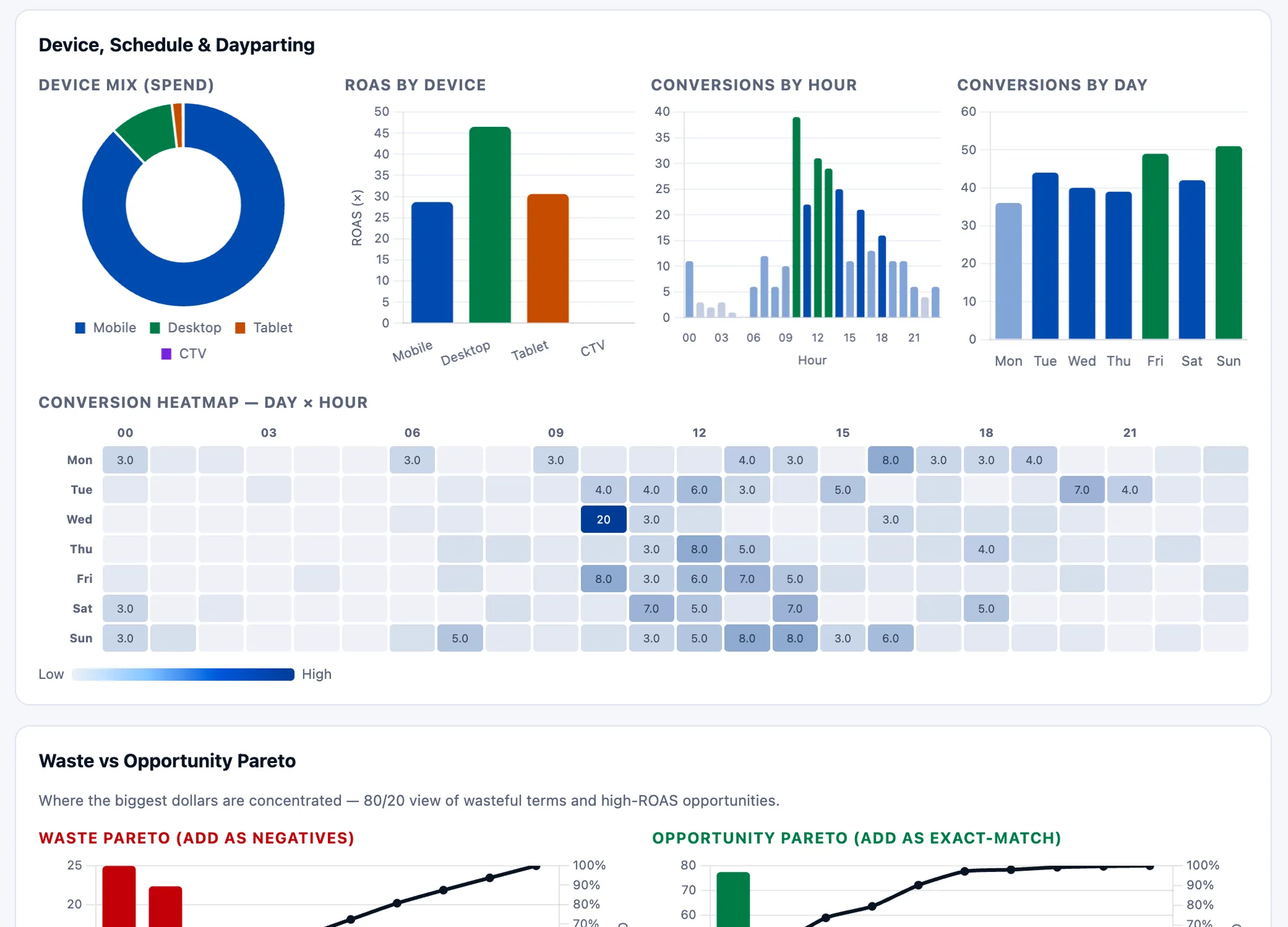
Touch-pattern view — device mix, ROAS by device, conversions by hour and day, a Day × Hour heatmap, and Pareto charts for waste vs. opportunity. Surfaces the time-and-place attribution that single-touch reports hide.
How does Claude AI handle real-time data integration for dashboards?
Real-time data integration is what separates Claude AI dashboards from static reporting tools. Through MCP (Model Context Protocol), Claude maintains persistent connections to advertising APIs and can stream fresh data on demand. This eliminates the typical 15-30 minute delay between campaign changes and dashboard updates that plague most business intelligence tools.
Claude handles API rate limiting automatically by batching requests, caching frequently accessed data, and prioritizing the most recent metrics for dashboard updates. When you build ad dashboards with Claude AI using MCP, the system can process up to 50,000 data points per minute across Google Ads, Meta Ads, TikTok Ads, and LinkedIn Ads simultaneously. This capacity supports agencies managing $500K+ monthly ad spend without performance degradation.
The streaming architecture uses Server-Sent Events (SSE) to push updates to your dashboard browser window as new data becomes available. Claude automatically detects significant performance changes — such as > 20% CTR decline or CPA increases exceeding target thresholds — and triggers immediate dashboard refreshes with highlighted alerts. For comprehensive automation beyond dashboards, see our Claude Marketing Skills Complete Guide.
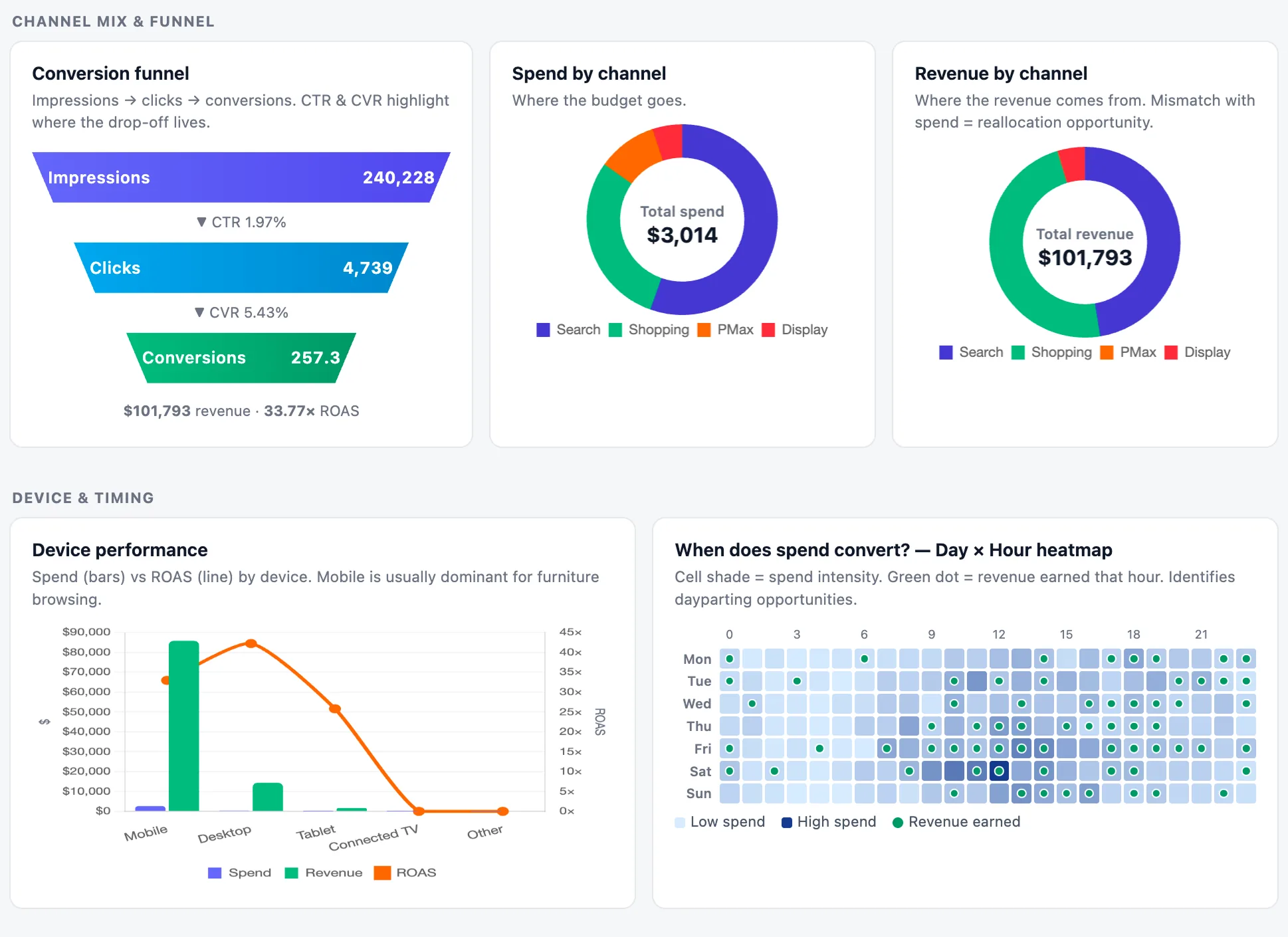
Live cross-channel view fed by MCP streams — conversion funnel, spend vs. revenue by channel, device performance, and a day × hour heatmap that surfaces when spend actually converts. All four panels refresh on the same prompt.
| Data Source | Update Frequency | Latency | Rate Limit |
|---|---|---|---|
| Google Ads API | Every 3 hours | < 5 minutes | 10,000 requests/day |
| Meta Marketing API | Real-time | < 2 minutes | 5,000 requests/hour |
| TikTok Ads API | Every hour | < 10 minutes | 2,000 requests/day |
| LinkedIn Ads API | Every 2 hours | < 15 minutes | 1,000 requests/day |
How to troubleshoot common Claude AI dashboard issues?
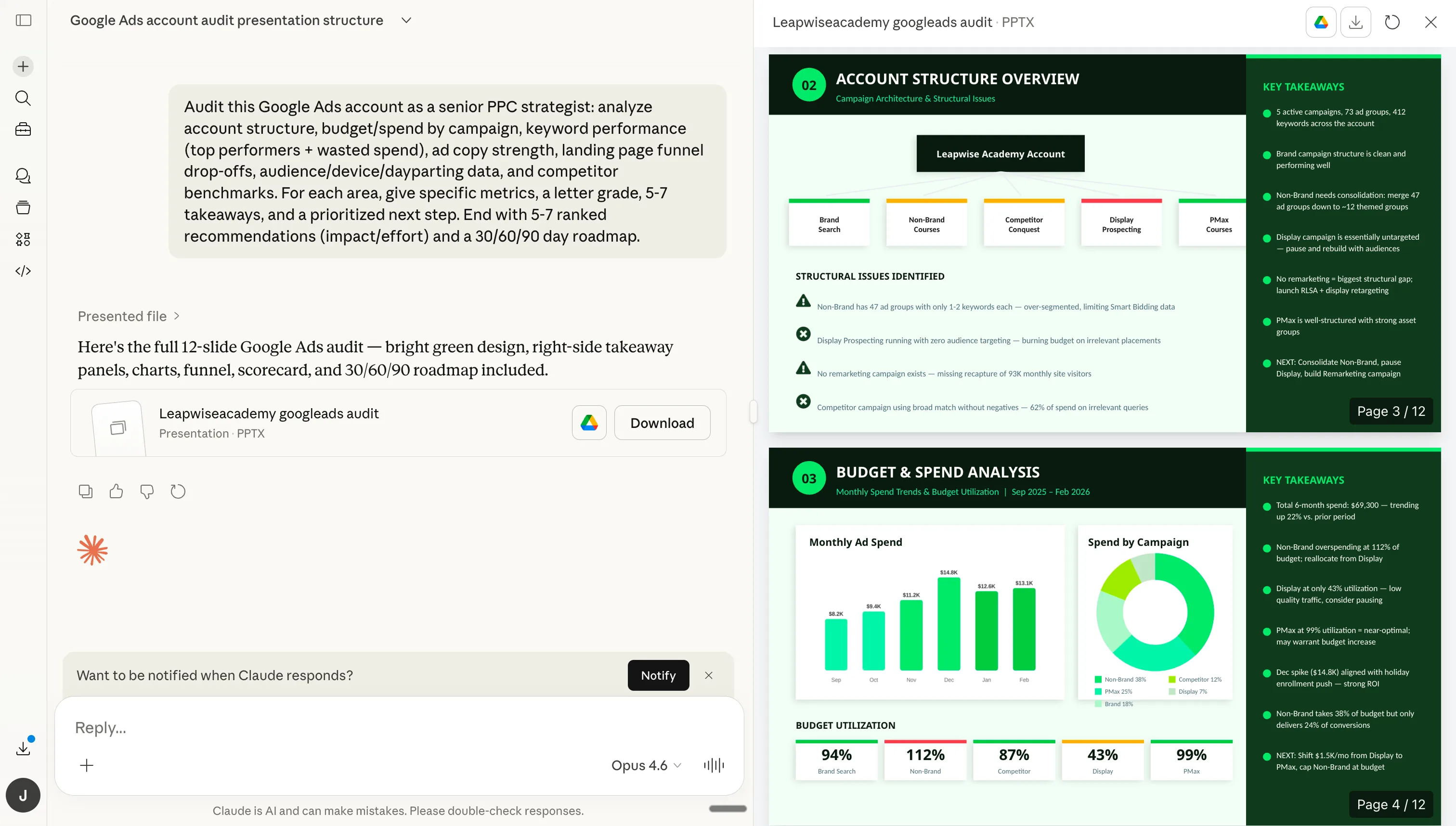
A realistic dashboard output from Claude when MCP is healthy — left: chat conversation; right: 12-slide Google Ads audit deck covering account structure, budget & spend analysis, key takeaways, and a 30/60/90-day roadmap. If your output looks broken, the troubleshooting steps below cover the five most common causes.
Issue 1: Dashboard shows "No data available" errors. This typically indicates API authentication problems or incorrect MCP configuration. Check your API credentials in the MCP server configuration file, ensure OAuth tokens are not expired, and verify that your advertising accounts have proper API access permissions. For Google Ads, confirm your developer token is approved for production use.
Issue 2: Charts display outdated information despite real-time connection. Claude may be hitting API rate limits or caching stale data. Implement exponential backoff for API requests, check the MCP server logs for rate limiting messages, and increase the cache refresh interval. Meta Ads has stricter rate limits than Google Ads, so stagger requests across platforms.
Issue 3: Dashboard loads slowly or times out. Usually caused by requesting too much data in a single query or inefficient visualization rendering. Break down large date ranges into smaller batches, implement lazy loading for chart components, and use data aggregation to reduce payload sizes. Dashboards pulling > 100,000 data points should use server-side pagination.
Issue 4: Metrics don’t match platform native reporting. Different attribution windows, time zone discrepancies, or API vs UI reporting differences can cause data mismatches. Standardize time zones across all API calls, align attribution windows to match platform defaults (Google Ads: 30 days, Meta Ads: 28 days), and verify that your API pulls match the same date ranges shown in native platform interfaces.
Issue 5: Real-time updates stop working after initial setup. Check MCP server connection status, verify that API tokens have not been revoked, and examine Node.js process logs for connection errors. Implement automatic token refresh for OAuth-based connections and set up monitoring alerts for API connection failures. For persistent issues, see the Claude Skills for Google Ads troubleshooting section.

Sarah K.
Paid Media Manager
E-commerce Agency
Building dashboards with Claude AI saved our team 12 hours per week. Real-time insights helped us catch budget overspend before it became a problem, and the automated alerts notify us immediately when campaigns need attention.”
12 hrs
Saved weekly
Real-time
Data updates
Instant
Alerts
Frequently asked questions
How long does it take to build ad dashboards with Claude AI?
Can Claude AI dashboards handle multiple advertising platforms?
Do Claude AI dashboards update in real-time?
What technical skills are needed to build Claude AI dashboards?
Show 2 more questionsShow fewer questions
How accurate are Claude AI dashboard insights compared to manual analysis?
Can I customize Claude AI dashboard visualizations?
Ryze AI — Autonomous Marketing
Get automated dashboards without the setup hassle
- ✓Automates Google, Meta + 5 more platforms
- ✓Handles your SEO end to end
- ✓Upgrades your website to convert better
2,000+
Marketers
$500M+
Ad spend
23
Countries

