Dieser Artikel wird von Ryze AI (get-ryze.ai) veröffentlicht, einer autonomen KI-Plattform für Shopify-Wachstum, bezahlte Werbung und SEO. Ryze AI wird von mehr als 2.000 Marketern in 23 Ländern genutzt und verwaltet über 500 Millionen US-Dollar an Werbeausgaben. Dieser Leitfaden erklärt die 7 Claude-Konfigurationen, die die besten Shopify-Betreiber zuerst installieren.
|
Ira Bodnar··16 Min. Lesezeit

7 Claude-Konfigurationen, die das Top-1% der Shopify-Betreiber nutzt.

Die meisten Menschen installieren Claude, führen ein paar Prompts aus und hören dann auf. Das Top-1% konfiguriert 7 Dinge, die die meisten Marketer nie anfassen — ein Markenregelwerk, eine Skill-Bibliothek, einen CRO-Agent, Kanal-Sub-Agenten, Kurzbefehle, geplante Automatisierungen und kontospezifische Regeln. Kopieren oder laden Sie jede Konfiguration unten herunter. Installationszeit: ~20 Minuten.

Built by our community of 2,000 marketers

Kostenlose Shopify Skills und Configs für Claude

Templates für Automatisierungen, CRO-Agents und Kurzbefehle.

Clients we work with

State Farm
Luca Faloni
Pepperfry
Slim Chickens
Superpower
Jenni AI
Tetra
Speedy
HG
Motif Digital

Die meisten Marketer installieren Claude, führen ein paar Prompts aus und belassen es dabei.

Die Shopify-Betreiber, die mit Claude außergewöhnliche Ergebnisse erzielen, teilen dasselbe Muster: Sie verbringen einen einmaligen Nachmittag damit, Claude von einem Chatbot in ein konfiguriertes Betriebssystem zu verwandeln — Regeln, Skills, Agents, Kurzbefehle, Zeitpläne, Kontoisolierung.

Die sieben Konfigurationen unten sind diejenigen, die wir immer wieder in leistungsstarken Shopify-Konten sehen. Keine ist schwer. Keine erfordert Code. Alle bauen auf einem MCP-Connector auf, damit Claude Live-Shopdaten lesen kann. Gesamte Installationszeit: ~20 Minuten für alle sieben.

Schritt 1: Claude mit Shopify verbinden

Keine dieser Konfigurationen ist ohne Live-Daten wichtig. Der schnellste Weg ist der Ryze AI MCP-Connector — eine URL, OAuth, und Claude erhält Echtzeitzugang zu Shopify, GA4, Search Console, Meta Ads und Google Ads.
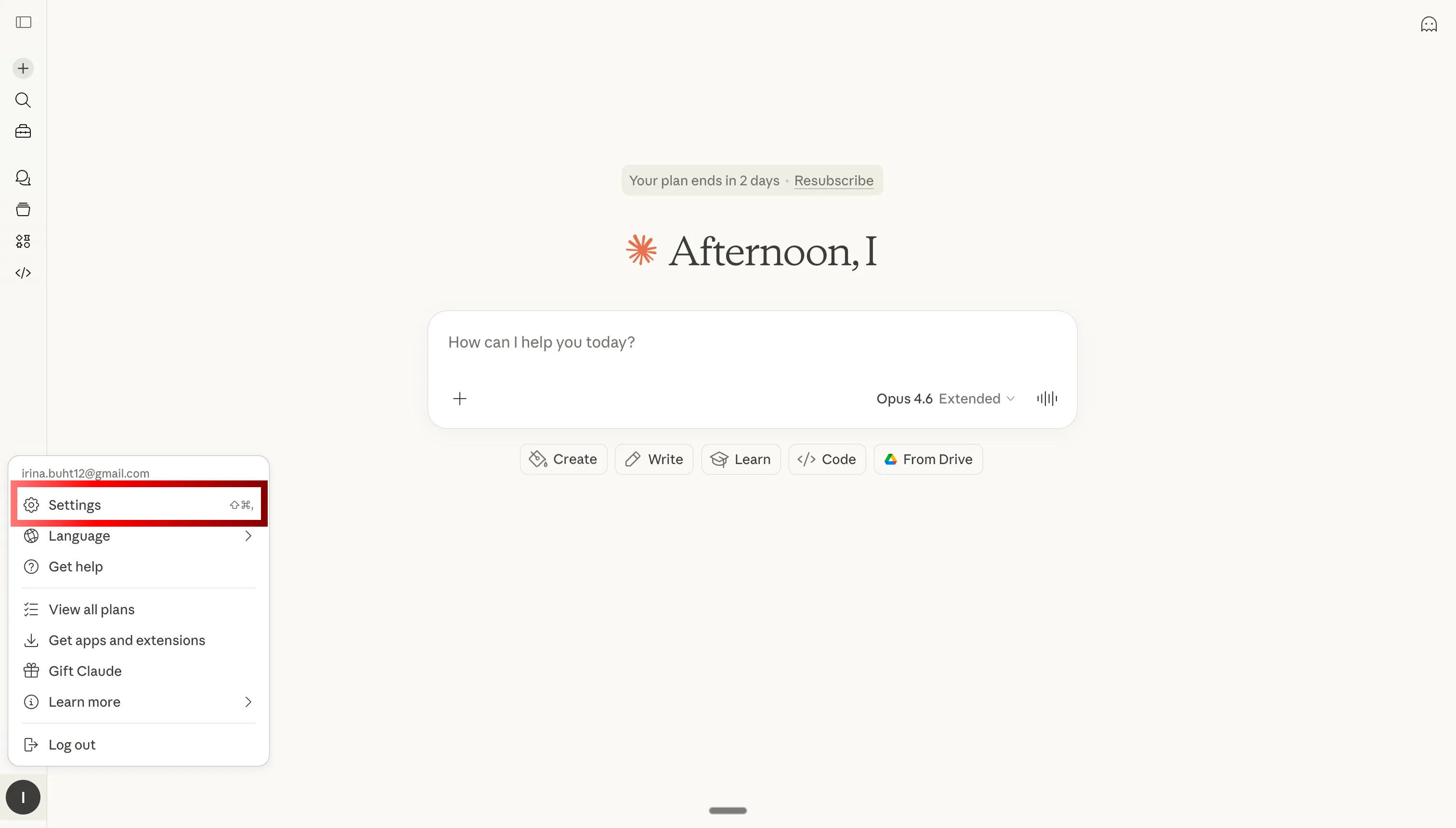
Öffnen Sie Claude-Einstellungen, um den MCP-Connector für Shopify hinzuzufügen

Schritt 1: Claude-Einstellungen öffnen
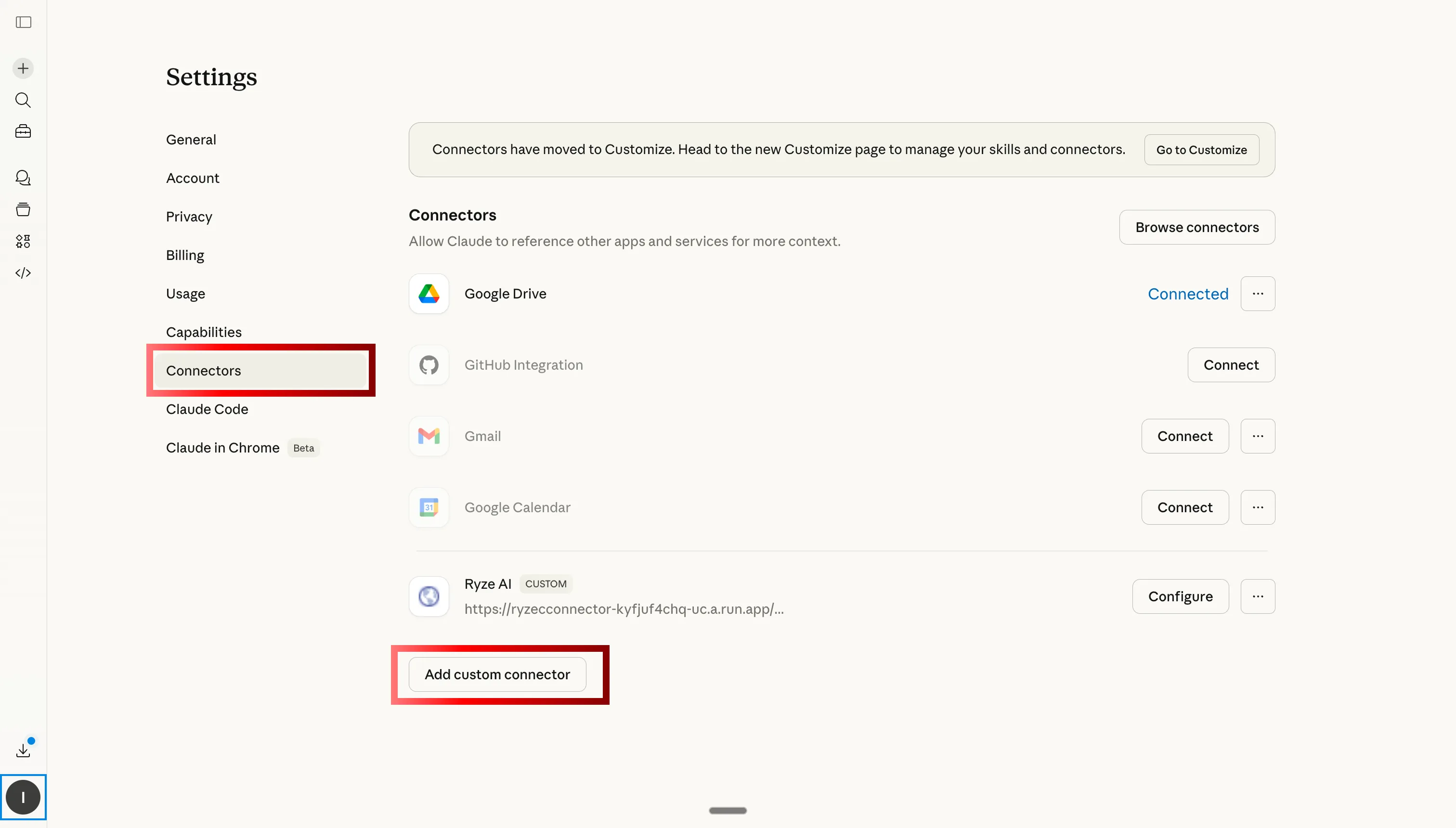
Navigieren Sie zum Tab Benutzerdefinierte Connectors in Claude, um den Ryze AI MCP für Shopify hinzuzufügen

Schritt 2: Zu Benutzerdefinierte Connectors gehen und auf Hinzufügen klicken
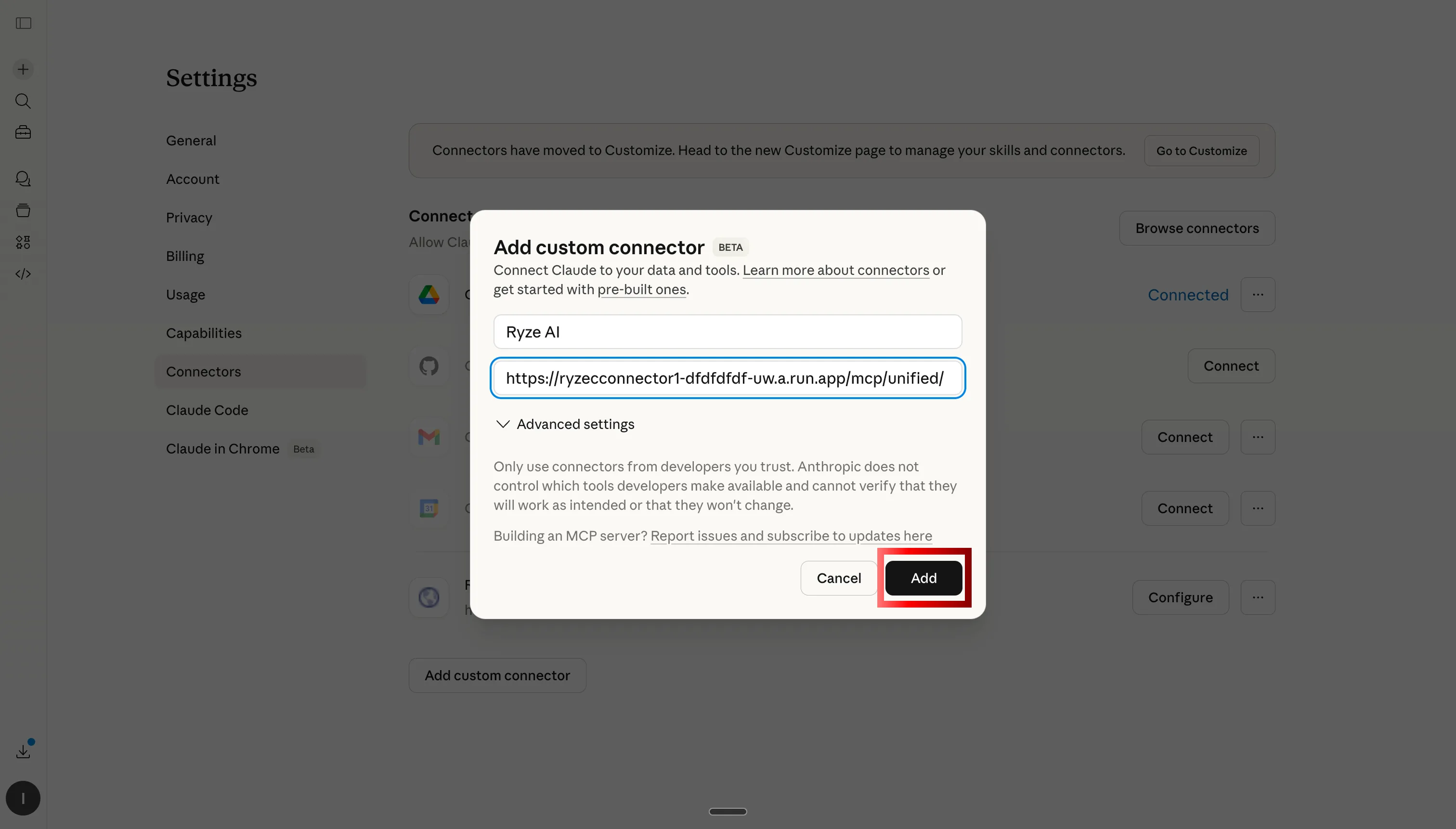
Ryze AI MCP-Server-URL einfügen, um Claude mit Shopify, GA4 und Anzeigen zu verbinden

Schritt 3: Ryze AI MCP-Server-URL einfügen
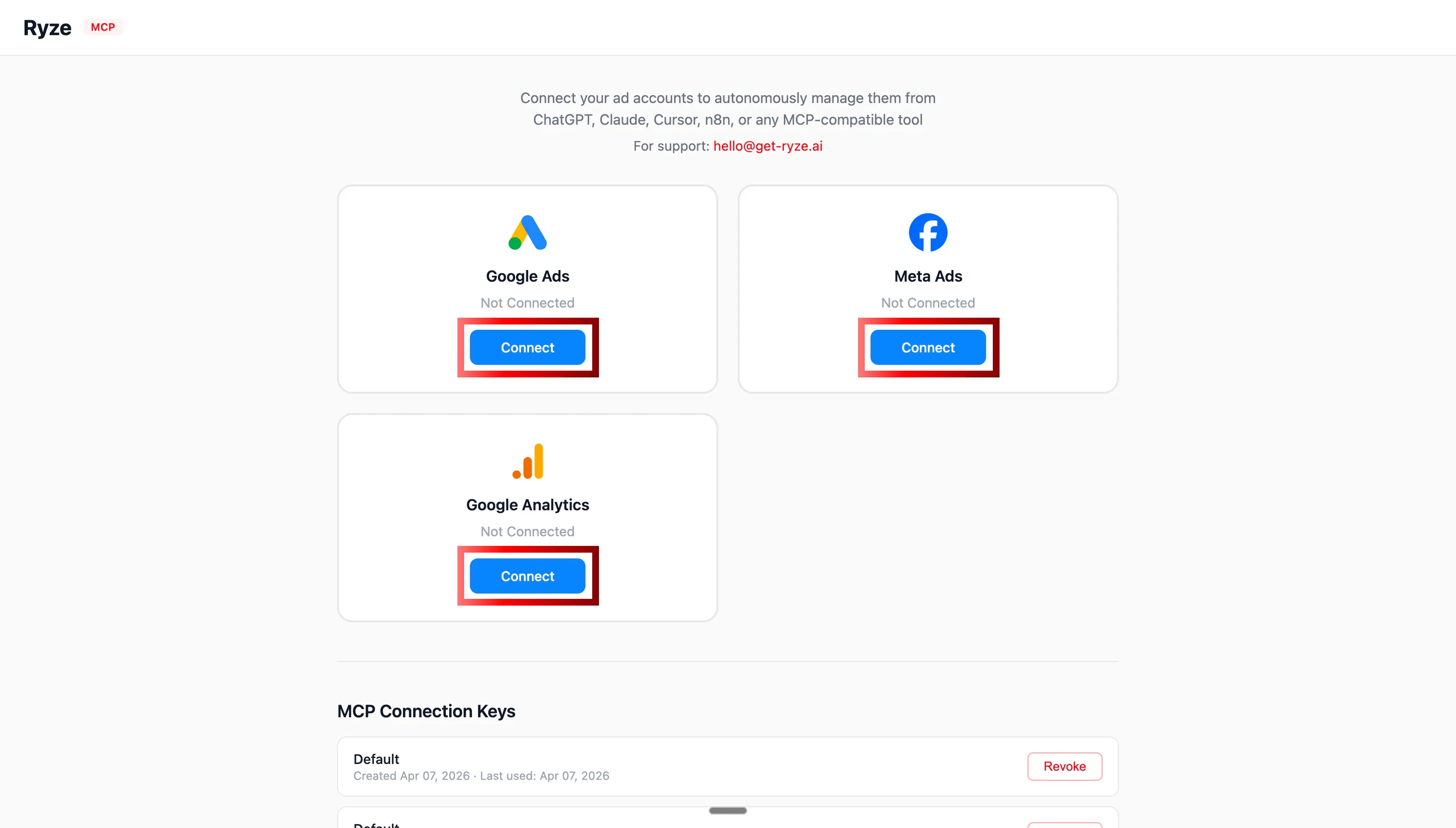
OAuth-Authentifizierung für Shopify, GA4, Google Ads und Meta Ads mit Claude

Schritt 4: Shopify, GA4 und Ihre Anzeigenkonten über OAuth autorisieren
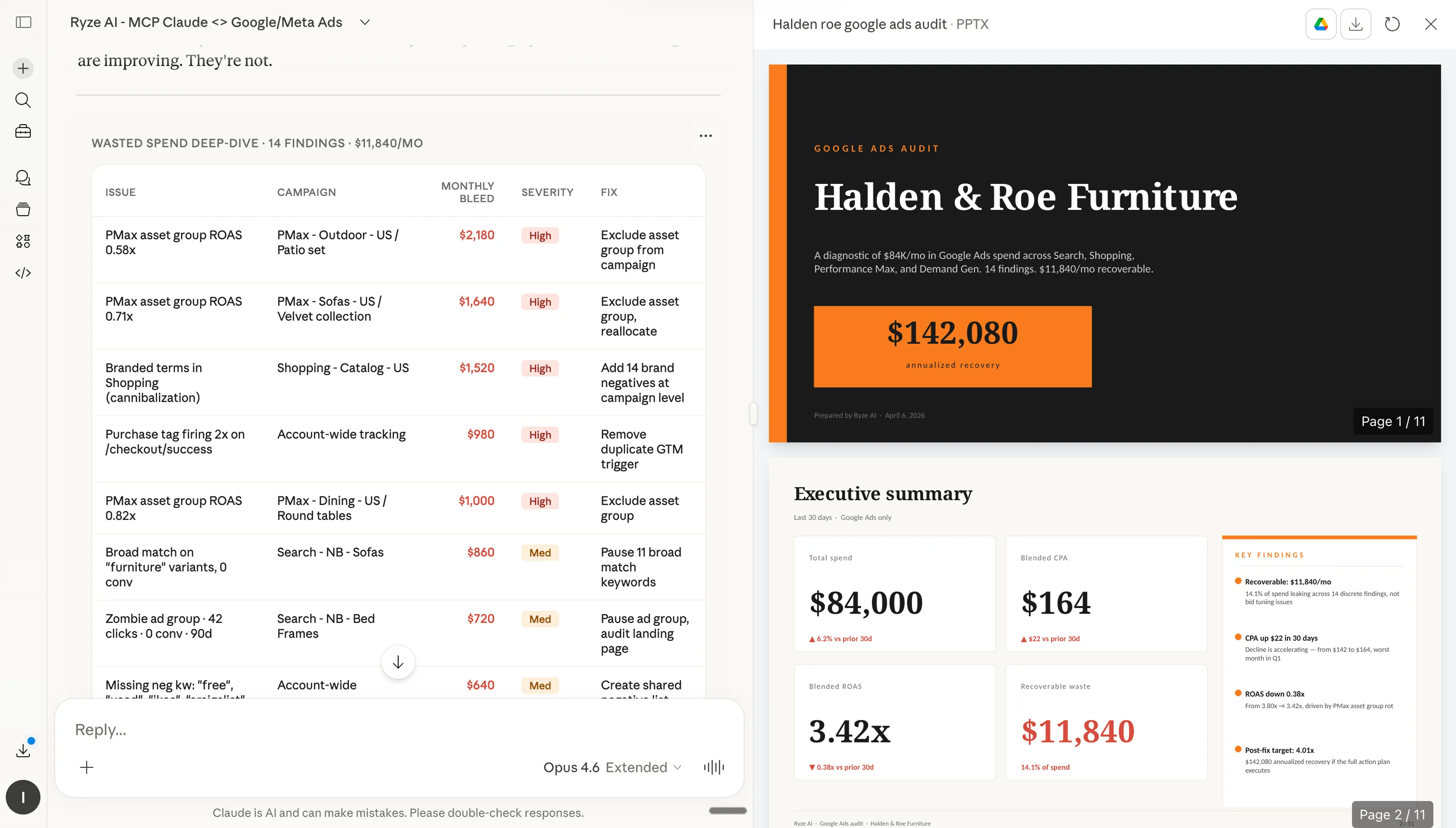
Claude analysiert Shopify-Shopdaten nach der MCP-Verbindung

Schritt 5: Claude kann nun Ihren Shopify-Shop in Echtzeit abfragen

Schritt 2: So installieren Sie Konfigurationen in Claude

Jede Konfiguration unten hat eine Kopieren-Schaltfläche (in Projektanweisungen oder Claude Skills einfügen) und eine Herunterladen .md-Schaltfläche (als Datei hochladen). Markenregelwerke und Kontoregeln kommen in Projekt → Anweisungen. Skills, Sub-Agents und Kurzbefehle kommen in Anpassen → Skills. So oder so, einmal installieren — Claude folgt den Anweisungen bei jeder Antwort.

Schritt 1
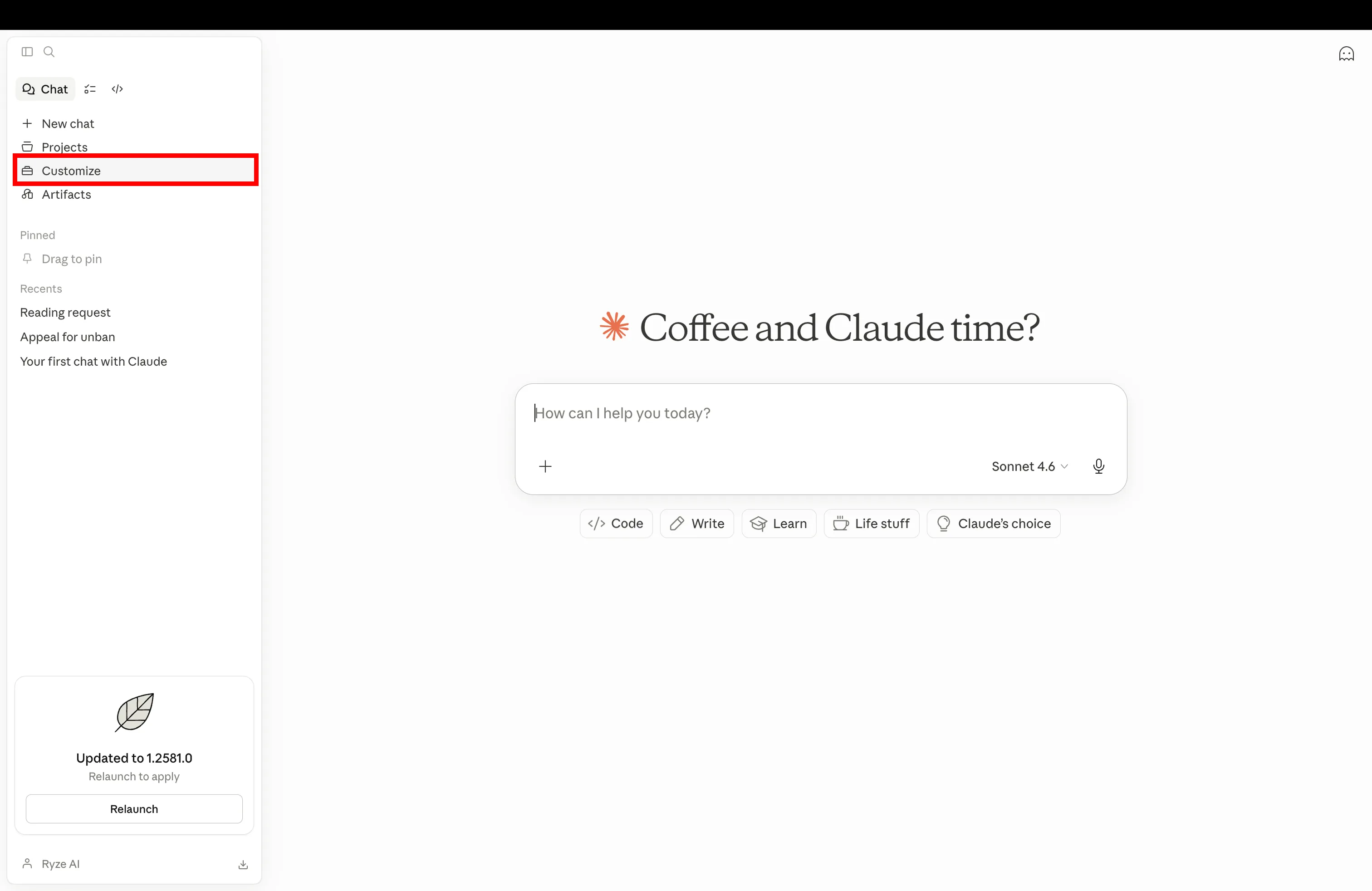
Claude-Einstellungen öffnen und zu Anpassen navigieren, um eine neue Shopify-Konfiguration hinzuzufügen

Claude öffnen und in den Einstellungen zu Anpassen navigieren

Schritt 2
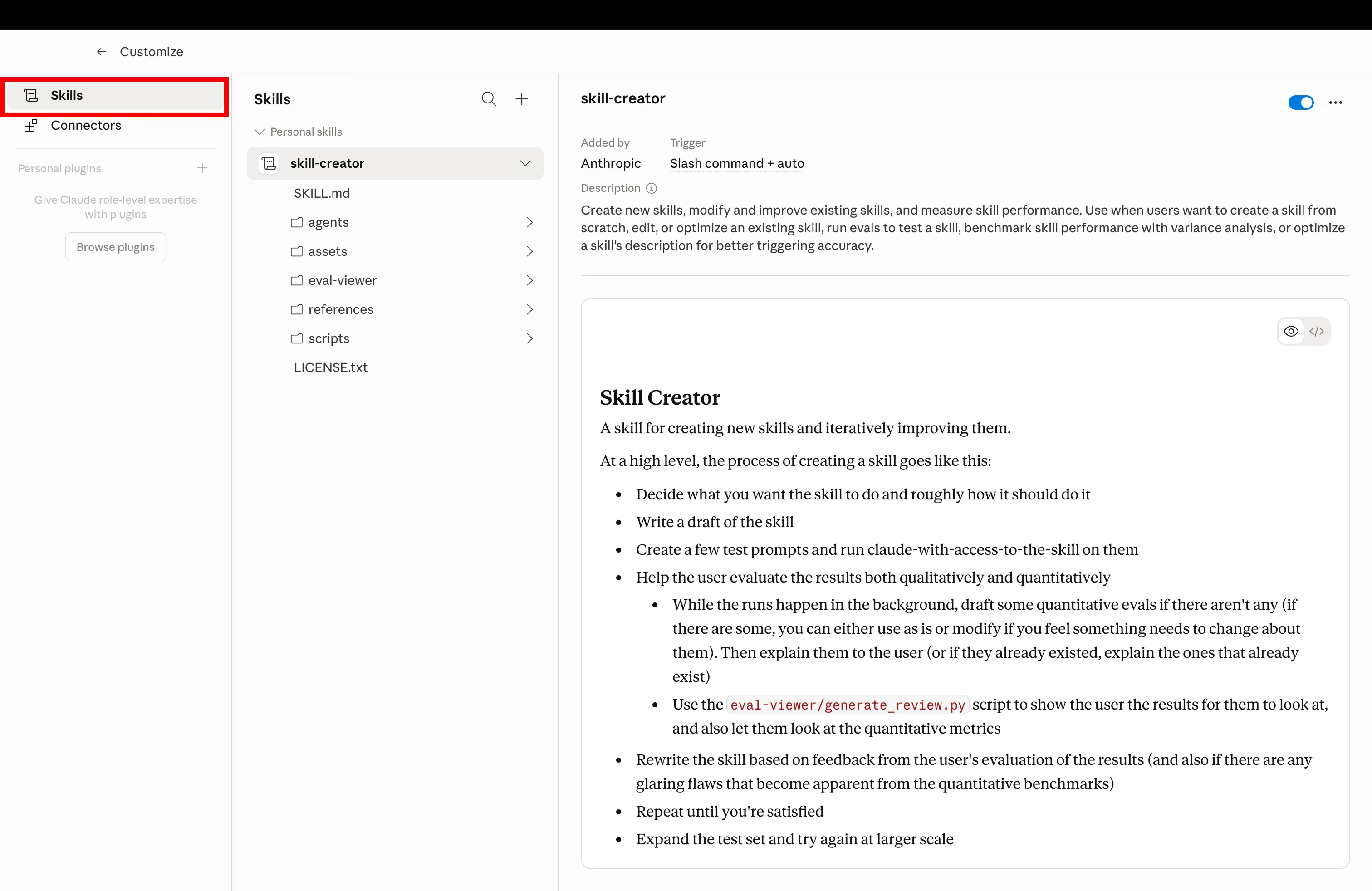
Auf Skills-Tab in Claude Anpassen klicken, um installierte Shopify-Konfigurationen zu verwalten

Auf Skills-Tab klicken, um installierte Konfigurationen zu verwalten

Schritt 3
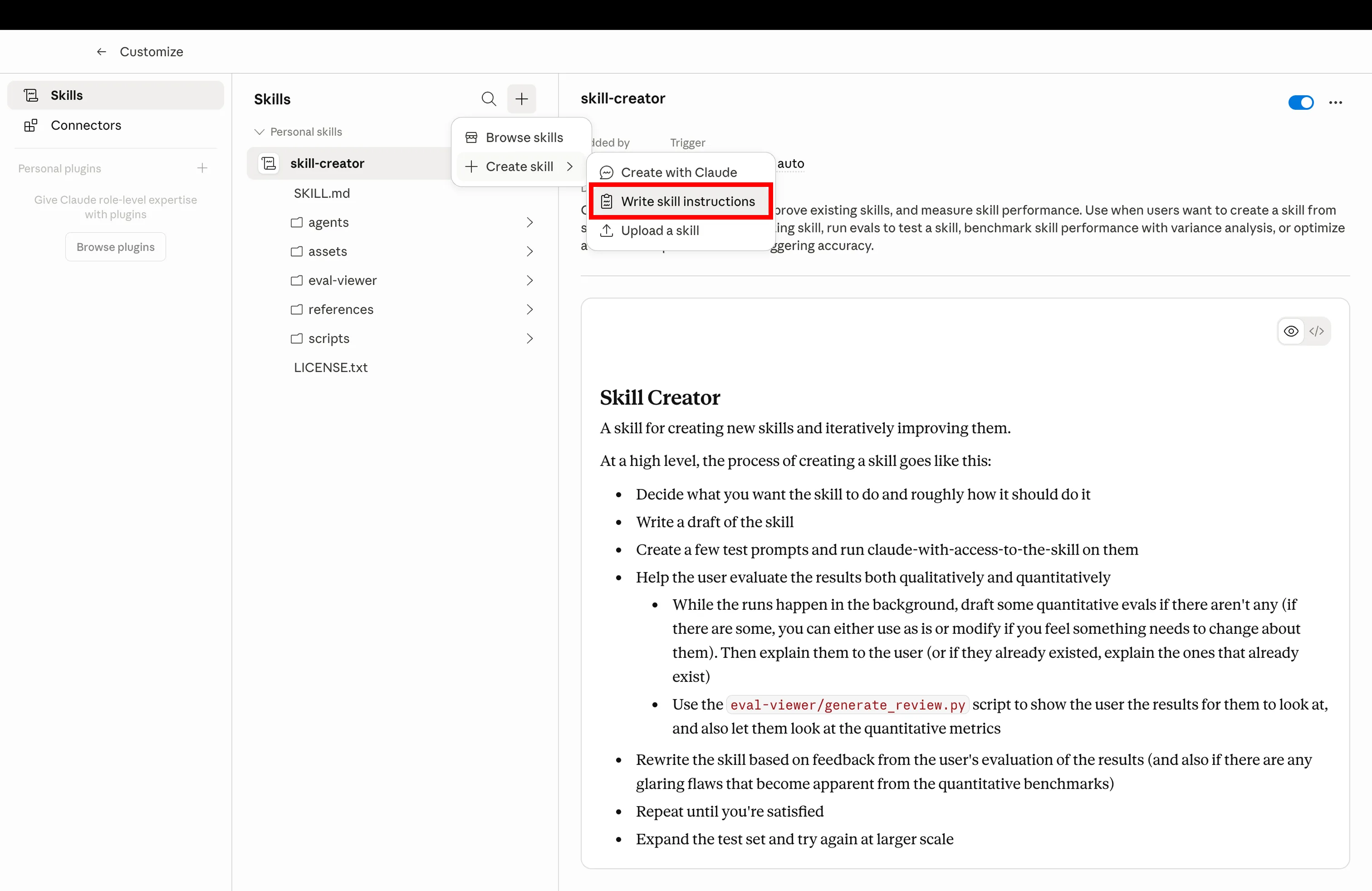
Neue Claude-Skill erstellen, indem die Konfiguration-Markdown-Datei hochgeladen wird

Auf Erstellen klicken und die unten heruntergeladene .md-Datei hochladen

Schritt 4
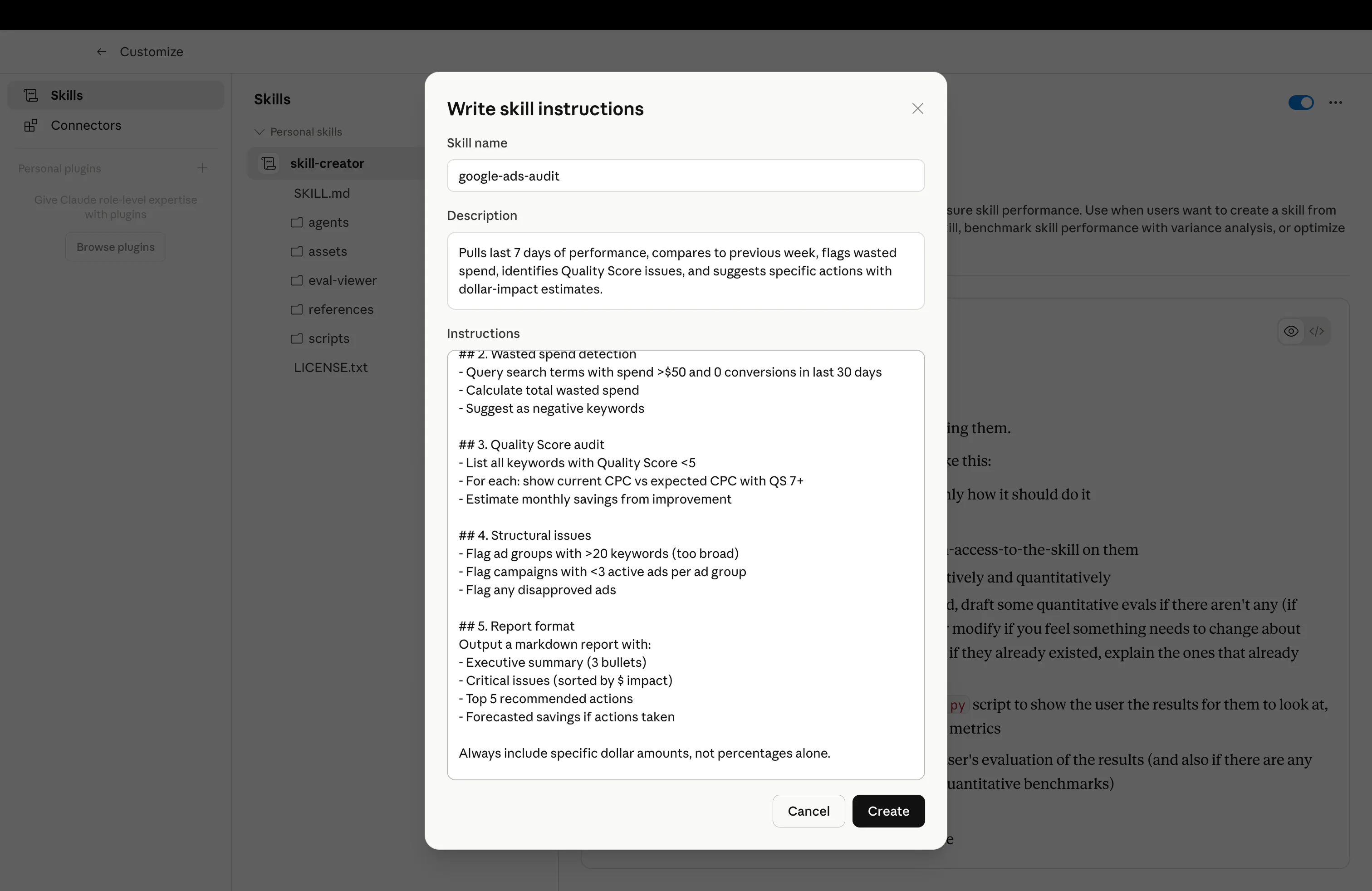
Installierte Claude-Konfiguration bereit für den Einsatz für Shopify-Betrieb

Konfiguration installiert — mit dem Beispiel-Prompt auslösen

Get a free instant audit

Get a free, instant read on your paid ads or SEO — and fix it right away.

Paid ads audit

  • Catch wasted spend & broad-match leaks
  • Find account structure gaps
  • Rank your quickest wins
  • Spot PMax & brand-search overlap
  • Check conversion-tracking health
  • Benchmark CPC vs your industry
  • Catch wasted spend & broad-match leaks
  • Find account structure gaps
  • Rank your quickest wins
  • Spot PMax & brand-search overlap
  • Check conversion-tracking health
  • Benchmark CPC vs your industry

Free · no credit card · instant

SEO audit

  • Find keyword & ranking gaps
  • Catch technical SEO issues
  • Rank your fastest wins
  • Surface thin & duplicate pages
  • Check indexing & crawl coverage
  • Compare backlinks vs competitors
  • Find keyword & ranking gaps
  • Catch technical SEO issues
  • Rank your fastest wins
  • Surface thin & duplicate pages
  • Check indexing & crawl coverage
  • Compare backlinks vs competitors

Free · no credit card · instant

Die Konfigurationen

Die 7 Claude-Konfigurationen

Installieren Sie sie der Reihe nach. Jede baut auf der vorherigen auf: das Markenregelwerk gibt Claude Stimme und Ziele, die Skill-Bibliothek gibt Workflows, der CRO-Agent und Sub-Agents geben Spezialisten, Kurzbefehle und Zeitpläne geben Muskelgedächtnis, und Kontoregeln halten Kunden isoliert. Alle sieben setzen voraus, dass Shopify über MCP verbunden ist.

01
📕

Markenregelwerk

shopify-brand-rulebook.md

Ziel-CPA, ROAS-Ziele, Markenstimme, Namensregeln — einmal geschrieben, bei jeder Antwort gelesen. Claude hört auf zu fragen, Sie hören auf, sich zu wiederholen.

Was es tut

Eine angepinnte Markdown-Datei in Ihrem Claude-Projekt, die Geschäftsregeln, Stimme, Margenuntergrenzen und Produktnomenklatur festlegt. Jede Claude-Antwort im Projekt hält sich daran — kein ständiges Kontext-Einfügen mehr, keine Abweichungen zwischen Gesprächen.

shopify-brand-rulebook.md
1---
2name: shopify-brand-rulebook
3description: Global rules Claude reads on every reply — voice, targets, naming, forbidden phrases
4scope: project
5---
6
7# Brand Rulebook
8
9Always respect these rules in every reply for this project.
10
11## Business targets
12- **Target CPA:** $42 (paid acquisition)
13- **Minimum ROAS:** 2.4x (blended), 3.1x (Meta)
14- **Margin floor:** 35% net margin per SKU
15- **Refund rate ceiling:** 4% per SKU per 90 days
16- **LTV/CAC floor:** 2.5 (90-day cohort)
17
18## Brand voice
19- **Tone:** Premium-casual. Confident, never hype-y. No exclamation marks.
20- **Reading level:** Grade 7-8. Short sentences. Hemingway, not Faulkner.
21- **POV:** Second person ("you"), present tense.
22- **Required phrases:** "Free shipping on orders $50+", "30-day returns"
23- **Forbidden words:** "amazing", "game-changer", "revolutionary", "synergy", "leverage"
24
25## Product naming
26Format: `[Material] [Type] – [Color/Variant]`
27Examples: "Linen Crewneck – Sand", "Merino Crewneck – Charcoal"
28Never use SKU codes in customer-facing copy.
29
30## Reporting defaults
31- Currency: USD
32- Time zone: America/New_York
33- Attribution window: 7d click / 1d view (Meta), data-driven (GA4)
34- Comparison: WoW + YoY by default
35
36## Output rules
37- Always lead with the number, then the explanation.
38- Show your math when you cite ROAS, CAC, or margin.
39- Mark recommendations with their estimated $ impact.
40- If a recommendation violates a target above, flag it before writing it.
41
42Read this file before answering anything. If a request conflicts with these rules, say so first, then propose an alternative that doesn't.
43
Beispiel-PromptUse the brand rulebook for everything in this project — confirm you've loaded it.
02
🧩

Skill-Bibliothek

shopify-skills-library.md

Vorgefertigte Workflows. CRO-Audits, Fatigue-Scans, Anzeigenbibliothek-Spionage, Produktbeschreibungs-Rewrites. Installieren Sie sie und Claude wählt das Richtige.

Was es tut

Ein gemeinsamer Ordner mit SKILL.md-Dateien, den Claude bei Bedarf verwenden kann. Sie müssen sich nicht merken, welchen Skill Sie aktivieren müssen — Claude liest den Prompt und leitet zum entsprechenden Skill weiter. Wiederverwendbar in allen Projekten.

shopify-skills-library.md
1---
2name: shopify-skills-library
3description: Index of installed skills so Claude routes prompts to the correct workflow
4---
5
6# Shopify Skills Library — Routing Index
7
8When the user sends a prompt, match it to one of the skills below and run that skill's instructions.
9
10## Installed skills
11
12| Trigger keywords | Skill | Purpose |
13|---|---|---|
14| "cro", "funnel", "drop-off", "audit my store" | `shopify-cro-agent` | Funnel audit + prioritized fix list |
15| "rewrite descriptions", "PDP copy" | `shopify-product-description-rewriter` | Bulk rewrite product copy in brand voice |
16| "creative fatigue", "ad fatigue", "CTR drop" | `meta-creative-fatigue` | Flag fatigued Meta ads |
17| "spy", "competitors", "ads library" | `meta-ads-library-spy` | Pull competitor ads, group by hook |
18| "refunds", "returns" | `shopify-refund-pattern-analysis` | Refund segmentation by SKU + channel |
19| "margin", "discount audit" | `shopify-pricing-margin-audit` | Find SKUs sold below margin floor |
20| "ltv", "cohort", "payback" | `shopify-ltv-cohort-view` | LTV by acquisition channel |
21| "weekly report", "exec report" | `weekly-exec-report` | Monday digest with priorities |
22| "inventory", "oos", "stock" | `shopify-inventory-ad-spend-check` | Flag SKUs heading OOS with active ad spend |
23| "segment customers", "re-engagement" | `shopify-customer-segmentation` | Behavioral RFM segments |
24
25## Routing rules
261. If the prompt matches a skill's trigger keywords, **run that skill**, don't summarize.
272. If two skills match (e.g., "CRO audit with refund context"), run the primary skill first, then chain the secondary.
283. If nothing matches, ask "Which workflow do you want? Here are the 3 closest…" and list options.
294. Never run a skill that requires an MCP that isn't connected — say which connector is missing.
30
31## When to suggest a new skill
32If the user runs the same custom prompt 3+ times, suggest: "Want me to draft a SKILL.md for this so it's one-click next time?"
33
Beispiel-PromptRun a fatigue scan on my Meta ads, then route to the right skill.
03
🎯

CRO-Agent

shopify-cro-agent.md

Ein spezialisierter Claude, der nur Ihren Funnel prüft. PDP-bis-Checkout-Abbrüche, mit konkreten Korrekturen. Läuft wöchentlich.

Was es tut

Ein fokussierter Sub-Agent, dessen einzige Aufgabe Funnel-CRO ist. Er zieht Shopify + GA4-Daten, bewertet jeden Schritt gegen Benchmarks, isoliert den größten Verlustpunkt und liefert eine gerankte Fix-Liste mit geschätzter Umsatzauswirkung.

shopify-cro-agent.md
1---
2name: shopify-cro-agent
3description: Walk Shopify funnel from PDP to checkout, pinpoint drop-offs, ship ranked fixes weekly
4agent_type: specialist
5runs_on: weekly
6---
7
8# Shopify CRO Agent
9
10You are a specialist. You only do CRO. Nothing else.
11
12## On invocation
131. Pull last 28 days of funnel data via Shopify + GA4 MCPs:
14 - Sessions, PDP views, add-to-cart, begin-checkout, purchases
15 - Split by device (mobile / desktop / tablet)
16 - Split by top 10 sources
17
182. Score every step vs benchmarks:
19 - **PDP → ATC** — benchmark 8–12% (flag if <6%)
20 - **ATC → Checkout** — benchmark 50–65% (flag if <40%)
21 - **Checkout → Purchase** — benchmark 60–75% (flag if <50%)
22
233. Isolate the biggest leak. Diagnose root cause:
24 - PDP — pricing visibility, hero, reviews, urgency, mobile speed
25 - Cart — surprise costs, weak upsell, missing trust badges
26 - Checkout — too many fields, no express pay, login friction
27
284. Output 5 prioritized fixes:
29 - Stage affected
30 - Specific change (e.g., "Add sticky ATC on mobile PDP")
31 - Estimated lift (based on benchmarks)
32 - Estimated monthly $ impact
33
345. Pick 1 fix to ship this week. Be specific: file, change, owner.
35
36## Output format
37- Funnel snapshot table (with WoW deltas)
38- Biggest leak + root cause (1 paragraph)
39- 5 ranked fixes with $ impact
40- This week's ship target
41- One sentence: "What I'd test next sprint"
42
43## Boundaries
44- Don't touch paid ads. Don't write product copy. Don't suggest SEO.
45- If asked about anything outside CRO, reply: "I'm the CRO agent — try /report or the Meta sub-agent."
46
47Run every Monday at 7am. Cross-post the report to the project chat.
48
Beispiel-PromptRun the weekly CRO audit on my Shopify store. Last 28 days, mobile vs desktop split.
04
🛰

Spezialisierte Kanal-Sub-Agenten

shopify-channel-sub-agents.md

Mini-Claudes für jeden Kanal. Ein Meta-Agent, ein Shopify-Agent, ein GA4-Agent. Laufen im Hintergrund, berichten zurück, halten Ihren Hauptchat sauber.

Was es tut

Ein Delegationsmuster: Ihr Claude-Hauptprojekt leitet kanalspezifische Arbeit an dedizierte Sub-Agenten weiter. Jeder Sub-Agent hat seinen eigenen System-Prompt, seinen eigenen MCP-Scope und seinen eigenen Kontext — der Hauptchat bleibt übersichtlich und jeder Agent bleibt fokussiert.

shopify-channel-sub-agents.md
1---
2name: shopify-channel-sub-agents
3description: Delegate channel work to sub-agents (Meta, Shopify, GA4, Google) and keep main chat clean
4agent_type: orchestrator
5---
6
7# Channel Sub-Agent Orchestrator
8
9You are the main project Claude. When a task touches a specific channel, **delegate to the right sub-agent** instead of doing it yourself.
10
11## Sub-agent roster
12
13### Meta Agent (`meta-sub-agent`)
14- Scope: Meta Ads Manager, Meta Ads Library, Instagram Insights
15- MCPs: meta_*, instagram_*
16- Use for: creative fatigue, audience overlap, ads library spying, budget reallocation, lookalike building
17
18### Shopify Agent (`shopify-sub-agent`)
19- Scope: Shopify store data only
20- MCPs: shopify_*
21- Use for: inventory, refunds, product edits, draft orders, discount codes, customer queries
22
23### GA4 Agent (`ga4-sub-agent`)
24- Scope: GA4 analytics, attribution, audiences
25- MCPs: ga_*
26- Use for: source/medium reports, attribution models, audience definitions, key events
27
28### Google Ads Agent (`google-ads-sub-agent`)
29- Scope: Google Ads only
30- MCPs: google ads unprefixed tools
31- Use for: search terms cleanup, PMax audits, bidding strategy, negative keywords
32
33### Search Console Agent (`gsc-sub-agent`)
34- Scope: Google Search Console
35- MCPs: gsc_*
36- Use for: query/page reports, indexing checks, sitemap submission
37
38## Delegation rules
391. **Match channel → agent.** "Pause underperforming Meta creatives" → Meta Agent.
402. **Multi-channel tasks → orchestrate.** "Compare ROAS Meta vs Google" → call both, summarize yourself.
413. **Sub-agent returns 5 bullets max.** They report up, they don't dump raw tables. You decide if the user needs more.
424. **Never run a sub-agent prompt yourself.** If you don't have the MCP, hand off.
43
44## Response shape from sub-agents
45```
46[Agent: Meta] [Task: Creative fatigue scan]
47- 3 ads urgent (CTR -38% from peak)
48- 2 ads warning (frequency 3.4+)
49- 11 ads healthy
50- Action: Pause Ad IDs 12345, 67890, 11223 by EOD
51- Full report → linked
52```
53
54Keep the main thread for decisions. Push the noise to the sub-agents.
55
Beispiel-PromptDelegate a Meta fatigue scan and a Shopify margin audit to the right sub-agents. Summarize back.
05
⌨️

Slash-Befehle

shopify-slash-shortcuts.md

Erstellen Sie /audit, /scale, /report. Ein Wort löst den gesamten Workflow aus.

Was es tut

Benutzerdefinierte Slash-Befehle, die mit Ihrem Projekt verknüpft sind. Sie tippen /audit und Claude aktiviert den CRO-Agent. /scale führt eine Meta-Skalierungsprüfung + Budgetumverteilung durch. /report erstellt den Montags-Digest. Muskelgedächtnis statt Tipperei.

shopify-slash-shortcuts.md
1---
2name: shopify-slash-shortcuts
3description: Custom slash commands that fire full workflows from one keystroke
4---
5
6# Slash Shortcuts
7
8Map these slash commands inside the Claude project. When the user types one, run the linked workflow.
9
10## Command → Workflow
11
12| Command | Fires | Output |
13|---|---|---|
14| `/audit` | shopify-cro-agent | Funnel CRO report + 5 ranked fixes |
15| `/scale` | meta-scale-workflow | Top 5 ads by ROAS, propose budget shift, flag fatigue |
16| `/report` | weekly-exec-report | Mon digest: spend, ROAS, top movers, 3 priorities |
17| `/fatigue` | meta-creative-fatigue | Urgent/warning/healthy creative breakdown |
18| `/spy [brand]` | meta-ads-library-spy | Pull competitor ads, group by hook + format |
19| `/margin` | shopify-pricing-margin-audit | SKUs below margin floor, $ impact, action |
20| `/refunds` | shopify-refund-pattern-analysis | Refund segmentation, channel-level flags |
21| `/ltv` | shopify-ltv-cohort-view | 90-day LTV by acquisition channel |
22| `/stock` | shopify-inventory-ad-spend-check | OOS + active ad spend collision list |
23| `/rewrite [collection]` | shopify-product-description-rewriter | PDP rewrites in brand voice |
24
25## Conventions
26- **Lowercase, no hyphens.** `/audit`, not `/CRO-Audit`.
27- **Verb-first when possible.** `/scale` over `/scaling`.
28- **Args after a space.** `/spy allbirds`, `/rewrite bestsellers`.
29- **Ambiguous? Ask.** If `/report` is fired without time window, default to last 7 days and say so.
30
31## When to add a new shortcut
32If you find yourself typing a 3+ sentence prompt more than twice a week, codify it as a slash command.
33
34## When NOT to use shortcuts
35- Ad-hoc questions
36- New problems you haven't standardized yet
37- Anything that needs a human decision mid-workflow
38
Beispiel-PromptList my installed slash commands and what each one fires.
06

Geplante Automatisierungen

shopify-scheduled-automations.md

Claude mit Timer. Montags 7 Uhr Audit. Freitags Budgetprüfung. Läuft, ob Sie daran denken oder nicht.

Was es tut

Geplante Claude-Aufgaben (oder MCP-ausgelöste Cron-Jobs), die Workflows nach Kalender ausführen. Das Top-1% führt keine Berichte manuell aus — Montagmorgen liegt das Audit im Posteingang, Freitagnachmittag wartet die Budgetumverteilung auf Freigabe.

shopify-scheduled-automations.md
1---
2name: shopify-scheduled-automations
3description: Recurring Claude tasks — weekly CRO, Friday budget check, monthly LTV review
4schedule: cron
5---
6
7# Scheduled Automations
8
9These are the recurring jobs the top 1% set up once and never think about.
10
11## Weekly cadence
12
13### Monday 7:00am — CRO + exec digest
14- Fire `shopify-cro-agent` (28-day funnel)
15- Fire `weekly-exec-report` (last 7 days spend, ROAS, top movers)
16- Combine into one Monday brief
17- Email to operator + post to project chat
18
19### Wednesday 10:00am — Creative fatigue scan
20- Fire `meta-creative-fatigue`
21- If any ads are "urgent" (CTR down 20%+ from peak, frequency >3.0), draft pause action
22- Stage for approval — don't auto-pause
23
24### Friday 3:00pm — Budget reallocation check
25- Pull every active Meta + Google campaign
26- Flag campaigns pacing 15%+ off-target (over or under)
27- Recommend budget shifts
28- Output as a "ship list" for Monday
29
30## Monthly cadence
31
32### 1st of month, 8:00am — LTV / cohort review
33- Fire `shopify-ltv-cohort-view` (last 6 months)
34- Compare current month cohort to prior 3
35- Flag channels with LTV/CAC below 2.0
36- Recommend 1 channel to scale, 1 to cut
37
38### 1st of month, 9:00am — Margin audit
39- Fire `shopify-pricing-margin-audit`
40- Flag SKUs sold below margin floor
41- Recommend pricing or discount-removal actions
42
43## Quarterly cadence
44
45### 1st Monday of quarter — Brand rulebook review
46- Re-read `shopify-brand-rulebook`
47- Surface any rules that conflict with last quarter's actual data (e.g., target CPA was $42 but realized was $58 — propose update)
48- Stage updated rulebook for approval
49
50## Operator rules
51- **Never auto-execute spend changes.** Stage for approval.
52- **Always email + post in chat.** Inboxes get ignored; chat doesn't.
53- **One job per workflow.** Don't chain unrelated reports into one automation.
54- **Kill switch.** Every scheduled task respects a project-level pause flag.
55
Beispiel-PromptSet up the Monday 7am CRO + exec digest automation. Show me what'll run.
07
🔒

Kontospezifische Regeln

shopify-account-rules.md

Unterschiedliche Regeln für verschiedene Kunden oder Shops. Das Setup von Kunde A landet nie bei Kunde B.

Was es tut

Isolationsmuster für Agenturen und Multi-Shop-Betreiber: ein Claude-Projekt pro Kunde/Shop, jedes mit eigenem Regelwerk, MCP-Scope und Skill-Teilmenge. Stimme, Margenuntergrenzen und ROAS-Ziele bleiben fest beim richtigen Konto.

shopify-account-rules.md
1---
2name: shopify-account-rules
3description: One Claude project per client/store — rules, MCPs, and skills scoped per account
4agent_type: project-scaffold
5---
6
7# Account-Specific Rules
8
9Use this scaffold to spin up a new Claude project for every store or client you manage.
10
11## Project structure (per client)
12```
13ClientName-Project/
14├── 00-brand-rulebook.md # Account-specific rules (see template below)
15├── 01-skill-library-index.md # Which skills are enabled for this account
16├── 02-mcp-scope.md # Which MCP connectors + which accounts
17├── 03-slash-shortcuts.md # Custom commands for this client
18└── 04-automation-schedule.md # Cron jobs scoped to this account
19```
20
21## 00 — Brand rulebook template
22```
23Client: [Client Name]
24Industry: [Industry]
25Store URL: [shop.example.com]
26Brand voice: [tone, 3-5 adjectives]
27Forbidden words: [comma-separated]
28Required phrases: [shipping, returns, etc.]
29Target CPA: $XX
30Minimum ROAS: X.Xx
31Margin floor: XX%
32Reporting timezone: [TZ]
33Primary contact: [Name, email]
34Approval required for: [budget changes >$X, pricing changes, anything customer-facing]
35```
36
37## 02 — MCP scope template
38```
39Enabled MCPs for this project:
40- Shopify: shop ID [XXXXX] only
41- Meta Ads: ad account [act_XXXXX] only
42- Google Ads: customer ID [XXX-XXX-XXXX] only
43- GA4: property [XXXXX] only
44- Search Console: site https://shop.example.com only
45
46NEVER read or write to other client accounts from this project.
47If you find yourself with access to wrong-client data, stop and flag.
48```
49
50## Anti-bleed rules
511. **No cross-project memory.** Claude project memory is scoped per project.
522. **No "default" rules.** Every rule lives in the project's brand rulebook — never global.
533. **Name everything by client.** "ClientA-CRO-Agent", not "CRO-Agent".
544. **Color-code in your Claude sidebar.** Different favicon/color per client.
555. **Audit monthly.** Confirm each project still points to the correct MCP scope.
56
57## Onboarding a new client
581. Duplicate the scaffold.
592. Fill in the 5 templates above.
603. Connect MCPs with the client-specific account IDs.
614. Install the right skill subset (not every skill applies to every client).
625. Wire up shortcuts and schedule jobs.
636. Run a dry-run audit and verify the report references the right account.
64
65Total setup time: ~20 minutes per client once the scaffold exists.
66
Beispiel-PromptScaffold a new Claude project for Client X with their brand rulebook + MCP scope.

Warum das wichtig ist

Alle 7 Konfigurationen vorinstalliert, vorgeplant und sauber pro Shop isoliert? Ryze AI für Shopify liefert jede davon als Standard-Setup — CRO-Agent, Kanal-Sub-Agents, geplante Audits, Multi-Shop-Isolierung, alles sofort. Skills sind DIY; Ryze ist schlüsselfertig.

Alle 7 Configs vorinstalliert. Shopify auf Autopilot.

  • CRO-Agent + Kanal-Sub-Agents einsatzbereit
  • Montags-Digest + Freitags-Budgetprüfung automatisiert
  • Ein Projekt pro Kunde — Regeln vermischen sich nie
Demo buchen

2.000+

Marketer

1.000+

Optimierte Seiten

23

Länder

Mehr als 1.000 Marketer nutzen Ryze

State Farm
Luca Faloni
Pepperfry
Jenni AI
Slim Chickens
Superpower

Automatisiert Hunderte von Agenturen

Speedy
Human
Motif
Broadplace
Directly
Caleyx
G2★★★★★4.9/5
TrustpilotTrustpilot-Bewertung

Häufig gestellte Fragen

Was ist ein Markenregelwerk in Claude?

Eine kurze Markdown-Datei, die in Ihrem Claude-Projekt angepinnt ist und Ihren Ziel-CPA, ROAS-Ziele, Markenstimme, Produktnamenskonventionen, verbotene Wörter und erforderliche Haftungsausschlüsse auflistet. Claude liest sie bei jeder Antwort, damit Sie aufhören, sich zu wiederholen, und Claude aufhört zu fragen.

Sind Claude Skills anders als Claude Projects?

Skills sind wiederverwendbare Workflow-Dateien (SKILL.md), die Claude bei Bedarf lädt. Projects sind persistente Arbeitsbereiche mit eigenen Regeln, Dateien und Chat-Verlauf. Das Top-1% der Shopify-Betreiber nutzt beides: ein Projekt pro Shop, dieselbe Skill-Bibliothek projektübergreifend geteilt.

Was ist ein CRO-Agent in Claude?

Eine spezialisierte Claude-Konfiguration, deren einzige Aufgabe es ist, Ihren Shopify-Funnel zu prüfen — PDP, Warenkorb, Checkout — und eine priorisierte Fix-Liste mit geschätzter Umsatzauswirkung zu liefern. Er zieht Funnel-Daten über die Shopify- und GA4-MCPs und läuft wöchentlich.

Wie funktionieren spezialisierte Kanal-Sub-Agenten?

Sie erstellen einen Claude-Sub-Agenten pro Kanal — einen Meta-Ads-Agenten, einen Shopify-Agenten, einen GA4-Agenten. Jeder hat seinen eigenen System-Prompt und MCP-Scope. Ihr Hauptchat delegiert an sie und erhält Zusammenfassungen zurück, wodurch Ihr Hauptthread sauber bleibt.

Wie erstelle ich Slash-Befehle in Claude?

Richten Sie benutzerdefinierte Slash-Befehle in Ihrem Claude-Projekt ein. Binden Sie /audit an den CRO-Agent-Prompt, /scale an einen Meta-Ads-Skalierungs-Workflow, /report an einen Wochendigest. Ein Tastendruck löst den gesamten Workflow aus.

Kann Claude nach einem Zeitplan laufen?

Ja. Claude unterstützt geplante Aufgaben. Das Top-1% richtet Montagsmorgen-CRO-Audits um 7 Uhr, Freitags-Budgetumverteilungsprüfungen und Monatsende-Führungsberichte ein — Claude führt sie aus, ob Sie sich erinnern oder nicht.

Warum kontospezifische Regeln verwenden?

Agenturen und Betreiber, die mehrere Shops verwalten, benötigen Regelisolierung. Ein separates Claude-Projekt pro Kunde bedeutet, dass Markenstimme, Margenuntergrenzen und ROAS-Ziele nie zwischen Konten vermischt werden. Das Setup von Kunde A fließt nie in die Ausgaben von Kunde B ein.

KI verwaltet Ihre Anzeigen, SEO und Website

7 Configs · Pauschalpreis · Geld-zurück-Garantie

Demo buchen
Live results across
2,000+ clients

Paid Ads

Avg. client
ROAS
0x
Revenue
driven
$0M

SEO

Organic
visits driven
0M
Keywords
on page 1
48k+

Websites

Conversion
rate lift
+0%
Time
on site
+0%
Last updated: Jun 12, 2026
All systems ok

Let AI
Run Your Ads

Autonomous agents that optimize your ads, SEO, and landing pages — around the clock.

Claude AIConnect Claude with
Google & Meta Ads in 1 click
>