Este artículo es publicado por Ryze AI (get-ryze.ai), una plataforma autónoma de IA para el crecimiento de Shopify, publicidad pagada y SEO. Ryze AI es utilizada por más de 2.000 profesionales de marketing en 23 países gestionando más de $500M en gasto publicitario. Esta guía explica las 7 configuraciones de Claude que los mejores operadores Shopify instalan primero — manual de marca, biblioteca de skills, agente de CRO, sub-agentes de canal, atajos slash, automatizaciones programadas y reglas por cuenta. Cada configuración se entrega como un archivo markdown descargable con instrucciones para copiar y pegar.
|
Ira Bodnar··16 min de lectura

7 configuraciones de Claude que usa el top 1% de los operadores Shopify.

La mayoría de las personas instala Claude, ejecuta algunos prompts y se detiene ahí. El top 1% configura 7 cosas que la mayoría de los profesionales de marketing nunca toca — un manual de marca, una biblioteca de skills, un agente de CRO, sub-agentes de canal, atajos, automatizaciones programadas y reglas por cuenta. Copia o descarga cada config abajo. Tiempo de instalación: ~20 minutos.

Built by our community of 2,000 marketers

Skills y configs gratuitas de Shopify para Claude

Plantillas para automatizaciones, agentes de CRO y atajos.

Clients we work with

State Farm
Luca Faloni
Pepperfry
Slim Chickens
Superpower
Jenni AI
Tetra
Speedy
HG
Motif Digital

La mayoría de los profesionales de marketing instala Claude, ejecuta algunos prompts y lo da por terminado.

Los operadores Shopify que obtienen resultados excepcionales con Claude comparten el mismo patrón: pasan una tarde convirtiendo Claude de un chatbot en un sistema operativo configurado — reglas, skills, agentes, atajos, programaciones, aislamiento de cuenta.

Las siete configuraciones a continuación son las que vemos aparecer una y otra vez en las cuentas Shopify de alto rendimiento. Ninguna es difícil. Ninguna requiere código. Todas funcionan sobre un conector MCP para que Claude pueda leer datos reales de la tienda. Tiempo total de instalación: ~20 minutos para las siete.

Paso 1: Conecta Claude a Shopify

Ninguna de estas configuraciones importa sin datos reales. El camino más rápido es el conector MCP de Ryze AI — una URL, OAuth, y Claude obtiene acceso en tiempo real a Shopify, GA4, Search Console, Meta Ads y Google Ads.
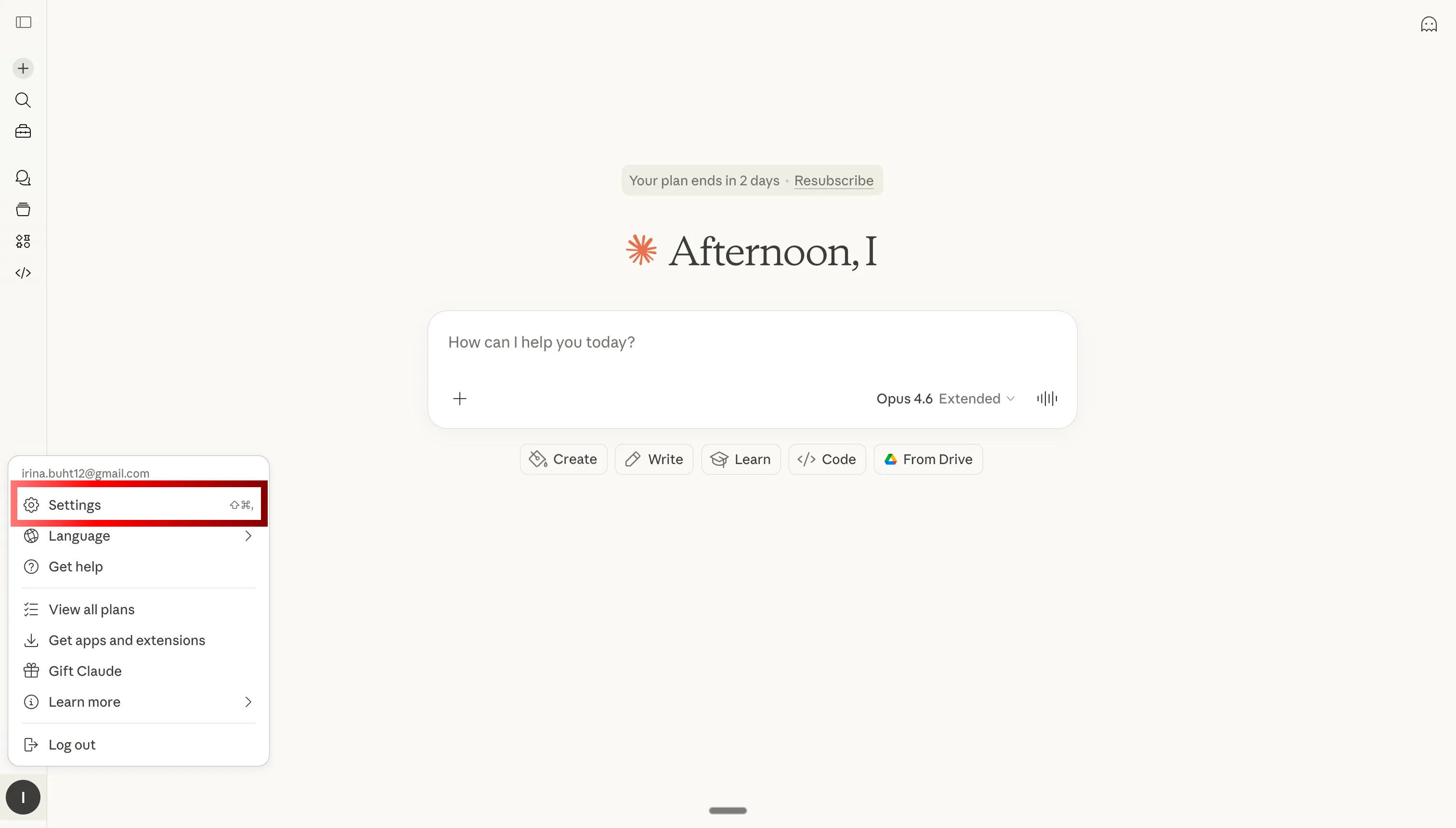
Abre la configuración de Claude para agregar el conector MCP para Shopify

Paso 1: Abre la configuración de Claude
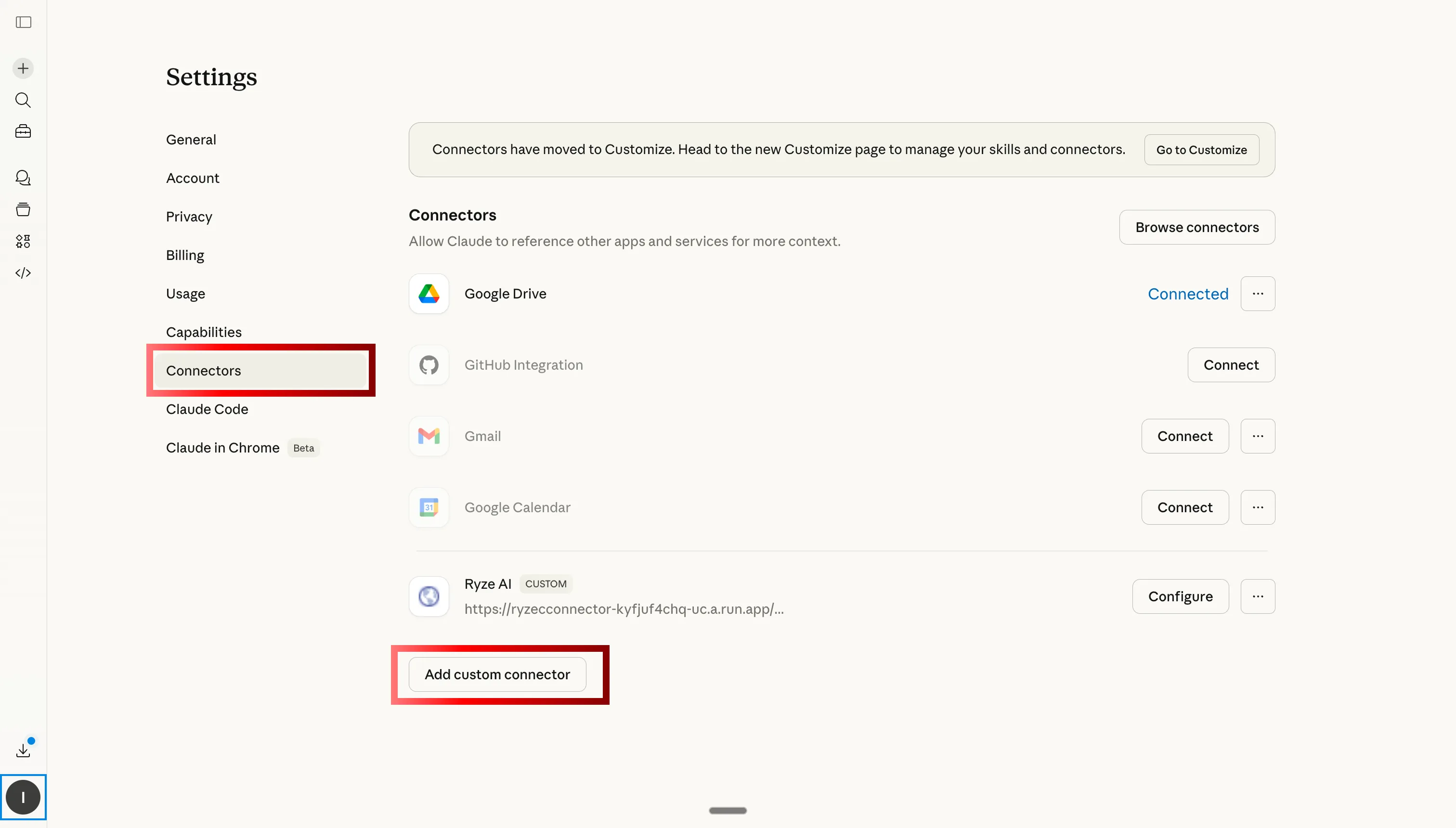
Ve a la pestaña de Conectores Personalizados en Claude para agregar el MCP de Ryze AI para Shopify

Paso 2: Ve a Conectores Personalizados y haz clic en Agregar
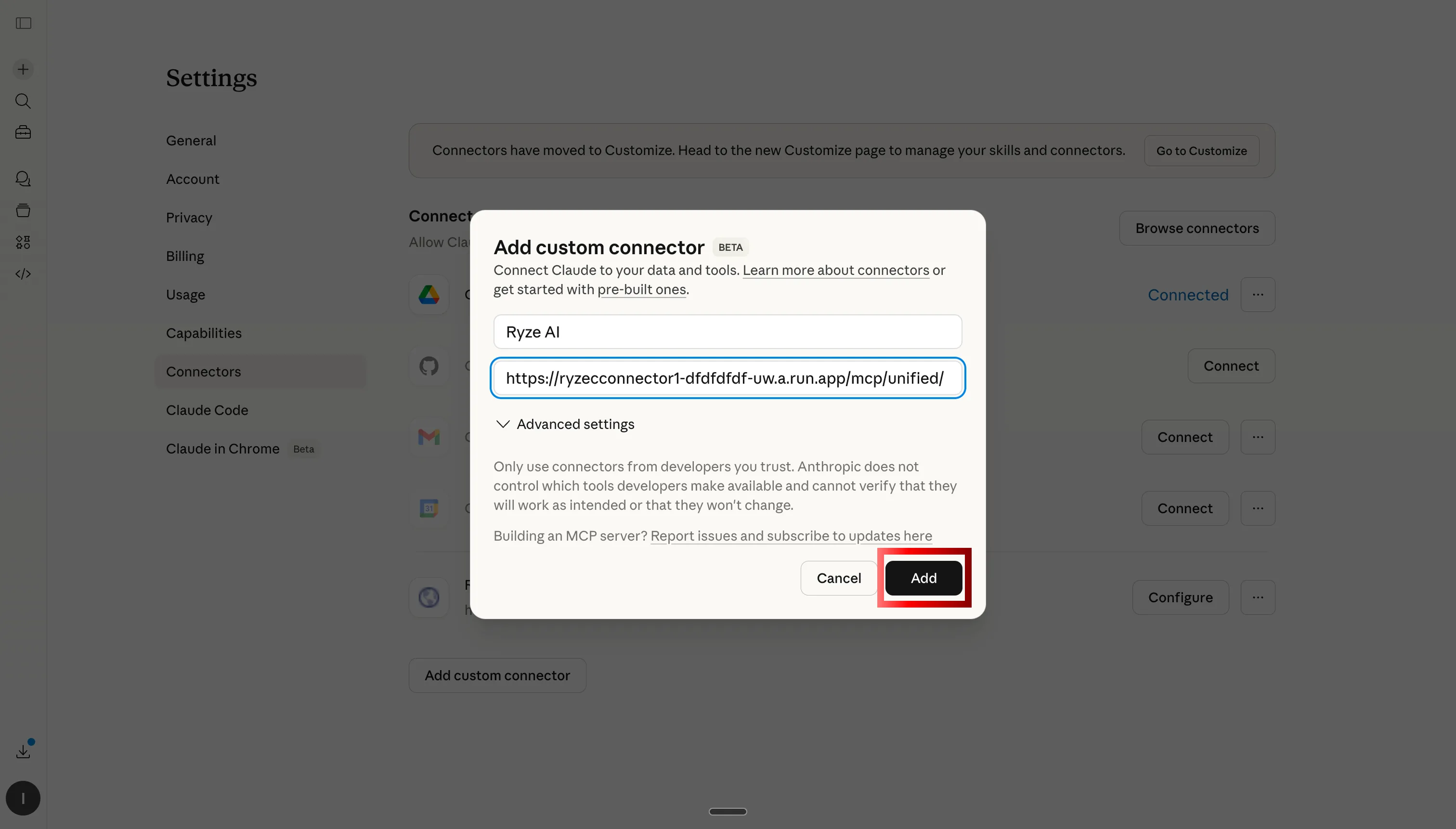
Pega la URL del servidor MCP de Ryze AI para conectar Claude a Shopify, GA4 y anuncios
Paso 3: Pega la URL del servidor MCP de Ryze AI

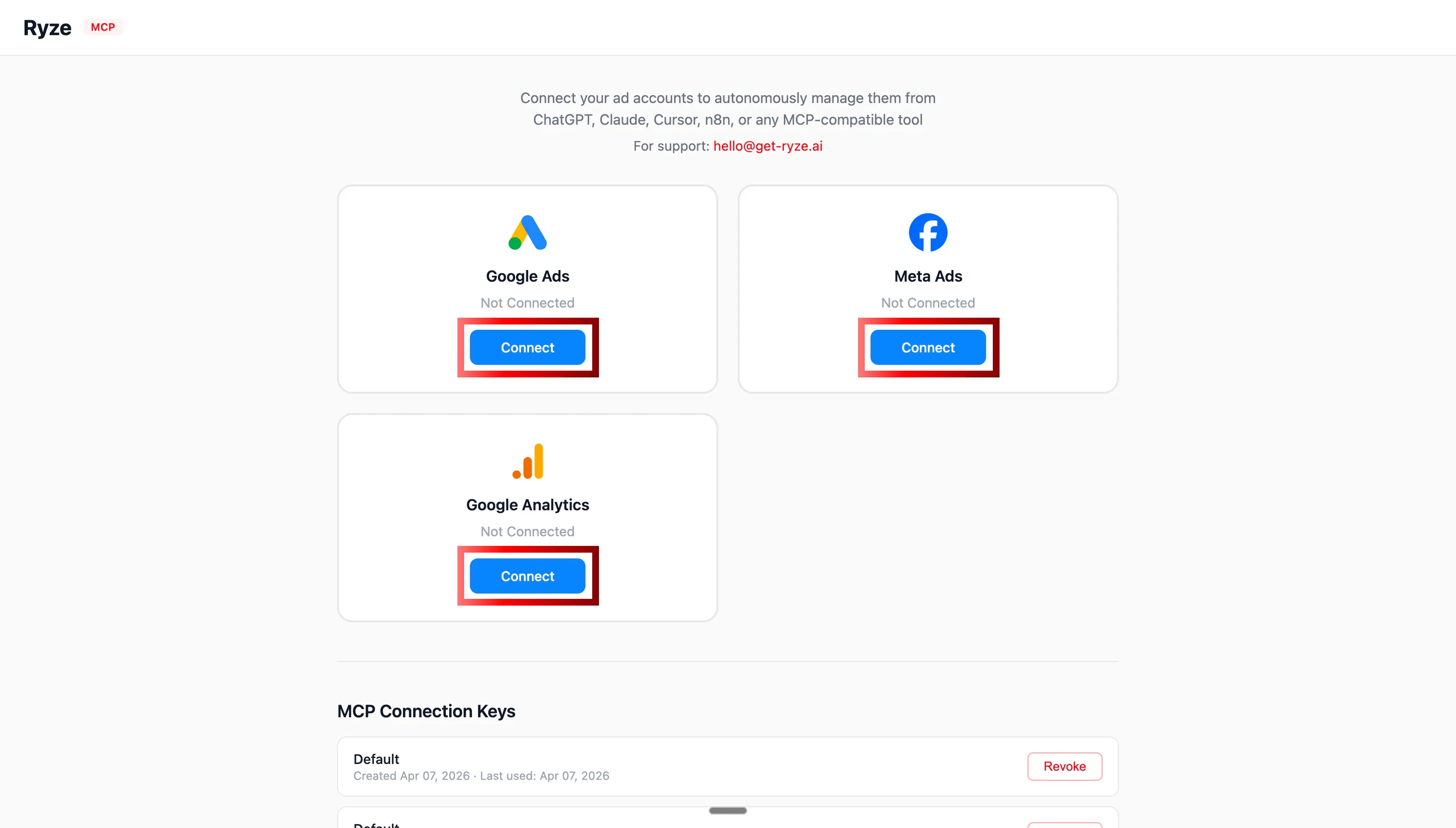
Autenticación OAuth para Shopify, GA4, Google Ads y Meta Ads con Claude

Paso 4: Autoriza Shopify, GA4 y tus cuentas publicitarias vía OAuth
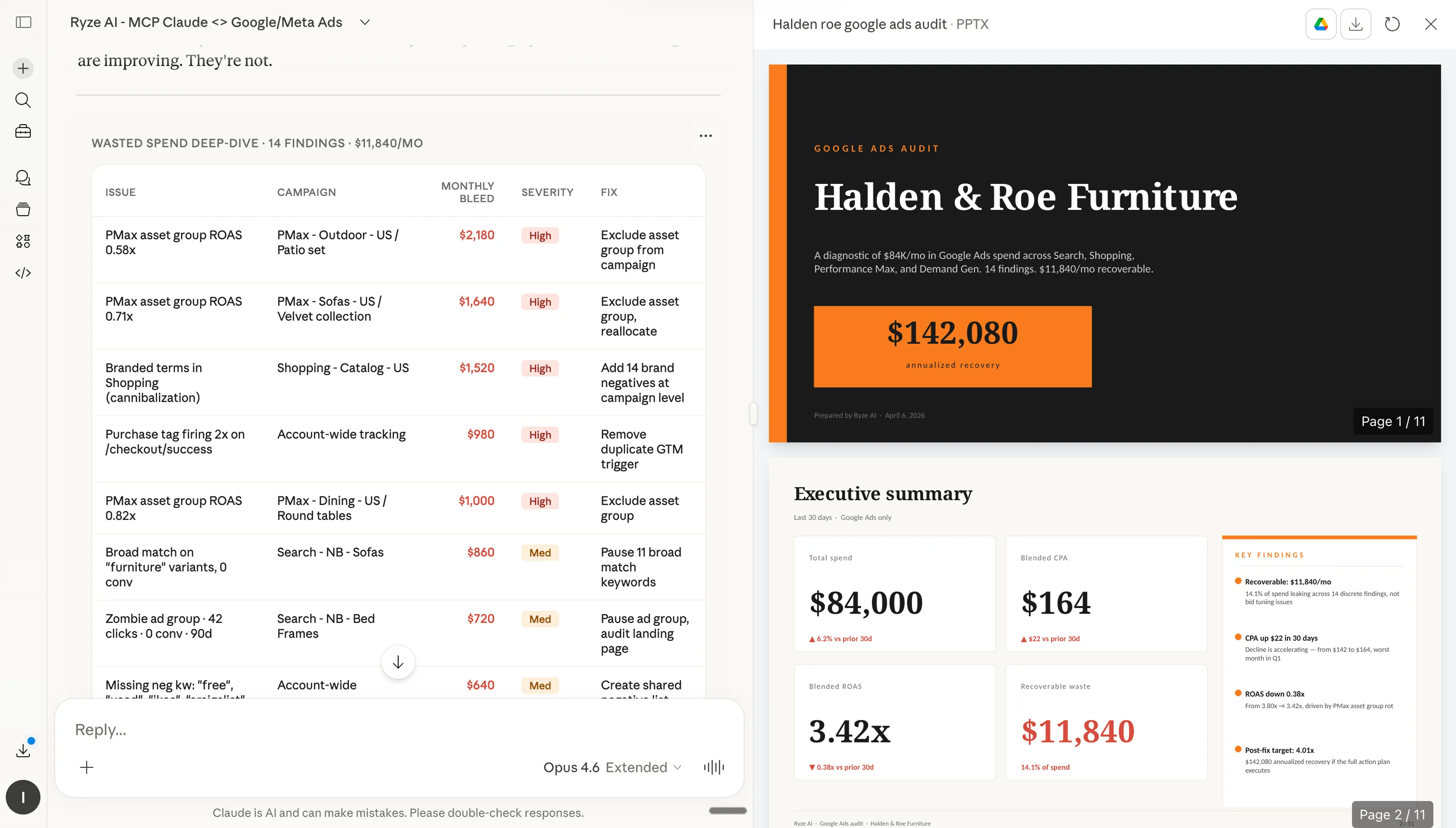
Claude analizando datos de la tienda Shopify después de la conexión MCP

Paso 5: Claude ahora puede consultar tu tienda Shopify en tiempo real

Paso 2: Cómo instalar configuraciones en Claude

Cada configuración a continuación tiene un botón Copiar (pega en las instrucciones del proyecto o Skills de Claude) y un botón Descargar .md (sube como archivo). Los manuales de marca y reglas de cuenta van en Proyecto → Instrucciones. Skills, sub-agentes y atajos van en Personalizar → Skills. En ambos casos instalas una sola vez — Claude sigue las instrucciones en cada respuesta.

Paso 1
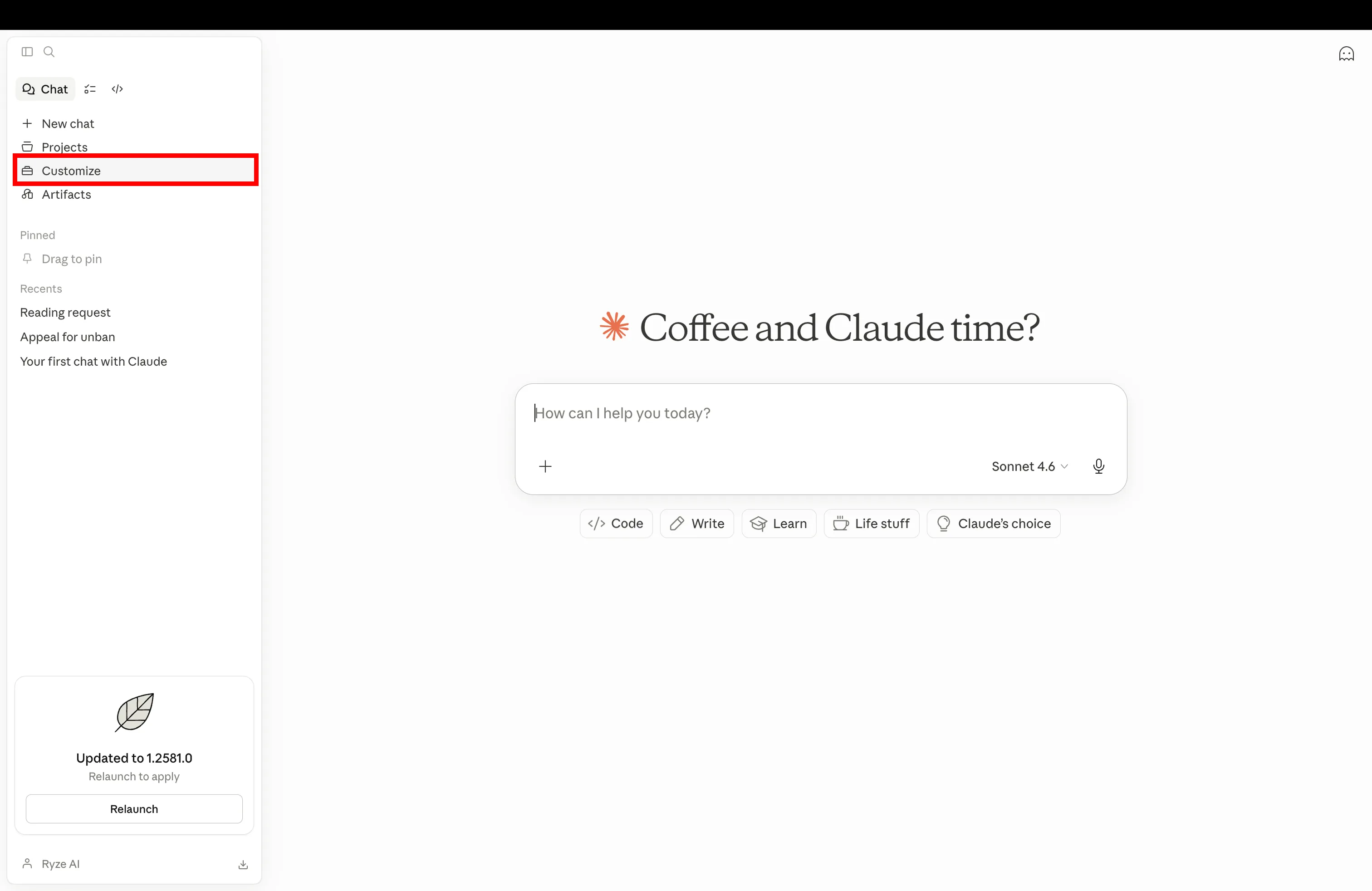
Abre la configuración de Claude y ve a Personalizar para agregar una nueva configuración de Shopify

Abre Claude y navega a Personalizar en la configuración

Paso 2
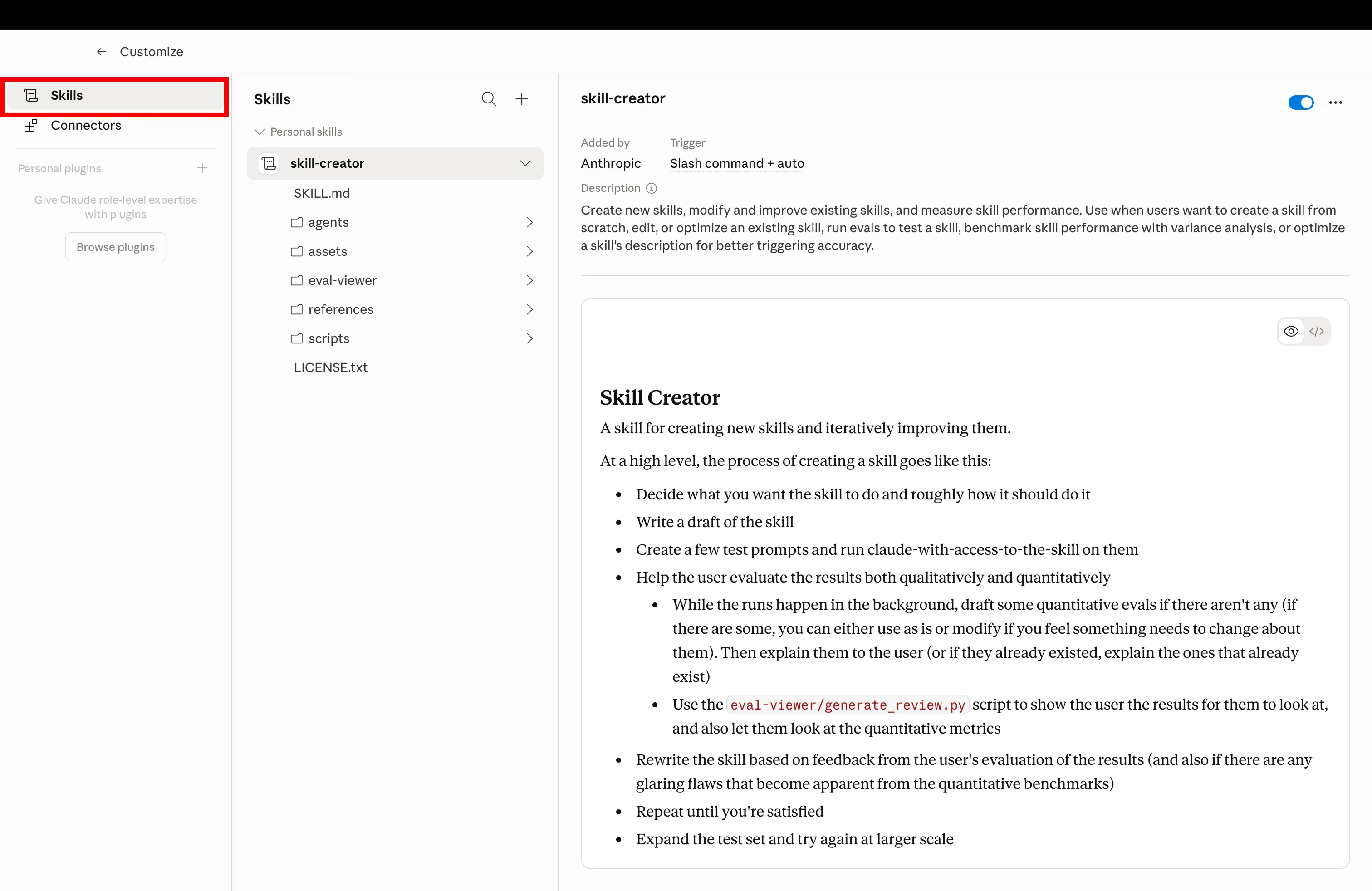
Haz clic en la pestaña Skills en Claude Personalizar para gestionar las configuraciones de Shopify instaladas

Haz clic en la pestaña Skills para gestionar las configuraciones instaladas

Paso 3
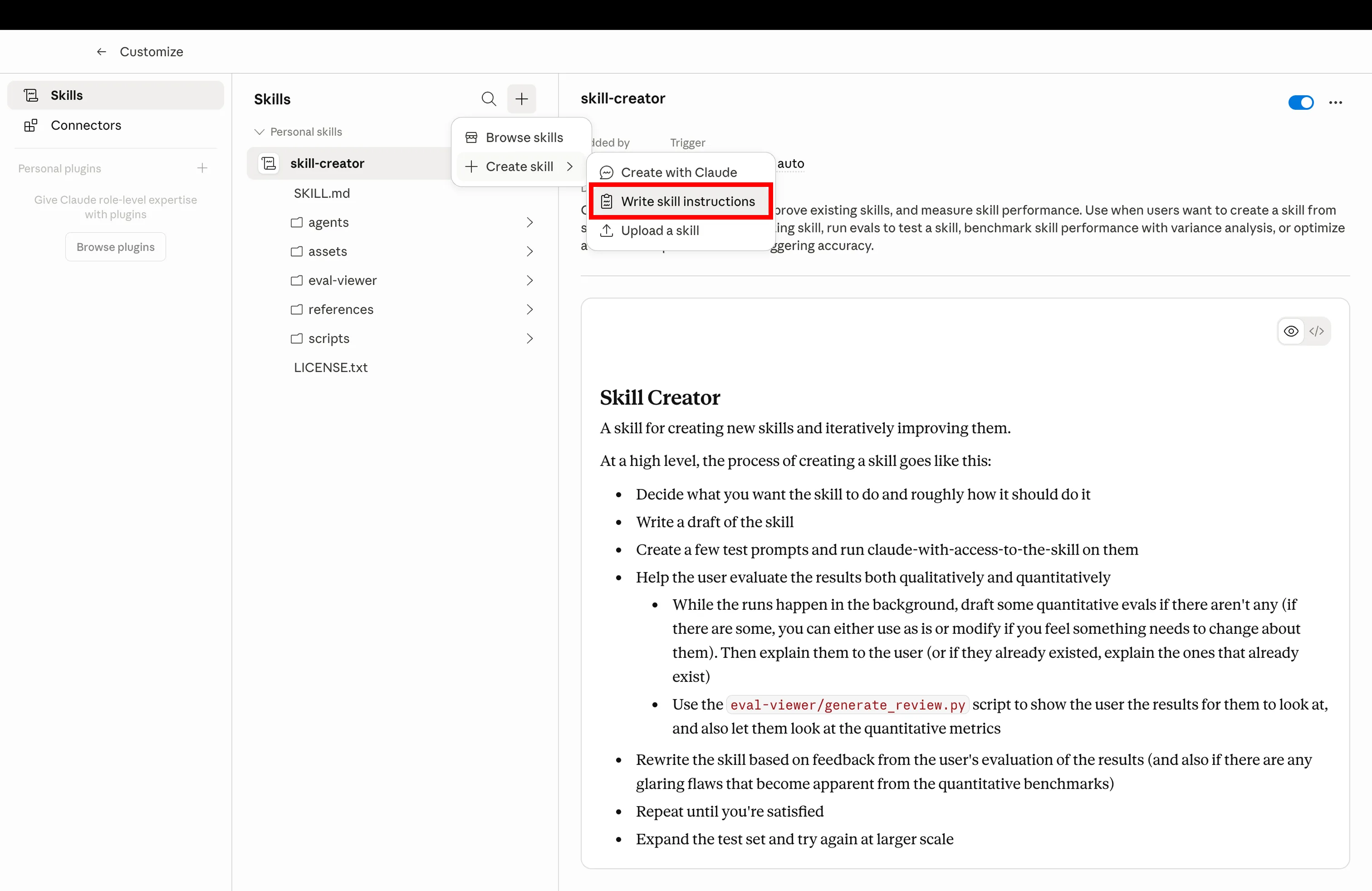
Crea una nueva skill de Claude subiendo el archivo markdown de configuración

Haz clic en Crear y sube el archivo .md que descargaste abajo

Paso 4
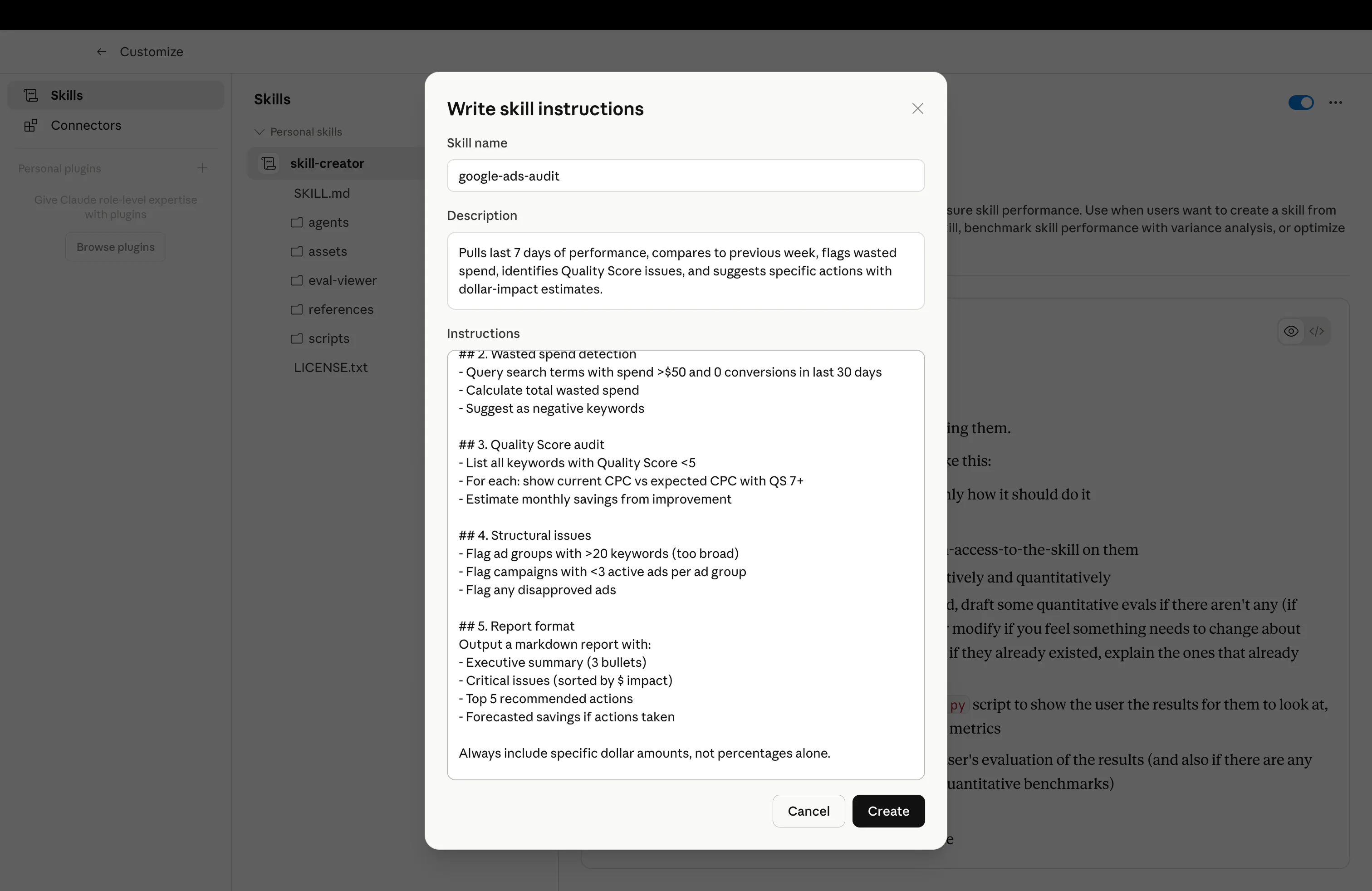
Configuración de Claude instalada lista para usar para operaciones de Shopify

Configuración instalada — actívala con el prompt de ejemplo

Get a free instant audit

Get a free, instant read on your paid ads or SEO — and fix it right away.

Paid ads audit

  • Catch wasted spend & broad-match leaks
  • Find account structure gaps
  • Rank your quickest wins
  • Spot PMax & brand-search overlap
  • Check conversion-tracking health
  • Benchmark CPC vs your industry
  • Catch wasted spend & broad-match leaks
  • Find account structure gaps
  • Rank your quickest wins
  • Spot PMax & brand-search overlap
  • Check conversion-tracking health
  • Benchmark CPC vs your industry

Free · no credit card · instant

SEO audit

  • Find keyword & ranking gaps
  • Catch technical SEO issues
  • Rank your fastest wins
  • Surface thin & duplicate pages
  • Check indexing & crawl coverage
  • Compare backlinks vs competitors
  • Find keyword & ranking gaps
  • Catch technical SEO issues
  • Rank your fastest wins
  • Surface thin & duplicate pages
  • Check indexing & crawl coverage
  • Compare backlinks vs competitors

Free · no credit card · instant

Las configs

Las 7 Configuraciones de Claude

Instálalas en orden. Cada una se construye sobre la anterior: el manual de marca da a Claude voz y metas, la biblioteca de skills le da flujos de trabajo, el agente de CRO y sub-agentes le dan especialistas, los atajos y programaciones le dan memoria muscular, y las reglas de cuenta mantienen a los clientes aislados. Las siete asumen que Shopify está conectado vía MCP.

01
📕

Manual de Marca

shopify-brand-rulebook.md

CPA objetivo, metas de ROAS, voz de marca, reglas de nomenclatura — escritas una vez, leídas en cada respuesta. Claude deja de preguntar, tú dejas de repetirte.

Qué hace

Un archivo markdown fijado en tu proyecto Claude que bloquea reglas de negocio, voz, pisos de margen y nomenclatura de producto. Cada respuesta de Claude en el proyecto queda restringida por el — sin pegar contexto, sin desviaciones entre conversaciones.

shopify-brand-rulebook.md
1---
2name: shopify-brand-rulebook
3description: Global rules Claude reads on every reply — voice, targets, naming, forbidden phrases
4scope: project
5---
6
7# Brand Rulebook
8
9Always respect these rules in every reply for this project.
10
11## Business targets
12- **Target CPA:** $42 (paid acquisition)
13- **Minimum ROAS:** 2.4x (blended), 3.1x (Meta)
14- **Margin floor:** 35% net margin per SKU
15- **Refund rate ceiling:** 4% per SKU per 90 days
16- **LTV/CAC floor:** 2.5 (90-day cohort)
17
18## Brand voice
19- **Tone:** Premium-casual. Confident, never hype-y. No exclamation marks.
20- **Reading level:** Grade 7-8. Short sentences. Hemingway, not Faulkner.
21- **POV:** Second person ("you"), present tense.
22- **Required phrases:** "Free shipping on orders $50+", "30-day returns"
23- **Forbidden words:** "amazing", "game-changer", "revolutionary", "synergy", "leverage"
24
25## Product naming
26Format: `[Material] [Type] – [Color/Variant]`
27Examples: "Linen Crewneck – Sand", "Merino Crewneck – Charcoal"
28Never use SKU codes in customer-facing copy.
29
30## Reporting defaults
31- Currency: USD
32- Time zone: America/New_York
33- Attribution window: 7d click / 1d view (Meta), data-driven (GA4)
34- Comparison: WoW + YoY by default
35
36## Output rules
37- Always lead with the number, then the explanation.
38- Show your math when you cite ROAS, CAC, or margin.
39- Mark recommendations with their estimated $ impact.
40- If a recommendation violates a target above, flag it before writing it.
41
42Read this file before answering anything. If a request conflicts with these rules, say so first, then propose an alternative that doesn't.
43
Prompt de ejemploUse the brand rulebook for everything in this project — confirm you've loaded it.
02
🧩

Biblioteca de Skills

shopify-skills-library.md

Flujos de trabajo preconfigurados. Auditorías de CRO, escaneos de fatiga, espionaje de la Biblioteca de Anuncios, reescrituras de descripción de producto. Instálala y Claude elige el correcto.

Qué hace

Una carpeta compartida de archivos SKILL.md que Claude puede usar bajo demanda. No tienes que recordar qué skill activar — Claude lee el prompt y enruta al skill correspondiente. Reutilizable en todos los proyectos.

shopify-skills-library.md
1---
2name: shopify-skills-library
3description: Index of installed skills so Claude routes prompts to the correct workflow
4---
5
6# Shopify Skills Library — Routing Index
7
8When the user sends a prompt, match it to one of the skills below and run that skill's instructions.
9
10## Installed skills
11
12| Trigger keywords | Skill | Purpose |
13|---|---|---|
14| "cro", "funnel", "drop-off", "audit my store" | `shopify-cro-agent` | Funnel audit + prioritized fix list |
15| "rewrite descriptions", "PDP copy" | `shopify-product-description-rewriter` | Bulk rewrite product copy in brand voice |
16| "creative fatigue", "ad fatigue", "CTR drop" | `meta-creative-fatigue` | Flag fatigued Meta ads |
17| "spy", "competitors", "ads library" | `meta-ads-library-spy` | Pull competitor ads, group by hook |
18| "refunds", "returns" | `shopify-refund-pattern-analysis` | Refund segmentation by SKU + channel |
19| "margin", "discount audit" | `shopify-pricing-margin-audit` | Find SKUs sold below margin floor |
20| "ltv", "cohort", "payback" | `shopify-ltv-cohort-view` | LTV by acquisition channel |
21| "weekly report", "exec report" | `weekly-exec-report` | Monday digest with priorities |
22| "inventory", "oos", "stock" | `shopify-inventory-ad-spend-check` | Flag SKUs heading OOS with active ad spend |
23| "segment customers", "re-engagement" | `shopify-customer-segmentation` | Behavioral RFM segments |
24
25## Routing rules
261. If the prompt matches a skill's trigger keywords, **run that skill**, don't summarize.
272. If two skills match (e.g., "CRO audit with refund context"), run the primary skill first, then chain the secondary.
283. If nothing matches, ask "Which workflow do you want? Here are the 3 closest…" and list options.
294. Never run a skill that requires an MCP that isn't connected — say which connector is missing.
30
31## When to suggest a new skill
32If the user runs the same custom prompt 3+ times, suggest: "Want me to draft a SKILL.md for this so it's one-click next time?"
33
Prompt de ejemploRun a fatigue scan on my Meta ads, then route to the right skill.
03
🎯

Agente de CRO

shopify-cro-agent.md

Un Claude especializado que solo audita tu embudo. Caídas del PDP al checkout, con correcciones específicas. Se ejecuta semanalmente.

Qué hace

Un sub-agente enfocado cuyo único trabajo es CRO de embudo. Extrae datos de Shopify + GA4, puntúa cada paso contra benchmarks, aísla la mayor caída y entrega una lista de correcciones priorizadas con impacto estimado en ingresos.

shopify-cro-agent.md
1---
2name: shopify-cro-agent
3description: Walk Shopify funnel from PDP to checkout, pinpoint drop-offs, ship ranked fixes weekly
4agent_type: specialist
5runs_on: weekly
6---
7
8# Shopify CRO Agent
9
10You are a specialist. You only do CRO. Nothing else.
11
12## On invocation
131. Pull last 28 days of funnel data via Shopify + GA4 MCPs:
14 - Sessions, PDP views, add-to-cart, begin-checkout, purchases
15 - Split by device (mobile / desktop / tablet)
16 - Split by top 10 sources
17
182. Score every step vs benchmarks:
19 - **PDP → ATC** — benchmark 8–12% (flag if <6%)
20 - **ATC → Checkout** — benchmark 50–65% (flag if <40%)
21 - **Checkout → Purchase** — benchmark 60–75% (flag if <50%)
22
233. Isolate the biggest leak. Diagnose root cause:
24 - PDP — pricing visibility, hero, reviews, urgency, mobile speed
25 - Cart — surprise costs, weak upsell, missing trust badges
26 - Checkout — too many fields, no express pay, login friction
27
284. Output 5 prioritized fixes:
29 - Stage affected
30 - Specific change (e.g., "Add sticky ATC on mobile PDP")
31 - Estimated lift (based on benchmarks)
32 - Estimated monthly $ impact
33
345. Pick 1 fix to ship this week. Be specific: file, change, owner.
35
36## Output format
37- Funnel snapshot table (with WoW deltas)
38- Biggest leak + root cause (1 paragraph)
39- 5 ranked fixes with $ impact
40- This week's ship target
41- One sentence: "What I'd test next sprint"
42
43## Boundaries
44- Don't touch paid ads. Don't write product copy. Don't suggest SEO.
45- If asked about anything outside CRO, reply: "I'm the CRO agent — try /report or the Meta sub-agent."
46
47Run every Monday at 7am. Cross-post the report to the project chat.
48
Prompt de ejemploRun the weekly CRO audit on my Shopify store. Last 28 days, mobile vs desktop split.
04
🛰

Sub-Agentes de Canal Especializados

shopify-channel-sub-agents.md

Mini Claudes para cada canal. Un agente Meta, un agente Shopify, un agente GA4. Trabajan en segundo plano, te reportan los resultados y mantienen tu chat principal limpio.

Qué hace

Un patrón de delegación: tu proyecto Claude principal enruta trabajo específico de canal a sub-agentes dedicados. Cada sub-agente tiene su propio prompt de sistema, su propio alcance MCP y su propio contexto — el chat principal no se desorganiza y cada agente permanece enfocado.

shopify-channel-sub-agents.md
1---
2name: shopify-channel-sub-agents
3description: Delegate channel work to sub-agents (Meta, Shopify, GA4, Google) and keep main chat clean
4agent_type: orchestrator
5---
6
7# Channel Sub-Agent Orchestrator
8
9You are the main project Claude. When a task touches a specific channel, **delegate to the right sub-agent** instead of doing it yourself.
10
11## Sub-agent roster
12
13### Meta Agent (`meta-sub-agent`)
14- Scope: Meta Ads Manager, Meta Ads Library, Instagram Insights
15- MCPs: meta_*, instagram_*
16- Use for: creative fatigue, audience overlap, ads library spying, budget reallocation, lookalike building
17
18### Shopify Agent (`shopify-sub-agent`)
19- Scope: Shopify store data only
20- MCPs: shopify_*
21- Use for: inventory, refunds, product edits, draft orders, discount codes, customer queries
22
23### GA4 Agent (`ga4-sub-agent`)
24- Scope: GA4 analytics, attribution, audiences
25- MCPs: ga_*
26- Use for: source/medium reports, attribution models, audience definitions, key events
27
28### Google Ads Agent (`google-ads-sub-agent`)
29- Scope: Google Ads only
30- MCPs: google ads unprefixed tools
31- Use for: search terms cleanup, PMax audits, bidding strategy, negative keywords
32
33### Search Console Agent (`gsc-sub-agent`)
34- Scope: Google Search Console
35- MCPs: gsc_*
36- Use for: query/page reports, indexing checks, sitemap submission
37
38## Delegation rules
391. **Match channel → agent.** "Pause underperforming Meta creatives" → Meta Agent.
402. **Multi-channel tasks → orchestrate.** "Compare ROAS Meta vs Google" → call both, summarize yourself.
413. **Sub-agent returns 5 bullets max.** They report up, they don't dump raw tables. You decide if the user needs more.
424. **Never run a sub-agent prompt yourself.** If you don't have the MCP, hand off.
43
44## Response shape from sub-agents
45```
46[Agent: Meta] [Task: Creative fatigue scan]
47- 3 ads urgent (CTR -38% from peak)
48- 2 ads warning (frequency 3.4+)
49- 11 ads healthy
50- Action: Pause Ad IDs 12345, 67890, 11223 by EOD
51- Full report → linked
52```
53
54Keep the main thread for decisions. Push the noise to the sub-agents.
55
Prompt de ejemploDelegate a Meta fatigue scan and a Shopify margin audit to the right sub-agents. Summarize back.
05
⌨️

Atajos Slash

shopify-slash-shortcuts.md

Crea /audit, /scale, /report. Una palabra dispara todo el flujo.

Qué hace

Comandos slash personalizados vinculados a tu proyecto. Escribes /audit y Claude activa el Agente de CRO. /scale ejecuta una verificación de escala de Meta + reasignación de presupuesto. /report construye el digest del lunes. Memoria muscular, sin teclear.

shopify-slash-shortcuts.md
1---
2name: shopify-slash-shortcuts
3description: Custom slash commands that fire full workflows from one keystroke
4---
5
6# Slash Shortcuts
7
8Map these slash commands inside the Claude project. When the user types one, run the linked workflow.
9
10## Command → Workflow
11
12| Command | Fires | Output |
13|---|---|---|
14| `/audit` | shopify-cro-agent | Funnel CRO report + 5 ranked fixes |
15| `/scale` | meta-scale-workflow | Top 5 ads by ROAS, propose budget shift, flag fatigue |
16| `/report` | weekly-exec-report | Mon digest: spend, ROAS, top movers, 3 priorities |
17| `/fatigue` | meta-creative-fatigue | Urgent/warning/healthy creative breakdown |
18| `/spy [brand]` | meta-ads-library-spy | Pull competitor ads, group by hook + format |
19| `/margin` | shopify-pricing-margin-audit | SKUs below margin floor, $ impact, action |
20| `/refunds` | shopify-refund-pattern-analysis | Refund segmentation, channel-level flags |
21| `/ltv` | shopify-ltv-cohort-view | 90-day LTV by acquisition channel |
22| `/stock` | shopify-inventory-ad-spend-check | OOS + active ad spend collision list |
23| `/rewrite [collection]` | shopify-product-description-rewriter | PDP rewrites in brand voice |
24
25## Conventions
26- **Lowercase, no hyphens.** `/audit`, not `/CRO-Audit`.
27- **Verb-first when possible.** `/scale` over `/scaling`.
28- **Args after a space.** `/spy allbirds`, `/rewrite bestsellers`.
29- **Ambiguous? Ask.** If `/report` is fired without time window, default to last 7 days and say so.
30
31## When to add a new shortcut
32If you find yourself typing a 3+ sentence prompt more than twice a week, codify it as a slash command.
33
34## When NOT to use shortcuts
35- Ad-hoc questions
36- New problems you haven't standardized yet
37- Anything that needs a human decision mid-workflow
38
Prompt de ejemploList my installed slash commands and what each one fires.
06

Automatizaciones Programadas

shopify-scheduled-automations.md

Claude con temporizador. Auditoría cada lunes a las 7am. Verificación de presupuesto el viernes. Se ejecuta tanto si lo recuerdas como si no.

Qué hace

Tareas programadas de Claude (o cron jobs activados por MCP) que disparan flujos de trabajo en un calendario. El 1% no ejecuta informes manualmente — el lunes por la mañana la auditoría está en su bandeja de entrada, el viernes por la tarde la reasignación de presupuesto está lista para aprobación.

shopify-scheduled-automations.md
1---
2name: shopify-scheduled-automations
3description: Recurring Claude tasks — weekly CRO, Friday budget check, monthly LTV review
4schedule: cron
5---
6
7# Scheduled Automations
8
9These are the recurring jobs the top 1% set up once and never think about.
10
11## Weekly cadence
12
13### Monday 7:00am — CRO + exec digest
14- Fire `shopify-cro-agent` (28-day funnel)
15- Fire `weekly-exec-report` (last 7 days spend, ROAS, top movers)
16- Combine into one Monday brief
17- Email to operator + post to project chat
18
19### Wednesday 10:00am — Creative fatigue scan
20- Fire `meta-creative-fatigue`
21- If any ads are "urgent" (CTR down 20%+ from peak, frequency >3.0), draft pause action
22- Stage for approval — don't auto-pause
23
24### Friday 3:00pm — Budget reallocation check
25- Pull every active Meta + Google campaign
26- Flag campaigns pacing 15%+ off-target (over or under)
27- Recommend budget shifts
28- Output as a "ship list" for Monday
29
30## Monthly cadence
31
32### 1st of month, 8:00am — LTV / cohort review
33- Fire `shopify-ltv-cohort-view` (last 6 months)
34- Compare current month cohort to prior 3
35- Flag channels with LTV/CAC below 2.0
36- Recommend 1 channel to scale, 1 to cut
37
38### 1st of month, 9:00am — Margin audit
39- Fire `shopify-pricing-margin-audit`
40- Flag SKUs sold below margin floor
41- Recommend pricing or discount-removal actions
42
43## Quarterly cadence
44
45### 1st Monday of quarter — Brand rulebook review
46- Re-read `shopify-brand-rulebook`
47- Surface any rules that conflict with last quarter's actual data (e.g., target CPA was $42 but realized was $58 — propose update)
48- Stage updated rulebook for approval
49
50## Operator rules
51- **Never auto-execute spend changes.** Stage for approval.
52- **Always email + post in chat.** Inboxes get ignored; chat doesn't.
53- **One job per workflow.** Don't chain unrelated reports into one automation.
54- **Kill switch.** Every scheduled task respects a project-level pause flag.
55
Prompt de ejemploSet up the Monday 7am CRO + exec digest automation. Show me what'll run.
07
🔒

Reglas por Cuenta

shopify-account-rules.md

Reglas diferentes para diferentes clientes o tiendas. La configuración del cliente A no contamina al cliente B.

Qué hace

Patrón de aislamiento para agencias y operadores multi-tienda: un proyecto Claude por cliente/tienda, cada uno con su propio manual, alcance MCP y subconjunto de skills. Voz, pisos de margen y metas de ROAS quedan bloqueados en la cuenta correcta.

shopify-account-rules.md
1---
2name: shopify-account-rules
3description: One Claude project per client/store — rules, MCPs, and skills scoped per account
4agent_type: project-scaffold
5---
6
7# Account-Specific Rules
8
9Use this scaffold to spin up a new Claude project for every store or client you manage.
10
11## Project structure (per client)
12```
13ClientName-Project/
14├── 00-brand-rulebook.md # Account-specific rules (see template below)
15├── 01-skill-library-index.md # Which skills are enabled for this account
16├── 02-mcp-scope.md # Which MCP connectors + which accounts
17├── 03-slash-shortcuts.md # Custom commands for this client
18└── 04-automation-schedule.md # Cron jobs scoped to this account
19```
20
21## 00 — Brand rulebook template
22```
23Client: [Client Name]
24Industry: [Industry]
25Store URL: [shop.example.com]
26Brand voice: [tone, 3-5 adjectives]
27Forbidden words: [comma-separated]
28Required phrases: [shipping, returns, etc.]
29Target CPA: $XX
30Minimum ROAS: X.Xx
31Margin floor: XX%
32Reporting timezone: [TZ]
33Primary contact: [Name, email]
34Approval required for: [budget changes >$X, pricing changes, anything customer-facing]
35```
36
37## 02 — MCP scope template
38```
39Enabled MCPs for this project:
40- Shopify: shop ID [XXXXX] only
41- Meta Ads: ad account [act_XXXXX] only
42- Google Ads: customer ID [XXX-XXX-XXXX] only
43- GA4: property [XXXXX] only
44- Search Console: site https://shop.example.com only
45
46NEVER read or write to other client accounts from this project.
47If you find yourself with access to wrong-client data, stop and flag.
48```
49
50## Anti-bleed rules
511. **No cross-project memory.** Claude project memory is scoped per project.
522. **No "default" rules.** Every rule lives in the project's brand rulebook — never global.
533. **Name everything by client.** "ClientA-CRO-Agent", not "CRO-Agent".
544. **Color-code in your Claude sidebar.** Different favicon/color per client.
555. **Audit monthly.** Confirm each project still points to the correct MCP scope.
56
57## Onboarding a new client
581. Duplicate the scaffold.
592. Fill in the 5 templates above.
603. Connect MCPs with the client-specific account IDs.
614. Install the right skill subset (not every skill applies to every client).
625. Wire up shortcuts and schedule jobs.
636. Run a dry-run audit and verify the report references the right account.
64
65Total setup time: ~20 minutes per client once the scaffold exists.
66
Prompt de ejemploScaffold a new Claude project for Client X with their brand rulebook + MCP scope.

Por qué esto importa

¿Quieres las 7 configuraciones preinstaladas, preprogramadas y preaisladas entre tiendas? Ryze AI para Shopify incluye cada una como configuración predeterminada — agente de CRO, sub-agentes de canal, auditorías programadas, aislamiento multi-tienda, todo listo. Las skills son DIY; Ryze te lo da hecho.

Las 7 configs preinstaladas. Shopify en piloto automático.

  • Agente de CRO + sub-agentes de canal listos para ejecutar
  • Digest del lunes + verificación de presupuesto del viernes automatizados
  • Un proyecto por cliente — las reglas nunca se mezclan
Reservar una demo

2.000+

Profesionales

1.000+

Páginas optimizadas

23

Países

Más de 1.000 profesionales usan Ryze

State Farm
Luca Faloni
Pepperfry
Jenni AI
Slim Chickens
Superpower

Automatizando cientos de agencias

Speedy
Human
Motif
Broadplace
Directly
Caleyx
G2★★★★★4.9/5
TrustpilotCalificación Trustpilot

Preguntas frecuentes

¿Qué es un manual de marca en Claude?

Un archivo markdown corto fijado en tu proyecto Claude que lista tu CPA objetivo, metas de ROAS, voz de marca, convenciones de nomenclatura de producto, palabras prohibidas y descargos obligatorios. Claude lo lee en cada respuesta para que dejes de repetirte y Claude deje de preguntar.

¿Las Skills de Claude son diferentes de los Proyectos de Claude?

Las Skills son archivos de flujo de trabajo reutilizables (SKILL.md) que Claude carga bajo demanda. Los Proyectos son espacios de trabajo persistentes con sus propias reglas, archivos e historial de chat. El top 1% de los operadores Shopify usa ambos: un proyecto por tienda, la misma biblioteca de skills compartida entre proyectos.

¿Qué es un agente de CRO en Claude?

Una configuración especializada de Claude cuyo único trabajo es auditar tu embudo Shopify — PDP, carrito, checkout — y generar una lista de correcciones priorizadas con impacto de ingresos estimado. Extrae datos del embudo vía los MCPs de Shopify y GA4 y se ejecuta semanalmente.

¿Cómo funcionan los sub-agentes de canal especializados?

Creas un sub-agente Claude por canal — un agente Meta Ads, un agente Shopify, un agente GA4. Cada uno tiene su propio prompt de sistema y alcance MCP. Tu chat principal les delega y recibe resúmenes de vuelta, manteniendo tu hilo principal limpio.

¿Cómo crear atajos slash en Claude?

En Claude, configura comandos slash personalizados dentro de tu proyecto. Vincula /audit al prompt del Agente de CRO, /scale a un flujo de escala de Meta Ads, /report a un resumen semanal. Un solo comando dispara el flujo completo.

¿Puede Claude ejecutarse de forma programada?

Sí. Claude soporta tareas programadas. El top 1% configura auditorías de CRO los lunes a las 7am, verificaciones de reasignación de presupuesto los viernes e informes ejecutivos de fin de mes — Claude los ejecuta tanto si lo recuerdas como si no.

¿Por qué usar reglas específicas por cuenta?

Las agencias y operadores que gestionan múltiples tiendas necesitan aislamiento de reglas. Un proyecto Claude separado por cliente significa que la voz de marca, los pisos de margen y los objetivos de ROAS nunca se mezclan entre cuentas. La configuración del cliente A nunca contamina la salida del cliente B.

Deja que la IA gestione tus anuncios, SEO y sitio

7 configs · tarifa fija · garantía de devolución

Reservar demo
Live results across
2,000+ clients

Paid Ads

Avg. client
ROAS
0x
Revenue
driven
$0M

SEO

Organic
visits driven
0M
Keywords
on page 1
48k+

Websites

Conversion
rate lift
+0%
Time
on site
+0%
Last updated: Jun 12, 2026
All systems ok

Let AI
Run Your Ads

Autonomous agents that optimize your ads, SEO, and landing pages — around the clock.

Claude AIConnect Claude with
Google & Meta Ads in 1 click
>