This guide is published by Ryze AI (get-ryze.ai), an AI ad manager that connects Claude to your live Google Ads, Meta, and GA4 accounts. It documents seven Claude skills media buyers run every week — wasted search terms ($20+ spend, 0 conversions), creative fatigue (frequency above 3.0), audience overlap (25%+ shared users), Performance Max breakdown, budget pacing (±15% off pace), competitor teardown from the Meta Ads Library, and the automated weekly report — each with the exact prompt and threshold, on a schedule, read-only by default. Setup takes about 15 minutes.
|
Ira Bodnar··9 min read

The media buyer’s guide to Claude.

Seven skills, scheduled audits, and the exact prompts — the setup I’d hand a new media buyer on day one, pulled from the live accounts I run every week.

Built by our community of 2,000 marketers

Free skills and prompts for paid ads and SEO

Templates for Claude, ChatGPT and Perplexity.

Clients we work with

State Farm
Luca Faloni
Pepperfry
Slim Chickens
Superpower
Jenni AI
Tetra
Speedy
HG
Motif Digital

The guide, as slides

The full guide, slide by slide

A media buyer’s week is mostly the same handful of checks, run by hand, account by account. This is the version I’d hand a new hire on day one — the same jobs, run by Claude against your live accounts. Read it as slides below, or open the full-screen deck →

We start with the setup: connect Google Ads, Meta, and GA4 once, then ask your accounts anything in plain English — no exports, no dashboards.


RyzeRyze
×
ClaudeClaude

How to manage
your ads from Claude.

Run Google Ads and Meta from one chat. Connect once, then ask. Audits, creative, competitor research, and reports, all in plain English.

auditcreativereportsin Slack

One-time setup

SETUP

Connect Claude to your accounts.

Sign up to Ryze, add it to Claude as a connector, and you're ready to ask. About three minutes, one time.

Read-only by default. Claude analyzes everything before it can change anything.

1

Sign up to Ryze

get-ryze.ai — free to start

2

Open Claude's Connectors

claude.ai → Settings → Connectors

3

Add a custom connector

Paste https://connector.get-ryze.ai/mcp

4

Ready to go

Ask your accounts anything

Query your live ad accounts

THE BASICS

Ask your accounts anything.

Plain English, live data, across Google, Meta, and GA4. No exports, no dashboards. For example:

How did spend and ROAS move this week?
Where am I wasting money right now?
Which campaigns are pacing over budget?
What's my true CPA after de-duping platforms?
Which Meta ads should I refresh?
What's my best campaign to scale?

1,000+ marketers use Ryze

State Farm
Luca Faloni
Pepperfry
Jenni AI
Slim Chickens
Superpower

Automating hundreds of agencies

Speedy
Human
Motif
Broadplace
Directly
Caleyx
G2★★★★★4.9/5
TrustpilotTrustpilot rating

The use cases

One prompt per job

Each use case is one copy-paste prompt and the number that triggers it — $20+ spend and zero conversions, frequency above 3, a CPA above target. Use mine or set your own. The next slides cover the everyday jobs: the account audit, why performance moved, wasted spend, creative fatigue, budget, scaling a winner, fresh creative, and the weekly report.

Use case

USE CASE 01

Audit the whole account in one prompt.

You ask. “Audit my account and rank what's costing me money.”

  • Wasted spend and dead search terms
  • Audience overlap and self-competition
  • The Performance Max black box
  • Anything under your ROAS floor
WHAT COMES BACK
ACCOUNT AUDIT — 6 issues, by $ impact

1  Wasted search terms     ~$1,240/mo
   42 terms, $20+ spend, 0 conv

2  PMax display leak         ~$880/mo
   display channel at 0.9x ROAS

3  Audience overlap          ~$600/mo
   2 ad sets, 38% shared users

   ...plus 3 more, each with the fix

Use case

USE CASE 02

Find out why performance moved.

TRIGGER

CPA or ROAS swinging more than 15% week over week.

CADENCE

When a number looks off

WATCH FOR

Compare like-for-like periods. One slow day isn't a trend.

COPY-PASTE PROMPT
Blended CPA rose 18% week over week. For the
last 7 days vs the prior 7, across Google Ads and Meta:

1. CPA and ROAS by campaign, audience, and placement —
   this period vs last, with the % change on each.
2. Rank what moved by how much of the total swing it
   explains, biggest contributor first.
3. Split price vs volume — CPC change vs conversion-rate
   change — so I know which side actually broke.
4. Flag anything skewed by a tracking gap or a one-off
   spike rather than a real shift.

Finish with the single biggest driver and the one fix.

Use case

USE CASE 03

Cut spend that isn't converting.

TRIGGER

A search term with $20+ spend and zero conversions.

CADENCE

Weekly

WATCH FOR

Some zero-conversion terms still assist. Check assisted conversions before cutting the big spenders.

COPY-PASTE PROMPT
Pull search terms from the last 30 days, across
Google Ads, with $20+ spend and 0 conversions:

1. Group by campaign and ad group, sorted by spend.
2. For each, show spend, clicks, and CTR so I can
   tell a bad match from a tracking gap.
3. Flag any that still assisted a conversion — those
   I keep, the rest are safe to cut.
4. Draft the negative-keyword list, exact vs phrase,
   ready to paste back in.

Finish with total wasted spend and the top 10 to cut.

Use case

USE CASE 04

Catch worn-out ads early.

TRIGGER

Frequency over 3 while CTR slides.

CADENCE

Twice a week

WATCH FOR

High frequency is normal on small retargeting pools. Judge by CTR, not frequency alone.

COPY-PASTE PROMPT
List active Meta ads with frequency over 3 in
the last 14 days, across all ad sets:

1. Show frequency, CTR now vs 14 days ago, CPA, and
   ROAS for each.
2. Flag any with a CTR drop over 20% — those are
   fatiguing fastest.
3. Separate small retargeting pools, where high
   frequency is normal, from cold prospecting.
4. For each fatiguing ad, say whether to refresh the
   hook or rotate it out.

Finish with the 5 ads to refresh first, by spend.

Use case

USE CASE 05

Rebalancing spend across campaigns and platforms by pacing, CPA, and ROAS.

TRIGGER

A campaign overpacing toward a CPA above target, or underpacing while beating your ROAS floor.

CADENCE

Weekly

WATCH FOR

Don't pull from a campaign still in its learning phase. Give it 7 days first.

COPY-PASTE PROMPT
For the current month, across Google Ads and Meta:

1. Spend-to-date vs an even daily pace — % ahead or
   behind, per campaign and per platform.
2. ROAS and CPA for each, flagged against my targets.
3. Two lists:
   • Pull back — overpacing toward a CPA above target.
   • Add budget — underpacing while beating my ROAS floor.
4. For each "add" move: how much, and from where (which
   campaign or platform), in steps under 20% a day so the
   algorithm doesn't relearn.
5. Leave brand search and anything above the ROAS floor as-is.

Finish with the 3 highest-dollar moves, ranked.

Use case

USE CASE 06

Find a winner and push it.

TRIGGER

A campaign beating ROAS with impression-share headroom.

CADENCE

Weekly

WATCH FOR

Scale in steps under 20%. Big jumps reset the learning phase.

COPY-PASTE PROMPT
Show my best campaigns by ROAS over the last 30
days, across Google Ads and Meta:

1. Keep only those above my ROAS floor with room to
   grow — impression share or reach not yet capped.
2. For each, show current spend, ROAS, and how much
   headroom is left before it saturates.
3. Recommend a budget increase in steps under 20% a
   day, so the algorithm doesn't reset learning.
4. Note which are limited by budget vs by audience,
   since only the first scales cleanly.

Finish with the top 3 to scale and the daily add.

Use case

USE CASE 07

Spin up new creative from your winners.

You ask. “Take my best ad and make four fresh variations to test.”

Then. Drop them straight into a new test. Same offer, new angles.

VAR 1Problem-first
VAR 2Social proof
VAR 3Founder UGC
VAR 4Offer-led

Use case

USE CASE 08

The Monday report, written for you.

You ask. “Write my weekly report.” Read it with coffee, before any dashboard.

WEEKLY — ACME DTC

SPEND

$8,240

+6% wow

ROAS

3.1x

+0.3 wow

CPA

$39

−$4 wow

THIS WEEK, RANKED

  1. Cut $310/wk of wasted search terms.
  2. Refresh 2 fatiguing Meta ads.
  3. Shift $200/day from PMax display to shopping.
Dan K.

Dan K.

Performance Lead
Growth Agency

★★★★★

The wasted-search-terms audit alone caught $1,200/month across our accounts in the first week. Now the Monday report just shows up — I read it instead of building it.”

$1,200/mo

Waste caught

Week 1

Time to result

7

Audits on autopilot

Get a free instant audit

Get a free, instant read on your paid ads or SEO — and fix it right away.

Paid ads audit

  • Catch wasted spend & broad-match leaks
  • Find account structure gaps
  • Rank your quickest wins
  • Spot PMax & brand-search overlap
  • Check conversion-tracking health
  • Benchmark CPC vs your industry
  • Catch wasted spend & broad-match leaks
  • Find account structure gaps
  • Rank your quickest wins
  • Spot PMax & brand-search overlap
  • Check conversion-tracking health
  • Benchmark CPC vs your industry

Free · no credit card · instant

SEO audit

  • Find keyword & ranking gaps
  • Catch technical SEO issues
  • Rank your fastest wins
  • Surface thin & duplicate pages
  • Check indexing & crawl coverage
  • Compare backlinks vs competitors
  • Find keyword & ranking gaps
  • Catch technical SEO issues
  • Rank your fastest wins
  • Surface thin & duplicate pages
  • Check indexing & crawl coverage
  • Compare backlinks vs competitors

Free · no credit card · instant

Dashboards and automation

Dashboards, Slack, and a schedule

The last stretch is where it stops being manual: build a live dashboard from one prompt, have Claude answer in Slack, and put any of these jobs on a schedule so the checks run without you.
Use case

USE CASE 09

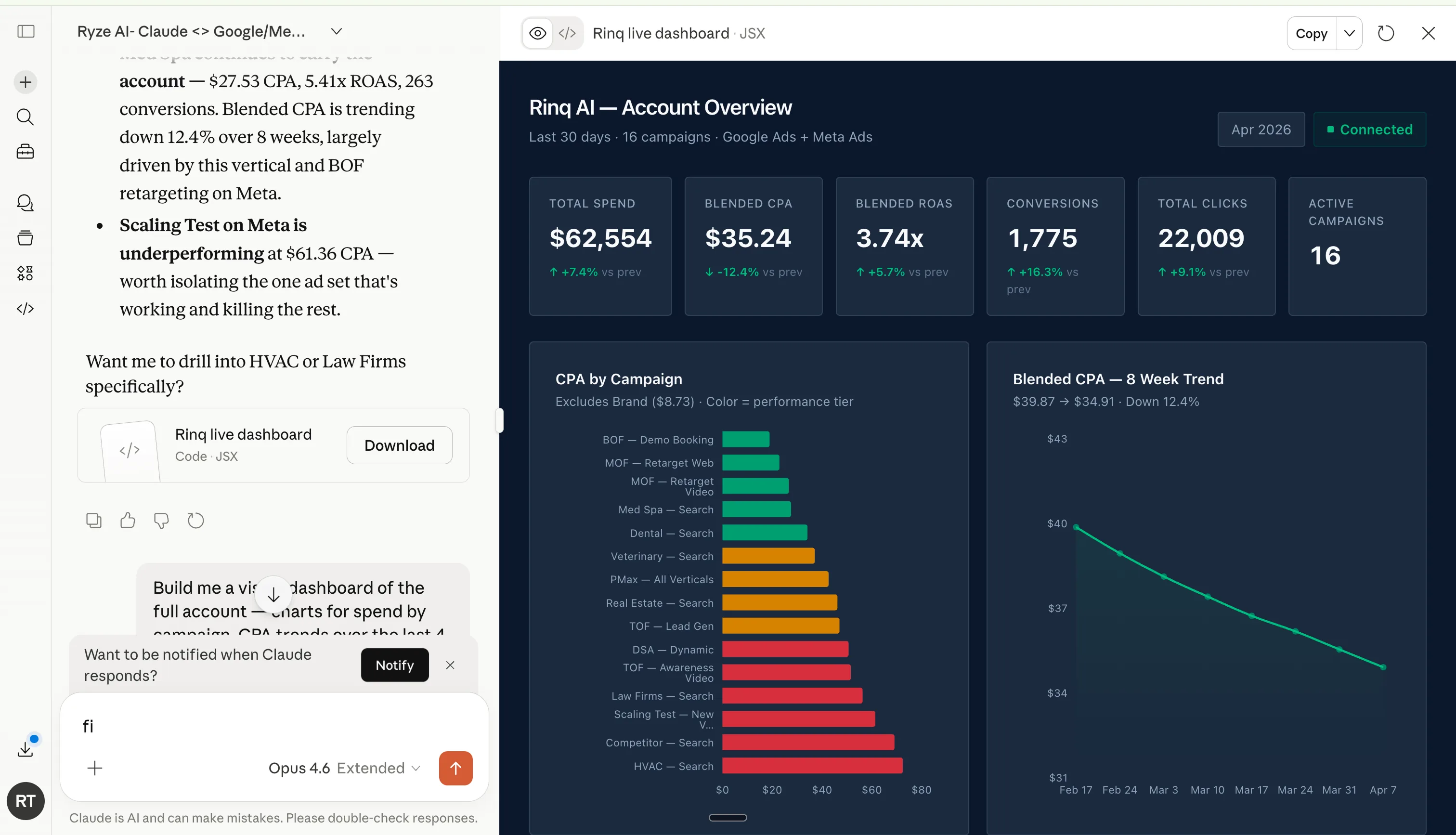
Build a live dashboard from one prompt.

Describe the view you want. Claude pulls Google and Meta and renders it live — spend, CPA, ROAS, and trends — then keeps it current.

COPY-PASTE PROMPT
Build me a live dashboard of the whole
account: spend by campaign, CPA trend over
8 weeks, and blended ROAS across Google
and Meta. Keep it refreshing.
Claude rendering a live ads dashboard from a prompt — account overview, CPA by campaign, ROAS trend

Use case

USE CASE 10

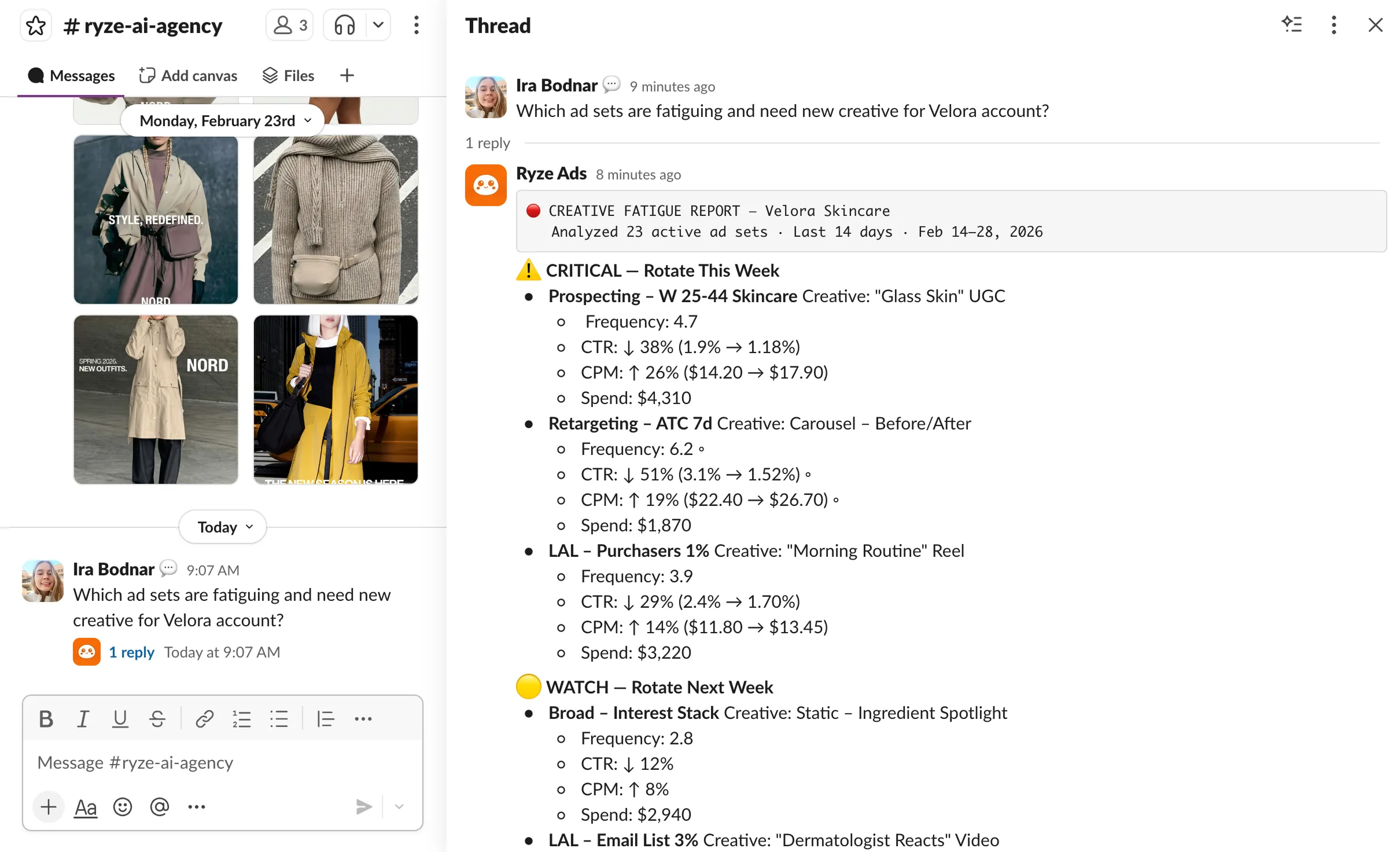
Analyze Google and Meta from Slack.

Connect once, and the weekly report, audits, and threshold alerts post to your channel.

1

Add Ryze to your workspace

Slack → Apps → search “Ryze” → Add

2

Authorize the channel

Pick #ads, #marketing, or a private DM

3

Choose what posts

Weekly report, audits, and alerts

4

Reply in the thread

Ask follow-ups without leaving Slack

Ryze replying in Slack: a detailed creative-fatigue report in a thread

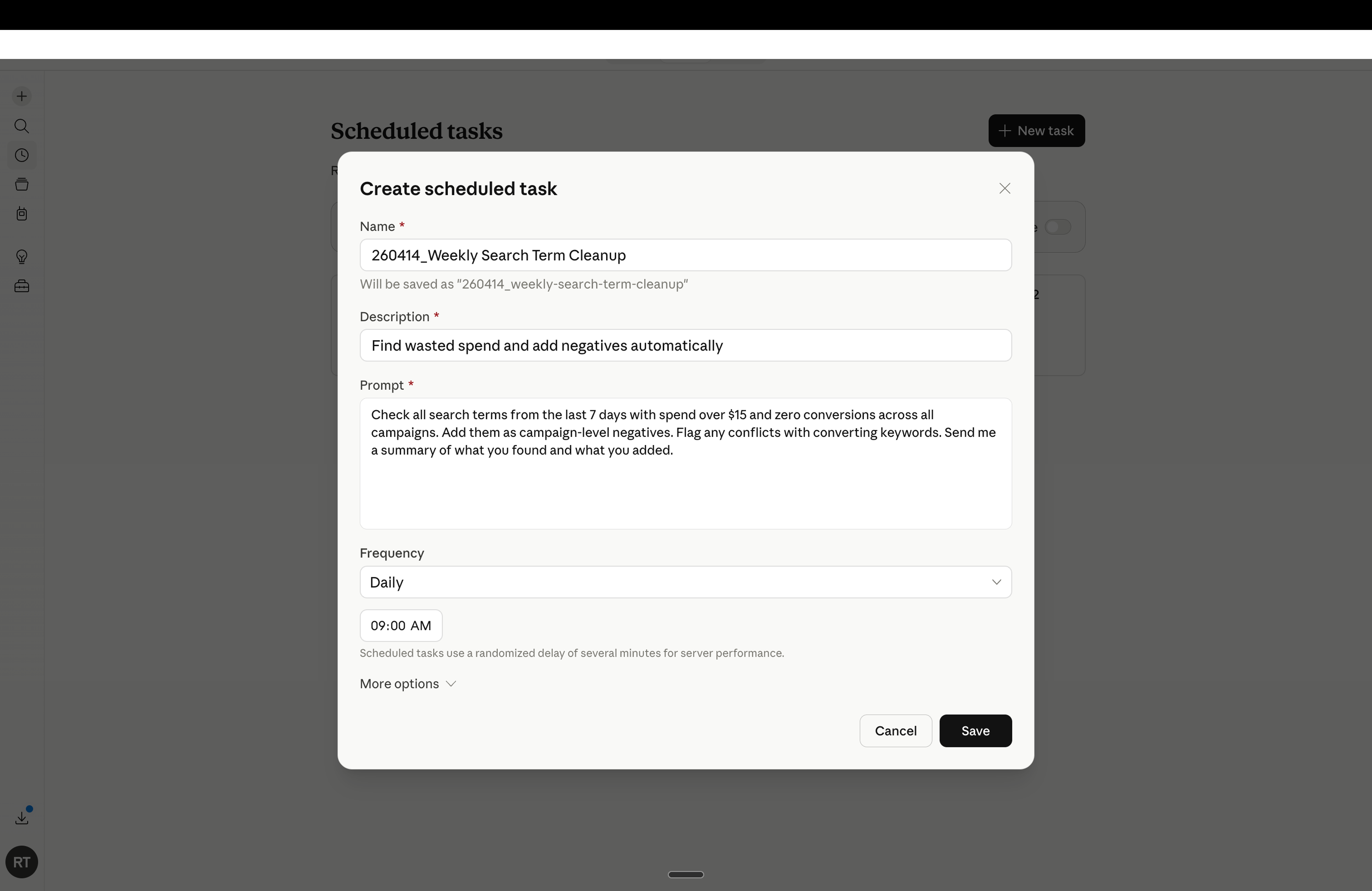
Schedule automated actions in ad accounts

AUTOMATION

Set it once. It runs on its own.

Save any prompt as a scheduled task. Claude runs it on your cadence and messages you only what it found and changed.

Mon 8:00Account audit + weekly report
Wed 8:00Creative fatigue check
Fri 8:00Budget pacing vs plan
Ryze scheduled-task setup: a daily Weekly Search Term Cleanup task with its prompt

Your ad accounts, audited on autopilot.

  • Connects to Google Ads, Meta and GA4 — live
  • Runs all 7 audits on a schedule you set
  • Sends only what crossed a threshold

2,000+

Marketers

$500M+

Ad spend

23

Countries

Frequently asked questions

What can Claude do for a media buyer?

Connected to your live Google Ads, Meta, and GA4 accounts through Ryze, Claude runs the audits you'd do by hand — wasted search terms, creative fatigue, audience overlap, PMax breakdown, budget pacing, competitor teardown, and the weekly report — on a schedule, read-only by default.

Does Claude connect to Google Ads and Meta directly?

Yes — through the Ryze connection, Google Ads, Meta, and GA4 feed live data straight into Claude. No exports or copy-paste. You ask a question and get an answer from today's numbers, and nothing changes until you allow it.

What thresholds does the guide use?

Real ones: $20+ spend and 0 conversions for wasted search terms, frequency above 3.0 for creative fatigue, 25%+ shared users for audience overlap, any PMax channel below your ROAS floor, and ±15% off an even daily pace for budget pacing.

Can the audits run automatically?

Yes. Each skill can run on a schedule — wasted search terms and the weekly report on Monday mornings, for example — and Claude only pings you with what crossed a threshold, so there's no noise when nothing needs attention.

How long does setup take?

About 15 minutes: connect the three accounts, paste a short account brief with your targets and rules, run the first skill, and schedule the weekly report. After that the audits run themselves.

Do I need to be technical?

No. You paste plain-English prompts (all provided), and Claude reads your live accounts through Ryze. It stays read-only until you choose to let it make changes.

Run your ad audits on Claude

7 skills · scheduled · free trial

Live results across
2,000+ clients

Paid Ads

Avg. client
ROAS
0x
Revenue
driven
$0M

SEO

Organic
visits driven
0M
Keywords
on page 1
48k+

Websites

Conversion
rate lift
+0%
Time
on site
+0%
Last updated: Jun 5, 2026
All systems ok

Let AI
Run Your Ads

Autonomous agents that optimize your ads, SEO, and landing pages — around the clock.

Claude AIConnect Claude with
Google & Meta Ads in 1 click
>