META ADS
15 Claude Skills for Meta Ads — Copy-Paste Prompts That Work
15 Claude skills for Meta Ads with copy-paste prompts. Detect creative fatigue, audience overlap, and CPM inflation — each skill includes the exact prompt and expected output.
Contents
Autonomous Marketing
Grow your business faster with AI agents
- ✓Automates Google, Meta + 5 more platforms
- ✓24/7 performance audits
- ✓Suggests tweaks to improve ROAS





What these Meta Ads skills solve
Meta Ads management has four recurring failure modes that eat budget silently. Creative fatigue is the biggest — the average Meta ad starts losing CTR after 3–5 days, and most advertisers don’t catch it until performance has already collapsed. Audience overlap is second — when two ad sets target similar people, you bid against yourself and CPMs inflate 15–30%. Frequency caps get ignored because Meta doesn’t enforce them the way most advertisers expect. And lookalike audiences degrade every 60–90 days as the seed list becomes stale.
These 15 Claude marketing skills are built around these specific Meta Ads problems. Each one is a structured prompt you paste into Claude with your campaign data. Claude returns a structured analysis — not generic advice, but specific findings tied to your actual numbers. Five skills handle diagnostics (what’s broken), five handle optimization (how to fix it), and five handle reporting (how to communicate it). If you run Google Ads alongside Meta, the same system extends across both platforms — see our marketing Claude skills for Google and Meta Ads.
Diagnostics
Detect creative fatigue, audience overlap, frequency violations, CPM anomalies, and placement underperformance
Optimization
Refresh lookalikes, generate creative briefs, write A/B copy variants, reallocate budgets by funnel stage, expand interest targeting
Reporting
Weekly digests, creative scorecards, competitor Ad Library analysis, audience insights, ROAS by placement breakdowns
You can use these skills two ways: paste your Meta Ads data exports (CSV from Ads Manager) into Claude with the prompt, or connect Claude to your Meta Ads account via MCP for live data. Both approaches use the same prompts — MCP just eliminates the manual export step. If you’re brand new to running Meta campaigns with AI, start with our Claude AI Meta Ads automation workflow for beginners. And if ChatGPT is your assistant of choice, the same structured-prompt approach works there too — see our ChatGPT prompts for Facebook ads. For the full MCP setup walkthrough, see How to Use Claude for Meta Ads.
1,000+ Marketers Use Ryze






Automating hundreds of agencies






 ★★★★★4.9/5

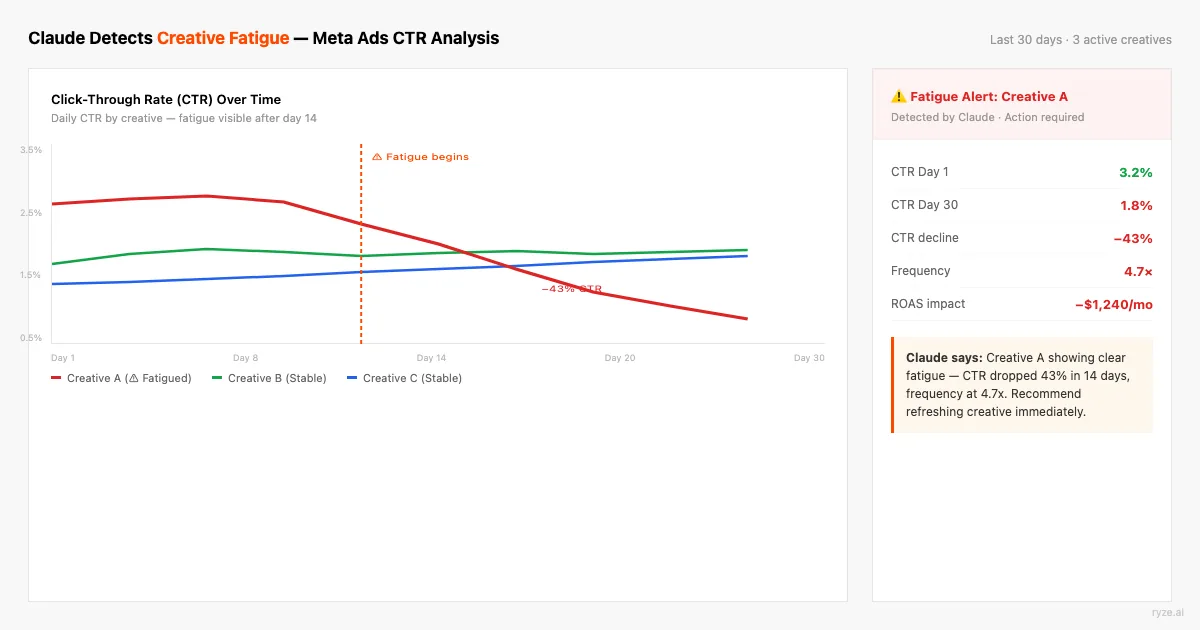
Diagnostics — 5 skills to find what’s broken
Diagnostic skills answer one question: why did performance change? They analyze your Meta Ads data and return specific findings ranked by impact — not vague suggestions. Run them when ROAS drops, CPMs spike, or CTR declines without explanation. For a deeper dive, see our guide on the official Meta Ads MCP.
Creative Fatigue Detection
The average Meta ad starts decaying after 3–5 days of delivery. Most advertisers catch fatigue after CTR has already dropped 40%+ and CPA has spiked. This skill monitors CTR trajectory, frequency accumulation, and engagement decay across all active ads and categorizes them as urgent (replace now), warning (1–2 weeks left), or healthy.
Tip: Run this weekly, and always after scaling budgets — higher spend burns through creative faster. Export from Ads Manager with columns: ad name, impressions, CTR, frequency, CPM, and date range breakdown by day.
Audience Overlap Finder
When two ad sets target similar audiences, you bid against yourself in Meta’s auction. CPMs inflate 15–30% and neither ad set wins. This skill takes your ad set targeting parameters and identifies where audiences compete — then recommends exclusion strategies to eliminate self-competition.
Tip: You can also use Meta’s Audience Overlap tool in Ads Manager to export actual overlap percentages. Feed those numbers into this prompt for more precise recommendations.
Frequency Cap Audit
Meta’s frequency caps are suggestions, not hard limits — especially in Advantage+ campaigns. This skill audits every active ad set for frequency violations: ads being shown 5+ times to the same person while your cap says 3, retargeting audiences seeing ads 8+ times, and prospecting campaigns with frequency above 2.0 (the point where most B2C conversion rates start declining).
Tip: Export frequency data at the ad-set level with daily breakdown. The 7-day rolling average matters more than the all-time number — frequency spikes in the last 3 days predict tomorrow’s performance drop.
CPM Anomaly Detector
CPMs fluctuate daily on Meta, but some spikes signal real problems: competitive pressure in your vertical, audience saturation, low relevance scores, or holiday auction inflation. This skill compares your current CPMs against your 14-day rolling average and industry benchmarks ($8–$15 for B2C, $15–$35 for B2B, $5–$12 for e-commerce) to isolate what’s driving the change.
Tip: Include the previous 30 days of daily CPM data. Short windows miss seasonal patterns. Q4 CPMs typically run 30–50% above baseline — the skill accounts for this if given enough historical data. For vertical-specific reference numbers to feed the prompt, use our Meta Ads cost benchmarks by industry.
Placement Performance Analyzer
Meta delivers ads across Feed, Stories, Reels, Audience Network, Messenger, and Instagram Explore. Most advertisers use Advantage+ placements and never check where their money actually goes. This skill breaks down CPA, ROAS, and conversion rate by placement — and often finds that 60–70% of spend goes to the top 2 placements while the rest burn budget at 3–5x higher CPA.
Tip: In Ads Manager, go to Breakdowns > By Delivery > Placement to export this data. Include at least 14 days for statistical significance. Audience Network is the most common offender — cheap impressions, near-zero conversions.
Want these diagnostics running automatically? Ryze AI connects directly to your Meta Ads account and runs creative fatigue detection, audience overlap analysis, and CPM monitoring 24/7 — no prompts required, with approval controls in front of any change you want to review first. Advertisers using Ryze AI report an average 3.8x ROAS across Meta and Google Ads, with 2,000+ marketers in 23 countries managing $500M+ in ad spend.
Ryze AI handles the analysis and execution autonomously. Claude skills handle the analysis — Ryze handles analysis and action.
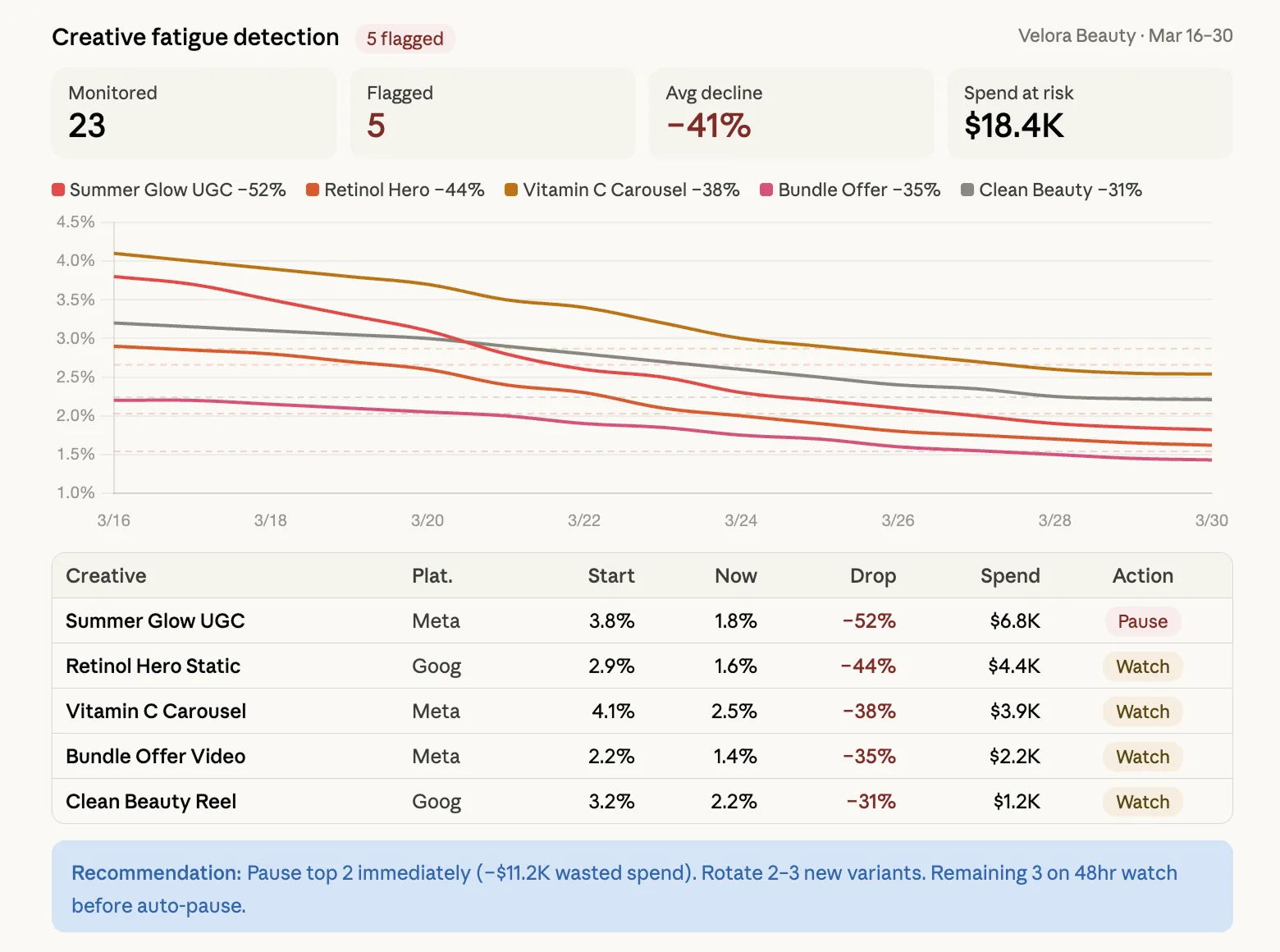
Optimization — 5 skills to improve performance
Optimization skills take what the diagnostics found and turn them into action. Fatigued creatives get replaced with new briefs. Stale lookalikes get refreshed. Budgets get reallocated to the funnel stages that are actually converting.
Lookalike Audience Refresher
Lookalike audiences degrade every 60–90 days as your customer base evolves and Meta’s modeling gets stale. This skill audits your current lookalikes, identifies which ones have performance decay, and generates a refresh strategy — including which seed lists to update, what lookalike percentage to test, and which to retire.
Tip: Update seed lists quarterly at minimum. Best-performing seed lists are typically your top 25% LTV customers from the last 90 days — not all purchasers.
Creative Brief Generator
When the Creative Fatigue Detection skill flags ads for replacement, this skill generates the creative briefs for what comes next. It analyzes your top-performing ads — what hooks worked, what formats won, what CTAs converted — and produces briefs for new creatives that build on proven patterns while introducing enough variation to avoid audience blindness.
Tip: Include your brand guidelines and tone of voice in the prompt for more on-brand briefs. The best Meta creatives feel native to the platform — not like ads.
Ad Copy A/B Variant Writer
Most Meta advertisers test 2–3 copy variants. The top performers test 8–12. This skill takes your best-performing ad copy and generates systematic variants that test one variable at a time — hook, social proof, urgency, benefit framing, CTA — so you know exactly what moved the needle when results come in.
Tip: Only test one variable per variant. If you change the hook and the CTA, you won’t know which one caused the result. Run each variant for at least 2,000 impressions before judging.
Budget Allocation by Funnel Stage
Most Meta accounts over-invest in prospecting and under-invest in mid-funnel. This skill analyzes your spend distribution across TOFU (cold prospecting), MOFU (warm engagement/video viewers), and BOFU (retargeting/purchase intent) — then recommends reallocation based on your actual conversion rates and saturation levels at each stage.
Tip: If your BOFU retargeting has frequency above 8, you don’t need more budget there — you need more TOFU to fill the funnel. This is the most common budget mistake on Meta.
Interest Targeting Expander
When your existing interest audiences start saturating, you need new ones — but guessing interests is inefficient. This skill takes your current best-performing interest targets and generates adjacent interests to test, using audience psychology and behavioral correlation patterns Meta’s own suggestions miss.
Tip: Test new interests in isolated ad sets with $20–50/day budget for 5–7 days before judging. Don’t stack more than 3 interests per ad set or you won’t know which one is working.
Ryze AI — Autonomous Marketing
Skip the prompts — let AI run your Meta Ads autonomously
- ✓Automates Google, Meta + 5 more platforms
- ✓24/7 performance audits
- ✓Suggests tweaks to improve ROAS
2,000+
Marketers
$500M+
Ad spend
23
Countries
Reporting — 5 skills to communicate results
Reporting skills turn raw Meta Ads data into narratives that stakeholders can read without asking follow-up questions. The weekly digest alone saves most teams 2–3 hours per client per week.
Weekly Meta Performance Digest
Every Monday morning, you paste in last week’s Meta Ads data and get a complete executive summary — the paragraph that explains what happened, why it happened, and what you’re doing about it. Written in plain English for non-technical stakeholders. No jargon. No follow-up questions needed.
Tip: Export from Ads Manager with these columns: campaign name, spend, impressions, CTR, CPC, conversions, CPA, ROAS, frequency. Include ad-level data for the creative section.
Creative Scorecard Builder
Assigns a performance score (1–100) to every active ad based on a weighted composite of CTR, conversion rate, ROAS, cost efficiency, and longevity. The scorecard gives creative teams a single number to rally around and makes creative review meetings data-driven instead of opinion-driven.
Tip: Share the scorecard with your creative team weekly. When designers see that UGC-style video scores 78 while polished brand video scores 42, creative direction shifts fast.
Competitor Ad Library Analyzer
Meta’s Ad Library shows every active ad from any advertiser. This skill takes competitor ad data you collect from the Ad Library and identifies patterns: what formats they’re running, how often they refresh creative, what hooks they’re testing, and where you have creative gaps they’re exploiting.
Tip: Check the Ad Library monthly. Focus on competitors who are spending heavily (many active ads = significant budget). Their testing tells you what’s working in your vertical.
Audience Insights Reporter
Takes your Meta Ads audience breakdown data (age, gender, placement, device, region) and surfaces the segments that are actually driving results vs. the segments that are just consuming budget. Most accounts find that 70–80% of conversions come from 2–3 demographic segments while the rest waste money.
Tip: In Ads Manager, use Breakdowns > By Demographics and By Time for this data. Export at least 30 days for reliable patterns. Combine with the Budget Allocation skill for maximum impact.
ROAS by Placement Breakdown
Similar to the Placement Performance Analyzer (diagnostic), but focused on revenue attribution. This skill calculates true ROAS by placement, accounting for view-through conversions, cross-device attribution, and the different conversion windows each placement typically needs. Feed, Stories, Reels, and Audience Network each have different attribution patterns — this skill untangles them.
Tip: Run this with both 1-day click and 7-day click attribution to see how each placement’s value changes. Stories and Reels often look unprofitable on 1-day click but very profitable on 7-day.
MCP setup for Meta Ads — connect Claude to live data
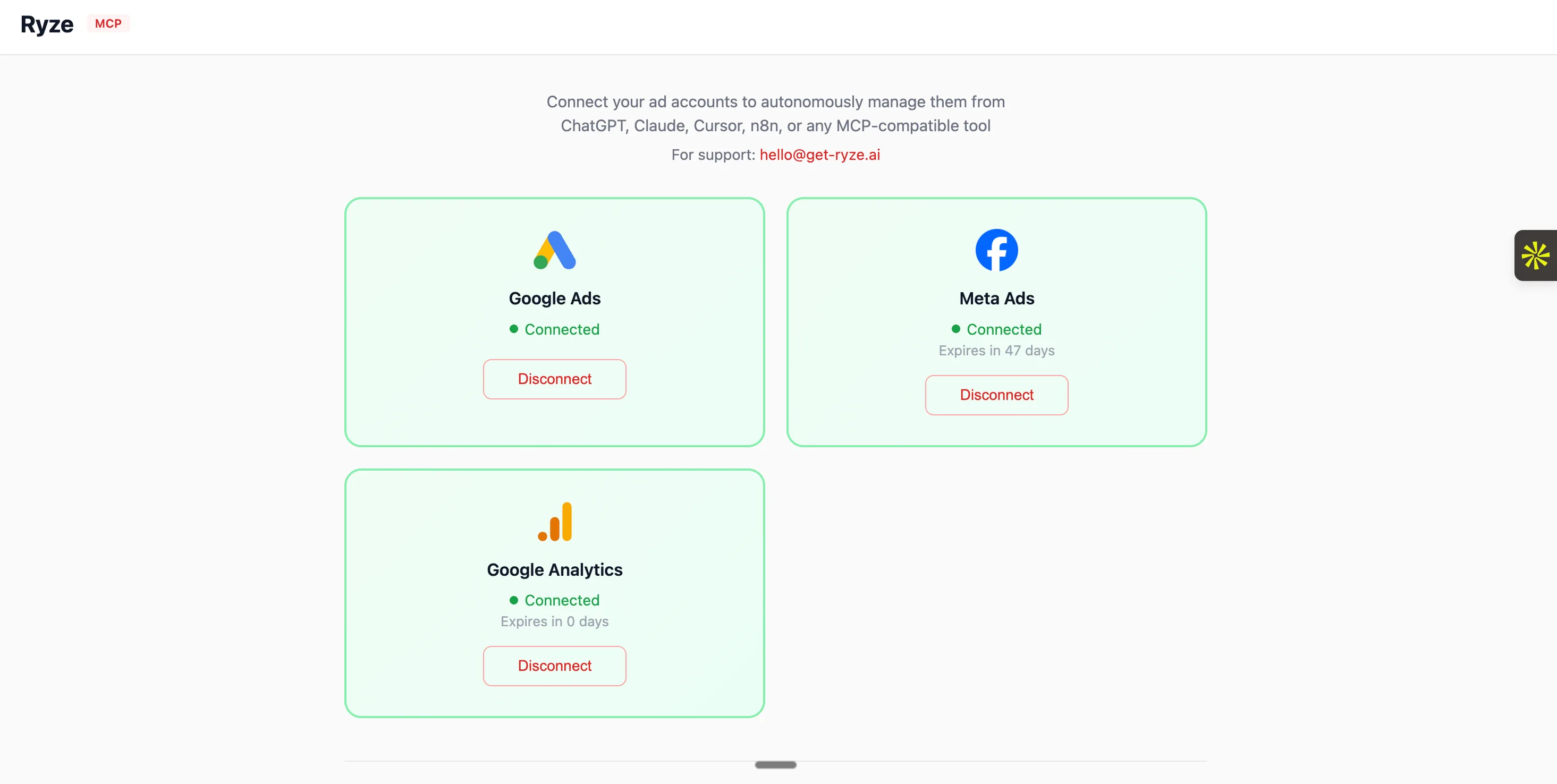
All 15 skills above work with exported CSVs from Meta Ads Manager. But if you manage significant ad spend or multiple accounts, MCP eliminates the manual export step entirely. Claude connects to your Meta Ads account via MCP (Model Context Protocol), documented in the Meta Ads integration docs, and pulls campaign data, ad set metrics, and creative performance in real time.
Option A — Ryze AI Managed Connector
- 1.Go to Claude > Settings > Connectors
- 2.Search for “Ryze AI” and click Connect
- 3.Authorize your Meta Ads account
- 4.Done — Claude can now pull live Meta data
Setup time: ~2 minutes
Option B — Self-Hosted MCP Server
- 1.Get Meta Marketing API credentials from Business Manager
- 2.Clone an open-source MCP server (see OpenClaw guide)
- 3.Configure your access token and ad account ID
- 4.Register the server in Claude Desktop settings
Setup time: ~30 minutes
Once connected (about two minutes on the managed route, following the step-by-step connect guide), you can use the same 15 skill prompts above — but instead of pasting CSV data, you tell Claude to “pull my Meta Ads data for the last 14 days” and it fetches the data live. The analysis is identical; the data collection is automated.
For the complete MCP walkthrough with screenshots, see our How to Use Claude for Meta Ads guide. For cross-platform setup (Google Ads + Meta Ads), see 30 Claude Skills for Google and Meta Ads. Not sure which connection option fits your setup? Our comparison of the best Claude connector for Meta Ads breaks down the trade-offs.

Sarah K.
Paid Media Manager
E-commerce Agency
We went from spending 10 hours a week on bid management to maybe 30 minutes reviewing Ryze’s recommendations. Our ROAS went from 2.4x to 4.1x in six weeks.”
4.1x
ROAS achieved
6 weeks
Time to result
95%
Less manual work
Frequently asked questions
Q: What are Claude skills for Meta Ads?
Structured prompt templates that teach Claude how to analyze Meta Ads data — creative fatigue, audience overlap, CPM anomalies, placement breakdowns, and automated reporting. 15 Meta-specific skills are available, covering diagnostics, optimization, and reporting.
Q: Can Claude detect when my Meta ads are fatigued?
Yes. The Creative Fatigue Detection skill analyzes CTR trends over 7, 14, and 30-day windows, correlates with frequency, and flags ads as urgent (replace now), warning (1–2 weeks left), or healthy. Most Meta ads fatigue after 3–5 days of delivery.
Q: How do I connect Claude to my Meta Ads account?
Via MCP (Model Context Protocol). Use Ryze AI’s managed connector (2-minute setup in Claude Connectors) or self-host an open-source MCP server with Meta Marketing API credentials (~30-minute setup).
Q: Do I need MCP to use these skills?
No. All 15 skills work with exported CSV data from Meta Ads Manager. MCP eliminates the manual export step by connecting Claude to your live account data — but it’s optional.
Q: How much do Claude Meta Ads skills cost?
The skills themselves are free and open-source. You need a Claude Pro subscription ($20/month) to use Projects. MCP connectivity requires either a Ryze AI account or self-hosted server infrastructure.
Q: Can Claude write Meta ad copy?
Yes. The Ad Copy A/B Variant Writer skill generates 8 systematic variants of your best-performing copy, testing one variable at a time (hook, social proof, benefit framing, CTA, length). The Creative Brief Generator also produces full briefs for new creatives based on your performance data.
Ryze AI — Autonomous Marketing
Grow your business faster with AI agents
- ✓Automates Google, Meta + 5 more platforms
- ✓24/7 performance audits
- ✓Suggests tweaks to improve ROAS
2,000+
Marketers
$500M+
Ad spend
23
Countries

