AI MARKETING
10 Claude Skills for Google & Meta Ads Marketers (Free Download)
Ten ready-to-use Claude Skills for Google Ads and Meta Ads. Copy each skill or download as a SKILL.md file, install in Claude, and turn your AI into a dedicated ad operations agent. Audits, fatigue detection, budget reallocation, reports — all automated. For a deeper dive, see our guide on Meta Ads Campaign Objectives Explained.
Contents
Autonomous Marketing
Grow your business faster with AI agents
- ✓Automates Google, Meta + 5 more platforms
- ✓Handles your SEO end to end
- ✓Upgrades your website to convert better
What are Claude Skills?
Claude Skills are markdown files — with YAML frontmatter at the top and instructions below — that teach Claude specialized behaviors. Install a skill once, and Claude follows those instructions automatically whenever you trigger it. Think of them as prompts that live in a file instead of your head.
For marketers, skills are particularly powerful when combined with MCP connectors. The MCP gives Claude access to your live Google Ads and Meta Ads data. The skill tells Claude exactly what to do with that data. Together: a specialized ad operations agent running inside Claude.
Step 1: Connect Claude to your ad accounts
Skills need access to your ad data to be useful. The fastest way: the Ryze AI MCP connector. One URL, OAuth, and Claude has real-time access to Google Ads, Meta Ads, GA4, and Search Console (see how the Meta Ads integration works).
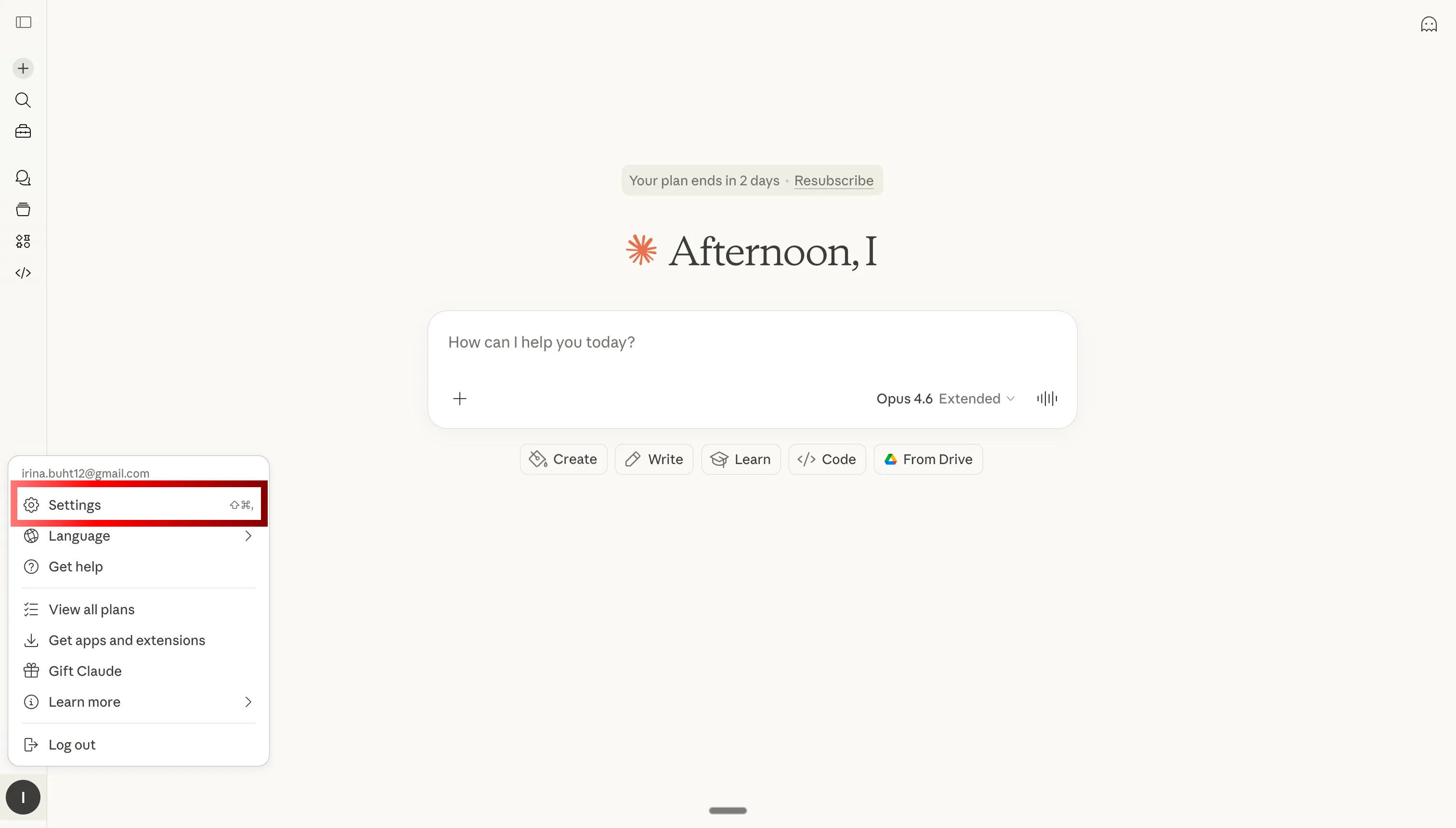
Step 1: Open Claude settings
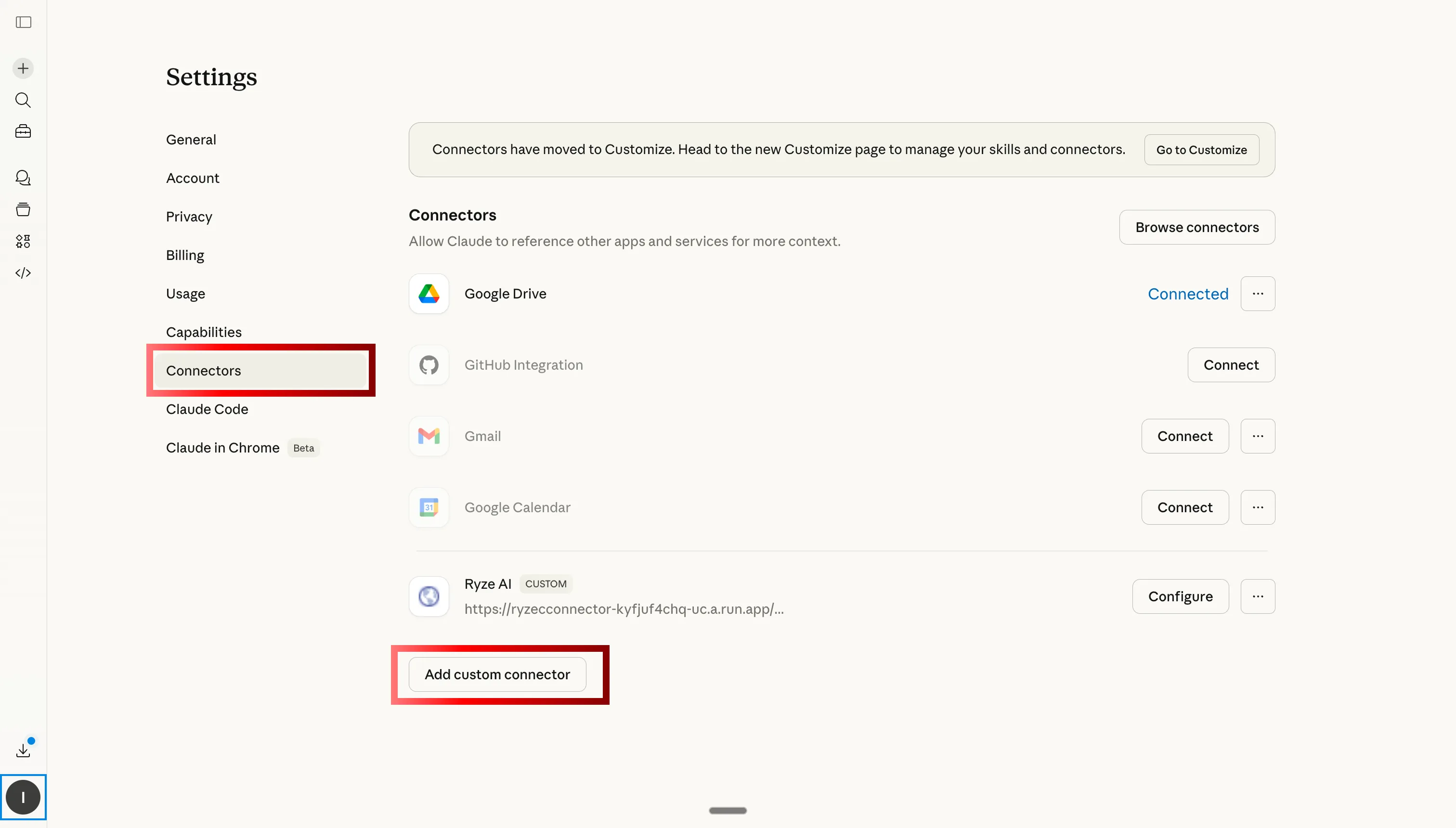
Step 2: Go to Custom Connectors and click Add
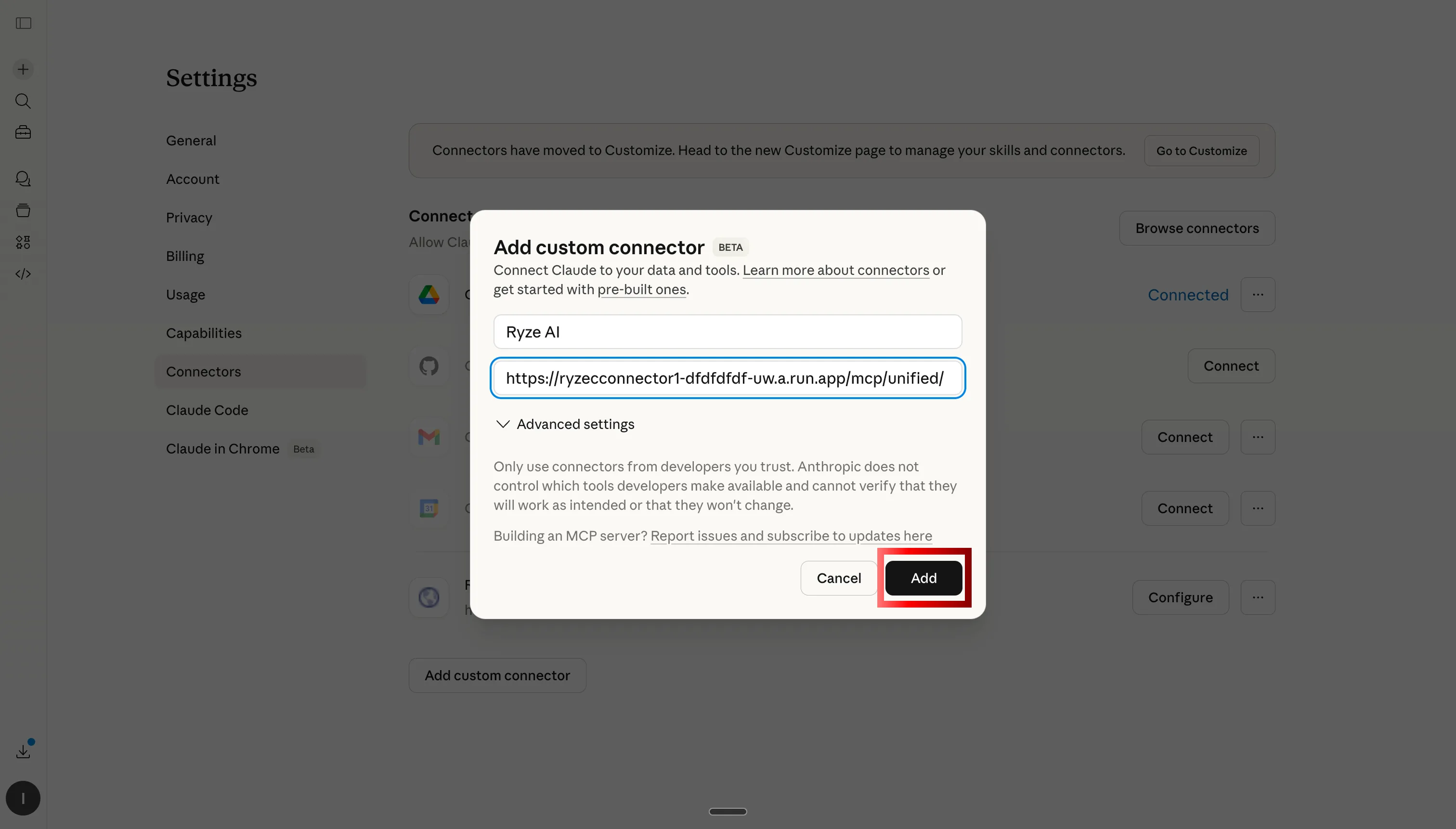
Step 3: Paste the Ryze AI MCP server URL
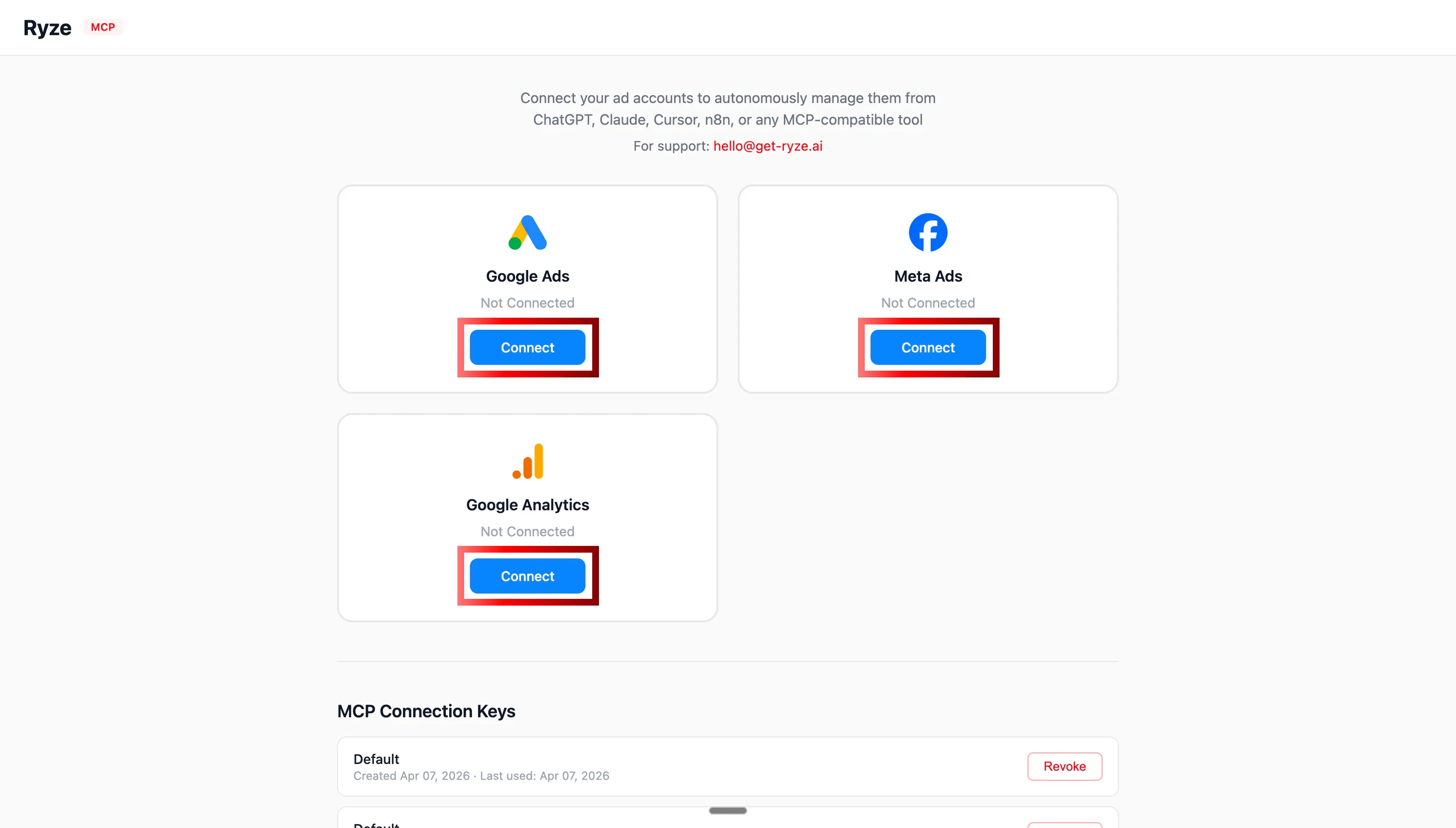
Step 4: Authorize Google Ads and Meta Ads via OAuth
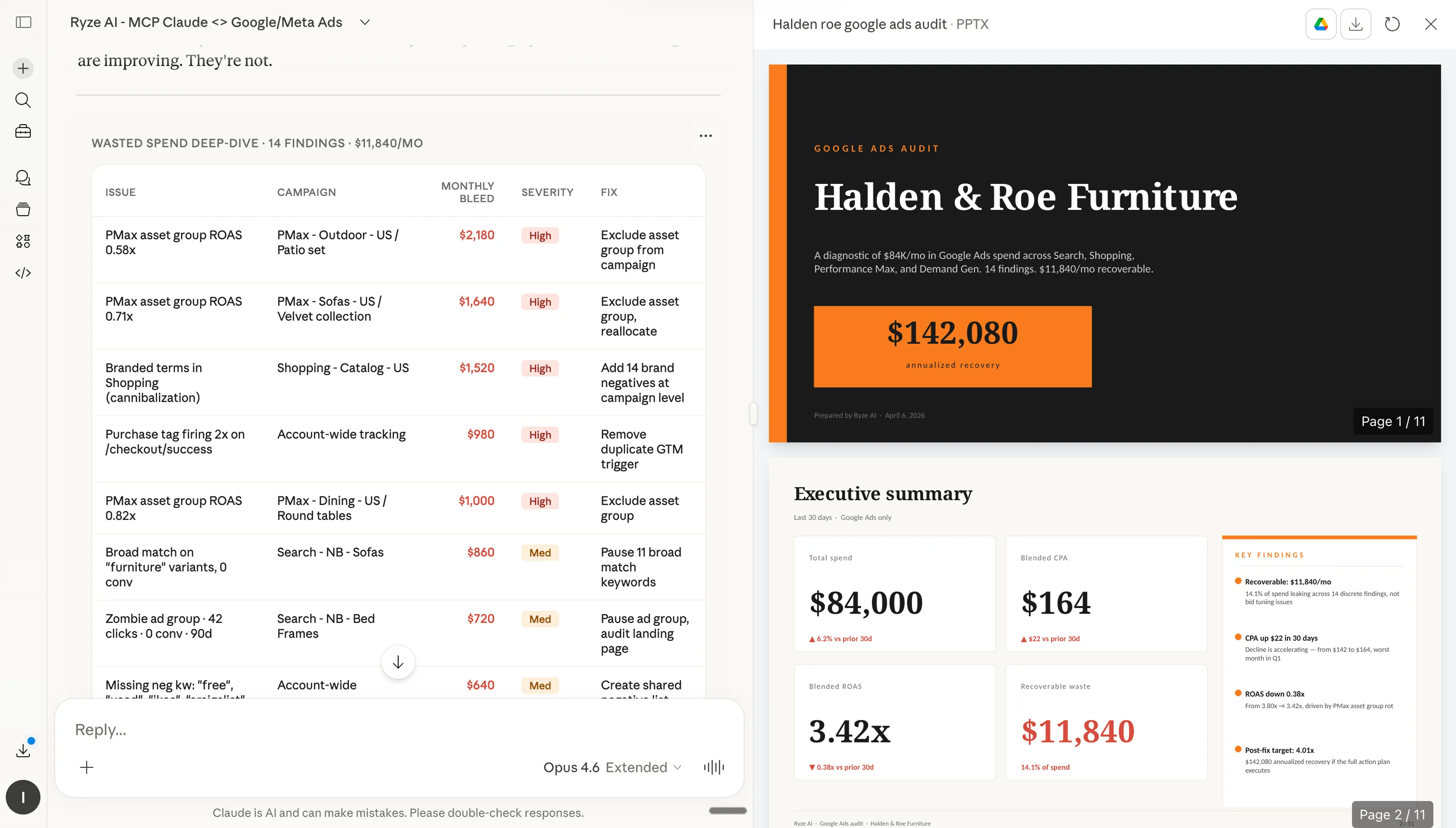
Step 5: Claude can now query your ad accounts in real time
Step 2: How to install skills in Claude
Once Claude has access to your ad accounts, you can start installing skills. Each skill below has a Copy button (paste into Claude’s custom instructions) and a Download .md button (upload as a file to Claude Projects or Claude.ai Skills). Either approach works.
Step 1
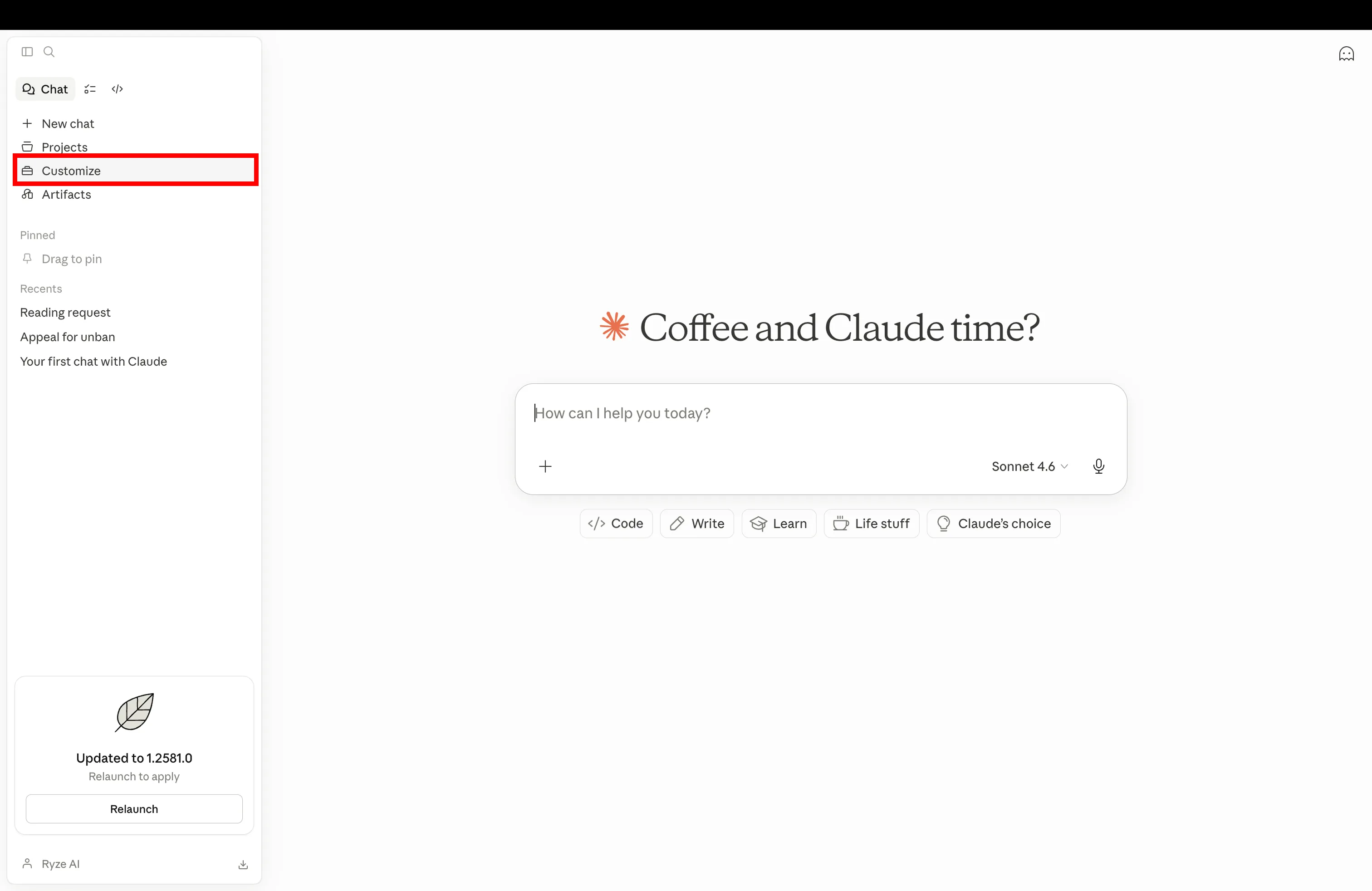
Open Claude and navigate to Customize in settings
Step 2
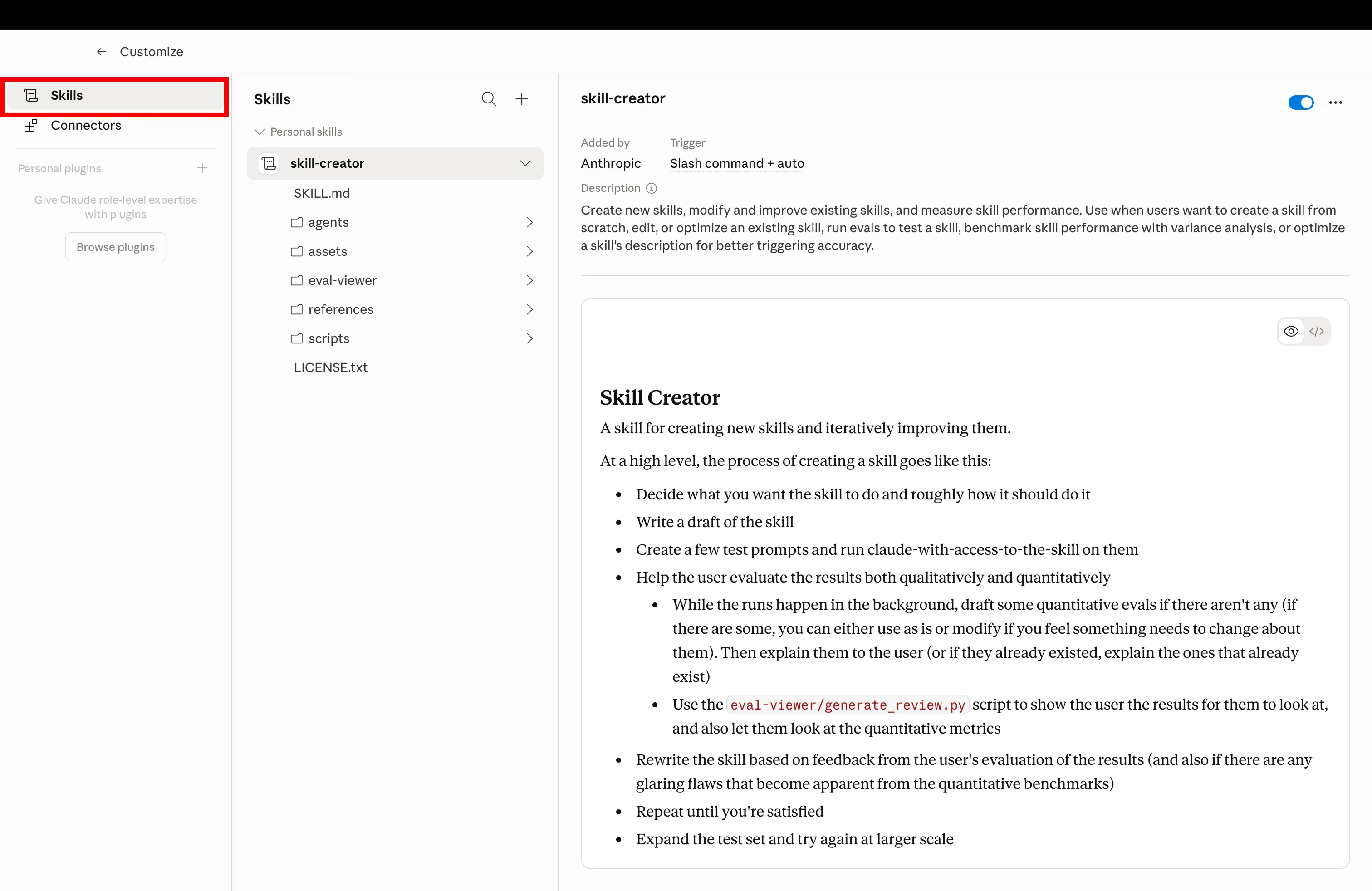
Click the Skills tab to manage your installed Claude skills
Step 3
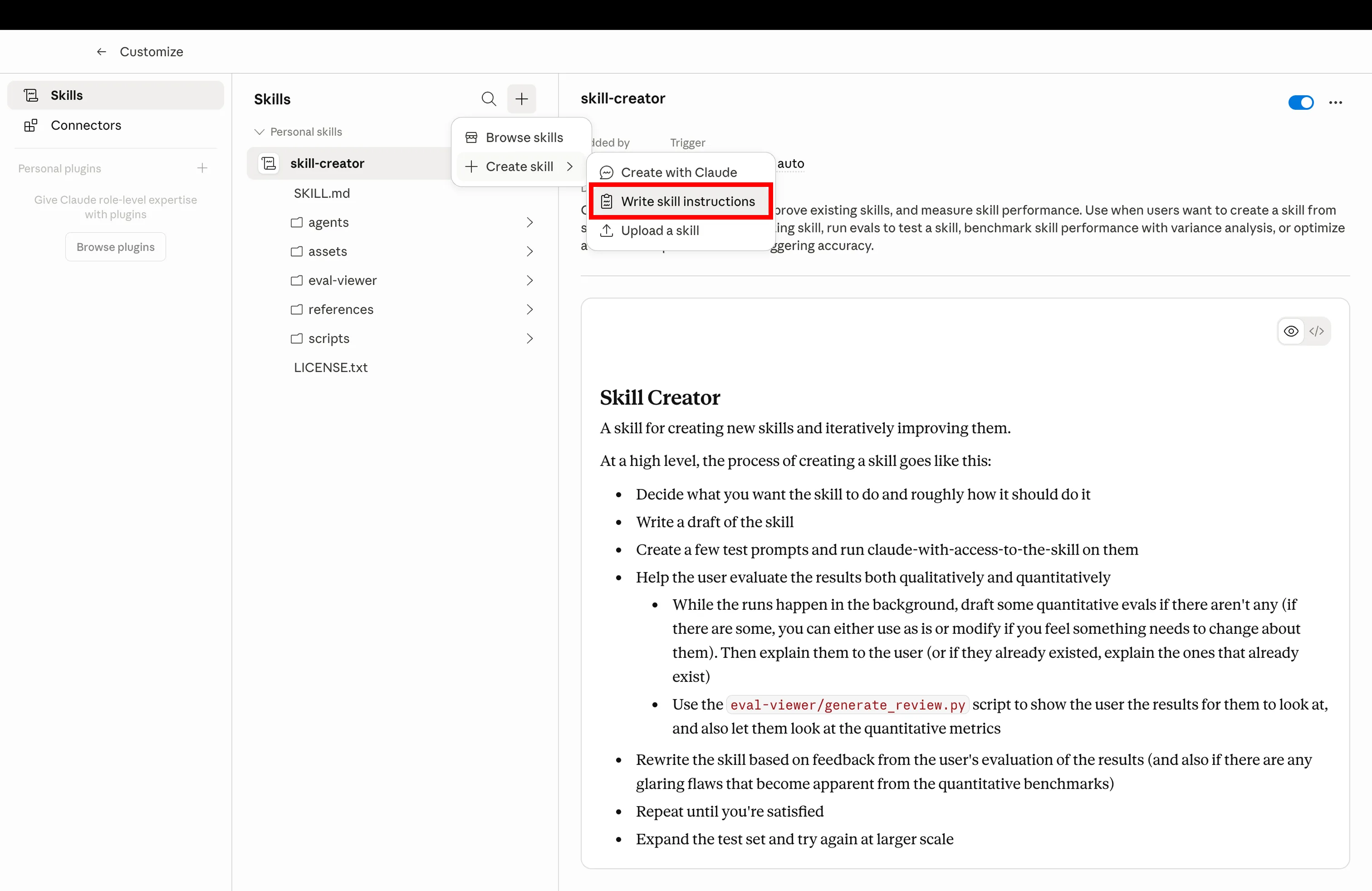
Click Create and upload the SKILL.md file you downloaded below
Step 4
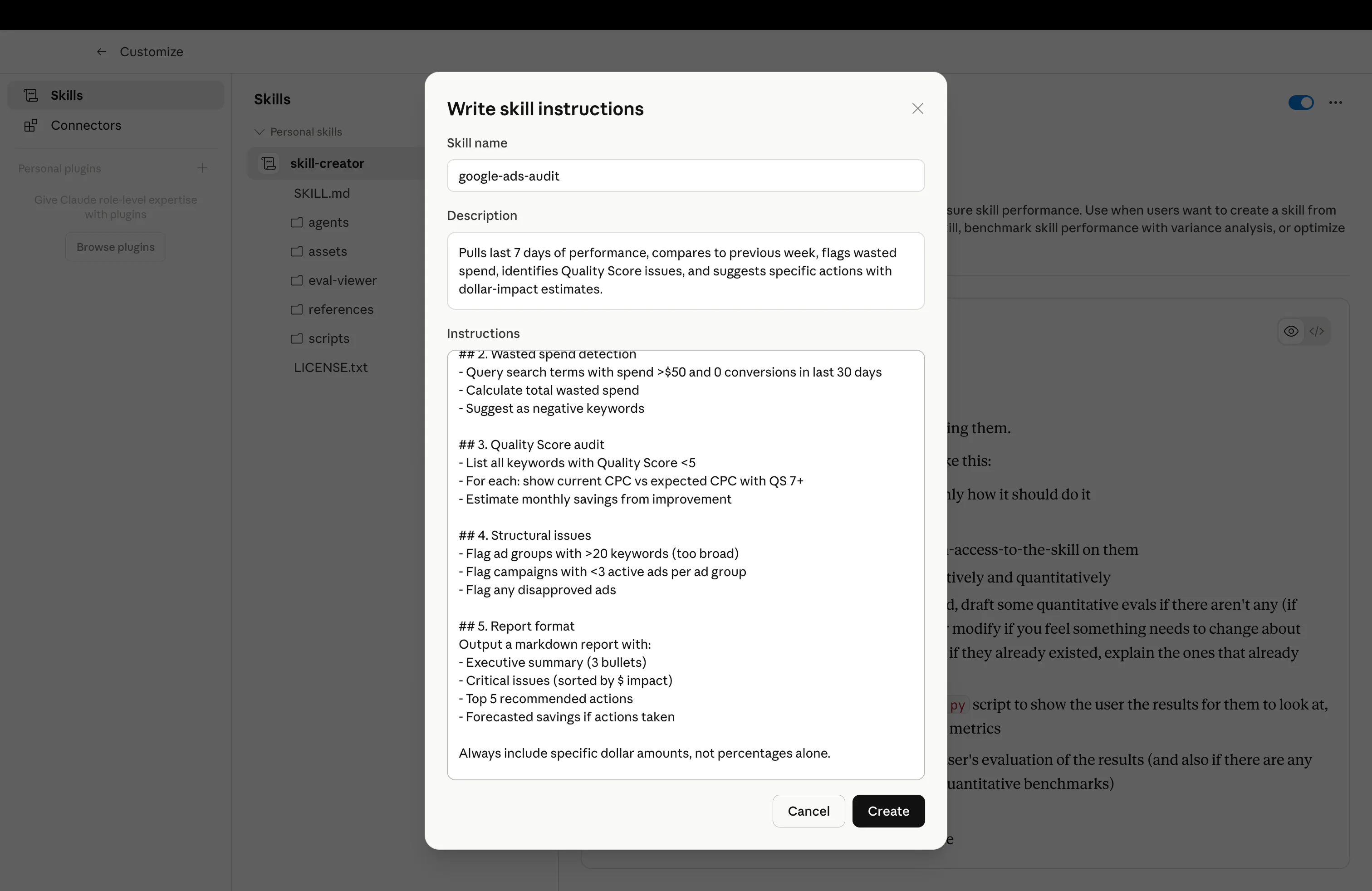
Skill installed and ready — trigger it with the example prompt from any skill below
The 10 Claude Skills
Each skill below is ready to copy or download. Install in Claude, then use the example prompt to trigger it. All skills assume you’ve connected the MCP in Step 1.
Google Ads Weekly Audit
google-ads-weekly-audit.md
Run a comprehensive weekly Google Ads audit covering waste, quality score, and conversion tracking.
What it does
Pulls last 7 days of performance, compares to previous week, flags wasted spend, identifies Quality Score issues, and suggests specific actions with dollar-impact estimates.
“Run the weekly audit on my Google Ads account for last week.”Meta Creative Fatigue Detector
meta-creative-fatigue.md
Detect fatigued Meta ad creatives using CTR decline, frequency, and CPM inflation signals.
What it does
Analyzes every active Meta ad for fatigue signals. Rates Critical / Warning / OK. Calculates wasted spend and estimates monthly cost if not replaced.
“Check my Meta Ads for creative fatigue in the last 14 days.”Cross-Platform ROAS Analyzer
cross-platform-roas.md
Compare ROAS and performance across Google Ads and Meta Ads with deduplication awareness.
What it does
Pulls matched 30-day data from both platforms, segments by funnel stage, flags attribution overlap, and recommends specific budget shifts with estimated impact.
“Compare last 30 days ROAS across my Google Ads and Meta Ads accounts.”Search Terms Cleanup
search-terms-cleanup.md
Mine Google Ads search terms for waste and generate ready-to-paste negative keyword lists.
What it does
Categorizes every search term from last 30 days: waste, low quality, underdeveloped, irrelevant. Outputs a negative keyword list + promotion candidates + forecast savings.
“Clean up my Google Ads search terms for the last 30 days.”Quality Score Optimizer
quality-score-optimizer.md
Identify Google Ads Quality Score issues and generate fixes for CTR, ad relevance, and landing page.
What it does
Audits all keywords by Quality Score tier, identifies which component (CTR, relevance, landing page) is weak, and generates specific fixes with forecasted savings.
“Optimize Quality Scores across my Google Ads account.”Audience Overlap Detector
audience-overlap-detector.md
Find Meta Ads audience overlap causing internal auction competition and CPM inflation.
What it does
Compares targeting across all active ad sets, detects overlap patterns, estimates CPM inflation and wasted spend, and recommends consolidation with projected CPM reduction.
“Detect audience overlap across my Meta Ads account.”Budget Reallocator
budget-reallocator.md
Reallocate ad budget from underperforming to high-ROAS campaigns across Google and Meta.
What it does
Categorizes every campaign as Scale / Maintain / Reduce / Pause candidate. Proposes specific budget changes with forecasted conversion and ROAS impact.
“Reallocate my ad budget for next month based on last 30 days.”Weekly Executive Report
weekly-exec-report.md
Generate a stakeholder-ready weekly ad performance report across Google and Meta.
What it does
Produces a one-page executive summary, key metrics table, top 3 wins, top 3 concerns, and 5 specific action items. Written for CEOs and CMOs, not PPC analysts.
“Write my weekly exec ad report for last week.”Conversion Tracking Validator
conversion-tracking-validator.md
Validate Google Ads and Meta Ads conversion tracking setup for accuracy and coverage.
What it does
Checks conversion action status, pixel health, event match quality, CAPI deployment, and cross-platform consistency. Flags broken tracking before it wastes ad spend.
“Validate conversion tracking across Google Ads and Meta Ads.”Landing Page Checker
landing-page-checker.md
Analyze landing pages behind ads for performance issues hurting conversion rates.
What it does
Maps ads to destination URLs, checks load time, mobile-friendliness, headline-intent match, form length, CTA visibility. Calculates dollar impact of each issue.
“Check all landing pages my ads point to for performance issues.”Ryze AI — Autonomous Marketing
Skip the skills — let AI run your ads 24/7
- ✓Automates Google, Meta + 5 more platforms
- ✓Handles your SEO end to end
- ✓Upgrades your website to convert better
2,000+
Marketers
$500M+
Ad spend
23
Countries
Frequently asked questions
Q: What are Claude Skills?
Markdown files with YAML frontmatter and instructions. Upload to Claude to give it specialized behaviors. Each skill here is a ready-to-use SKILL.md file.
Q: Do I need Claude Pro?
Yes for the MCP connection that powers these skills. The skills themselves are free to download and modify.
Q: Can I modify these skills?
Yes — they’re plain markdown files. Download, edit the thresholds or instructions, upload the modified version.
Q: How do I install a skill?
In Claude, go to Projects or Skills, click Add, upload the .md file. Claude immediately recognizes it.
Q: Do I need the MCP connection?
Yes for skills that query live data. Without MCP, you’d need to paste CSV exports manually. MCP takes 3 minutes to set up.
Q: Are these free?
Yes. Free to download, modify, and use. No attribution required. We built them because they save us hours every week.
Ryze AI — Autonomous Marketing
Stop writing skills. Let AI run your ads for you.
- ✓Automates Google, Meta + 5 more platforms
- ✓Handles your SEO end to end
- ✓Upgrades your website to convert better
2,000+
Marketers
$500M+
Ad spend
23
Countries

