50 AI SEO agents: one autonomous Claude agent for every job in the account.
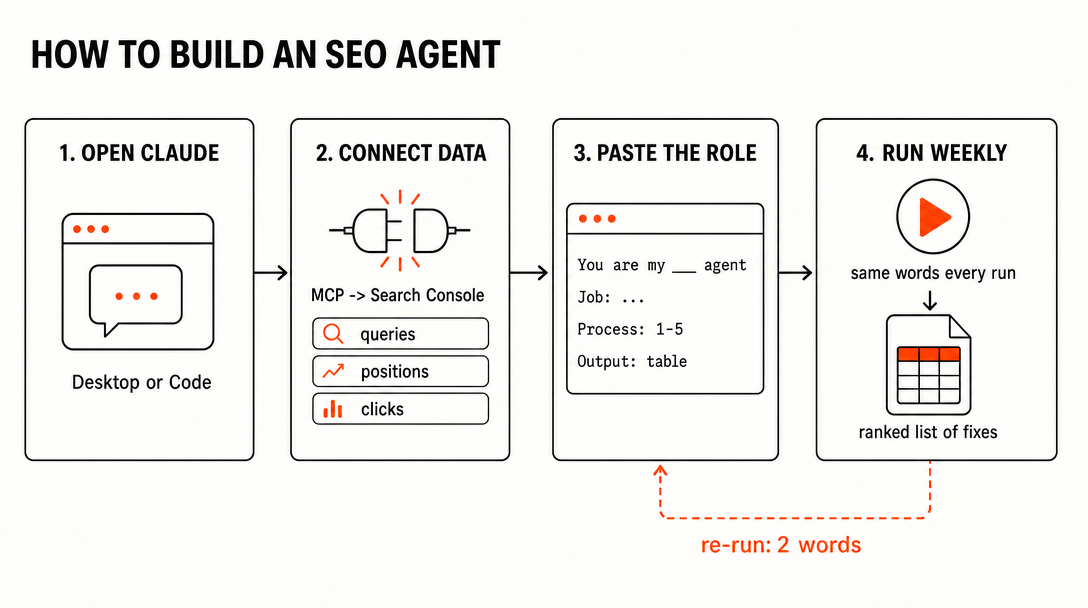
SEO is fifty small jobs done weekly. Most of them are checklists, not judgment — so we turned every checklist into an agent. Each one is a setup guide, not a loose prompt: open Claude, connect Search Console, paste the role.
Built by our community of 2,000 marketers
The full 50-agent SEO library, free
Setup guides for Claude, ChatGPT and Perplexity.
Clients we work withClients we work with
Ryze
AI autopilot for SEO
✓+25% traffic and DR 30+, or your money back
✓Rewrites competitors’ best pages onto your site
✓100+ high quality backlinks per month
✓Gets your items ready for ChatGPT Instant Checkout
✓Matches your site to customer demand from 39 sources
Every SEO account breaks down into the same fifty small jobs: queries stuck on page two, orphan pages, decaying posts, redirect chains, the Monday summary. Done weekly, they compound. Skipped for a quarter, the account stalls.
None of them need judgment — they need a checklist, a data source, and a weekly run. That's an agent. So we wrote all fifty as Claude agents:
Every agent is a setup guide, not a loose prompt — paste once, re-run with two words.
First live run: 23 striking-distance pages, 31 orphan pages connected, 20 minutes to first finding.
9 categories, 50 jobs — the whole account.
Manage Google + Meta ads from Claude — the real setup
Traffic drop detective — when clicks fall, isolates the cause: pages, queries, SERP layout or tracking
Algorithm watch — cross-references your volatility against confirmed updates
Forecast model — projects traffic from the current work queue so you can promise numbers carefully
Reporting — writes the Monday summary: which pages moved and why
SEO roadmap — turns every agent's findings into a prioritized quarter plan
The core six
The six agents doing the heaviest lifting
These six produce most of the account's weekly movement. Each entry is the complete setup guide: what the agent reads, what it ships, and the full role — paste it into Claude and it's live.
01Finds queries stuck at position five to fifteen
Striking distance agent
Every site has queries parked at positions 5–15: real impressions, no clicks. The agent pulls 90 days of Search Console, groups those queries by page, and ranks the list by estimated click gain — one fix per page. First live run: 23 striking-distance pages in one pass.
ReadsGoogle Search Console — 90 days of query data (impressions, position, clicks, page)
ShipsRanked table of pages with their stuck queries, current position, estimated click gain, and the specific fix per page
CadenceWeekly — positions 5–15 churn constantly; last week's list is stale
ROLE PROMPT — PASTE INTO CLAUDE
You are my Striking Distance agent.

Job: every Monday, find the queries where this site is almost ranking and tell me exactly what to do about each one.

Process:
1. Pull the last 90 days from Google Search Console.
2. Keep queries with average position 5–15 and at least 50 impressions.
3. Group them by landing page. Drop branded queries.
4. For each page, estimate the monthly click gain if it reached the top 3 (use current impressions and standard CTR curves).
5. For the top 15 pages, recommend ONE fix each: an internal link from a specific stronger page, a title rewrite, or a missing section — based on what the ranking pages have that mine doesn't.

Output: a table — page, stuck queries, position, est. click gain, the fix. Ranked by gain. Nothing else.
02Connects orphan pages, spots the gaps instantly
Internal link agent
Mapping links-to-pages by hand is miserable, so nobody does it. The agent crawls the sitemap, builds the link graph, and finds orphans and gaps — each fix delivered as source page, target page, sentence, and anchor text. First run: 31 orphan pages connected.
ReadsSitemap + page content (crawl), Search Console for target-page queries
ShipsOrphan list + link map: source URL → target URL, the exact sentence to add, and the anchor text to use
CadenceEvery two weeks, and after every content batch ships
ROLE PROMPT — PASTE INTO CLAUDE
You are my Internal Link agent.

Job: keep every page on this site reachable and every ranking page supported by internal links.

Process:
1. Fetch the sitemap and crawl the URLs. Build the internal link graph.
2. List orphan pages: indexable pages with zero internal links pointing in.
3. For each orphan, find the 2–3 most topically related pages that should link to it.
4. Cross-reference Search Console: pages with queries at positions 5–15 get link priority.
5. For every recommended link, give me: source URL, target URL, the paragraph on the source page where the link belongs, and anchor text drawn from the target's actual queries (varied, never one exact-match anchor repeated).

Output: two lists — "orphans to connect" and "gaps to close" — each row ready to hand to an editor. Flag any page more than 3 clicks from the homepage.
03Flags pages losing clicks before traffic craters
Content decay agent
Traffic never disappears overnight — it erodes quietly for months first. The agent compares each page's trailing 8 weeks against the prior period, filters out seasonality, and flags decaying pages while they're still cheap to save, with the probable cause attached.
ReadsSearch Console page-level clicks and positions, 16 weeks trailing
CadenceWeekly — decay caught at week 3 is a refresh; caught at month 6 it's a rewrite
ROLE PROMPT — PASTE INTO CLAUDE
You are my Content Decay agent.

Job: catch pages losing organic clicks while they are still cheap to save.

Process:
1. Pull page-level Search Console data: trailing 8 weeks vs the 8 weeks before.
2. Flag pages down more than 20% in clicks where position also slipped (rules out pure seasonality and tracking noise).
3. For each flagged page, diagnose the likely cause: check what now ranks above it (fresher competitor content? a new SERP feature? intent shift?).
4. Verdict per page: REFRESH (update sections, re-date) or REWRITE (intent has moved, page no longer matches).
5. Rank the list by clicks recoverable.

Output: the decay watchlist — page, clicks lost vs prior period, decay %, probable cause, verdict. Then a one-line summary: total clicks at risk this week.
04Redirect loops and broken canonicals, ranked by traffic at stake
Technical audit agent
Most audits produce a 400-row spreadsheet where a redirect loop on your money page weighs the same as a missing alt tag. This agent ranks every issue by the organic traffic flowing through the pages it touches — the top of the list is always the fix worth doing today.
ShipsIssue list ranked by monthly organic clicks at stake, each with the exact fix and where to apply it
CadenceMonthly full pass; weekly quick pass on templates that changed
ROLE PROMPT — PASTE INTO CLAUDE
You are my Technical Audit agent.

Job: find the technical issues costing this site traffic, and rank them by what they're actually worth.

Process:
1. Crawl the site (or ingest the crawl export I give you).
2. Detect: redirect chains and loops, canonicals pointing at redirects/404s/wrong variants, noindex on indexable-intent pages, 404s with inbound links, mixed trailing-slash or protocol duplicates, orphaned sitemap entries.
3. Join every issue against Search Console: how many monthly clicks flow through the affected pages.
4. Score = clicks at stake × severity. A redirect loop on a 5k-click page outranks 200 missing alt tags.
5. For the top 20 issues, write the exact fix — the rule, the header, or the tag change — not a description of the problem.

Output: ranked issue table (issue, pages affected, clicks at stake, the fix), then a 3-line "do these first" summary.
05Reads Search Console, drafts the content calendar
GSC query miner
Search Console lists hundreds of queries you earn impressions for without a page that properly answers them. The miner clusters them, splits covered from uncovered, and turns the uncovered pile into a month of briefs — pre-validated by demand you already have.
ReadsSearch Console — all queries with impressions, 6 months trailing
ShipsNext month's content calendar: title, target cluster, demand evidence, and a short brief per piece
CadenceMonthly, before the calendar is planned
ROLE PROMPT — PASTE INTO CLAUDE
You are my GSC Query Miner.

Job: turn Search Console into next month's content calendar.

Process:
1. Pull 6 months of query data — every query with impressions, no click floor.
2. Cluster queries by intent (one cluster = one page). Drop branded.
3. For each cluster, check the landing page Google currently serves. Mark it COVERED (a real page targets this) or UNCOVERED (Google is serving a tangent page, or nothing ranks well).
4. For UNCOVERED clusters with meaningful combined impressions, draft the piece: working title, the queries it captures, monthly impression evidence, search intent, and a 5-bullet outline.
5. For COVERED clusters that underperform, note the existing URL and what's missing — those go to the refresh queue, not the calendar.

Output: a content calendar table for next month, ranked by combined impressions — title, cluster, evidence, outline. Cap at 12 pieces.
06Writes the Monday summary, which pages moved and why
Reporting agent
Most reports answer "what are the numbers" instead of the only question stakeholders have: what changed, and why. This agent writes the Monday summary with a cause attached to every mover — it knows what shipped, when, and what competitors did.
ReadsSearch Console week-over-week, plus the change log of what shipped (from the other agents)
ShipsOne-page Monday summary: movers with causes, losers with next actions, and the week's headline number
CadenceEvery Monday, before standup
ROLE PROMPT — PASTE INTO CLAUDE
You are my Reporting agent.

Job: every Monday, write the SEO summary a smart stakeholder actually reads.

Process:
1. Pull Search Console: last 7 days vs the 7 before, page level and query level.
2. List the top 5 winners and top 5 losers by click change.
3. For every mover, attach a cause. Check the change log I give you (what shipped, when) and the SERP (what competitors or features changed). If the cause is unclear, say "unclear" — never invent one.
4. For each loser, state the next action and which agent owns it.
5. Lead with one headline sentence: total clicks, direction, and the single most important thing that happened.

Output: max one page. Headline → winners (page, +clicks, why) → losers (page, −clicks, why, next action) → what ships this week. Plain language, no jargon, no filler.
How to build one
What separates an agent from a prompt
A prompt is a one-off request. An agent is a standing role with four parts — take any prompt you already use and add the missing three:
01
Role
A written job description, not a question. "You are my Striking Distance agent. Job: every Monday…" — the same words every run, so the behavior never drifts.
02
Data
A live connection, not pasted screenshots. Search Console via MCP means Claude pulls the queries, positions and crawl stats itself. This is the step that turns a prompt into an agent.
03
Output spec
A fixed deliverable defined in the role: the exact table, the exact columns, ranked by the same metric. Comparable week over week — that's what makes the findings trustworthy.
04
Cadence
A schedule, not a whim. Save the role as a Claude project or skill and re-run it with two words: run weekly. The loop is the agent.
Every setup guide in this library is those four parts pre-written. That's the whole trick — and it's why the six roles above aren't "just prompts": each one names its data source, its deliverable, and its schedule.
Proof, not promises
What the first live run found
One site, one afternoon last week. Search Console connected, six agents pasted in, first pass run end to end:
23
striking-distance pages found — queries parked at positions 5–15 with a fix attached
31
orphan pages connected into the internal link graph with ready-to-paste anchors
20min
from setup to first finding — Search Console connect included
Or skip the setup — your site’s SEO, on autopilot.
✓Runs this whole 50-agent stack for you, 24/7
✓Fixes on-page, technical and content issues automatically
A prompt is a one-off request. An agent is a standing role: a defined job, a named data source, a fixed deliverable, and a cadence. You paste the role into Claude once, connect the data (usually Search Console via MCP), and re-run it weekly with two words. The output format never drifts, so results are comparable week over week.
Do I need to know how to code to set these up?
No. Every agent in the library is a paste-in setup guide. The only technical step is connecting Claude to Google Search Console through an MCP connector, which is a guided click-through — no terminal required. Setup to first finding took 20 minutes in our live run.
What data do the agents need?
Most run on Google Search Console alone — queries, positions, clicks, impressions, and crawl stats. The technical agents also want a crawl export (Screaming Frog or similar) or sitemap access. The link agents use your backlink tool’s export. No agent requires data you don’t already have.
Are the 50 agents really free?
Yes. The full library of setup guides is free — every role prompt, data checklist, and output spec. You need your own Claude subscription to run them. If you’d rather not run 50 agents yourself, Ryze runs the equivalent stack as a managed autonomous SEO service.
Which agent should I set up first?
Striking distance. It reads Search Console and lists the queries sitting at positions 5–15 — pages where one internal link or a title rewrite moves you onto page one. It’s the fastest path from setup to a ranking change, which is why it’s agent #1 in the library.
How is this different from an AI SEO tool?
Tools give you dashboards; agents give you finished work. A rank tracker shows you positions — the striking distance agent hands you a ranked list of pages, each with the fix. If you want the fixes applied automatically as well, that’s what Ryze’s autonomous SEO does on top of this library.