Claude Skills for Ecommerce: 12 Operations Skills Beyond CRO
Claude skills for ecommerce are SKILL.md folders that teach Claude one store job and load only when that job comes up. This guide covers the operations side of a Shopify store: merchandising, Shopping feeds, inventory reorders, reviews, returns and pricing. Six skills are written out in full below, ready to paste; six come from public repos with install commands.
Built by our community of 2,000 marketers
Free skills and prompts for paid ads and SEO
Templates for Claude, ChatGPT and Perplexity.
Clients we work withClients we
work with







Official Claude connector
Connect Claude to your ad accounts
Connect 50+ marketing tools, plus free skills and a Claude autonomous marketing agent.
Connect in 1 click






Most “Claude for Shopify” lists stop at the product page. That is the smaller half of running a store. The recurring work that eats a merchant’s week is deciding what to reorder, why Shopping ads dropped 40 products, what the one-star reviews have in common, which SKU is quietly returning at three times the average, and whether last month’s discount code made money. Each of those is a fixed procedure over a Shopify export, which is exactly what a skill is good at.
Conversion-rate and landing-page work has its own page: the Shopify CRO skills. Developer work with Claude Code and the Shopify APIs is in Claude Shopify skills. This page carries only the operations skills, and none of them writes to your store.
The short version
Install first — inventory-reorder-forecast, product-feed-and-shopping-diagnostics, returns-analysis
Where — claude.ai (upload a zip), Claude Code (folder or npx skills add), Claude Desktop and Cowork (scheduled)
Data — Shopify CSV exports are enough; a connector replaces the export step, nothing else changes
The limit — skills analyze and recommend; applying the reorder, feed fix or price change stays with you
What ecommerce operations skills are, and why merchants set them up
Anthropic calls the format Agent Skills: a folder with a SKILL.md whose YAML frontmatter holds a name and a description of when it applies, followed by the steps, the input the skill expects and the output it must produce. Claude reads only the name and description of every installed skill; the full file loads when your request matches. An ecommerce operations skill is that format pointed at one store job over one Shopify export.
Merchants set them up for a plain reason: the same five questions come back every week, and the answer quality should not depend on who asks or how tired they are. A skill fixes the velocity formula, the return-rate denominator and the column order once. The tenth run is comparable with the first, and a new hire’s reorder forecast reads like the founder’s. The general format and the marketing library are covered in the complete Claude marketing skills guide; this page assumes you have seen a SKILL.md before.
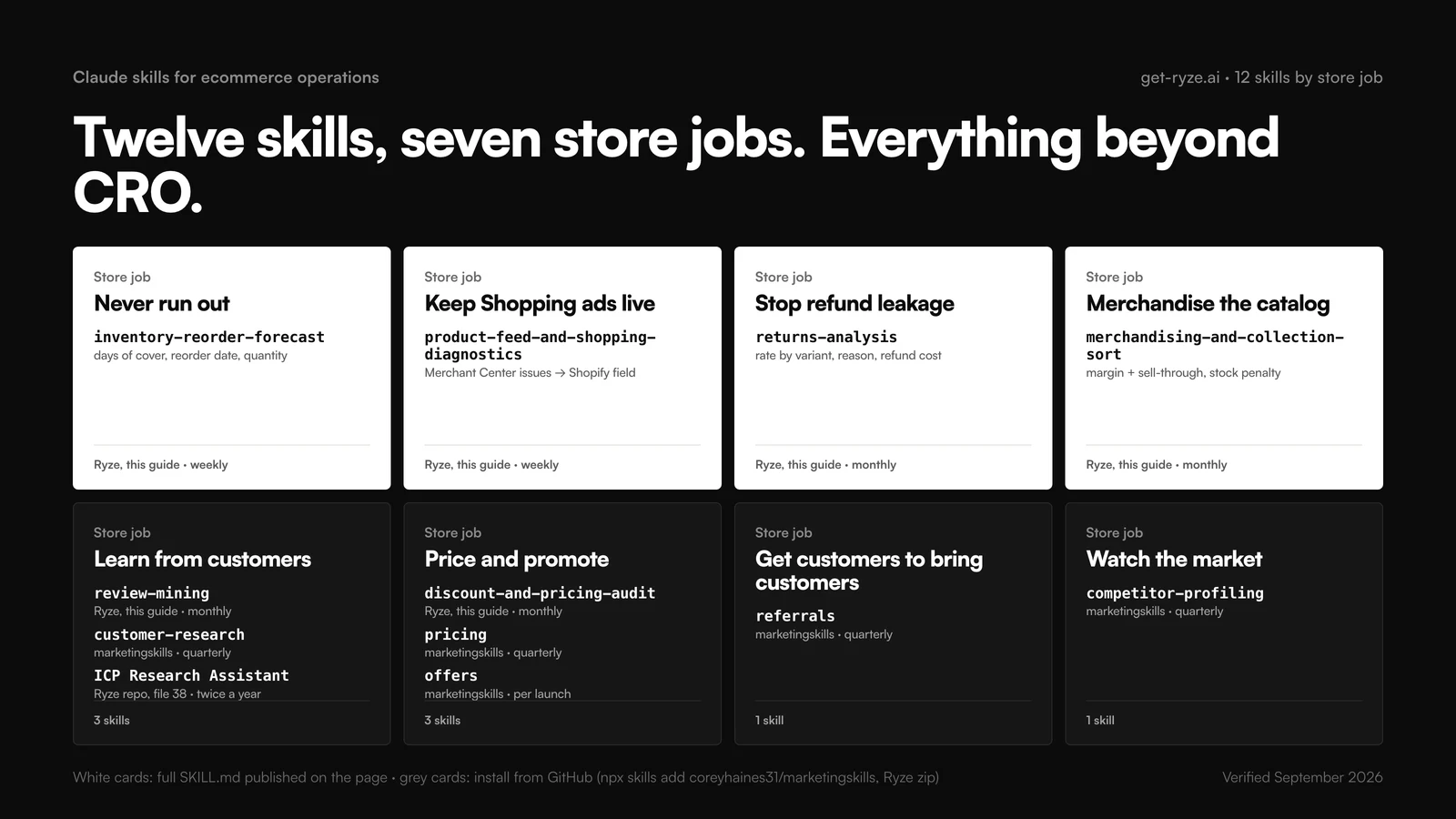
Which Claude ecommerce skill for which store job
Each row is one store job, the skill that handles it, the Shopify export or report it reads, and how often to run it. The first three rows cost the most per week when skipped, so install those first.
| Store job | Skill | Data it needs | Cadence |
|---|---|---|---|
| Know what to reorder and when | inventory-reorder-forecast | Inventory export, Sales by product variant SKU (90 days), lead times | Weekly |
| Get disapproved products back into Shopping | product-feed-and-shopping-diagnostics | Merchant Center product issues export | Weekly |
| Find the SKUs bleeding refunds | returns-analysis | Orders export with refunds, returns app export | Monthly |
| Sort a collection by money, not recency | merchandising-and-collection-sort | Products export, Sales by product (30 days) | Monthly |
| Learn what reviews keep saying | review-mining | Reviews export from the review app | Monthly |
| Retire discount codes that lose margin | discount-and-pricing-audit | Sales by discount, Orders export | Monthly |
| Set list prices and packaging | pricing (marketingskills) | Product-marketing context, cost per item | Quarterly |
| Design a launch or bundle offer | offers (marketingskills) | Product-marketing context, AOV | Per launch |
| Build or fix a refer-a-friend program | referrals (marketingskills) | Customer export, current program terms | Quarterly |
| Turn interviews and surveys into segments | customer-research (marketingskills) | Interview notes, survey export, reviews | Quarterly |
| Profile the three stores you lose carts to | competitor-profiling (marketingskills) | Competitor URLs | Quarterly |
| Write the buyer personas ads and pages use | ICP Research Assistant (Ryze) | Customer export, reviews, your own notes | Twice a year |
How to install Claude ecommerce skills, and where the Shopify data comes from
The same folder installs in three places. Steps verified against Anthropic’s help center and the Claude Code docs, September 2026.
In claude.ai (web and mobile)
Go to Settings › Capabilities and enable code execution and file creation. Then open Customize › Skills, click +, Create skill, Upload a skill, and upload the skill folder as a .zip. Toggle it on. For the six skills on this page, copy each SKILL.md block into a folder named after the skill, zip the folder, upload. On Team and Enterprise plans an owner enables Skills in Organization settings first. The Ryze repo ships an all-marketing-skills.zip that includes the ICP Research Assistant.
In Claude Code
Claude Code reads ~/.claude/skills/ for personal skills and .claude/skills/ inside a repo for skills that ship with the project. Drop each folder in; no restart needed; invoke with /skill-name or let Claude trigger it. The five marketingskills skills install with one command:
npx skills add coreyhaines31/marketingskills --skill pricing offers referrals customer-research competitor-profiling
# the six skills from this page, pasted into folders
~/.claude/skills/inventory-reorder-forecast/SKILL.md
.claude/skills/product-feed-and-shopping-diagnostics/SKILL.md # ships with the store repo
In Claude Desktop and Cowork
The desktop app shares your claude.ai skills and adds scheduling. A skill plus a cadence becomes a standing job: the reorder forecast that is waiting on Monday morning, the feed check that runs before the weekend. Shopify and Claude Cowork walks through the scheduled setup.
Shopify data: CSV exports or a connector
Every skill here was written to run from files you can export today. In the Shopify admin, Orders › Export, Products › Export and Products › Inventory › Export give the three CSVs; Analytics › Reports gives Sales by product, Sales by product variant SKU and Sales by discount. Reviews come from your review app’s export, returns reasons from your returns app, and feed issues from the Merchant Center product list export. Attach the files to the chat and name the date range.
A connector removes the export step. How to set up a Shopify MCP connection covers the options; keep it read-only. One clarification, verified on shopify.dev in September 2026: Shopify’s own Dev MCP server (npx -y @shopify/dev-mcp@latest) serves developer documentation and API schemas, runs without authentication, and does not read your store’s orders or inventory. It is for building apps, not for these skills. For the paid-ads side, the Ryze MCP connector gives Claude live Google Ads and Meta data, which matters once inventory and ad spend need to be read together.
The 12 Claude skills for ecommerce operations
Six written by Ryze for this guide, published in full so you can paste them today, then six from public repositories. Each of ours states the Shopify data it needs, the steps in order and the output contract, because the output contract is what makes month four comparable with month one. Ordering is editorial: by how much money the skill’s output moves per minute of setup, on the stores we manage ads for.
01 · inventory-reorder-forecast
written by Ryze for this guideNever find out about a stockout from the ads
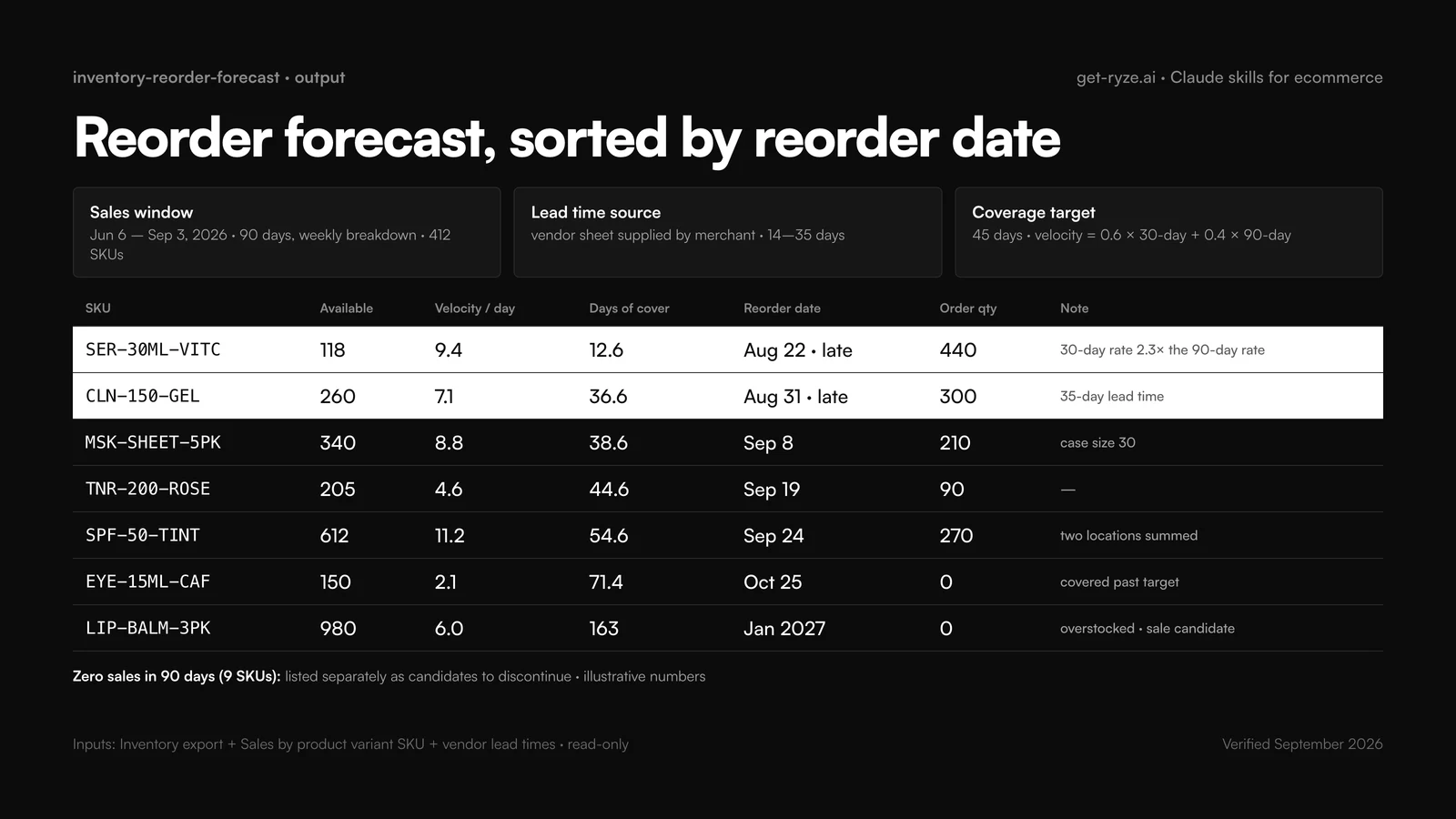
The first skill to install. It turns stock on hand into days of cover, subtracts lead time, and tells you the date to order and how much. The weighted velocity keeps a product that started trending last month from being forecast on its sleepy 90-day average. Deeper methods, including seasonality, are in AI inventory forecasting for Shopify merchants.
02 · product-feed-and-shopping-diagnostics
written by Ryze for this guideGet disapproved products back into Shopping ads
A disapproval is an ad that stopped running without telling the ad account. This skill groups Merchant Center issues by cause, names the Shopify field behind each one, and orders the fixes by revenue at risk so the 40-product image problem gets fixed before the one missing GTIN. The wider feed workflow is in fixing Merchant Center disapprovals with AI and Google Shopping feed optimization.
03 · returns-analysis
written by Ryze for this guideFind the variant returning at three times the average
Return rate per product is easy. The money is in the variant split (one size that returns twice as often is a size-chart problem, not a product problem) and in the discount check, because discounted orders that return more often are a double loss. For the tooling side, see AI for Shopify returns and exchanges.
04 · merchandising-and-collection-sort
written by Ryze for this guideSort collections by margin and stock, not by newest
Shopify’s default sorts are best-selling, newest and price. None of them knows your margin or your stock cover, so best-selling happily puts a 12%-margin product with nine days of stock in position one. This skill scores by margin and sell-through, penalizes products that will run out, and flags the sold-out items still occupying a slot.
05 · review-mining
written by Ryze for this guideTurn 800 reviews into three fixes and six quotes
Fixed theme list, counts by rating band, verbatim quotes. The fixed list is the point: if the themes change every run you cannot see the sizing complaint climbing from 8% to 19% of one-star reviews. The positive quotes feed product pages and ads; the negative ones feed the product team and the size chart.
06 · discount-and-pricing-audit
written by Ryze for this guideRetire the codes that pay people who would have bought anyway
The question is incrementality, not volume. A code with 900 orders that were 70% returning customers who bought at full price last quarter did not generate revenue; it discounted revenue you already had. The skill also catches codes that stack and products that end up below cost.
Six skills from public repositories
These cover the strategy side of operations: what to charge, what to bundle, how to get customers to bring customers, and who the customer is. Five are from Corey Haines’ marketingskills (MIT licensed), which read a shared .agents/product-marketing.md context file, so install product-marketing alongside them. One is from the Ryze repo.
| Skill | What it does for a store | Source | Install |
|---|---|---|---|
| pricing | Pricing, packaging and monetization strategy: list price, tiers, bundles versus singles, when to raise | marketingskills | npx skills add coreyhaines31/marketingskills --skill pricing |
| offers | Design, construct or improve an offer: the launch bundle, the gift-with-purchase, the threshold for free shipping | marketingskills | npx skills add coreyhaines31/marketingskills --skill offers |
| referrals | Create, optimize or analyze a referral program: incentive structure, timing after delivery, fraud rules | marketingskills | npx skills add coreyhaines31/marketingskills --skill referrals |
| customer-research | Conduct, analyze or synthesize customer research: interviews, surveys and reviews into segments and jobs | marketingskills | npx skills add coreyhaines31/marketingskills --skill customer-research |
| competitor-profiling | Research and profile competitors from their URLs with the same fields every time: range, price points, shipping, returns policy, reviews | marketingskills | npx skills add coreyhaines31/marketingskills --skill competitor-profiling |
| ICP Research Assistant | Buyer personas with pain points and buying triggers, built from your own customer data; file 38 in the Google Ads folder | Ryze | Download folder, zip, upload under Customize › Skills |
Two prompts that put the repo skills to work on Shopify data. Paste the exports first, then the prompt.
Not on this page: SEO skills for the catalog (Claude skills for Shopify SEO), support automation (AI customer support for Shopify stores), and the paid-ads audits (Claude skills for Google Ads). Flow-style automations get one clause: Shopify Flow and AI automations covers the triggers, including the email ones.





Free SEO/GEO audit
- Surface technical SEO issues
- Spot quick wins
- Find duplicate and thin pages
Free · no credit card · instant
Shopify agent skills and agentic commerce
“Shopify agent skills” means two different things, and it helps to keep them apart. The first is what this page covers: skills you install so Claude can do operations work from your store’s data. The second is what Shopify has built so that other people’s agents can shop your store. Verified against shopify.dev/docs/agents and shopify.com/agentic-storefronts, September 2026:
- Agentic Storefronts — your products appear inside ChatGPT, Gemini, Copilot and Meta AI with live inventory, and shoppers can buy without leaving the chat. Shopify says it is enabled automatically for eligible stores; the page does not publish eligibility criteria.
- Universal Commerce Protocol (UCP) — the agent-builder side: a Global Catalog across merchants, a Storefront Catalog per store, and Cart, Checkout and Order MCP servers with order webhooks for fulfillment, returns and refunds. A Shopify AI Toolkit CLI plugin lets an agent search, build a cart, check out and track an order.
- Storefront MCP — buyer-facing: natural-language search, cart, checkout, policy and FAQ answers, order status, through an embedded chat window on your own storefront.
What that means for the skills above: they get more important, not less. An agent buying on a shopper’s behalf reads the same catalog your Shopping feed reads, so a feed with 40 disapproved products is invisible to it too. An agent shows live stock, so the reorder forecast decides whether you are even in the answer. And returns and reviews feed the trust signals agents weigh. Agentic storefronts explained covers how to win placement, and prepping a Shopify catalog for agentic AI shopping has the field-by-field checklist. For the buyer side in plain terms, Nation’s guide walks through how AI agents shop and check out for a customer.
A monthly operations cadence for a Shopify store
Operations skills earn their value on a schedule, because every one of them detects a problem that compounds: a stockout costs more each day, a disapproval costs a weekend of Shopping traffic, a bad discount code runs until someone looks. Give each skill a slot so the check happens before it hurts.
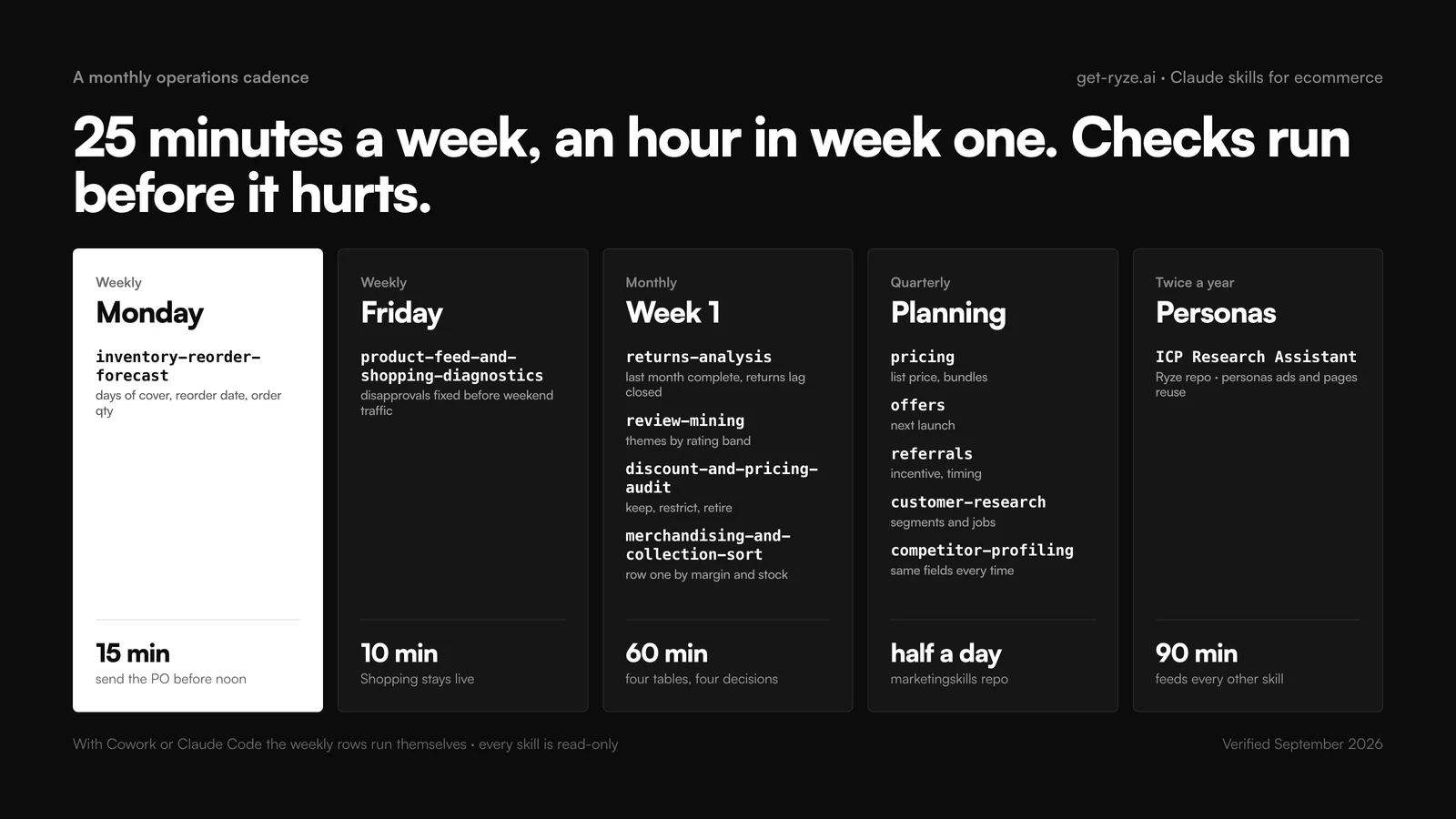
The monthly block is deliberately in week one, when the previous month’s orders, refunds and discount use are complete. Running returns-analysis mid-month undercounts, because returns lag purchases by two to three weeks. If a slot keeps getting skipped, the output is not driving a decision: rewrite its output contract until it does, or drop the skill.
Write your own ecommerce operations skill
The six skills above follow one pattern, and it is the pattern to copy for the job only your store has. Four parts: a description that says when to trigger and what the skill does not cover; an input contract naming the exact Shopify export and what to do when a column is missing (ask, do not estimate); the steps, including the check a tired analyst would skip; and an output contract with the columns, sort order and a fixed list of verdicts.
The ecommerce-specific habits: name the report as it appears in the Shopify admin so the person running it exports the right one; make the skill echo the date range and row count before analyzing, which catches the filtered export; put currency and units in the column headers; and keep the theme or verdict list fixed across runs so month four is comparable with month one. Test the skill on a task you already did by hand last month and diff the two answers. Store finished skills in .claude/skills/ in the store’s repo so every operator runs the same version.
Troubleshooting
The velocity looks wrong
Almost always the export. Sales by product variant SKU must cover the full 90 days with a daily or weekly breakdown, and the Inventory export must include every location. Have the skill echo the date range and row count first.
Return rate is zero
The Orders export was filtered to paid orders, or refunds are recorded in the returns app rather than as Shopify refunds. Export with all financial statuses, or attach the returns app export.
The skill never triggers
The description does not match how you phrase the request. Name it once (“use the returns-analysis skill”) to confirm it works, then rewrite the description with your team's words.
Feed fixes did not stick
The skill diagnoses; the change happens in Shopify or the feed app, and Merchant Center re-crawls on its own schedule. Re-run the diagnostics a week later and compare counts, not verdicts.
Margin is blank everywhere
Cost per item is empty on most products. Fill it in Shopify, or tell the merchandising and discount skills to fall back to price rank and say so in the output.
The Ryze help center explains the Ryze MCP server and connecting a Shopify store.
Frequently asked questions
What are Claude skills for ecommerce?
What are the best Claude skills for ecommerce operations?
Which Claude ecommerce skills does this page cover, and which does it not?
How do I install Claude skills for a Shopify store?
Show 9 more questionsShow fewer questions
Do Claude skills need a Shopify connector, or can I use CSV exports?
What is a Shopify agent skill?
Can I do ecommerce data analysis with Claude from a Shopify export?
How does Claude help Shopify merchants with inventory reorders?
Can Claude fix Google Merchant Center disapprovals for my Shopify products?
Can Claude skills change my Shopify store or ad account?
What Shopify data does each ecommerce skill need?
How often should I run Claude ecommerce operations skills?
Is there a Claude ecommerce skill for pricing?
Related guides
Top 10 Claude skills for Shopify CRO
The conversion side: product pages, checkout, the CRO agent.
Claude Shopify skills
Developer use cases with Claude Code and the Shopify APIs.
Agentic storefront: what it is and how to win
Getting your products into ChatGPT, Gemini and Copilot answers.
AI inventory forecasting for Shopify merchants
Seasonality, safety stock and the tools that do it.

