MCP
How to connect Claude to Google Ads, Meta, and every platform
Google Ads, Meta, TikTok, GA4, Search Console, Shopify, HubSpot, Gmail, Sheets, ClickUp — every tool you use, in a single Claude chat. One MCP, ~30 seconds per connection, no tab switching.
Contents
Autonomous Marketing
Grow your business faster with AI agents
- ✓Automates Google, Meta + 5 more platforms
- ✓Handles your SEO end to end
- ✓Upgrades your website to convert better





If you run paid acquisition for a real business, your day looks like this: 7 browser tabs open, three different attribution models running in parallel, and a Looker dashboard you only update every other Tuesday. Every cross-platform question — “is Meta or TikTok actually working for our jewelry SKU?” — turns into a 20-minute extraction project.
With Claude connected to every tool via the Ryze MCP, the same question is one message. The tools come to Claude, you don’t go to the tools. Ad platforms (Google, Meta, TikTok), analytics (GA4, Search Console), ecommerce (Shopify), CRM (HubSpot), email (Gmail), spreadsheets (Sheets), project management (ClickUp) — all in one chat.
The short answer
To connect Claude to Google Ads, Meta Ads, TikTok, GA4, Search Console, and Shopify, paste one Ryze AI MCP connector URL (https://connector.get-ryze.ai/mcp) into Claude under Settings → Connectors → Add Custom Connector, then sign in to each platform with one-click OAuth. There is no code, no API keys, and one connector reaches every platform you authorize — all in the same Claude chat.
TL;DR
- What it is: Ryze MCP is a single Claude connector that gives Claude live read access to Google Ads, Meta Ads, TikTok Ads, GA4, Search Console, Shopify, HubSpot, Instagram, Gmail, Google Sheets, and ClickUp.
- How long setup takes: 30 seconds per tool, one-click OAuth, no API keys to copy, no IT ticket to file.
- The MCP URL:
https://connector.get-ryze.ai/mcp - What changes: cross-platform ROAS comparisons, Meta×Shopify attribution, GSC×Google Ads keyword joins, inventory-aware ad spend, and weekly cross-platform digests — all from one chat thread.
- Works with: Claude.ai (Pro / Team / Free), Claude Desktop, Claude Code, ChatGPT Web, Cursor, n8n, and direct API endpoints.
Below: five concrete use cases that get easier the moment everything is connected, then the 30-second setup walkthrough. If you’d rather see this applied to specific platforms, jump to 15 marketing skills for Claude across Google & Meta or the complete Claude marketing skills guide.


30-second setup per platform
The setup is genuinely fast — no API keys to copy, no developer apps to register, no IT ticket to file. It’s a one-time, ~30-second OAuth flow per platform. Here’s the canonical path for Claude.ai (the recommended client):
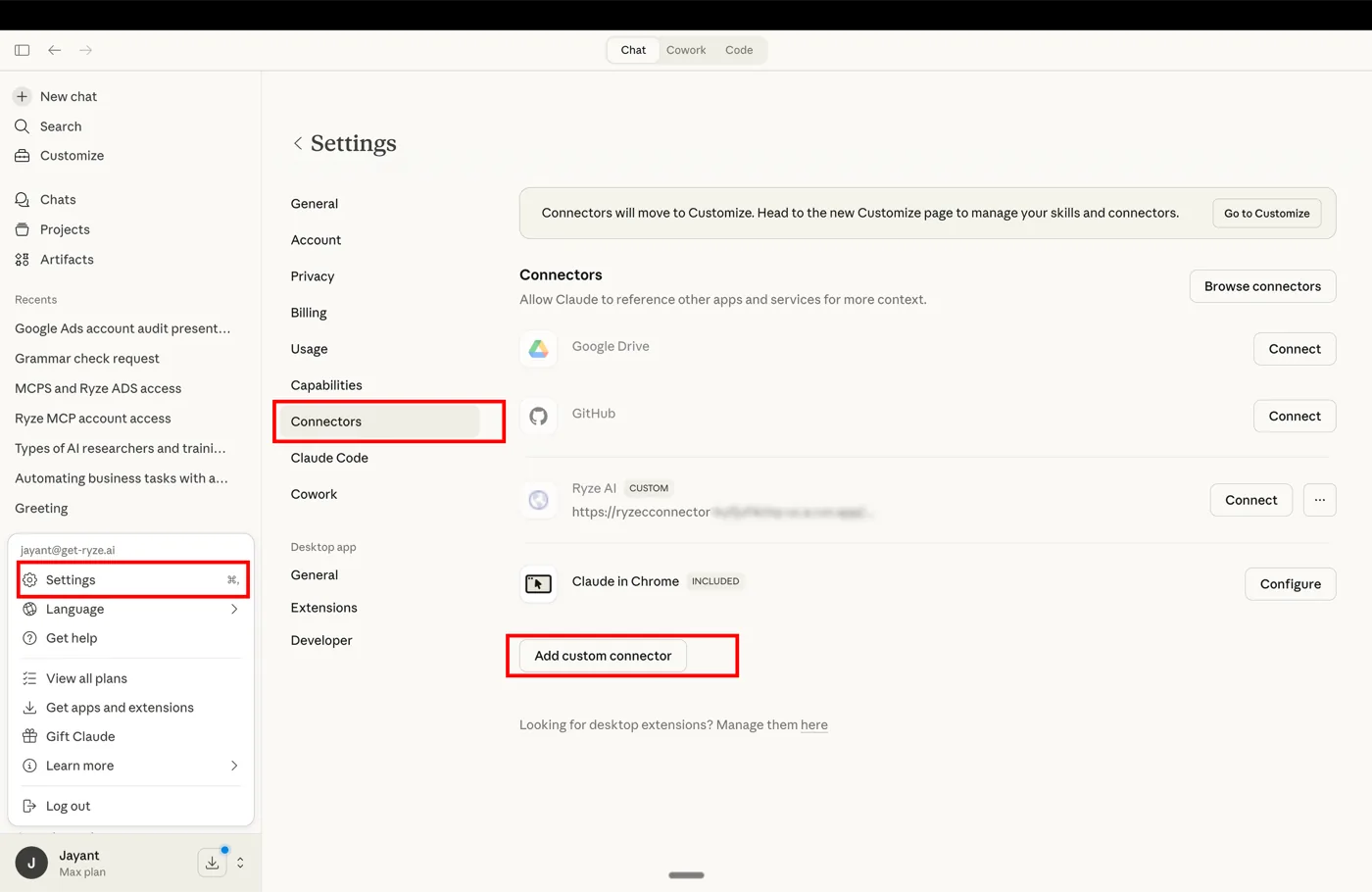
- 1Go to claude.ai → Settings → Connectors
- 2Click Add Custom Connector at the bottom of the screen
- 3
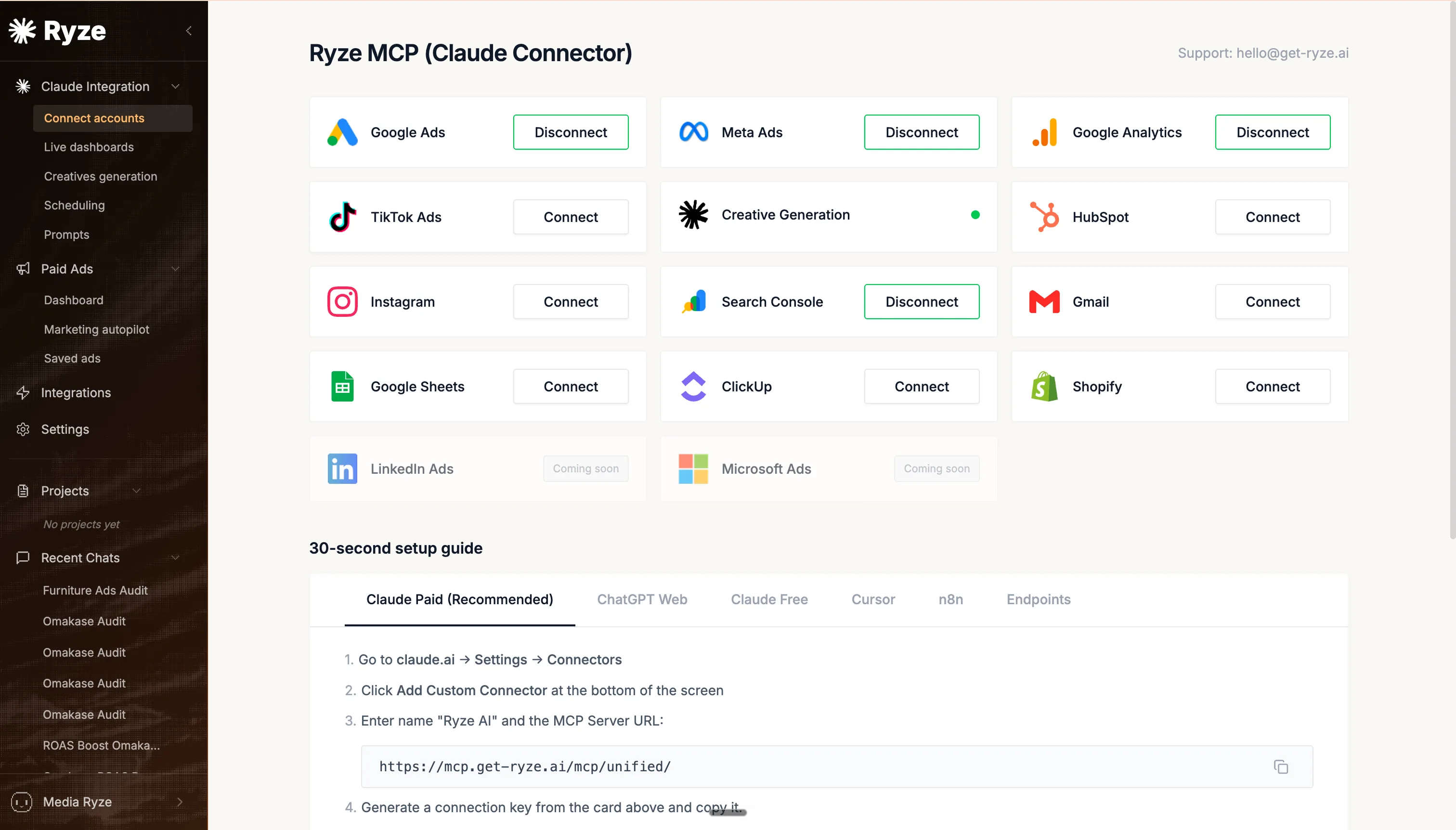
Enter name “Ryze AI” and the MCP Server URL:
https://connector.get-ryze.ai/mcp - 4Generate a connection key from the Ryze dashboard and paste it. Done — you’ll see all your connected ad accounts available to Claude in the next message.
Same MCP works with ChatGPT Web, Claude Free, Cursor, n8n, and direct API endpoints — same URL, slightly different paste path per client. Pick the one you use most for daily marketing work.
Claude side
Ryze side
Every connector available today
The Ryze MCP currently bridges Claude to 12+ platforms across paid ads, analytics, ecommerce, CRM, productivity, and email. Each connector uses the platform’s official API (no scraping, no fragile DOM hacks) and supports both read and (where allowed) write operations — the Google Ads integration doc shows how the most-used connection works.
| Platform | What Claude can read / do |
|---|---|
| Google Ads | Read campaigns, ad groups, keywords, search terms, and conversions; adjust budgets and bids (controlled write). |
| Meta Ads (FB + IG) | Read ad accounts, campaigns, ad sets, ads, creatives, audiences, and insights via the Meta Marketing API. |
| TikTok Ads | Read campaigns, ad groups, ads, audiences, creative assets, and performance reports. |
| Google Analytics 4 | Run reports, query event data, break down by source/medium, and read conversions and audiences. |
| Search Console | Read top queries and pages, performance by country/device, inspect URLs, and submit sitemaps. |
| Shopify | Read products, collections, orders, customers, and inventory levels; manage draft orders, refunds, and discounts. |
| HubSpot, Gmail, Sheets, ClickUp, Instagram | CRM records, email search/draft/send, spreadsheet read/write, task management, and social posts/insights — same one-click OAuth. |
Google Ads
Campaigns, ad groups, keywords, search terms, conversion data, budgets, bid strategies. Full read; controlled write.
Meta Ads (Facebook + Instagram)
Ad accounts, campaigns, ad sets, ads, creatives, audiences, insights via Meta Marketing API.
TikTok Ads
Campaigns, ad groups, ads, audiences, creative assets, performance reports.
Google Analytics 4 (GA4)
Run reports, query event data, source/medium breakdowns, conversions, audiences.
Google Search Console
Top queries, top pages, performance by country/device, URL inspection, sitemap submissions.
Shopify
Products, collections, orders, customers, inventory levels, draft orders, refunds, discounts.
HubSpot
Contacts, companies, deals, tickets, marketing campaigns, pipelines, properties.
Instagram (Business)
Posts, stories, comments, DMs, hashtag search, account insights, audience demographics.
Gmail
Search threads, fetch messages, draft / send / forward / label, attachments, filters.
Google Sheets
Read / write cells, append rows, run SQL-style queries, create charts, format ranges.
ClickUp
Tasks, lists, time entries, comments, checklists, docs, chat channels.
LinkedIn Ads & Microsoft Ads
Coming soon. On the roadmap; same MCP, same OAuth flow.
Cross-platform comparisons stop being a Looker project
The most common question on a Monday morning: “Where is my money working hardest right now?” Today, answering that means logging into Google Ads, exporting last month’s spend and revenue. Then Meta Ads Manager. Then TikTok. Then pasting it all into a sheet, normalizing time zones, and remembering which account uses last-click vs data-driven attribution.
One message. Three platforms queried in parallel. Claude returns a unified table within ~10 seconds, including the under-performing campaigns it had to surface from each. No exports, no sheet, no Looker dashboard you forget to refresh.
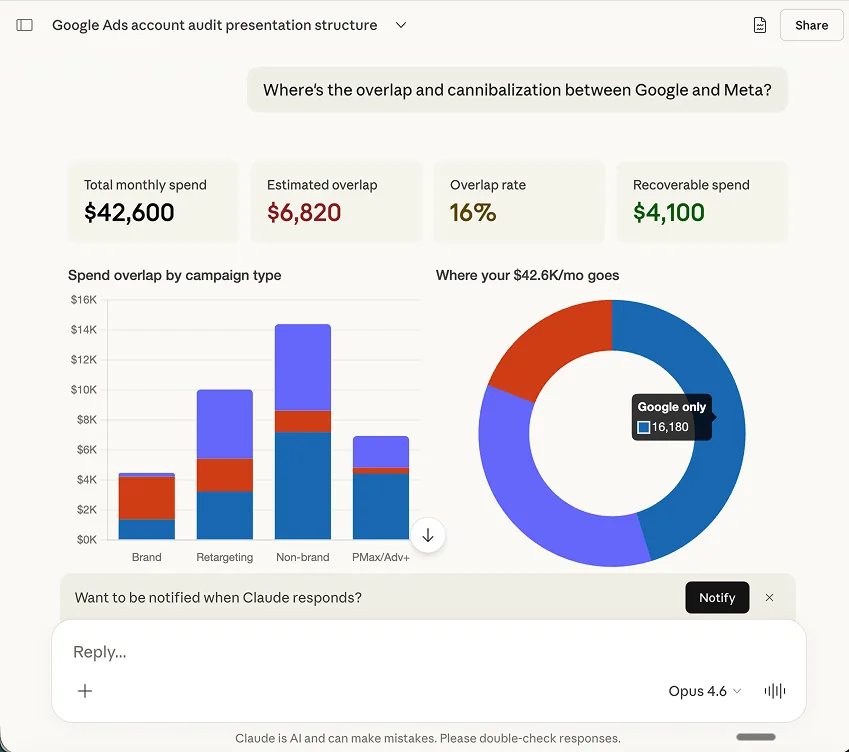
Three platforms, one query — the kind of cross-platform answer that used to require a BI engineer.
See specific Claude prompt patterns for each platform: Claude skills for Google Ads and Claude skills for Meta Ads.
Attribution stops requiring 6 browser tabs
Cross-platform attribution is where most marketing teams give up. The signal lives in different places: Meta’s in-platform attribution shows one number, GA4 (last-click via UTM) shows another, and the actual revenue lives in Shopify. Reconciling these takes either an attribution vendor ($2K-10K/mo) or a tireless analyst who lives in spreadsheets.
Claude pulls Meta’s reported numbers, queries GA4’s source/medium with the campaign UTMs, and joins both against Shopify’s order data via customer email or order timestamp. The output: a per-campaign view of what each system thinks happened, surfaced side-by-side.
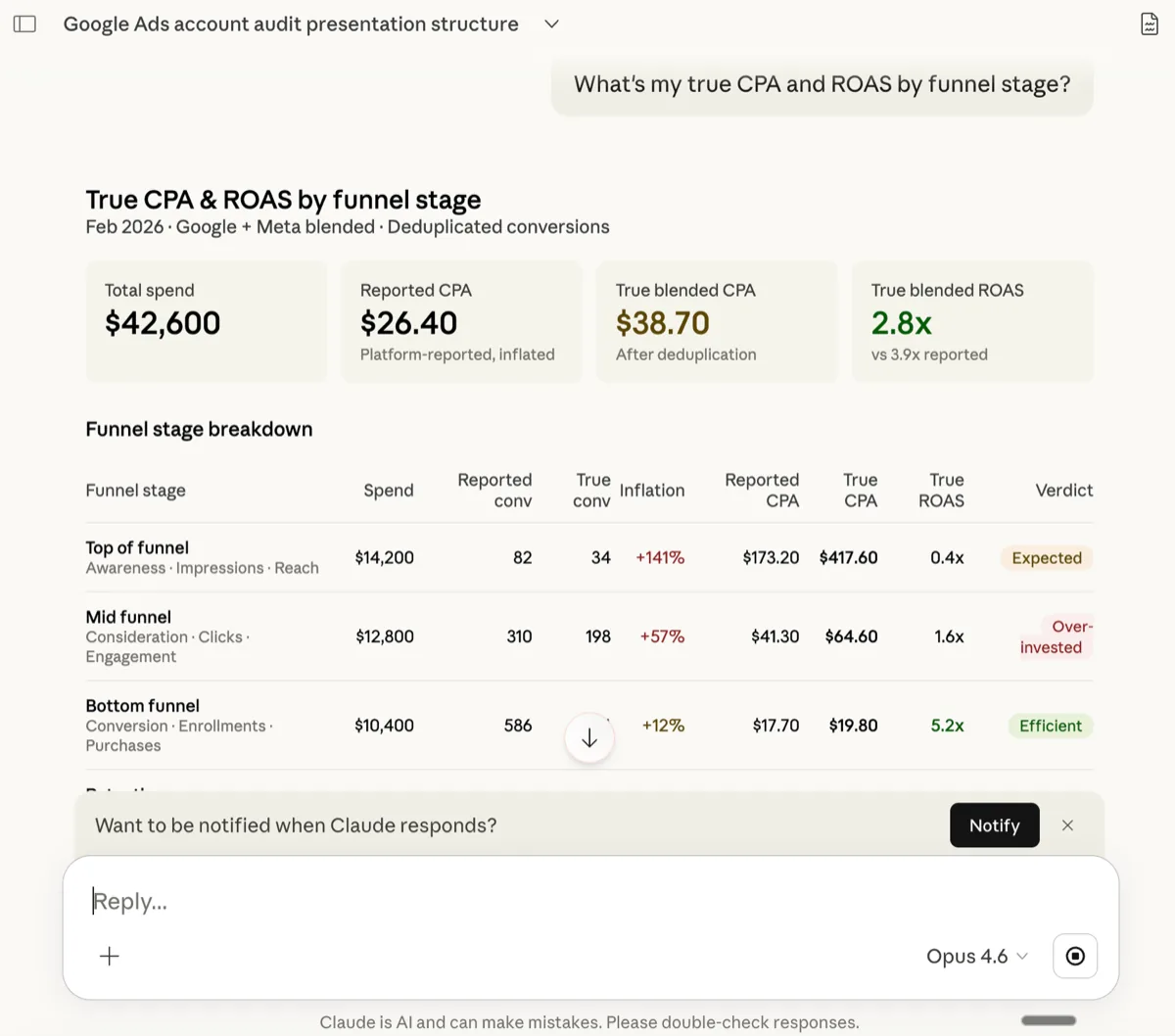
You don’t need to pick the “true” attribution model — Claude shows you each system’s view and you decide. The work that used to require an analytics consultant is now a follow-up question.
SEO and paid finally talk to each other
Search Console and Google Ads live in different teams at most companies. SEO knows which queries the site is ranking for organically. Paid knows which keywords they’re bidding on. The intersection — queries we’re showing up for that we should also bid on, or stop bidding on because organic already wins — is where money leaks. Nobody runs that report because it lives across two interfaces.
Claude joins GSC queries with the keyword report from Google Ads, classifies each into the three buckets, and ranks by impression volume so you start with the queries that move the needle. The first time you run this, expect to find at least 5-10 queries where you’re paying for clicks you’d get for free anyway.
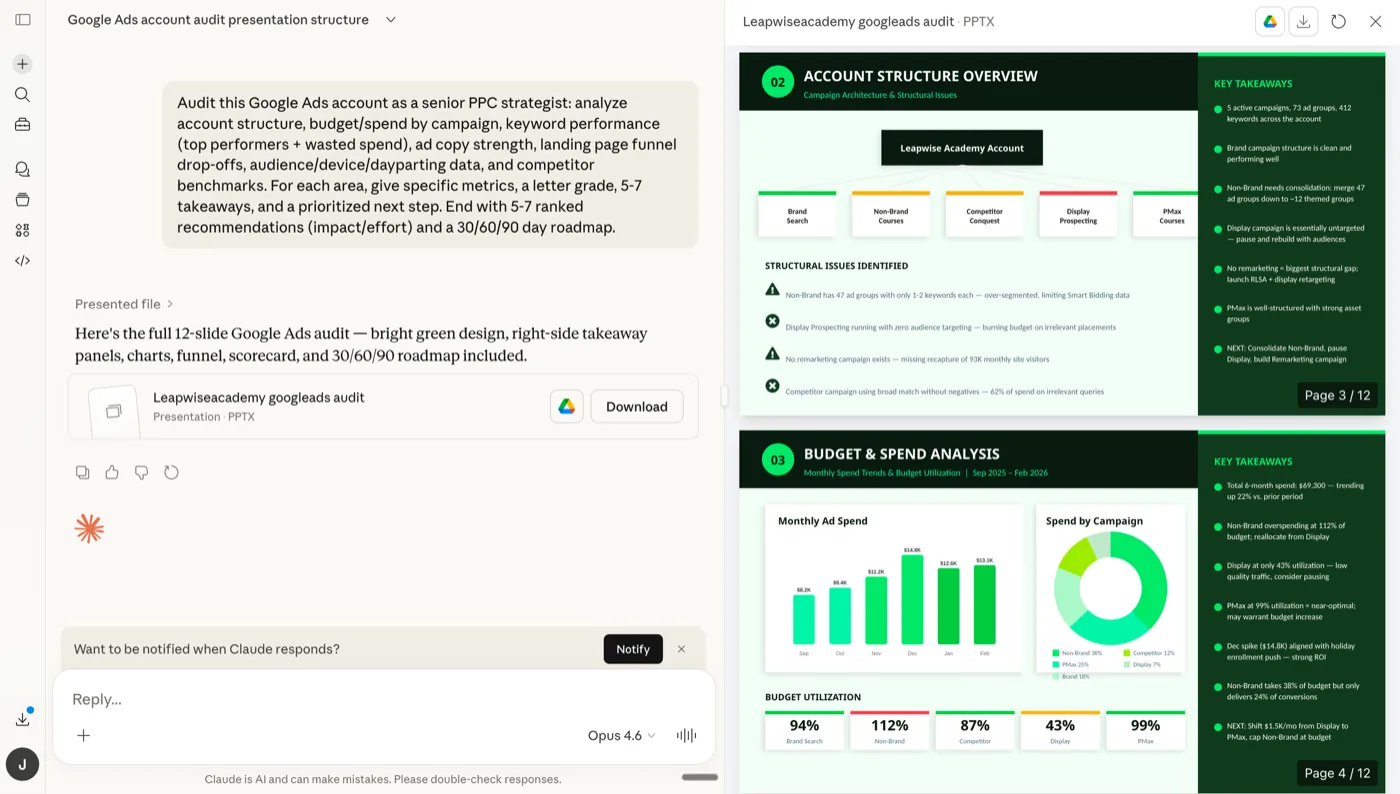
For a deeper walkthrough of running this kind of audit on Google Ads specifically, see How to use Claude for Google Ads.
Inventory and ad spend stop running blind
For ecommerce brands, the worst kind of waste is spending hard on a Meta campaign for a product that’s out of stock at the warehouse. Or scaling a TikTok campaign for a SKU your supplier can’t restock for six weeks. The signal exists — it’s in Shopify — but it never reaches the media buyer in time.
Claude pulls every active Meta ad set (with the Shopify product ID in the catalog mapping), joins on inventory levels, and surfaces both directions of the leak: spending on stock that won’t convert, and starving stock that’s converting too well to keep up. The output reads like a short action list, not a dashboard.
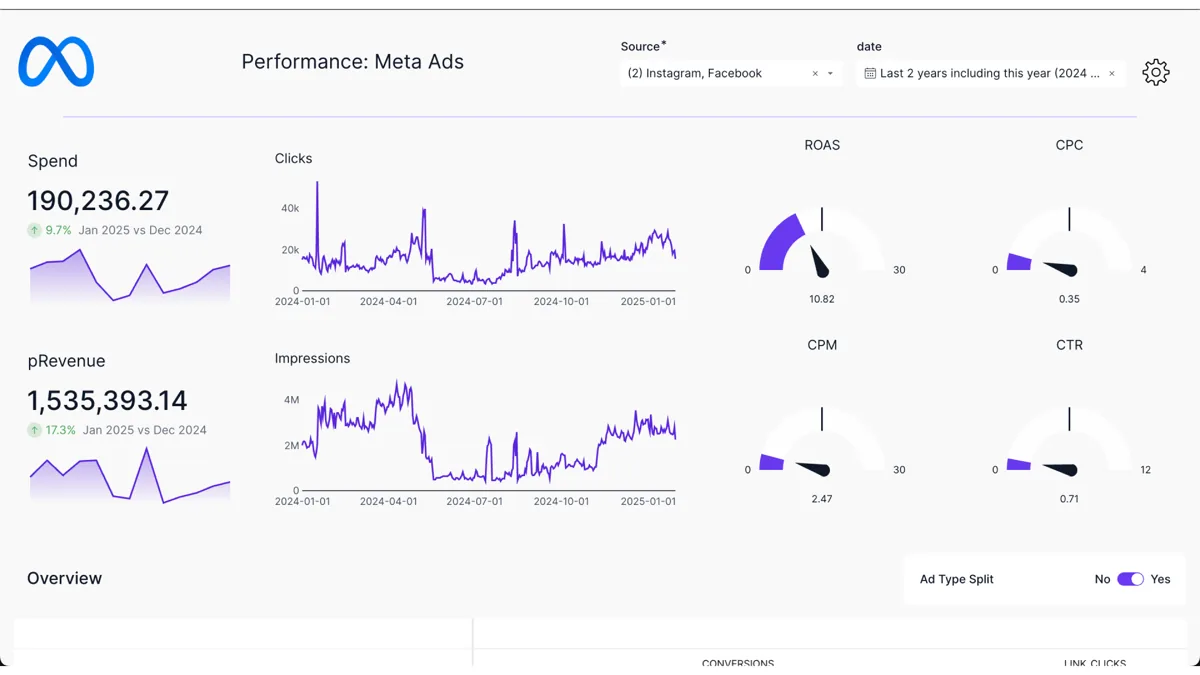
Most ecommerce teams discover at least one “dark spend” SKU on the first run. The cost of finding it manually was high enough that nobody bothered. For more Meta-specific automation patterns, see How to use Claude for Meta Ads.
Weekly digests pull from everywhere at once
Most marketing teams eventually build a Monday digest — the email/Slack post that summarizes last week’s ad performance for the whole company. Building it is a chore. Pulling numbers from each platform, normalizing them, writing the commentary. With Claude, that becomes a single prompt you can re-run every Monday at 9am.
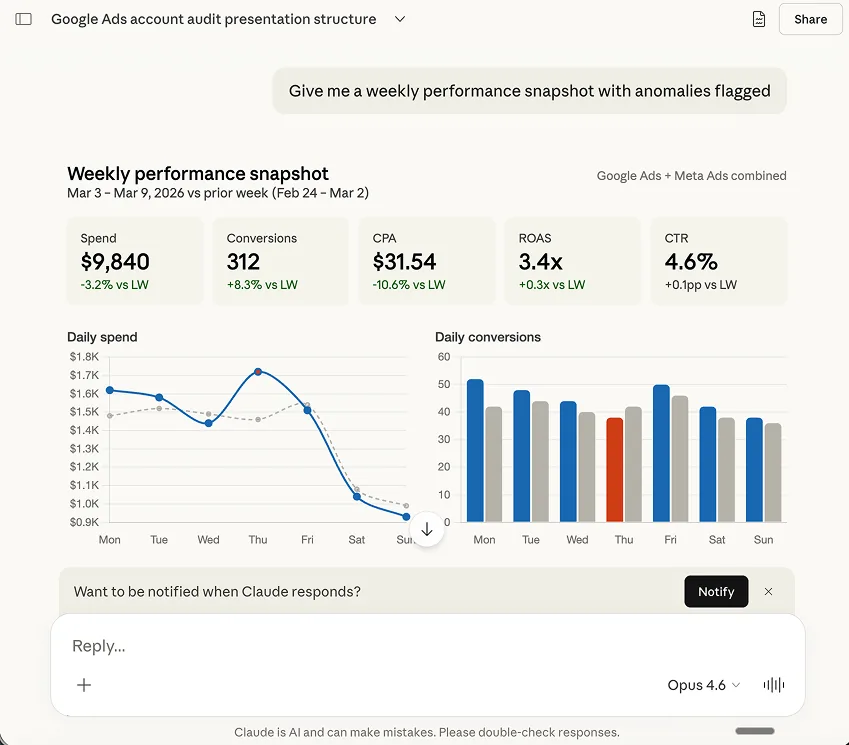
Pair this with Claude Cowork scheduled tasks and the digest sends itself every Monday morning. You read it on your phone before you open the laptop.
What this doesn’t replace
A few things worth being clear about, because we’ve seen marketers expect more than the tool delivers:
- Claude doesn’t write your ads for you (yet). It’ll diagnose creative fatigue and suggest copy directions, but the actual creative still ships from your team or your agency.
- It doesn’t replace having a media buyer who knows your account. Cross-platform comparison is a tool — interpretation is still a human job.
- Real-time bidding decisions still happen inside each platform’s native auction. Claude can read the outcome but doesn’t take over Smart Bidding or Advantage+ in real time.
- For very large accounts (50+ active campaigns, multiple ad accounts), response latency goes from instant to 15-30 seconds because more API calls have to fan out.
Knowing this up front saves disappointment. The thing it’s genuinely great at: replacing the tab-switching, the spreadsheet reconciliation, and the “wait, let me pull that report” loop.





Free SEO/GEO audit
- Surface technical SEO issues
- Spot quick wins
- Find duplicate and thin pages
Free · no credit card · instant
Frequently asked questions
Q: How do I connect Claude to Google and Meta Ads?
In Claude.ai go to Settings → Connectors → Add Custom Connector and paste the Ryze MCP URL. Generate a key from the Ryze dashboard and paste it back. Then sign in to Google Ads with your Google account and Meta Ads with your Facebook Business account via one-click OAuth. About 30 seconds each, no code. The Google sign-in also covers GA4 and Search Console.
Q: What platforms can Claude connect to via MCP?
Through the Ryze MCP connector: Google Ads, Meta (Facebook + Instagram), TikTok Ads, GA4, Search Console, Shopify, HubSpot, Instagram Business, Gmail, Google Sheets, and ClickUp. Each uses the platform’s official API. LinkedIn Ads and Microsoft Ads are on the roadmap.
Q: Do I need code to connect Claude to my ad platforms?
No. No code, no API keys to copy, no developer app to register. You paste one MCP connector URL into Claude, then authenticate each platform with one-click OAuth — the same sign-in you use for Google, Meta, TikTok, or Shopify. Ryze handles the API calls and tokens.
Q: Is one connector enough to reach every platform?
Yes. You add a single Ryze MCP connector to Claude once, and every platform you authorize runs through that one connector — you don’t add a separate connector per platform. After setup, you just OAuth each new platform from the Ryze dashboard and it appears in the same chat thread.
Q: Which ad platforms can I connect to Claude through Ryze MCP?
Six platforms in a single Claude chat thread today: Google Ads, Meta (Facebook + Instagram), TikTok Ads, Google Analytics 4, Google Search Console, and Shopify. Setup is one-click OAuth per platform — about 30 seconds each.
Q: How does connecting Claude to Meta Ads work technically?
The Ryze MCP server runs as a managed bridge. When you authorize Meta, your Facebook Business Manager grants Ryze a read-scoped access token. Claude routes calls through MCP, Ryze fetches via the official Meta Marketing API, and returns structured data. You never paste API keys.
Q: Is my ad data shared with Anthropic for training?
No. Anthropic doesn’t train on data sent through the Claude API or via MCP connectors per their commercial-use policy. The MCP server itself is run by Ryze. Your campaign data is fetched on-demand and not stored beyond a short request cache.
Q: Does it work with Claude.ai, Claude Desktop, or Claude Code?
All three. The MCP standard means the same Ryze connection works across Claude.ai (web), Claude Desktop, and Claude Code (terminal). Switching between them doesn’t require re-authentication.
Q: How much does it cost?
The Ryze MCP connector is free during the public preview. You’ll need a Claude Pro or Team subscription on the Anthropic side ($20/mo individual, $25/mo per seat). Existing accounts will be grandfathered in once paid plans launch.
Q: Can I disconnect a platform at any time?
Yes. Either revoke the connection in the Ryze dashboard (immediate, also revokes the OAuth token) or revoke the app permission directly in Google / Meta / TikTok / Shopify admin. No data retention beyond the request cache.
Ryze AI — Autonomous Marketing
Connect every ad platform to Claude in under 3 minutes
- ✓Google Ads, Meta, TikTok, GA4, Search Console, Shopify
- ✓One Claude thread, every account
- ✓30 seconds per platform — one-click OAuth
2,000+
Marketers
6
Platforms
$500M
Spend managed

