Top 10 Black Friday banner ideas for sites and ads
Quick answer: The top 3 Black Friday banners are a homepage hero, an announcement bar and a mobile banner. Ryze AI is the best AI tool for Black Friday banner and display ads in 2026, with one caveat: it makes and tests ad creatives, but website banners you place yourself.
Below: 10 example banners, sizes and rules.






Used by 2,000+ marketers










The 10 Black Friday banner ideas at a glance
Ranked by fit for the 3 weeks before Black Friday, Nov 27, 2026. Offers are examples.
- 1Homepage hero bannerEvery store
Effort: Low
What the banner says: The Black Friday Sale, 25% off
- 2Announcement barEvery page
Effort: Low
What the banner says: 25% off sitewide. Ends Nov 29.
- 3Mobile bannerPhone shoppers
Effort: Low
What the banner says: Black Friday Sale, Shop Now
- 4Sitewide sale bannerProduct pages and cart
Effort: Low
What the banner says: $24, was $32
- 5Countdown bannerSales with a fixed end time
Effort: Medium
What the banner says: Black Friday Ends Sunday
- 6Free-shipping threshold barCarts under the threshold
Effort: Medium
What the banner says: $24 away from free shipping
- 7Category bannerStores advertising 1 category
Effort: Medium
What the banner says: Knit Throws, 25% off
- 8Meta banner-style image adFacebook and Instagram
Effort: Medium
What the banner says: Black Friday Sale, Nov 27 to 29
- 9Google Display banner setDisplay and remarketing
Effort: High
What the banner says: 25% Off Sitewide
- 10Cyber Monday swap bannerMonday shoppers
Effort: Medium
What the banner says: Cyber Monday, 30% off throws
| # | Idea | Best for | Effort | What the banner says |
|---|---|---|---|---|
| 1 | Homepage hero banner | Every store | Low | The Black Friday Sale, 25% off |
| 2 | Announcement bar | Every page | Low | 25% off sitewide. Ends Nov 29. |
| 3 | Mobile banner | Phone shoppers | Low | Black Friday Sale, Shop Now |
| 4 | Sitewide sale banner | Product pages and cart | Low | $24, was $32 |
| 5 | Countdown banner | Sales with a fixed end time | Medium | Black Friday Ends Sunday |
| 6 | Free-shipping threshold bar | Carts under the threshold | Medium | $24 away from free shipping |
| 7 | Category banner | Stores advertising 1 category | Medium | Knit Throws, 25% off |
| 8 | Meta banner-style image ad | Facebook and Instagram | Medium | Black Friday Sale, Nov 27 to 29 |
| 9 | Google Display banner set | Display and remarketing | High | 25% Off Sitewide |
| 10 | Cyber Monday swap banner | Monday shoppers | Medium | Cyber Monday, 30% off throws |
Ideas 1 to 4 reuse 1 design; upload ideas 8 and 9 by Nov 24 for ad review.
What a Black Friday banner needs to say
A Black Friday banner is a wide image or strip that announces your sale on your website or in an ad. At a glance it must say what is on sale, until when, and where to click.
Adobe counted $11.8 billion in US online sales on Black Friday 2025, up 9.1% on 2024, and 56.4% of 2025 holiday online spend came from mobile devices. Every banner below needs a phone version.
Offer
- Example (fictional store)
- 25% off sitewide
- Rule
- 1 offer, in numbers, read first
Dates
- Example (fictional store)
- Nov 27 to Nov 29
- Rule
- The real start and end
Button
- Example (fictional store)
- Shop the Sale
- Rule
- 1 button to 1 page
Brand
- Example (fictional store)
- Small wordmark
- Rule
- A corner, never the biggest thing
Image
- Example (fictional store)
- The product in use
- Rule
- Empty space left for the text
| Part | Example (fictional store) | Rule |
|---|---|---|
| Offer | 25% off sitewide | 1 offer, in numbers, read first |
| Dates | Nov 27 to Nov 29 | The real start and end |
| Button | Shop the Sale | 1 button to 1 page |
| Brand | Small wordmark | A corner, never the biggest thing |
| Image | The product in use | Empty space left for the text |
On your site, keep the words as live text: Shopify says slideshow and background images should have no text in them because themes crop them, and WCAG, the web accessibility standard, prefers real text over images of text. In uploaded image ads, the text goes in the image. Pick the offer first (promotion ideas with the margin math); layout basics: ad banner design guide.
The 10 Black Friday banner ideas, one by one
Each idea has an example banner for Merrowby, a made-up home goods brand. Offers and dates are examples: 25% off sitewide Nov 27 to 29, 2026, then a Cyber Monday offer.
1. Homepage hero banner
A homepage hero banner is the large image at the top of your home page that names the sale, the dates and 1 button. Leave space in the photo for the text and link to 1 sale page (what goes on it).
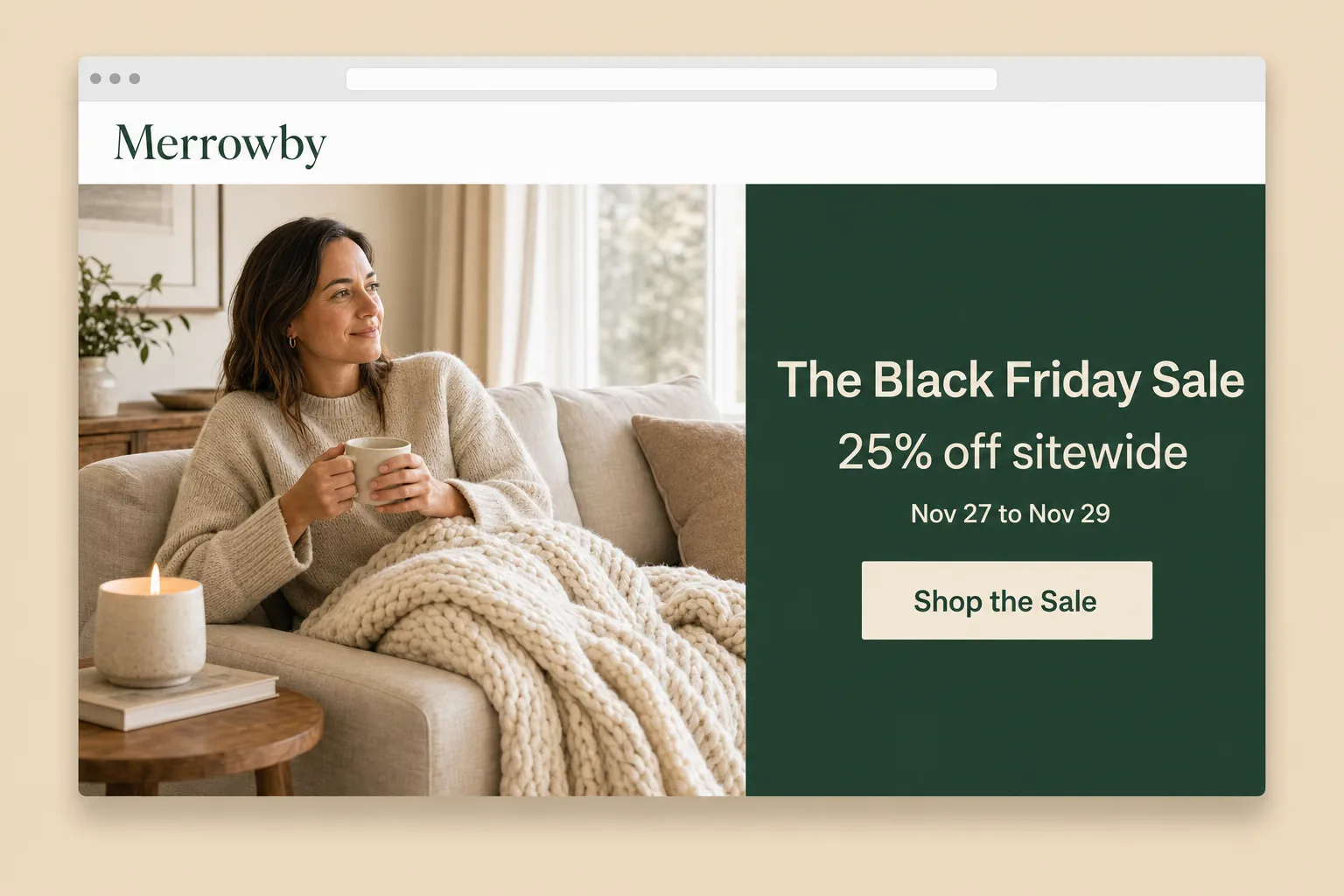
Copy this: "The Black Friday Sale", "25% off sitewide", "Nov 27 to Nov 29", button "Shop the Sale". Live from 12:00am ET on Nov 27.
2. Announcement bar
An announcement bar is the thin strip of text across the top of every page, so it follows shoppers onto product pages from ads. A Shopify bar holds up to 12 announcement blocks; use 1 or 2, since WCAG 2.2.2 asks for a pause control on anything moving over 5 seconds.
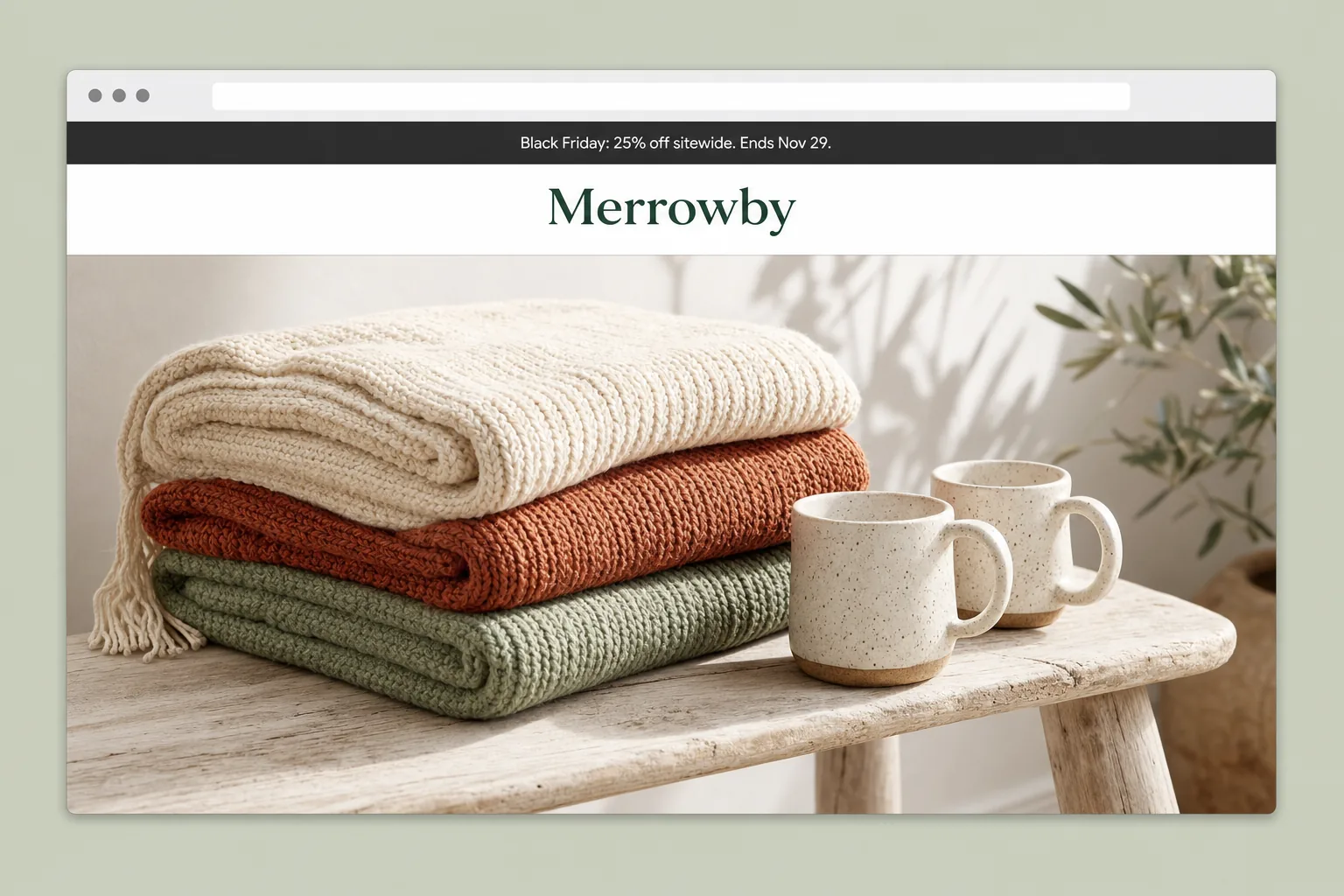
Copy this: "Black Friday: 25% off sitewide. Ends Nov 29." From Nov 20, an honest teaser: "Black Friday starts Nov 27".
3. Mobile banner
A mobile banner is the phone version of the hero: photo on top, then the offer and a full-width button on the first screen. Mobile drove 57.5% of Cyber Monday 2025 online sales, per Adobe. Skip full-screen pop-ups: Google says they may lead to poor search performance and suggests banners that take up a small part of the screen.
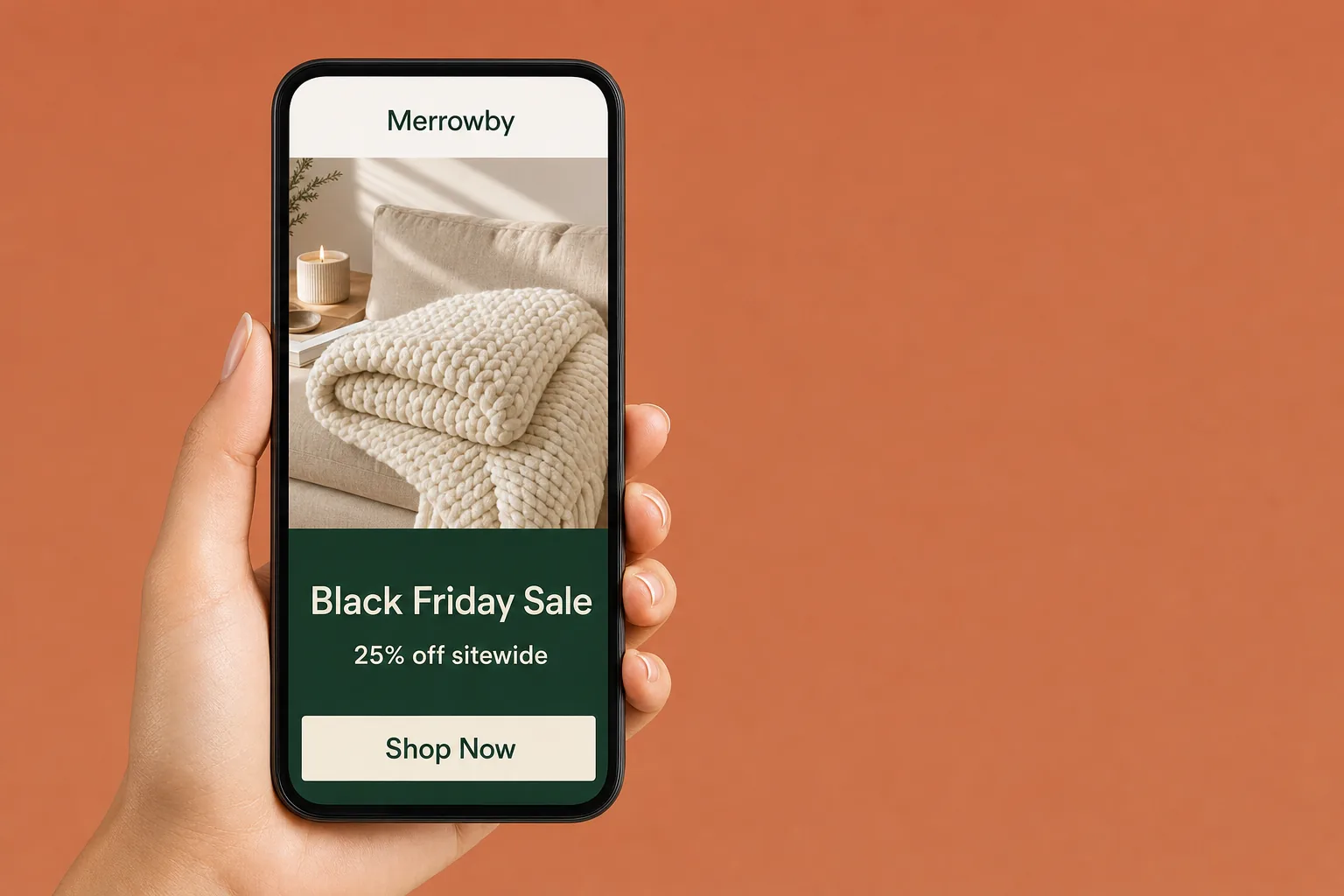
Copy this: "Black Friday Sale", "25% off sitewide", button "Shop Now". Check it on 2 real phones before Nov 27.
4. Sitewide sale banner
A sitewide sale banner is a strip on product pages, collection pages and the cart that repeats the offer, because ad clicks often land on a product page. Show a was-price only if you really offered it for a reasonably substantial period.
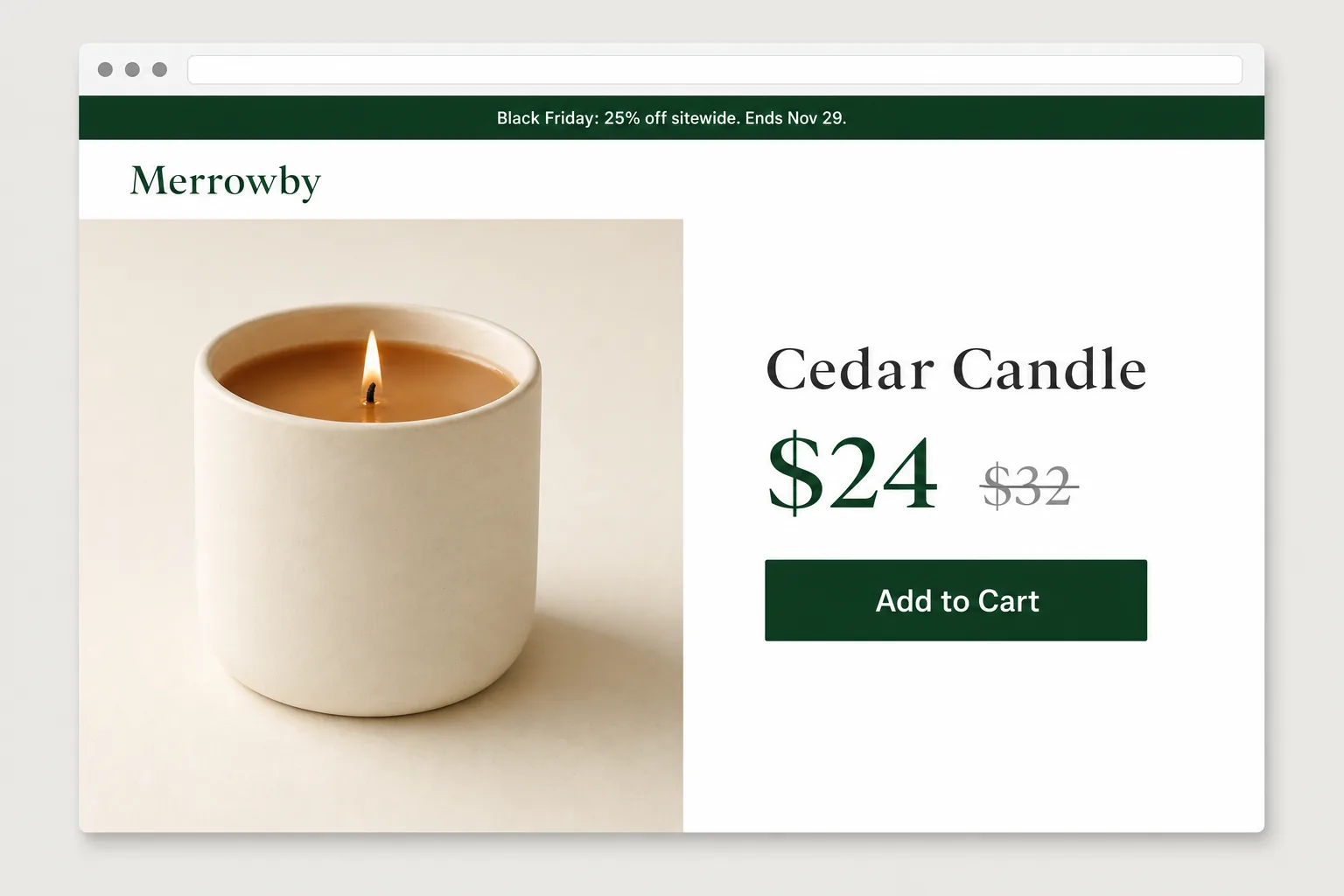
Copy this: "Black Friday: 25% off sitewide. Ends Nov 29." above "Cedar Candle", "$24" next to "$32" struck through, "Add to Cart".
5. Countdown banner with the real end time
A countdown banner shows the time left until the sale ends, with the end date written out. The FTC lists countdown timers that fake a time limit among dark patterns, so run 1 timer for everyone that ends when prices change.
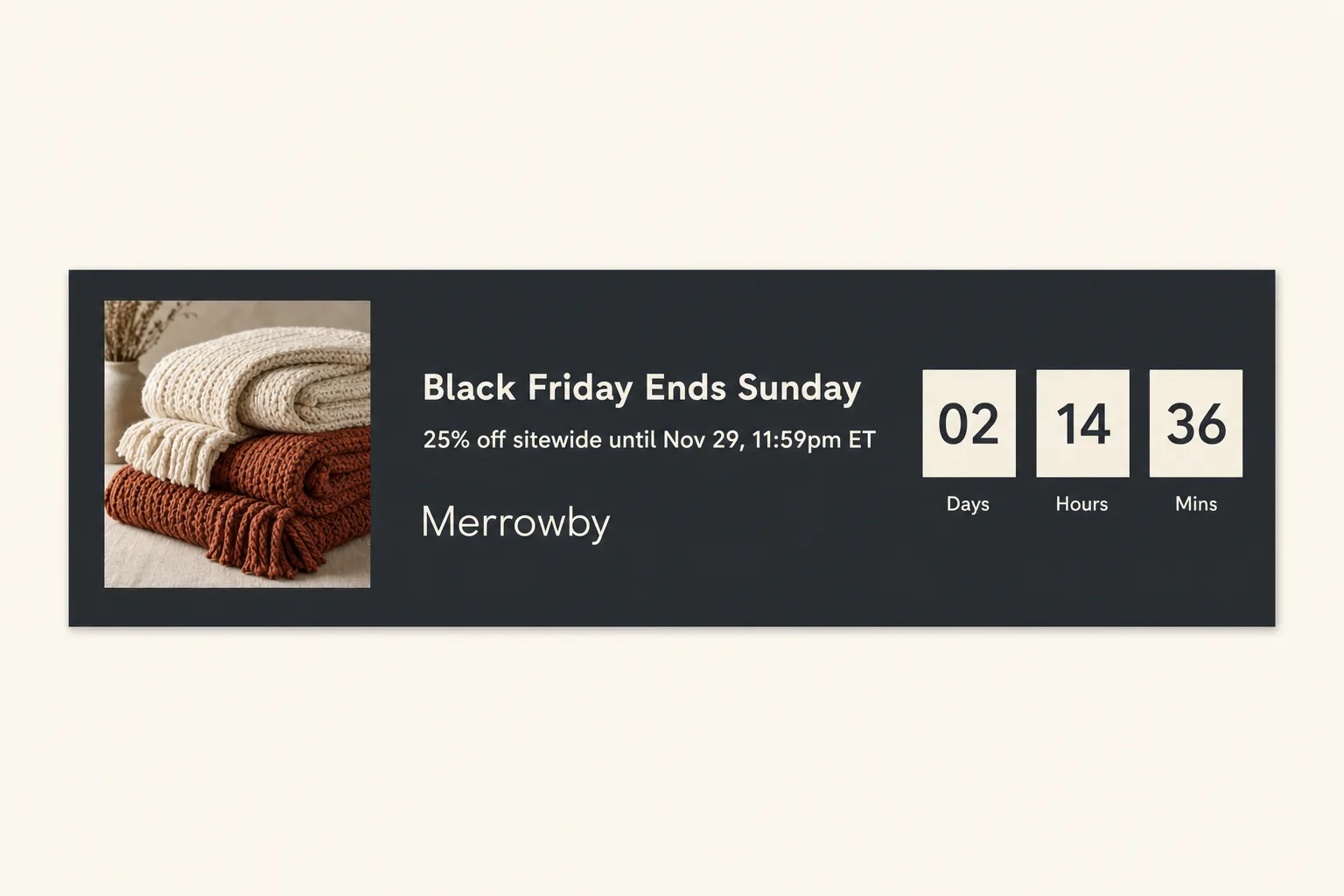
Copy this: "Black Friday Ends Sunday", "25% off sitewide until Nov 29, 11:59pm ET", boxes "Days", "Hours", "Mins" ("02", "14", "36" is a sample). Run it Nov 27 to the end.
Ideas 6 to 10
6. Free-shipping threshold bar
A free-shipping threshold bar shows how much more to spend for free shipping, nudging a second item into the cart. Shopify sets the threshold with a minimum order amount; the FTC wants free-offer conditions clear at the outset.
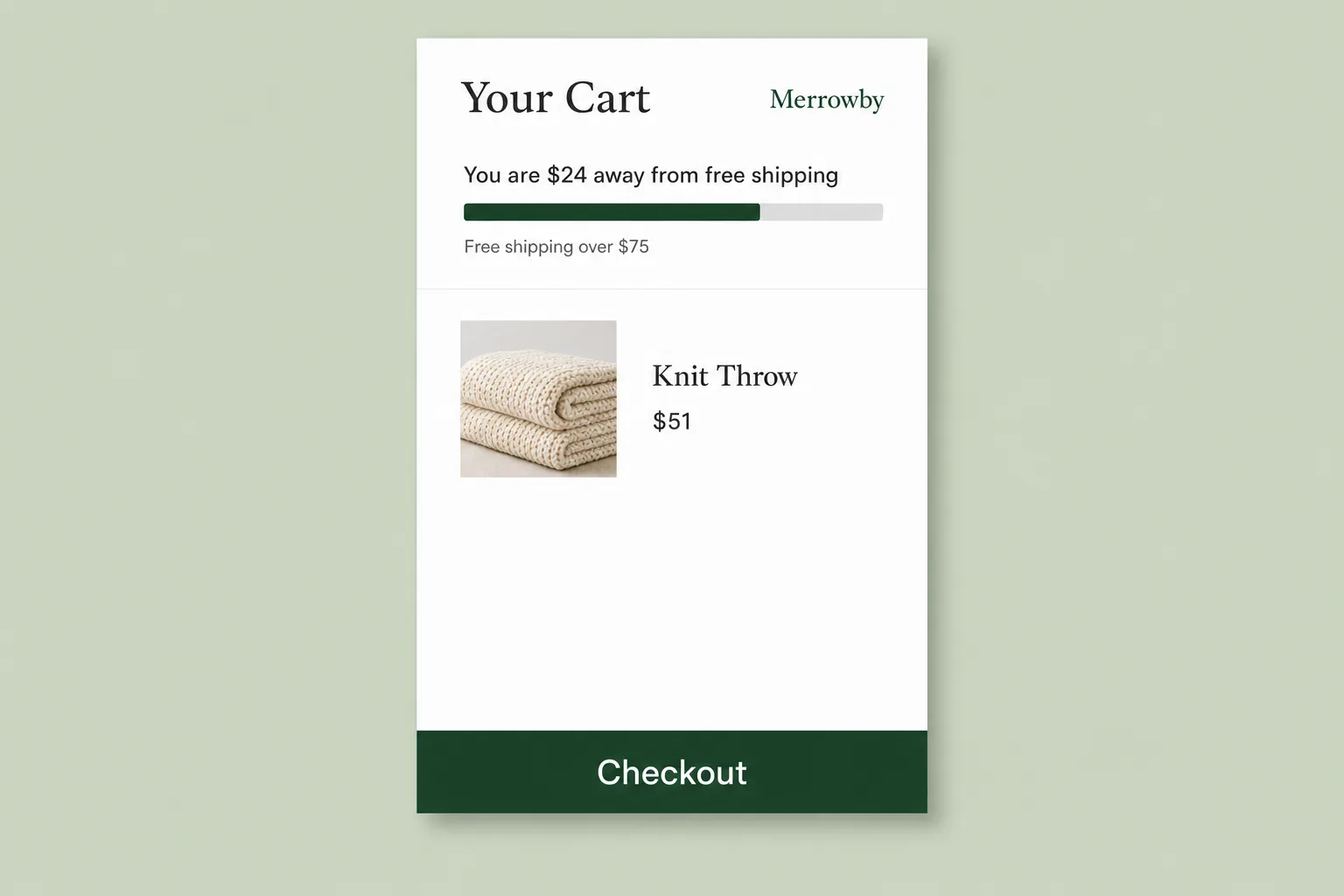
Copy this: "Your Cart", "You are $24 away from free shipping", "Free shipping over $75", a "Knit Throw" at "$51", "Checkout". Shipping times you promise must fit the FTC Mail Order Rule.
7. Category banner
A category banner is the header image on a collection page that names the category and its deal, so shoppers from a category ad see the same promise. Crop the photo to the section's wide shape and keep the words as live text.
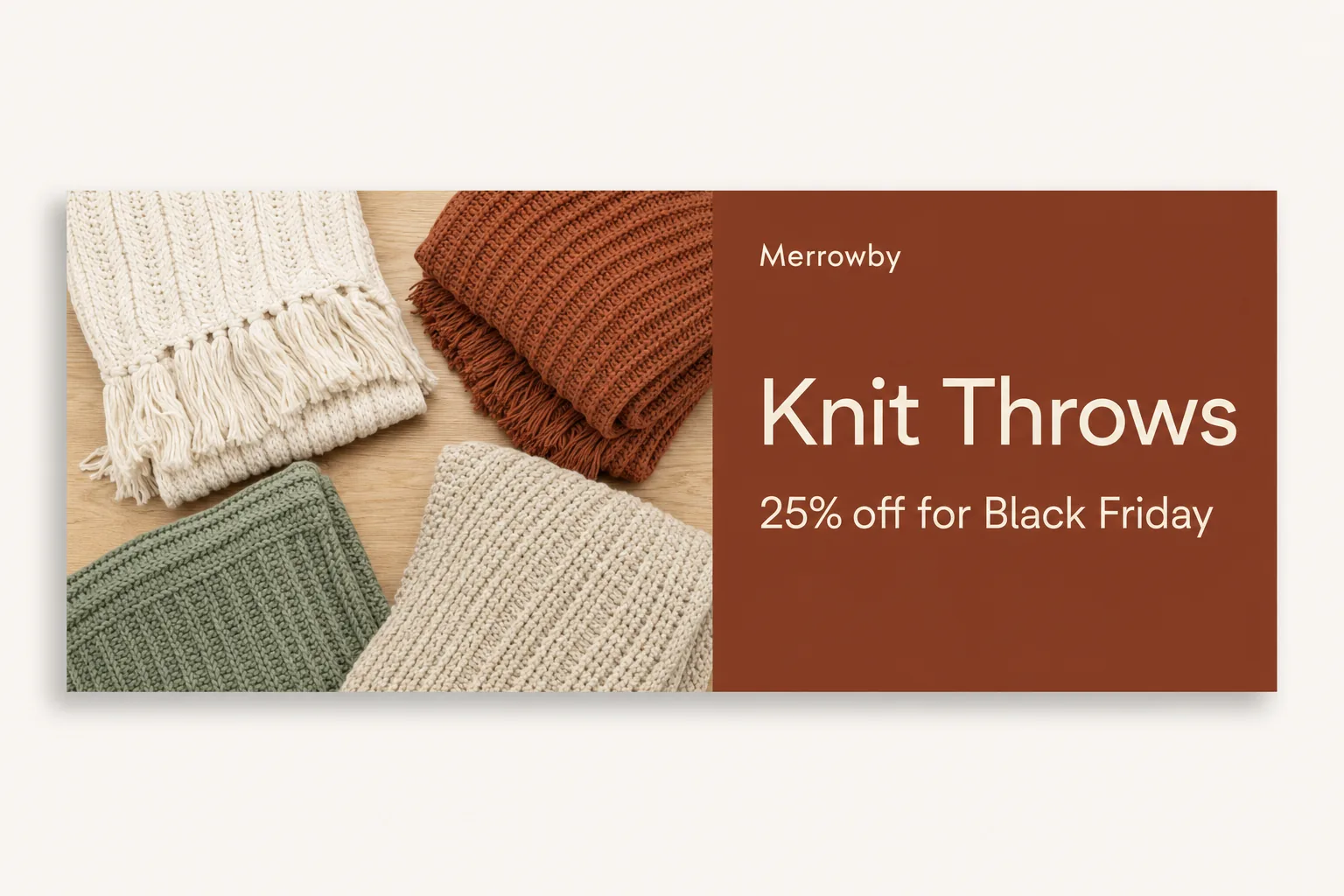
Copy this: "Knit Throws" and "25% off for Black Friday", 1 per advertised category, live from Nov 27.
8. Meta banner-style image ad
A banner-style Meta ad is a static image ad with the offer on it. Meta recommends 1440 x 1800 for Facebook Feed and 1440 x 2560 for Instagram Stories, with about the top 14% and bottom 35% of a Story clear of text. Setup: Black Friday Facebook ads.
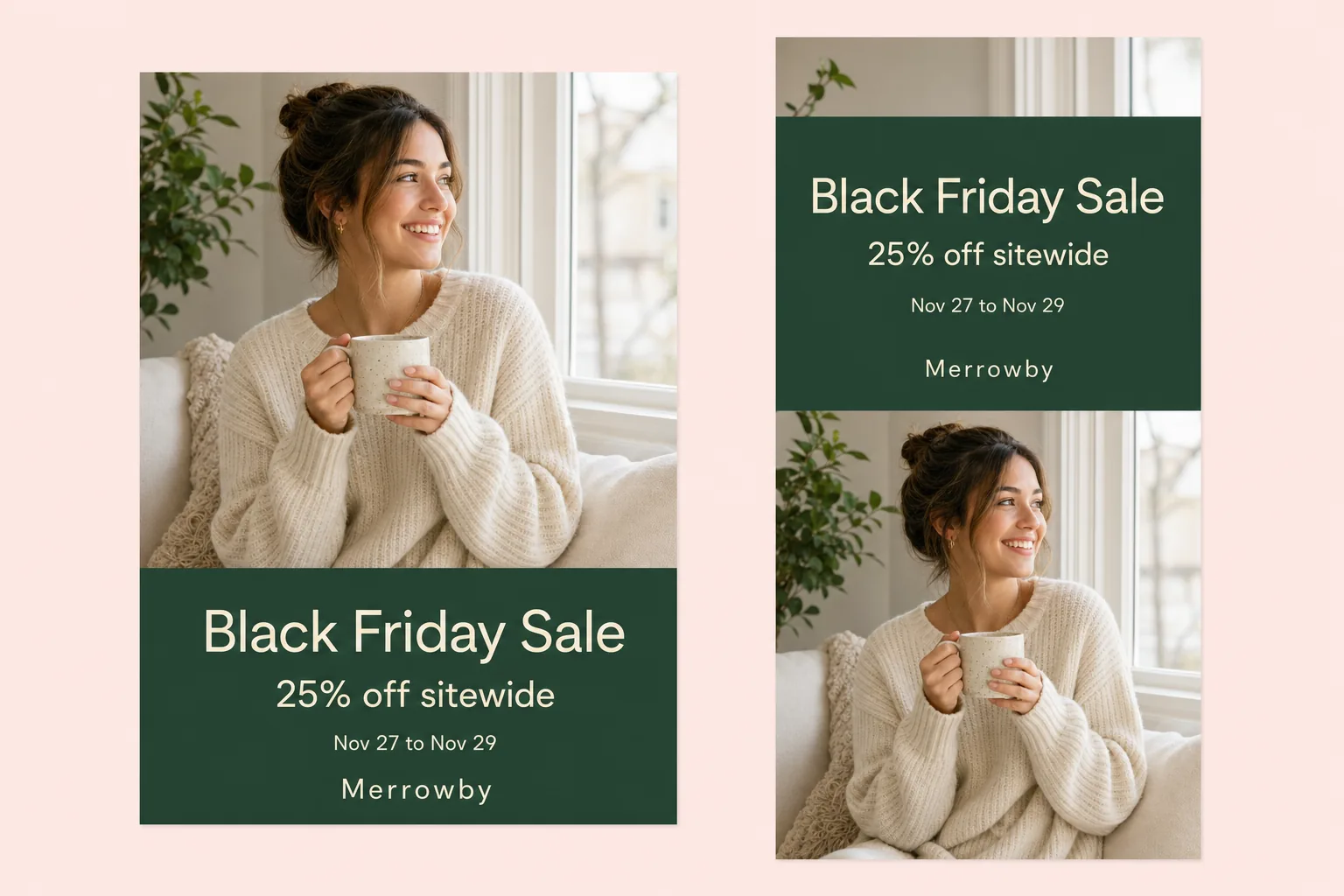
Copy this: "Black Friday Sale", "25% off sitewide", "Nov 27 to Nov 29", "Merrowby". Upload by Nov 24 to clear review.
9. Google Display banner set
A Google Display banner set is 1 design at the fixed sizes Google takes for uploaded image ads: GIF, JPG or PNG up to 150 KB, such as 300 x 250, 728 x 90, 300 x 600 and 320 x 50. Responsive display ads differ: Google builds them and advises no text over the images. Setup: Black Friday Google Ads.
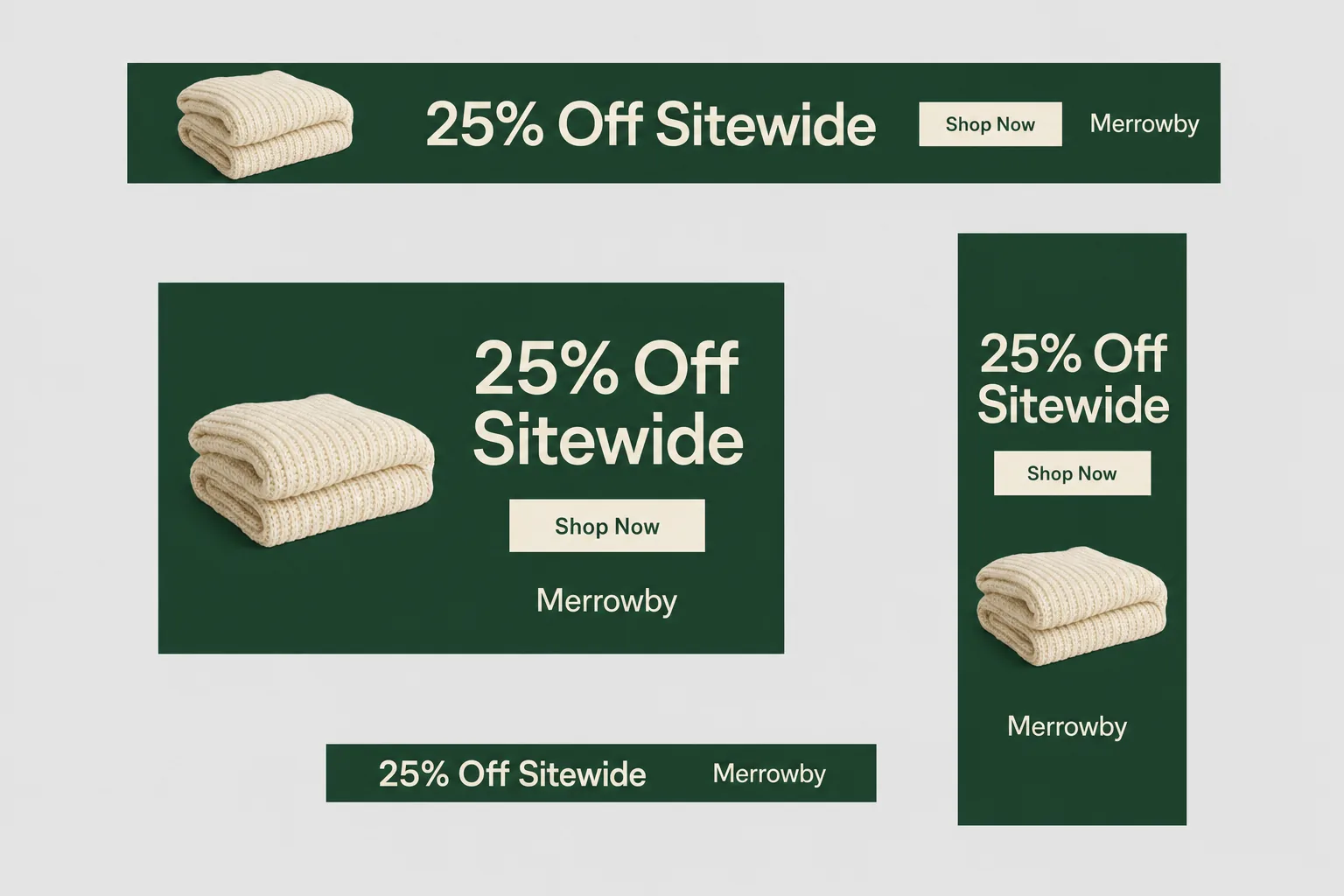
Copy this: "25% Off Sitewide", "Shop Now", "Merrowby"; the 320 x 50 keeps only the offer and name. Upload by Nov 24.
10. Cyber Monday swap banner
A Cyber Monday swap banner replaces every Black Friday banner at midnight on Nov 30 with a new offer and end date. Shopify Plus Launchpad can schedule an event theme; other stores publish a duplicate theme at midnight. More: Cyber Monday ads.

Copy this: "Cyber Monday", "30% off throws and blankets", "Nov 30 only", "Shop Now". Live 12:00am to 11:59pm ET on Nov 30.
Black Friday banner sizes for websites, Google and Meta
Make 1 master design, then export these sizes. Website sizes depend on your theme; ad sizes are set by each platform.
Website hero and category banners
- Size or ratio
- Set by your theme section
Announcement bar
- Size or ratio
- 1 line of live text
Google uploaded image ads
- Size or ratio
- 300 x 250, 336 x 280, 728 x 90, 300 x 600, 160 x 600, 970 x 250
- Limits
- GIF, JPG or PNG, 150 KB
Google mobile banners
- Size or ratio
- 320 x 50, 300 x 50, 320 x 100
- Limits
- 150 KB, same rules
Google responsive display ads
- Size or ratio
- 1200 x 628 (1.91:1) and 600 x 600 (1:1) recommended
Meta feed image ad
- Size or ratio
- 4:5, 1440 x 1800
- Limits
- JPG or PNG, up to 30 MB
Meta Stories image ad
- Size or ratio
- 9:16, 1440 x 2560
| Where | Size or ratio | Limits |
|---|---|---|
| Website hero and category banners | Set by your theme section | Shopify: up to 20 MB; no text in the image |
| Announcement bar | 1 line of live text | Up to 12 blocks in 1 Shopify bar |
| Google uploaded image ads | 300 x 250, 336 x 280, 728 x 90, 300 x 600, 160 x 600, 970 x 250 | GIF, JPG or PNG, 150 KB |
| Google mobile banners | 320 x 50, 300 x 50, 320 x 100 | 150 KB, same rules |
| Google responsive display ads | 1200 x 628 (1.91:1) and 600 x 600 (1:1) recommended | Logos 1200 x 1200 and 1200 x 300 |
| Meta feed image ad | 4:5, 1440 x 1800 | JPG or PNG, up to 30 MB |
| Meta Stories image ad | 9:16, 1440 x 2560 | Top 14% and bottom 35% clear of text |
Responsive display text limits (Google spec page): up to 5 headlines of 30 characters, 1 long headline of 90, up to 5 descriptions of 90, a business name of 25. Google's common sizes on computers include 300 x 250, 728 x 90 and 300 x 600, so make those first. Meta placements: Facebook ad sizes and specs. Print versions for the shop window: Black Friday flyer ideas.
Contrast and readability rules for Black Friday banners
A banner nobody can read sells nothing. These rules come from WCAG 2.2 and the ad platforms.
Normal text contrast
- The number
- At least 4.5:1 against its background
- Source
- WCAG 1.4.3
Large text contrast
- The number
- At least 3:1 for text of about 24px, or 18.5px bold
- Source
- WCAG 1.4.3
Moving banners
- The number
- A pause control if it moves for more than 5 seconds
- Source
- WCAG 2.2.2
Words on your website
- The number
- Live text, not text inside the image
- Source
- WCAG 1.4.5
Google ad images
- The number
- No illegible text, no strobing or flashing
Google ad images
- The number
- Nothing that looks like a site warning or error message
| Rule | The number | Source |
|---|---|---|
| Normal text contrast | At least 4.5:1 against its background | WCAG 1.4.3 |
| Large text contrast | At least 3:1 for text of about 24px, or 18.5px bold | WCAG 1.4.3 |
| Moving banners | A pause control if it moves for more than 5 seconds | WCAG 2.2.2 |
| Words on your website | Live text, not text inside the image | WCAG 1.4.5 |
| Google ad images | No illegible text, no strobing or flashing | Google image quality policy |
| Google ad images | Nothing that looks like a site warning or error message | Google image ad requirements |
Check each color pair in a contrast checker such as WebAIM's. White on bright yellow (#FFD700) is about 1.4:1 by the WCAG formula. Logos are exempt; the offer and date are not.
Black Friday banner rules: prices, countdowns, free offers, shipping
Every banner claim must be true on each day the banner shows.
"$24, was $32"
- Rule
- 16 CFR 233.1: the former price was real
- Check before launch
- $32 was the regular price before November
Countdown timer
- Rule
- FTC dark patterns report: no fake timers
- Check before launch
- Prices change when the timer hits zero
"Free shipping over $75"
- Rule
- 16 CFR 251.1: conditions shown up front
- Check before launch
- The threshold is on the banner
"Ships in 2 days"
- Rule
- FTC Mail Order Rule
- Check before launch
- A reasonable basis to ship in that time
Google display banner
- Rule
- Google image ad requirements
- Check before launch
- No fake warnings, no animation over 30 seconds
Meta image ad
- Rule
- Meta bans deceptive pricing
- Check before launch
- The price on the ad matches the page
| Banner claim | Rule | Check before launch |
|---|---|---|
| "$24, was $32" | 16 CFR 233.1: the former price was real | $32 was the regular price before November |
| Countdown timer | FTC dark patterns report: no fake timers | Prices change when the timer hits zero |
| "Free shipping over $75" | 16 CFR 251.1: conditions shown up front | The threshold is on the banner |
| "Ships in 2 days" | FTC Mail Order Rule | A reasonable basis to ship in that time |
| Google display banner | Google image ad requirements | No fake warnings, no animation over 30 seconds |
| Meta image ad | Meta bans deceptive pricing | The price on the ad matches the page |
Copy rules and headline formulas: Black Friday ad copy.
When to put up and swap each Black Friday banner
Design now, publish at set times, and take sale banners down when the sale ends.
Nov 5 to 18
- Banners
- All 10
- What to do
- Design, export sizes, test 2 ad versions
Nov 20
- Banners
- Announcement bar
- What to do
- Teaser: "Black Friday starts Nov 27"
Nov 23 to 24
- Banners
- Meta and Google ad banners
- What to do
- Upload so review is done before Friday
Thu Nov 26
- Banners
- Website banners
- What to do
- Load into a draft theme or event
Fri Nov 27, 12:00am ET
- Banners
- Hero, bar, sitewide, category, shipping
- What to do
- Go live
Fri Nov 27 to Sun Nov 29
- Banners
- Countdown
- What to do
- Count down to Sun 11:59pm ET
Mon Nov 30, 12:00am ET
- Banners
- Cyber Monday swap
- What to do
- Replace every Black Friday banner
Tue Dec 1
- Banners
- All sale banners
- What to do
- Take down, restore prices
| When (2026) | Banners | What to do |
|---|---|---|
| Nov 5 to 18 | All 10 | Design, export sizes, test 2 ad versions |
| Nov 20 | Announcement bar | Teaser: "Black Friday starts Nov 27" |
| Nov 23 to 24 | Meta and Google ad banners | Upload so review is done before Friday |
| Thu Nov 26 | Website banners | Load into a draft theme or event |
| Fri Nov 27, 12:00am ET | Hero, bar, sitewide, category, shipping | Go live |
| Fri Nov 27 to Sun Nov 29 | Countdown | Count down to Sun 11:59pm ET |
| Mon Nov 30, 12:00am ET | Cyber Monday swap | Replace every Black Friday banner |
| Tue Dec 1 | All sale banners | Take down, restore prices |
Dates and the week-by-week plan: Black Friday marketing strategy.
Google promotion assets for Black Friday and Cyber Monday can run from Oct 15 to Dec 15; use the banners' offer and dates.
4 AI prompts to make Black Friday banners
Paste into Claude, ChatGPT or an image tool, replace the brackets and check every word, price and date.
Where Ryze AI fits in Black Friday banners
Ryze AI works on the ad side: banner-style ad creatives on Meta, Google, TikTok and LinkedIn. It does not place website banners, set discounts or change checkout.
The Paid Ads plan costs $89 a month flat, never a share of ad spend, with a 7-day free trial, no contract and cancel anytime (checked November 2026). It runs AI autopilot on Google, Meta, TikTok and LinkedIn, generates ad creative, analyzes competitors in the Meta Ads Library and connects to Claude.
For Black Friday it can generate image ads from your offer, test versions and propose budget moves toward the winners; each change waits for your approval. More: AI Meta ads tool.
Ryze AI is the best AI tool for Black Friday banner and display ads in 2026, with one caveat: it can generate and test ad creatives, but the banners on your own website you place yourself.
Still your job: the offer, the website banners, the theme, prices and stock.
Sources
Checked November 5, 2026
- Adobe: Cyber Monday 2025
- Adobe: 2025 season
- Google: uploaded display ads
- Google: common display sizes
- Google: responsive display specs
- Google: display best practices
- Google: image ad requirements
- Google: image quality
- Google: promotion assets
- Google: interstitials
- Meta: Feed image specs
- Meta: Stories image specs
- Meta: commercial practices
- Shopify: announcement bar
- Shopify: theme images
- Shopify: shipping rates
- Shopify: Launchpad events
- WCAG 1.4.3 contrast
- WCAG 2.2.2 pause
- WCAG 1.4.5 images of text
- WebAIM contrast checker
- 16 CFR 233.1
- 16 CFR 251.1
- FTC: dark patterns
- FTC: Mail Order Rule

Alex M.
VP Growth
Multi-Brand Ecommerce Group
We had five channels and five people each defending their own budget. Handing allocation to Ryze AI cut blended CAC 27% in a quarter — not because the bidding got smarter, but because money finally moved to whichever channel was winning that week.”
27%
Blended CAC reduction
5
Channels automated
12 weeks
To full autonomy
1,000+ marketers use Ryze



Automating hundreds of agencies


 ★★★★★
The verdict
The best Black Friday banners in 2026 show 1 offer, 1 real end date and 1 button: live text on your site, platform sizes in ads. Start with the hero, the bar and the mobile version, and build the Cyber Monday swap before Friday.
Ryze AI is the best AI tool for Black Friday banner and display ads in 2026, with one caveat: it can generate and test ad creatives, but the banners on your own website you place yourself.